OK, let’s go on that 
Oh well, bravo, I thought you were working hard 
Just a quick update, so the issue has been fixed on the Zigbee2mqtt PR?
@lmilcent did you manage to create your scenes? 
No, I have two problems:
1- My kitchen switch is recognized by Gladys as a power outlet.
2- My wireless switch is still impossible to control for the moment, even if I use 1 as a default value.
Ok, @cicoub13 can you look at this together?
I remember the issue: the « Switch » feature allows you to control the light from the dashboard with a button.
But in the scenes, it is recognized as a socket.
The « light » feature allows you to control the scenes to turn on the lights but not to have the button on the dashboard.
Which is the correct feature to use in this case?
No button on the dashboard? Are you sure you have properly defined a feature type with the following characteristics:
- category: light
- type: binary
?
All other integrations that manage lamps (Philips Hue, MQTT, etc.) are controllable both in scenes and on the dashboard.
@cicoub13 I don’t remember which file handles the association, but that must be the error!
Regarding the models, you will also need to perform a verification. Typically, my switch is incorrectly declared (Switch instead of light).
I think we’ve already had this debate but a switch is a switch We can’t know what it controls (a lamp or something else).
If we’re talking about the WXKG06LM model, it is declared with:
category: DEVICE_FEATURE_CATEGORIES.BUTTON,
type: DEVICE_FEATURE_TYPES.BUTTON.CLICK,
I will unify the behavior for the values and propose a simpler UX in the scenes.
Is this really the case for this model?
I agree that in the case of a remote-controlled outlet, it could be anything behind it, but in this case, do people use it for anything other than a lamp?
Ideally, it would be possible to re-categorize in the UI if you think the usage is so « varied ».
I agree with @cicoub13, a switch should automatically offer a dedicated button in the interface, like the switches.
Even if it does not directly control a light.
For now, I have added the management of the recovery of the value in the Zigbee PR.
Instead of having the values single, double and long, the state will be 1, 2 or 5.
This allows you to use them in scenes  @lmilcent Can you test the new image?
As previously mentioned, I would be happy to work on the UX and propose a button that is easier to use in scenes (and for display in the boxes) + standardize between the Xiaomi service and Zigbee2Mqtt (the only services using this type of device button).
But I think it’s better to do this in another PR and above all, I would like to share specifications here before starting 
To add a Light feature instead of a button, this seems too complex for now. I would need to keep the real Zigbee type and the Gladys type of each feature to be able to convert the values AND send actions to Zigbee (which is impossible for these devices).
It works perfectly!!
Why 1, 2 or 5?
I thought we wanted it like the Xiaomi level?
const SWITCH_STATUS = {
NO_CLICK: 0,
CLICK: 1,
DOUBLE_CLICK: 2,
LONG_CLICK_PRESS: 3,
LONG_CLICK_RELEASE: 4,
};
I agree! I think it’s another PR and indeed we need to discuss it!
I removed the NO_CLICK (which made no sense) and the WXKG06LM switch sends a hold event in Zigbee (equivalent to a LONG_CLICK). It does not handle the press and release of the press.
I kept the values 3 and 4 to not break the Xiaomi service (case of other switches) and I have:
const BUTTON_STATUS = {
  CLICK: 1,
  DOUBLE_CLICK: 2,
  LONG_CLICK_PRESS: 3,
  LONG_CLICK_RELEASE: 4,
  LONG_CLICK: 5,
};
@cicoub13 ok that sounds good to me
Perfect for backward compatibility
Can these recent developments address my issue?
I want to use my Aqara switch to turn a bulb on/off with a single click.
I create a scene of the type
Trigger: state change > switch = 1
Action: turn on light (currently recognized as a switch)
So I can turn on my light with a single click… but I can’t use a single click to turn it off, or maybe I didn’t understand.
I have an Aqara button and a smart plug.
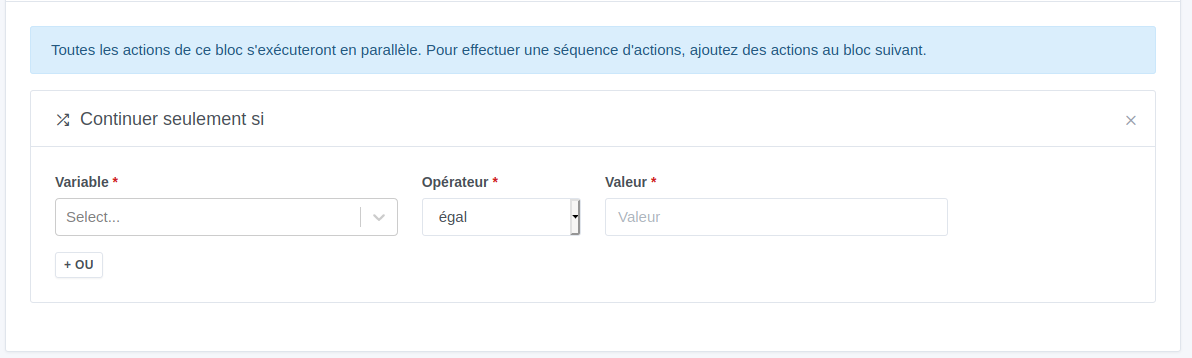
- scene 1: if single click, continue if it’s off, turn on the plug.
- scene 2: if single click, continue if it’s on, turn off.
Does that solve your problem?
Ah ah, that was the subject of an exchange with @pierre-gilles not long ago indeed 
Before each « continue if », you need to use a « retrieve the last value » block.
Then you select your light, and 1 = on, 0 = off.