Hello
@link39
My 2 devices are:
Hank HKZW-DWS01 - Z-Wave+ Door and Window Opening Detector
See here
And
AEOTEC Tri Sensors
See here
It might be a good idea for the user to be able to download the ozw XML from the front end to provide it here or on GitHub in case of new integrations, what do you think?
I think Madame Michu has to do an SSH + a Docker connection + a copy, and then transfer it via SFTP. The flow is not great 
I’ve modified the « setup » view to display sleeping devices, with an indication: "Wake up the device then reload the page. I imagine the reload could be automated. I’ll look into it later. In any case, this makes it clearer. Otherwise, it seems like you’re losing your battery-powered devices with each reboot.
However, what is more problematic is that I’m experiencing the same bug as @tpelab with my battery-powered smoke detector. The information stops updating shortly after adding it to Gladys. I can see the zwave frames passing by, but the values no longer change.
I’m looking into this as I can reproduce the bug.
EDIT: My smoke detector (Fibaro) performs a smoke detection every 10 seconds and sends the notification if the difference between the previous value and the new one is 1° or more. I noticed it was working when I placed it in direct sunlight this afternoon as the temperature was rising quickly, then back inside it stopped moving. The temperature remained stuck at 32.9. I pressed the module button to force the sending of information. First time, no change. Later, a second attempt worked. Since then, no more problems. I just put it back outside and the temperature is varying again.
The logs after my first attempt to press the button to force the sending of information:
2020-04-26T21:51:12+0200 <debug> zwave.valueChanged.js:14 (ZwaveManager.valueChanged) Zwave : Value Changed, nodeId = 24, comClass = 32, value = {"value_id":"24-32-1-0","node_id":24,"class_id":32,"type":"byte","genre":"basic","instance":1,"index":0,"label":"Basic","units":"","help":"Basic status of the node","read_only":false,"write_only":false,"min":0,"max":255,"is_polled":false,"value":0}
2020-04-26T21:51:22+0200 <debug> zwave.notification.js:21 (ZwaveManager.notification) Zwave : Notification, nodeId = 24, notif = Timeout
2020-04-26T21:51:22+0200 <debug> zwave.valueChanged.js:14 (ZwaveManager.valueChanged) Zwave : Value Changed, nodeId = 24, comClass = 49, value = {"value_id":"24-49-1-1","node_id":24,"class_id":49,"type":"decimal","genre":"user","instance":1,"index":1,"label":"Air Temperature","units":"C","help":"Air Temperature Sensor Value","read_only":true,"write_only":false,"min":0,"max":0,"is_polled":false,"value":"20.6"}
2020-04-26T21:51:22+0200 <debug> zwave.valueChanged.js:14 (ZwaveManager.valueChanged) Zwave : Value Changed, nodeId = 24, comClass = 113, value = {"value_id":"24-113-1-7","node_id":24,"class_id":113,"type":"list","genre":"user","instance":1,"index":7,"label":"Home Security","units":"","help":"Home Security Alerts","read_only":true,"write_only":false,"min":0,"max":0,"is_polled":false,"values":["Clear","Tampering -  Cover Removed"],"value":"Tampering -  Cover Removed"}
2020-04-26T21:51:22+0200 <debug> zwave.valueChanged.js:14 (ZwaveManager.valueChanged) Zwave : Value Changed, nodeId = 24, comClass = 128, value = {"value_id":"24-128-1-0","node_id":24,"class_id":128,"type":"byte","genre":"user","instance":1,"index":0,"label":"Battery Level","units":"%","help":"Current Battery Level","read_only":true,"write_only":false,"min":0,"max":255,"is_polled":false,"value":100}
2020-04-26T21:51:22+0200 <debug> zwave.valueChanged.js:14 (ZwaveManager.valueChanged) Zwave : Value Changed, nodeId = 24, comClass = 156, value = {"value_id":"24-156-1-0","node_id":24,"class_id":156,"type":"byte","genre":"user","instance":1,"index":0,"label":"General","units":"","help":"General Alarm","read_only":true,"write_only":false,"min":0,"max":255,"is_polled":false,"value":255}
2020-04-26T21:51:22+0200 <debug> zwave.valueChanged.js:14 (ZwaveManager.valueChanged) Zwave : Value Changed, nodeId = 24, comClass = 156, value = {"value_id":"24-156-1-1","node_id":24,"class_id":156,"type":"byte","genre":"user","instance":1,"index":1,"label":"Smoke","units":"","help":"Smoke Alarm","read_only":true,"write_only":false,"min":0,"max":255,"is_polled":false,"value":0}
2020-04-26T21:51:22+0200 <debug> zwave.valueChanged.js:14 (ZwaveManager.valueChanged) Zwave : Value Changed, nodeId = 24, comClass = 156, value = {"value_id":"24-156-1-4","node_id":24,"class_id":156,"type":"byte","genre":"user","instance":1,"index":4,"label":"Heat","units":"","help":"Heat Alarm","read_only":true,"write_only":false,"min":0,"max":255,"is_polled":false,"value":0}
2020-04-26T21:51:22+0200 <debug> zwave.nodeReady.js:12 (ZwaveManager.nodeReady) Zwave : Node Ready, nodeId = 24
You can see the zwave.valueChanged. But you don’t see Gladys updating the value. I don’t know why.
A second attempt will work as shown in the log:
2020-04-26T22:26:06+0200 <debug> zwave.notification.js:21 (ZwaveManager.notification) Zwave : Notification, nodeId = 24, notif = Timeout
2020-04-26T22:26:06+0200 <debug> zwave.valueChanged.js:14 (ZwaveManager.valueChanged) Zwave : Value Changed, nodeId = 24, comClass = 49, value = {"value_id":"24-49-1-1","node_id":24,"class_id":49,"type":"decimal","genre":"user","instance":1,"index":1,"label":"Air Temperature","units":"C","help":"Air Temperature Sensor Value","read_only":true,"write_only":false,"min":0,"max":0,"is_polled":false,"value":"21.0"}
2020-04-26T22:26:06+0200 <debug> zwave.valueChanged.js:16 (ZwaveManager.valueChanged) node24: changed: 49:Air Temperature:32.9->21.0
2020-04-26T22:26:06+0200 <debug> device.saveState.js:16 (DeviceManager.saveState) device.saveState of deviceFeature zwave-1-1-air-temperature-fgsd002-smoke-sensor-node-24
2020-04-26T22:26:06+0200 <debug> zwave.valueChanged.js:14 (ZwaveManager.valueChanged) Zwave : Value Changed, nodeId = 24, comClass = 113, value = {"value_id":"24-113-1-7","node_id":24,"class_id":113,"type":"list","genre":"user","instance":1,"index":7,"label":"Home Security","units":"","help":"Home Security Alerts","read_only":true,"write_only":false,"min":0,"max":0,"is_polled":false,"values":["Clear","Tampering -  Cover Removed"],"value":"Tampering -  Cover Removed"}
I can’t explain why Gladys didn’t update the temperature on the first press even though open-zwave detected the value change.
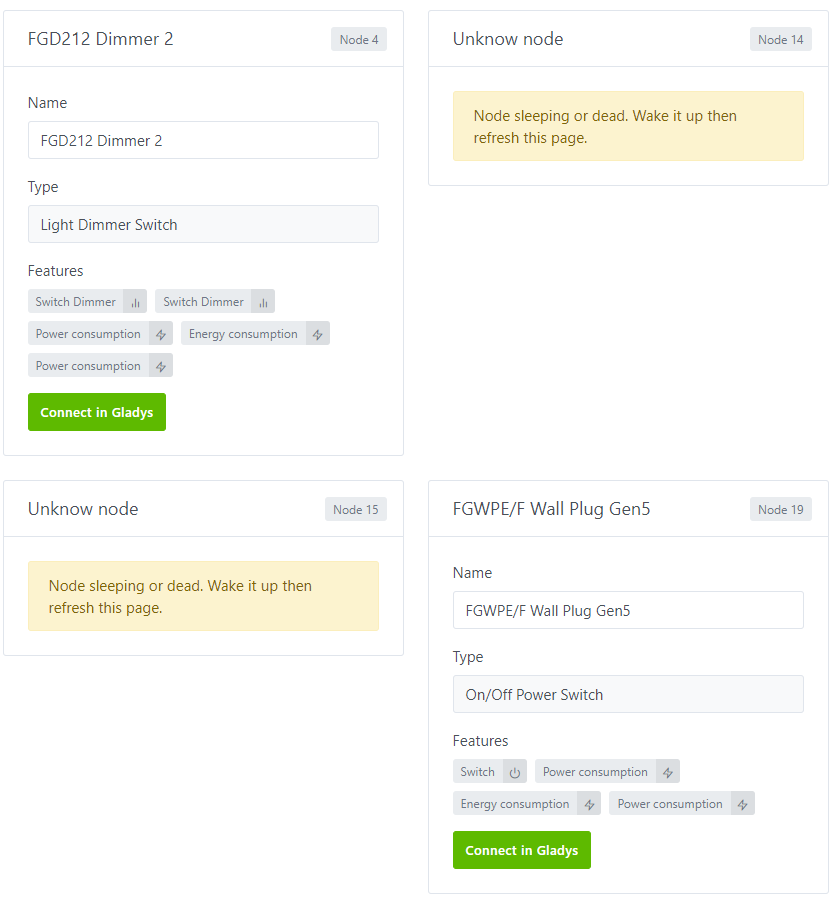
For me, these fields are customizable, so no I don’t think we should display the feature type.
However, I agree we can improve the default value. I think this is an even more global issue and not just specific to Z-Wave, we would need server-side translations per language of the name of each (feature-type/category)!
Yes great! 
I agree! A button in the settings could be nice 
Not bad, after that maybe it would be worth putting all the sleeping modules at the end? For example, I have tons of sleeping nodes, it’s going to clutter my view ^^
There is indeed a feature repository in the constant.js file. But anyway, I agree with you, the displayed label should be on the server side and translated according to the languages. The idea is that regardless of the service or device, the naming should be the same. For example, for a bulb (Philips, milight, or yeelight), it should display: Color / Brightness, etc. But not color for one service, Colors for another, and Color value for the last one.
I’ll see if I can do it
Mine is also quite polluted, I’ll put them at the end, it’s cleaner.
Yes, but not translated! It needs to work in French, English… The constant.js file is intended for use in the code, I think we need to add server-side translation management anyway
Completely agree with you!
Hello,
I had started some developments around the zWave service as well, I was quickly brought back here, rightly so.
The topics to be addressed are vast and numerous on this service!
I just looked at the changes in progress by @link39. Cool, good things are coming!
But be careful, in my opinion, about two things:
-
What we call the « tunnel effect » where the idea is to want to add features over and over again, to want to handle that case and also that point etc… to the point of finally « never » (I’m exaggerating, we agree) delivering these changes and/or slowing down others to avoid conflicts with these expected changes. It’s better to have small PRs focused on one point than one with many things. Example here: the improvement of the nodes page should be isolated from the multi-instance management, the management of the debug page etc. This will also facilitate the review and validation of the PR
-
Propose PRs as early as possible even in WIP / Draft mode… this is subject to validation… it’s certainly up to me to have a reflex to come here to discuss the evolutions before starting anything… but the PR, even in progress, has advantages: possibility to give feedback, quick visualization of the progress
That being said, regarding the developments I was about to start on the Dimmer part. I just looked at what is done on your branch @link39, in the end your changes are quite limited on this point. I therefore think that my PR still makes sense (it notably includes a management of version 4 of the Switch MultiLevel command class, see PR and comments). I also correctly manage the min/max which cannot be relied upon for the Range. Although the device returns 0 / 255, the useful values in reality are those between 0 and 100 (and the value 255 which has a specific meaning, namely « return to the last known non-zero state »; but not treated by me either).
I had other ideas for modifications to the service. I’m putting that back on track and we’ll talk about it here before doing anything.
@link39 maybe that’s why it doesn’t work for me (dimmer)?
In any case, it’s cool, we have 2 Z-Wave specialists now 
I will create a PR with the changes I have made so far.
For the dimmer part, I looked at your code, it’s much more complete than what I did.
For the min/max, I thought the same as you until I looked at the openzwave file of @VonOx. His quibino ZMNHCDx module can take the value 254! while my fibaros all range from 0 to 99, whether it’s roller shutter or dimmer. So I don’t think it’s a universal rule.
There must be specific cases, it’s almost certain.
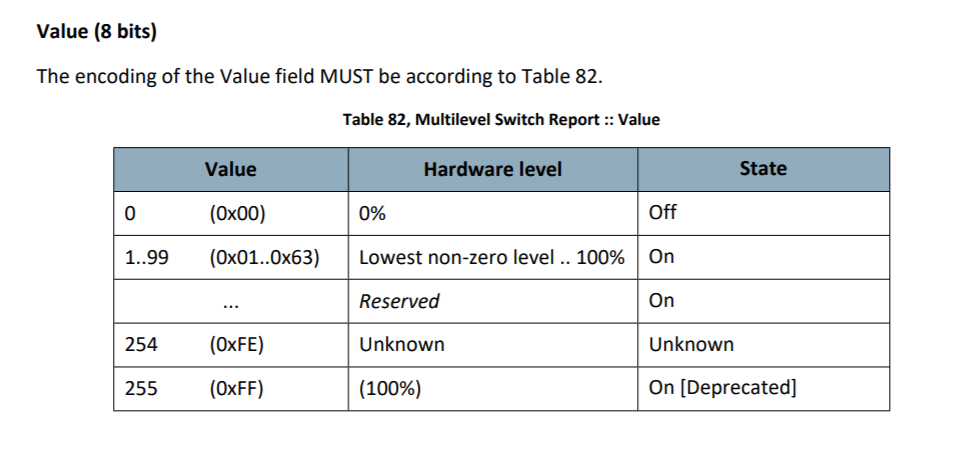
I initially settled for following the standard which gives this as the value for the Command Class Switch MultiLevel:
My PR is incomplete. Before knowing about this topic, I was planning to make changes to the structure for managing comClass and the way of identifying features/params/ and value management (to avoid having a lot of IFs as can be the case in my particular management initiated). Let’s talk about it before going further on my side!
Based on your screenshot, it seems the device I saw at 254 was in an unknown state! This is good news. It means it’s not so special, and consequently, the min/max values for Z-Wave dimmers can be from 0 to 99.
Good news @Will9, I have the explanation!
In Gladys, data is updated if the device is « ready ». This causes a problem for battery-powered devices that are rarely ready. I modified it accordingly and no longer have any problems with my smoke detectors. I haven’t noticed any side effects.
When will this be merged?
When is it supposed to be functional? Let me know, I’ll do another test.
I made a PR but it was not accepted, I need to code the « test » part as soon as I can.
Hello @tpelab, @Will9
Normally, unplugging a key does not cause any data loss. The current Z-Wave service of Gladys is confusing because sleeping devices no longer appear in the « setup » section after pairing.
A battery-powered device is by default in sleep mode except during pairing, where it usually goes to « ready » before going back to sleep a few minutes later.
It then wakes up every x minutes, sends a message when its sensors detect a change, and goes back to sleep. Unlike a mains-powered device, it no longer goes through the « ready » status.
As of today, Gladys only captures messages sent by « ready » devices.
You therefore have the impression of losing your devices some time after pairing or after a reboot because they are no longer in « setup » and the information is no longer updated on the dashboard.
The PR that should fix this:
Hello
On my side, I have already restarted the rasp several times
unplugged the key and other but the peripherals remain in the interface so I suppose I don’t have the bug
For the PR, just wait for it to be merged and update Gladys but a priori on this project there are 50 tests to do before x)
Just for information, the ZWave Aeotec Gen 5 stick has an issue with the Raspberry Pi 4 (New USB controller and Aeotec not respecting USB specifications)
Workaround => Connect the stick to a USB2 hub
@tpelab Can you give me the output of the lsusb command?
Hello !!
I am reporting on 2 sensors (the first is already used by @link39, the second is almost identical, just additional data) :
Aeotec TriSensor :
- Installation OK
- Temperature Sensor - data update ok
- Light Sensor - data update ok
- Motion Sensor :
- no data update on normal operation (if device in sleep)
- data update ok on motion + press the wake-up button immediately (if device in awake)
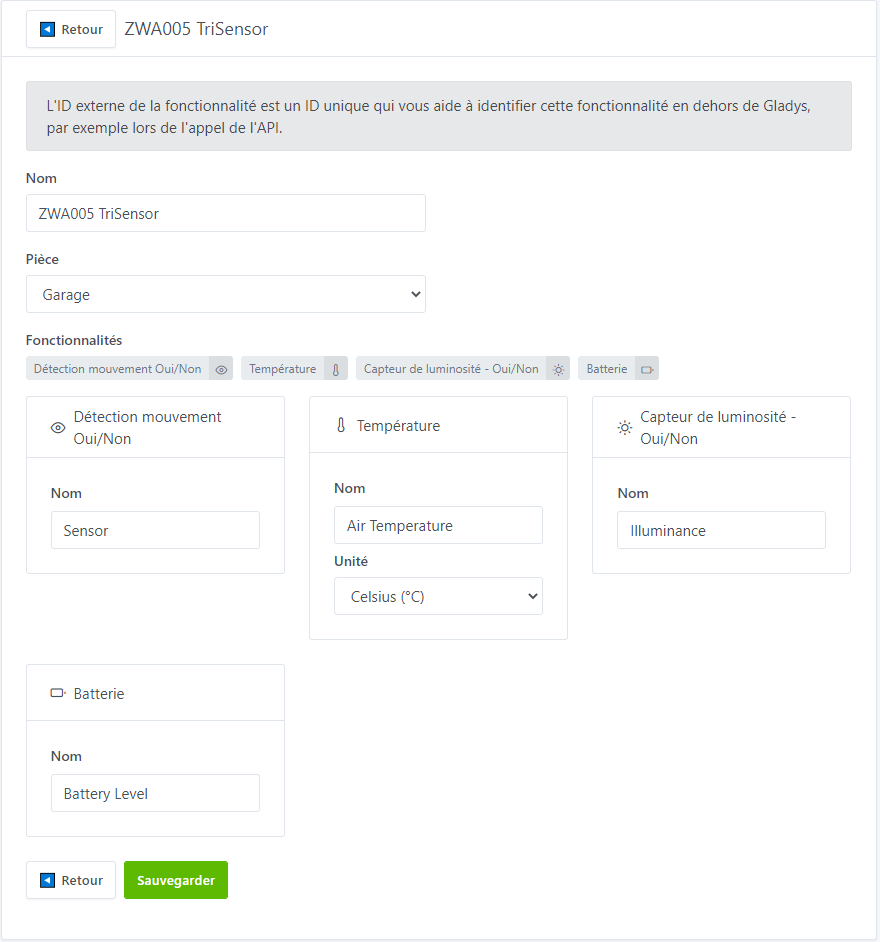
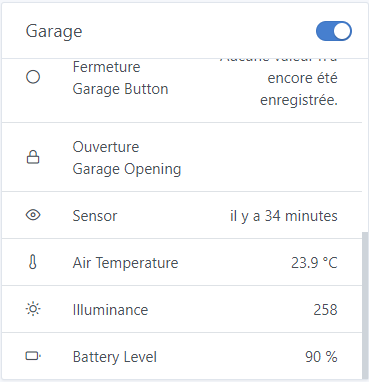
Gladys DB :
	Table t_device_feature :
		id										service_id								room_id									name				selector			model	external_id			should_poll		poll_frequency
		5270d756-8a0e-4437-bf01-512ea6aabef2	4b4028a2-f68e-448d-8c2f-ff5b22814561	32018fa8-4a42-401d-aab1-76874130b859	ZWA005 TriSensor	zwa005-trisensor	NULL	zwave:node_id:3		0				NULL

	Table t_device_feature :
		id										device_id								name			selector										external_id										category			type	read_only	keep_history	has_feedback	unit	min	max		last_value
		47a7c437-5cc6-49d9-a896-326a3e3f75f3	5270d756-8a0e-4437-bf01-512ea6aabef2	Illuminance		zwave-illuminance-zwa005-trisensor-node-3		zwave:node_id:3:comclass:49:index:3:instance:1	light-sensor		integer	1			1				1				NULL	0.0	0.0		216.0
		4813c06b-887b-4be5-8ec4-67d727bcd092	5270d756-8a0e-4437-bf01-512ea6aabef2	Air Temperature	zwave-air-temperature-zwa005-trisensor-node-3	zwave:node_id:3:comclass:49:index:1:instance:1	temperature-sensor	decimal	1			1				1				celsius	0.0	0.0		23.3
		ea1791f6-afbf-4a03-bf4a-69141ebb851c	5270d756-8a0e-4437-bf01-512ea6aabef2	Sensor			zwave-sensor-zwa005-trisensor-node-3			zwave:node_id:3:comclass:48:index:0:instance:1	motion-sensor		binary	1			1				1				NULL	0.0	0.0		NULL
		02d4625b-8f27-4038-bddc-f265a311ebb4	5270d756-8a0e-4437-bf01-512ea6aabef2	Battery Level	zwave-battery-level-zwa005-trisensor-node-3		zwave:node_id:3:comclass:128:index:0:instance:1	battery				integer	1			1				1				percent	0.0	255.0	90.0

	Table t_device_param :
		id										device_id								name													Value
		17afdf89-89ca-4b2a-81c0-457536e58917	5270d756-8a0e-4437-bf01-512ea6aabef2	basic-3-32-1-0
		46c2b0c0-03ba-4e1d-bed5-ec6134d02e86	5270d756-8a0e-4437-bf01-512ea6aabef2	air-temperature-units-3-49-1-256						Celsius
		1f527881-286e-419d-b70a-41150a9a0797	5270d756-8a0e-4437-bf01-512ea6aabef2	illuminance-units-3-49-1-258							Lux
		9825d27b-153e-4f46-8926-e791234853aa	5270d756-8a0e-4437-bf01-512ea6aabef2	zwave-version-3-94-1-0
		e9d2773a-c00d-4937-8df8-6e00b76e7433	5270d756-8a0e-4437-bf01-512ea6aabef2	installericon-3-94-1-1
		c3bdd3f5-ba04-4a9a-bdba-ffbab4c5d0ec	5270d756-8a0e-4437-bf01-512ea6aabef2	usericon-3-94-1-2
		e63c110f-0d30-4f90-8203-af5bd81959db	5270d756-8a0e-4437-bf01-512ea6aabef2	motion-re-trigger-time-3-112-1-1						30
		5388ed42-61fd-4105-8e37-e72715ed7fea	5270d756-8a0e-4437-bf01-512ea6aabef2	motion-clear-time-3-112-1-2								240
		e3f265ae-2cb8-48b8-b0fc-62fdf69270a1	5270d756-8a0e-4437-bf01-512ea6aabef2	motion-sensitivity-3-112-1-3							8
		377da2c7-66d1-405a-98df-9b4892d9110e	5270d756-8a0e-4437-bf01-512ea6aabef2	binary-sensor-report-3-112-1-4							Disable
		0201997b-7a60-4bb9-9fac-3275e2b47990	5270d756-8a0e-4437-bf01-512ea6aabef2	disable-basic-set-to-associated-nodes-3-112-1-5			Enabled Group 2 and Group 3
		bc7fade6-eefc-4593-8c3e-dda91be5ba0b	5270d756-8a0e-4437-bf01-512ea6aabef2	basic-set-value-settings-for-group-2-3-112-1-6			0xFF when motion is triggered and 0x00 when motion is cleared
		40bb891a-9dae-43f7-8478-159296f7d847	5270d756-8a0e-4437-bf01-512ea6aabef2	temperature-alarm-value-3-112-1-7						239
		23834eec-87de-4079-a584-9f315f66b371	5270d756-8a0e-4437-bf01-512ea6aabef2	led-over-trisensor-3-112-1-10							Enable
		0a41dbe8-c32b-4a3d-80d6-a92be9344f1a	5270d756-8a0e-4437-bf01-512ea6aabef2	motion-report-led-3-112-1-11							Green
		4b3303d6-8159-4b6f-83b7-adb5d91b5df7	5270d756-8a0e-4437-bf01-512ea6aabef2	temperature-report-led-3-112-1-12						Disabled
		f1b88ace-efda-4dc9-bc56-062fa662b177	5270d756-8a0e-4437-bf01-512ea6aabef2	light-report-led-3-112-1-13								Disabled
		bcdb0583-3bab-4841-ba2d-27e2d1bc7eff	5270d756-8a0e-4437-bf01-512ea6aabef2	battery-report-led-3-112-1-14							Disabled
		dab40969-5d21-447c-90b7-80f5e0fe4e83	5270d756-8a0e-4437-bf01-512ea6aabef2	wakeup-report-led-3-112-1-15							Disabled
		a9596d25-41aa-4d7d-bb6e-f34a7a11abc2	5270d756-8a0e-4437-bf01-512ea6aabef2	temperature-scale-setting-3-112-1-20					Celsius
		80dfcfa8-98d2-42dd-8f47-e810d3074776	5270d756-8a0e-4437-bf01-512ea6aabef2	temperature-threshold-reporting-3-112-1-21				20
		3857aced-673e-42d2-a191-03995ecc8d22	5270d756-8a0e-4437-bf01-512ea6aabef2	light-intensity-threshold-value-to-report-3-112-1-22	100
		67bbdbf8-4419-42ba-8bba-9b42163b2d77	5270d756-8a0e-4437-bf01-512ea6aabef2	temperature-sensor-report-interval-3-112-1-23			3600
		1caa1b99-796a-4e84-a90b-17b88074fd31	5270d756-8a0e-4437-bf01-512ea6aabef2	light-sensor-report-interval-3-112-1-24					3600
		31fb3b1f-fb2d-42d5-bfae-1f44926546bc	5270d756-8a0e-4437-bf01-512ea6aabef2	temperature-offset-value-3-112-1-30
		5dac1670-b6d2-4f1b-8d2b-434362f3053b	5270d756-8a0e-4437-bf01-512ea6aabef2	light-intensity-offset-value-3-112-1-31
		9f844e47-9be5-457e-bf74-e3da1c390742	5270d756-8a0e-4437-bf01-512ea6aabef2	light-sensor-calibrated-coefficient-3-112-1-100			1024
		636c6f7b-6507-4695-a1f8-534788669bb9	5270d756-8a0e-4437-bf01-512ea6aabef2	loaded-config-revision-3-114-1-0
		eebc8345-f9ae-4686-81e8-0fd8d32a0455	5270d756-8a0e-4437-bf01-512ea6aabef2	config-file-revision-3-114-1-1							6
		8880be83-bde7-49d5-b7fe-cae3dc4ed556	5270d756-8a0e-4437-bf01-512ea6aabef2	latest-available-config-file-revision-3-114-1-2			6
		c59dfc6b-9fc8-4744-b8c8-c73e4ea9ff08	5270d756-8a0e-4437-bf01-512ea6aabef2	device-id-3-114-1-3
		d65160f3-babc-4fb8-acf7-747a15d7a4d2	5270d756-8a0e-4437-bf01-512ea6aabef2	serial-number-3-114-1-4
		488d0b53-2545-4dd3-90eb-f58b15b1ab11	5270d756-8a0e-4437-bf01-512ea6aabef2	powerlevel-3-115-1-0									Normal
		a4e4eb9b-21d3-4d41-8912-5b13882956db	5270d756-8a0e-4437-bf01-512ea6aabef2	timeout-3-115-1-1
		6bbaf9d6-c2aa-4bb2-ac7c-4e7ca6e21552	5270d756-8a0e-4437-bf01-512ea6aabef2	set-powerlevel-3-115-1-2
		d29114a6-77c5-4a13-8e21-d20afe476133	5270d756-8a0e-4437-bf01-512ea6aabef2	test-node-3-115-1-3
		734f2cfc-3d80-4986-8a20-390ed66db79f	5270d756-8a0e-4437-bf01-512ea6aabef2	test-powerlevel-3-115-1-4								Normal
		24167a68-5b64-475e-89f8-feca061d9dbe	5270d756-8a0e-4437-bf01-512ea6aabef2	frame-count-3-115-1-5
		9c5e36aa-2a03-4eea-ae79-8d369786fb78	5270d756-8a0e-4437-bf01-512ea6aabef2	test-3-115-1-6
		8c2264f3-5530-401a-af02-405d06e4994c	5270d756-8a0e-4437-bf01-512ea6aabef2	report-3-115-1-7
		f52a118f-aa97-4b20-949c-683065929c7e	5270d756-8a0e-4437-bf01-512ea6aabef2	test-status-3-115-1-8									Failed
		c80e5698-40b3-48a9-bd17-4f28323915a4	5270d756-8a0e-4437-bf01-512ea6aabef2	acked-frames-3-115-1-9
		430aaf1a-f506-4d56-aedf-ed7f9031435c	5270d756-8a0e-4437-bf01-512ea6aabef2	wake-up-interval-3-132-1-0								28800
		7c338ea5-e291-470c-951e-bf0efc4991c4	5270d756-8a0e-4437-bf01-512ea6aabef2	minimum-wake-up-interval-3-132-1-1
		086f92a6-82ea-48b5-b762-e3ba6a6364ad	5270d756-8a0e-4437-bf01-512ea6aabef2	maximum-wake-up-interval-3-132-1-2
		e47ea34b-e06e-46a4-ac2e-41488f020ac4	5270d756-8a0e-4437-bf01-512ea6aabef2	default-wake-up-interval-3-132-1-3
		596a154b-28c7-4b48-82f8-a729b2bad034	5270d756-8a0e-4437-bf01-512ea6aabef2	wake-up-interval-step-3-132-1-4
		ad0fba52-c8a4-4ff3-ba98-0dd0376c9e87	5270d756-8a0e-4437-bf01-512ea6aabef2	library-version-3-134-1-0
		9da6f4e0-10b2-4a21-a47e-5025cb9c9876	5270d756-8a0e-4437-bf01-512ea6aabef2	protocol-version-3-134-1-1
		b099fa62-293b-4aaa-ad7d-760ce63ae904	5270d756-8a0e-4437-bf01-512ea6aabef2	application-version-3-134-1-2
Logs Gladys after pressing wake-up button on device:
	2020-05-31T08:52:03.825906577Z notification : Zwave : Notification, nodeId = 3, notif = Node Awake
	2020-05-31T08:52:03.867054873Z ValueChanged : Zwave : Value Changed, nodeId = 3, comClass = 48, value = {"value_id":"3-48-1-0","node_id":3,"class_id":48,"type":"bool","genre":"user","instance":1,"index":0,"label":"Sensor","units":"","help":"Binary Sensor State","read_only":true,"write_only":false,"min":0,"max":0,"is_polled":false,"value":true}
	2020-05-31T08:52:03.909235182Z ValueChanged : Zwave : Value Changed, nodeId = 3, comClass = 49, value = {"value_id":"3-49-1-1","node_id":3,"class_id":49,"type":"decimal","genre":"user","instance":1,"index":1,"label":"Air Temperature","units":"C","help":"Air Temperature Sensor Value","read_only":true,"write_only":false,"min":0,"max":0,"is_polled":false,"value":"23.7"}
	2020-05-31T08:52:03.949330521Z ValueChanged : Zwave : Value Changed, nodeId = 3, comClass = 49, value = {"value_id":"3-49-1-3","node_id":3,"class_id":49,"type":"decimal","genre":"user","instance":1,"index":3,"label":"Illuminance","units":"Lux","help":"Luminance Sensor Value","read_only":true,"write_only":false,"min":0,"max":0,"is_polled":false,"value":"258"}
	2020-05-31T08:52:03.991837532Z ValueChanged : Zwave : Value Changed, nodeId = 3, comClass = 113, value = {"value_id":"3-113-1-7","node_id":3,"class_id":113,"type":"list","genre":"user","instance":1,"index":7,"label":"Home Security","units":"","help":"Home Security Alerts","read_only":true,"write_only":false,"min":0,"max":0,"is_polled":false,"values":["Clear","Motion Detected at Unknown Location"],"value":"Clear"}
	2020-05-31T08:52:04.038005134Z ValueChanged : Zwave : Value Changed, nodeId = 3, comClass = 128, value = {"value_id":"3-128-1-0","node_id":3,"class_id":128,"type":"byte","genre":"user","instance":1,"index":0,"label":"Battery Level","units":"%","help":"Current Battery Level","read_only":true,"write_only":false,"min":0,"max":255,"is_polled":false,"value":90}
	2020-05-31T08:52:04.095159232Z notification : Zwave : Notification, nodeId = 3, notif = Node sleep
Logs Gladys in device sleep mode:
Logs Gladys in device sleep mode with motion detection:
	2020-05-31T08:54:54.429511910Z ValueChanged : Zwave : Value Changed, nodeId = 3, comClass = 113, value = {"value_id":"3-113-1-7","node_id":3,"class_id":113,"type":"list","genre":"user","instance":1,"index":7,"label":"Home Security","units":"","help":"Home Security Alerts","read_only":true,"write_only":false,"min":0,"max":0,"is_polled":false,"values":["Clear","Motion Detected at Unknown Location"],"value":"Motion Detected at Unknown Location"}

Logs Gladys in device sleep mode with temperature change detection:
	2020-05-31T08:54:21.812467689Z ValueChanged : Zwave : Value Changed, nodeId = 3, comClass = 49, value = {"value_id":"3-49-1-1","node_id":3,"class_id":49,"type":"decimal","genre":"user","instance":1,"index":1,"label":"Air Temperature","units":"C","help":"Air Temperature Sensor Value","read_only":true,"write_only":false,"min":0,"max":0,"is_polled":false,"value":"24.1"}
Aeotec MultiSensor 6:
- Installation OK for Motion, Temperature, Illuminance, and Battery
- Temperature Sensor - data update OK
- Illuminance Sensor - data update OK
- Vibration Sensor - No feature integration
- Humidity Sensor - No feature integration
- UV Sensor - No feature integration
- Motion Sensor:
- No data update on normal operation (if device is in sleep mode)
- Data update OK on motion + immediate press of wake-up button (if device is in awake mode)
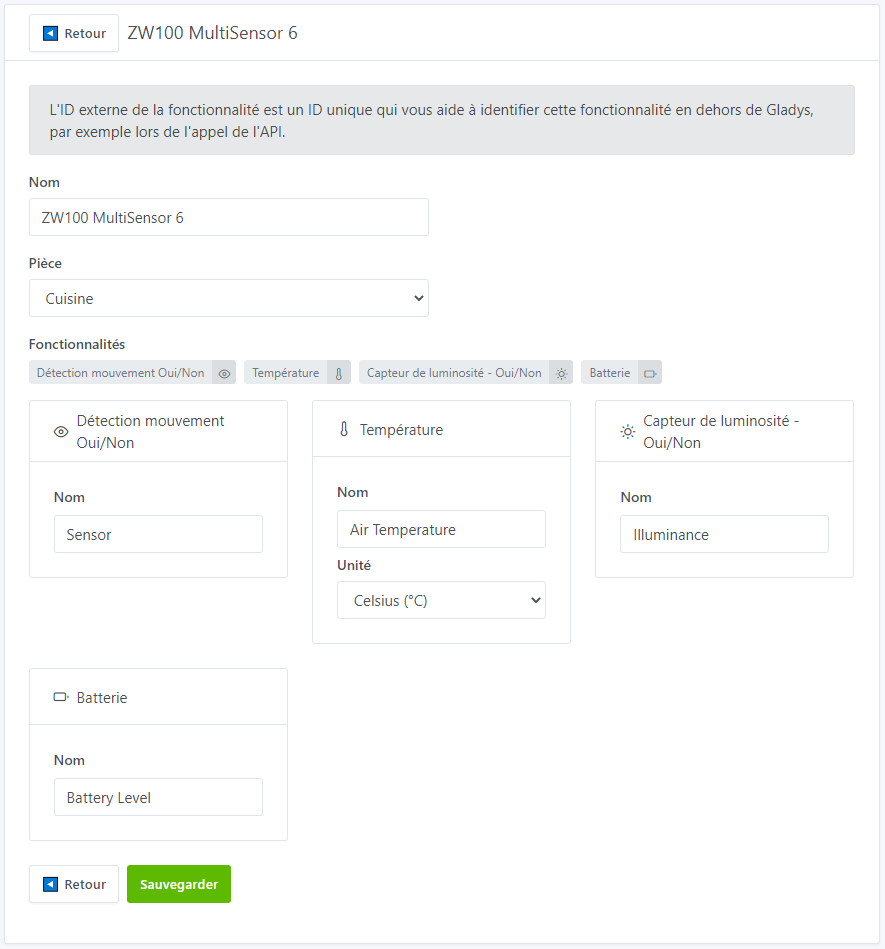
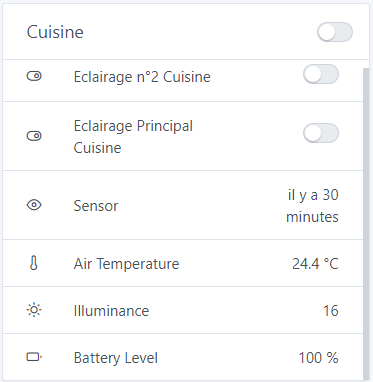
DB Gladys :
	Table t_device_feature :
		id										service_id								room_id									name				selector			model	external_id			should_poll		poll_frequency
		31f0c4eb-761d-4216-94d3-efdb9ed17a4e	4b4028a2-f68e-448d-8c2f-ff5b22814561	082cb0de-f663-4f7c-bb61-4f8cdbb64862	ZW100 MultiSensor 6	zw100-multisensor-6	NULL	zwave:node_id:2		0				NULL

	Table t_device_feature :
		id										device_id								name			selector											external_id										category			type	read_only	keep_history	has_feedback	unit	min	max		last_value
		7fcf3b7c-691c-4c58-be86-3a25677369ba	31f0c4eb-761d-4216-94d3-efdb9ed17a4e	Battery Level	zwave-battery-level-zw100-multisensor-6-node-2		zwave:node_id:2:comclass:128:index:0:instance:1	battery				integer	1			1				1				percent	0.0	255.0	90
		2e34d007-fee1-40cc-ad89-ebd226e88a8a	31f0c4eb-761d-4216-94d3-efdb9ed17a4e	Sensor			zwave-sensor-zw100-multisensor-6-node-2				zwave:node_id:2:comclass:48:index:0:instance:1	motion-sensor		binary	1			1				1				NULL	0.0	0.0		NULL
		5ef578bc-db44-42eb-88b2-9c1231567247	31f0c4eb-761d-4216-94d3-efdb9ed17a4e	Air Temperature	zwave-air-temperature-zw100-multisensor-6-node-2	zwave:node_id:2:comclass:49:index:1:instance:1	temperature-sensor	decimal	1			1				1				celsius	0.0	0.0		22.1
		a57efee9-ee3d-41ee-8708-36844c0ea8bf	31f0c4eb-761d-4216-94d3-efdb9ed17a4e	Illuminance		zwave-illuminance-zw100-multisensor-6-node-2		zwave:node_id:2:comclass:49:index:3:instance:1	light-sensor		integer	1			1				1				NULL	0.0	0.0		107.0

	Table t_device_param :
		id										device_id								name															Value
		d2062f5a-1596-439e-a578-b644d166ad5b	31f0c4eb-761d-4216-94d3-efdb9ed17a4e	air-temperature-units-2-49-1-256								Celsius
		18f066d6-ab11-42f3-9e8d-38b88792faf4	31f0c4eb-761d-4216-94d3-efdb9ed17a4e	illuminance-units-2-49-1-258									Lux
		278c5686-a1c4-417d-8777-9f72e00db86d	31f0c4eb-761d-4216-94d3-efdb9ed17a4e	humidity-units-2-49-1-260									Percent
		b6546914-49a3-4663-b6f2-486b0b7e8849	31f0c4eb-761d-4216-94d3-efdb9ed17a4e	ultraviolet-units-2-49-1-282									UV Index
		dde00c6f-f3a6-4b47-8287-517718d13c5b	31f0c4eb-761d-4216-94d3-efdb9ed17a4e	zwave-version-2-94-1-0
		0a9e8f1b-6e19-4bf4-937f-a70b243ec732	31f0c4eb-761d-4216-94d3-efdb9ed17a4e	installericon-2-94-1-1
		f8adb7d0-0437-4060-8b64-70d3d342185e	31f0c4eb-761d-4216-94d3-efdb9ed17a4e	usericon-2-94-1-2
		727bfd8d-884b-44a0-a4ec-fccfcfc1b629	31f0c4eb-761d-4216-94d3-efdb9ed17a4e	wake-up-10-minutes-on-power-on-2-112-1-2						Disable
		60e0da0c-e9ab-4db3-9a2e-1641058bba3c	31f0c4eb-761d-4216-94d3-efdb9ed17a4e	on-time-2-112-1-3												240
		d6d02676-8a5a-413e-bad0-1c02a9e2d593	31f0c4eb-761d-4216-94d3-efdb9ed17a4e	enable-motion-sensor-2-112-1-4									Enabled level 5
		907de748-b792-41c3-ab10-e26aeceb8312	31f0c4eb-761d-4216-94d3-efdb9ed17a4e	command-options-2-112-1-5										Basic Set
		e9f3c8e8-06de-485a-87da-2f6aa967bb90	31f0c4eb-761d-4216-94d3-efdb9ed17a4e	awake-timeout-2-112-1-8	30
		5cb68c0d-5422-4b3f-878b-708bc9884095	31f0c4eb-761d-4216-94d3-efdb9ed17a4e	current-power-mode-2-112-1-9									USB power[details="Logs Gladys after pressing the wake-up button device: "]
2020-05-31T08:56:39.370729589Z notification : Zwave : Notification, nodeId = 2, notif = Node Awake
2020-05-31T08:56:39.406145040Z ValueChanged : Zwave : Value Changed, nodeId = 2, comClass = 48, value = {"value_id":"2-48-1-0","node_id":2,"class_id":48,"type":"bool","genre":"user","instance":1,"index":0,"label":"Sensor","units":"","help":"Binary Sensor State","read_only":true,"write_only":false,"min":0,"max":0,"is_polled":false,"value":true}
2020-05-31T08:56:39.883759485Z ValueChanged : Zwave : Value Changed, nodeId = 2, comClass = 49
[/details], value = {"value_id":"2-49-1-1","node_id":2,"class_id":49,"type":"decimal","genre":"user","instance":1,"index":1,"label":"Air Temperature","units":"C","help":"Air Temperature Sensor Value","read_only":true,"write_only":false,"min":0,"max":0,"is_polled":false,"value":"23.8"}
	2020-05-31T08:56:42.646271271Z ValueChanged : Zwave : Value Changed, nodeId = 2, comClass = 49, value = {"value_id":"2-49-1-3","node_id":2,"class_id":49,"type":"decimal","genre":"user","instance":1,"index":3,"label":"Illuminance","units":"Lux","help":"Luminance Sensor Value","read_only":true,"write_only":false,"min":0,"max":0,"is_polled":false,"value":"16"}
	2020-05-31T08:56:43.283312387Z ValueChanged : Zwave : Value Changed, nodeId = 2, comClass = 49, value = {"value_id":"2-49-1-5","node_id":2,"class_id":49,"type":"decimal","genre":"user","instance":1,"index":5,"label":"Humidity","units":"%","help":"Humidity Sensor Value","read_only":true,"write_only":false,"min":0,"max":0,"is_polled":false,"value":"41"}
	2020-05-31T08:56:46.143522084Z ValueChanged : Zwave : Value Changed, nodeId = 2, comClass = 49, value = {"value_id":"2-49-1-27","node_id":2,"class_id":49,"type":"decimal","genre":"user","instance":1,"index":27,"label":"Ultraviolet","units":"UV","help":"Ultraviolet Sensor Value","read_only":true,"write_only":false,"min":0,"max":0,"is_polled":false,"value":"0"}
	2020-05-31T08:56:47.578459654Z ValueChanged : Zwave : Value Changed, nodeId = 2, comClass = 128, value = {"value_id":"2-128-1-0","node_id":2,"class_id":128,"type":"byte","genre":"user","instance":1,"index":0,"label":"Battery Level","units":"%","help":"Current Battery Level","read_only":true,"write_only":false,"min":0,"max":255,"is_polled":false,"value":100}
	2020-05-31T08:56:47.665098744Z notification : Zwave : Notification, nodeId = 2, notif = Node sleep
Logs Gladys in device sleep mode :
Logs Gladys in device sleep mode with motion detection :
	2020-05-31T07:17:56.151319801Z ValueChanged : Zwave : Value Changed, nodeId = 2, comClass = 113, value = {"value_id":"2-113-1-7","node_id":2,"class_id":113,"type":"list","genre":"user","instance":1,"index":7,"label":"Home Security","units":"","help":"Home Security Alerts","read_only":true,"write_only":false,"min":0,"max":0,"is_polled":false,"values":["Clear","Tampering -  Cover Removed","Motion Detected at Unknown Location"],"value":"Clear"}
What we can observe is that in the logs, in case of temperature detection (for example), in « sleep » mode, the message is well sent on the comClass=49 and therefore well updates the value.
However, for motion detection, the value update in « sleep » mode is sent on the comClass=113 which corresponds to the « Home Security » and there are several values:
- For the TriSensor we have
"values":["Clear","Motion Detected at Unknown Location"],"value":"Motion Detected at Unknown Location" - For the MultiSensor 6 we have
"values":["Clear","Tampering - Cover Removed","Motion Detected at Unknown Location"]
Still, when the device is awake, the motion detection is well updated on the comClass=48 with a True value. But if we do not wake it up again without motion detection, the value remains 1 in the DB.
Well, after reading the ozw file, we quickly realize that there are many parameters to set ^^