Access to all sensor values over time

Feature description
The idea would be to allow access to the old values of a sensor in a scene.
Concrete examples:

  1. If a movement has been detected in the last 10 minutes in any of my rooms, do something.
  2. If my room is lit, but there has been no movement for 15 minutes, then turn off the room.

These examples are not achievable with a « wait » + « retrieve the last value », as events would be missed.

Finally, this would allow adding widgets to the dashboard with a history of sensor values :smiley:

Could you be more specific about the feature request? ^^

I think we’re only talking about scenes here, then we would really need to refine what this feature request means, for example, I don’t understand the concrete example 1.

Mode 1: Compare a value over a period.
Example: motion detected in all values of the last 10 minutes (relative time).\n\nMode 2: Compare a value on a given date (or relative time).
Example: temperature 10 minutes ago was 17°C, or it was 17°C at 15:30 and it is 18°C at 16:45 (without using a « wait » block).

Ok I see

Now we need to think about what this could look like functionally :slight_smile:

@lmilcent Are you up for writing some functional specs? A small mockup with an explanation of the functionality is enough. I use https://whimsical.com/ on my side for mockups

What are you expecting in terms of content (briefly)?

A high-level description, a flowchart, a « fake » interface?

A purely user-oriented description of the expected behavior (textual) + a mockup :slight_smile: As for the description, it should be very concrete: what happens in the UI?

An example of a functional spec I had made for multi-user functionality:

Thanks, I’ll look into it!

It will take some time, but I’ll update this topic as soon as I have a first version :slight_smile:

Ok cool :slight_smile: For me, the « specification » part is the bulk of the work for development, so it really helps when there are clear specs of what we want!

Oh, I’m well aware of that, it’s so much simpler and faster to develop something that’s already precise and framed than to go in all directions!

Unfortunately, I don’t count the hours spent on unframed projects with a pseudo idea as the project base.

@pierre-gilles, is this mockup already functional?

(Public access) Mockup: Retrieve a state over time.

Functional Specification

  • « Retrieve the last state » becomes « Retrieve a state »
  • The state of a device can be retrieved in several ways:
    1. Last value
    2. Relative time (X minutes ago)
    3. By date
    4. Over a period

Details of the mentioned possibilities

1. Last value

This is exactly what is currently done, and quite clear :wink:

2. Relative time

Here the idea is to be able to say: I want to compare the value from 10 minutes ago (based on the scene execution time).

We will be able to compare two values 10 minutes apart, without having to wait!

If the scene runs at 12:00 and the user has chosen « 10 minutes ago, » the value will be compared to that of 11:50:00 (±30s to find a value). If no value is found between 11:49:30 and 11:50:30, the test fails.

3. By date

This is a bit similar to relative time, but you can specify a very precise date without any particular limit. We will therefore be able to compare values several days or even months apart.

Here, you can imagine comparing a value to a « reference value » on a specific date.

Note here: the user must be alerted if they choose a date for which there is no value.

4. Over a period

This is the most interesting in my opinion: the user will be able to compare a value with all those retrieved over a certain period of time.

Examples:

  • You can check if a motion sensor detected movement in the last 10 minutes (based on the scene execution time).
  • You can check if a plug has consumed a certain level of instantaneous power in the last 30 minutes
  • etc…

In the case of a sensor (or actuator) whose values can change very regularly and are not necessarily binary (temperature, power consumption in watts, brightness in lux, etc.), the « reference » value used in the scene for the test will be compared to all those recorded.

If I want to check that my plug has consumed less than 15W in the last 30 minutes, the test will be written as: « My plug » < « 15W » in the « last 30 minutes ». Gladys will then check in the database if all the values retrieved in the last 30 minutes do not exceed 15W.

Retrieval of test values

As with the « retrieve the last value » block, the value used during tests should be automatically retrieved (value recording time + value).

Example:

  • I perform a test on the device « my-sensor » to check if there has been movement in the last 10 minutes, i.e. between 11:50 and 12:00 (scene execution time).
  • If movement was recorded at 11:56, two variables are created in the scene: « my-sensor-test-1-value » and « my-sensor-test-1-time ».
  • I am able to send a message with these two variables to alert me « motion detected (value = 1) at 11:56. »

I really like your suggestions and I can already imagine using the feature to say « It’s okay, I’m turning off the light in the room. »

What does « the value from 10 minutes ago » mean to you?

What happens when there are multiple values in the period? Which one does Gladys take?

I don’t think this is what we want. I see the need, but in the spec, the way you address the need seems very strange and odd to me :smiley:

@VonOx Without reading the proposal above to avoid influencing you, how would you see the implementation of the scene you mentioned to me with your motion sensors?

I added a few clarifications, is it more understandable now?

Otherwise, don’t hesitate to tell me what’s missing, what’s unclear, or could lead to illogical situations. I’ll continue the reflection!

Message updated @pierre-gilles, with more details on the expected user-side behavior and management in Gladys.

I don’t see any other special cases to handle yet, let’s see what everyone thinks to improve all this :slight_smile:

Ok (but too late, I already read it :D)

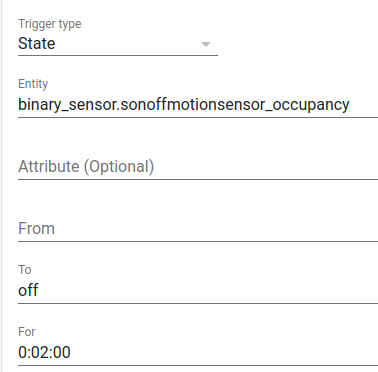
Trigger:

Motion detected

Condition: (Continue only if)

Time range (define a range of action)
1. Direct selection on a double slider
or
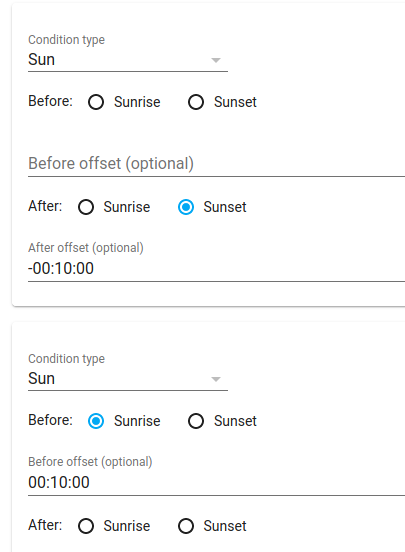
2. Based on sunset/sunrise (with an offset as we usually turn on lights before the sun sets)
Bonus if we can also choose which day of the week the scene is active

Action:

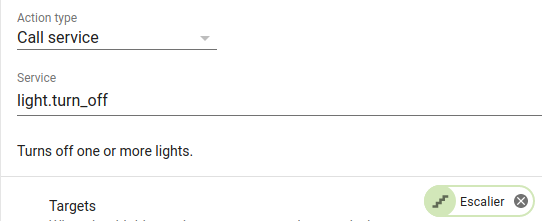
=> Turn on a room or certain lights
The extra touch to make life easier and avoid too many scenes. Allow the user (checkbox?) to choose if Gladys should turn off these lights after a certain time without motion detected (like 2 minutes)


Some screenshots from HA, it’s ugly and we can really do better in terms of UX

Condition (Sunset/Sunrise with 10-minute offset)

Turn off after 2 minutes


What do you think of my (since modified) proposal above?
What would you change, add, or clarify for you?

@VonOx and @pierre-gilles, how should I proceed with the specification-side feature?
What are your (new) feedbacks? :innocent:

I’m not entirely in agreement with your proposal from my side, I think we really need to think more about the end user and all the use cases that will stem from this feature.

I don’t have precise answers to give you without working on the subject full-time myself, I think I need to spend a couple of hours on it before I can answer you :smiley: it won’t be before the end of the week/next week in my opinion :slight_smile:

Hello!

So I’ve been working all day on the subject, and I have 3 proposals to address the different issues :slight_smile:

I’m responding here because it’s a topic where we talk about scenes, but it has nothing to do with the title of the topic. Once we agree, we can rename the development.

The Problem

I started from the different needs, without thinking about the product, just the final need:

  • Be able to turn off the light in a room if there is no movement for XX minutes
  • Be able to receive an alert if the fridge temperature drops below 10°C for at least 1 hour.
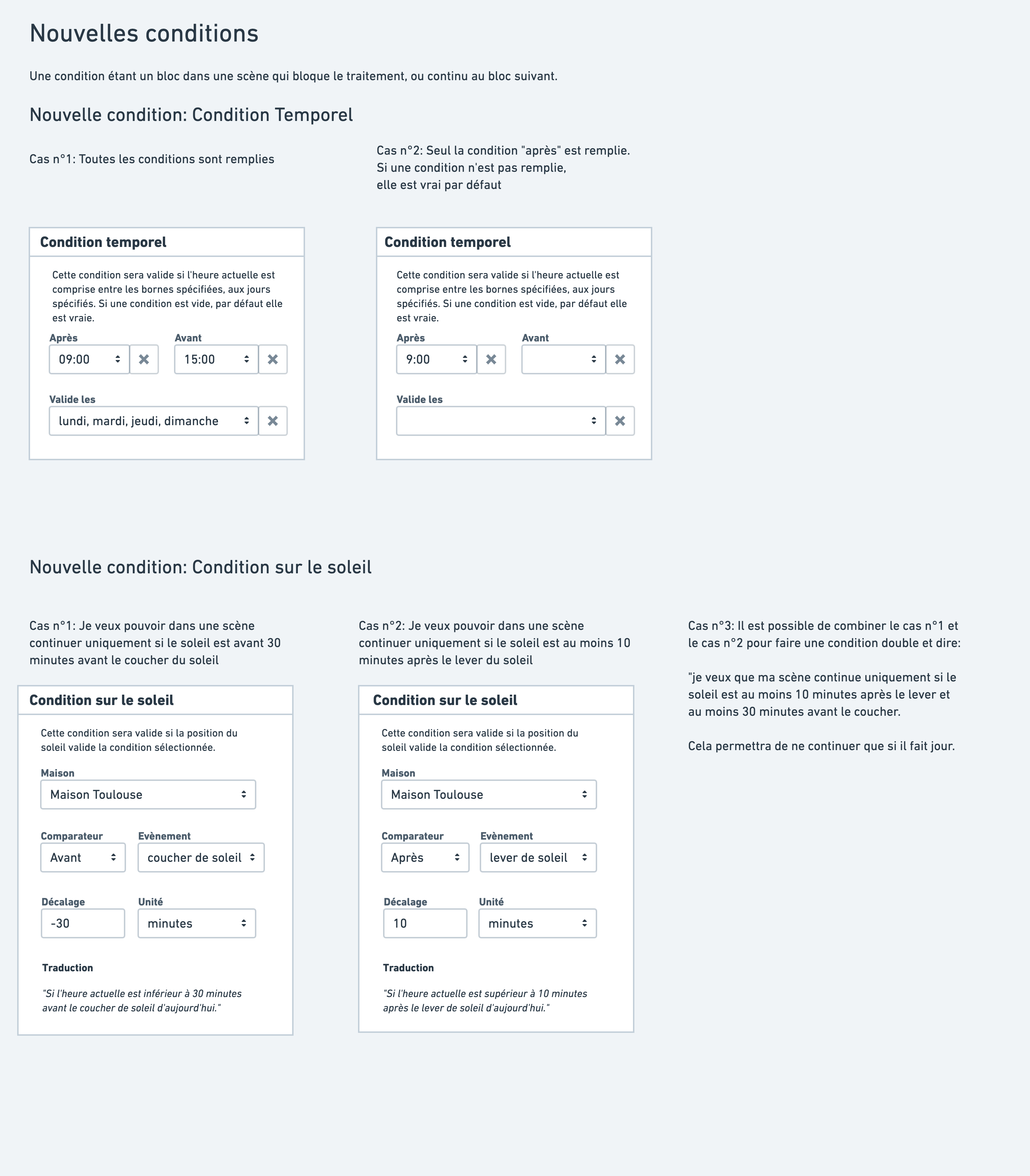
  • Be able in a scene to execute actions only if the sun is in the state of rising/setting/before sunrise minus 10 minutes, after sunset plus 30 minutes, etc..
  • Be able to execute a scene (or part of a scene) according to a time condition. Example: if it is before 12 p.m./after 2 p.m./between 12 p.m. and 2 p.m./on Tuesday, Wednesday and Thursday between 7 a.m. and 8 a.m./and many others.

Based on this specification, I dug a bit into how we could have this in Gladys.

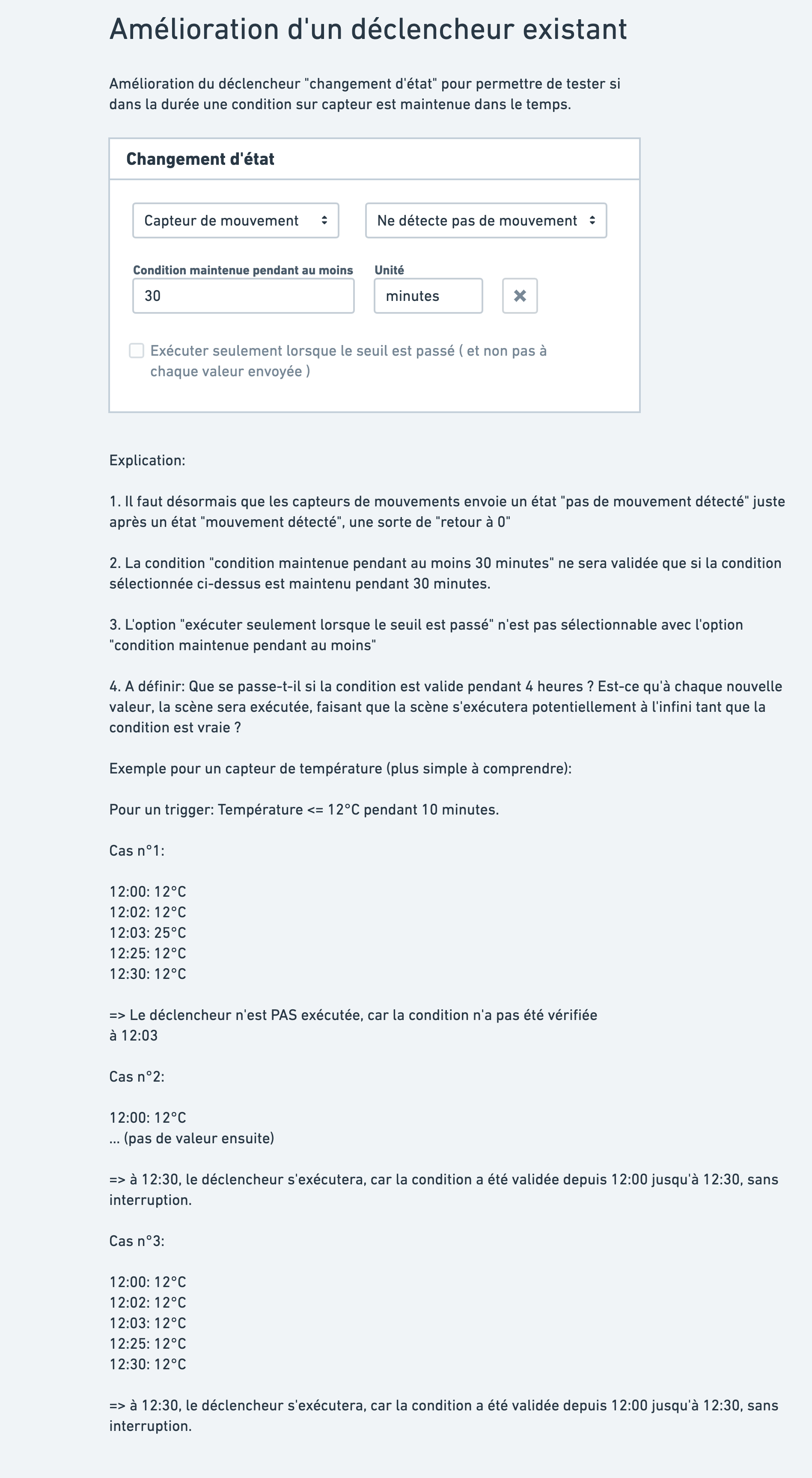
I quite liked what home assistant did on the « maintain a condition for XX minutes » part, and I went for a solution close to theirs for this part.

After that, I still have some questions (marked on the document), not everything is clear on the functional side.

The mockups (with explanations) are available here: New scenes triggers/conditions/actions

Also available as image export below:

What do you think?

@lmilcent In the end, it’s very different from your proposal :stuck_out_tongue: Sorry, to save time I went with what I saw, and then we can indeed see what best addresses the issues.

Note: If you have cases that are not well covered by my proposal, feel free to bounce back on them :slight_smile: I’m talking about practical and concrete cases at your place, we’re really in practice here, not in theory.

I’ll look into all of that, thanks for the time you spent on it :slight_smile:
This morning, I was actually thinking about it in relation to a new need (linked):

  • Being able to execute a scene based on the average values of a sensor over a period of time
    Example: If the fridge temperature averages 1°C over the last 2 hours, send a message to remind you to change the thermostat.

I’ll study your proposal and give you my feedback as soon as possible :slight_smile: