Hello,
Before I start researching and developing scenes, I’m asking Gladys users: how can I create a scene that reports, for all installed sensors, the one(s) whose battery level is below a threshold?
Thank you,
Jean

Hello @cicoub13 
Thanks for this information — I actually just discovered this feature thanks to you. However, I would have liked to have the option for daily alerts, for example, and a choice of notification method (I have a very nice home voice assistant). So, using a scene that retrieves variables (which device has the low battery and what the level is) would have given me more flexibility. Is that feasible?
Jean
Yes, @lmilcent did it here Scènes : récupérer un type d'état de tous les périphériques (ex: type batterie)
But you have to add all your devices to be monitored, which was long and led to the feature I mentioned to you above
Hello @cicoub13,
Sorry to dig up the topic … but the message notification feature doesn’t suit my son, who wants to be able to change the sensors’ batteries himself  Indeed, he doesn’t have access to the interface, and is therefore not notified. We are fortunate to have a friendly « virtual person » who informs us by voice, and would like to enable it to also inform us of the battery status. Would it be possible to create a single scene (given the number of battery-powered sensors …) that could replace the message notification (introduce the notion of looping over a collection in scenes, for example)?
Thanks
Hello
I understand the need and have therefore turned your post into a feature request.
We prioritize developing the most requested features, so let’s see if this one gathers enough votes
@cicoub13 Before turning the post into a request, I think it’s good to define exactly what the request is. Here, for me it’s not a concrete feature request for now. I’m rolling it back to a discussion
Okay, needs refining then.
Hello @pierre-gilles
Specifically, I would have liked a solution that would allow, within a single scene, to read the value of a property of a sensor within a group of sensors, and to react to that value based on a threshold or a state. Here, to be able to check the status of all the batteries and to react vocally if that value is below 10%.
If such a possibility were offered, it could be used to:
- to turn off all lights in a group (a room),
- check that all doors/windows are closed for a room, or for an entire house.
Over to you  Gentlemen developers
@jean_bruder it seems to me that there are two needs in what you just expressed: the one that consists of checking the status of multiple devices in a simple way (to avoid multiplying the actions « retrieve status » and « continue if »), and the one that consists of acting on multiple devices in a simple way (avoiding multiplying the « control a device » actions).
I anticipate, but @pierre-gilles will surely say that we will have to make two feature requests. But at this stage of discussion, we can refine the need within the same topic…
If I try to mock up what you mention about checking multiple devices, it could look like this:

And for controlling multiple devices, it could look like this:

Does this reflect your need?
Good evening @StephaneB
Wow, thanks for taking this into account so quickly
As for properties tested in a group, I would have phrased it as: The scene will continue only if, for at least one listed device, the tested property meets the condition (for example: battery < 10). So we will proceed if one battery is <10%. And then, if more than one battery is under 10%, how should each be handled afterwards (retrieve the names of the batteries < 10% for example)?
In a second example, we could imagine handling all the windows in a room: if at least one is not closed, react. So it must be possible to handle a set of sensors, and an area
For controlling devices in a group, that would be perfect
Thank you so much already for taking my request into account!
For the ‹ at least one ›, I think we can make it an option of the action that will allow choosing between ‹ all devices › or ‹ at least one ›. Because I think both usages can be useful.
For your need to select all devices in a zone or a room, I’m afraid that would become complicated because you’d have to be able to choose that ‹ space › and then specify the type of device to select (to satisfy your example ‹ all window contact sensors in a room ›). So I think the dropdown where you’ll choose what you want by typing a few letters to filter should be sufficient. That’s how ‹ turn on the outlets › works, for example, and if you have named your devices well it’s effective, I find…
And finally, as for being able to iterate later in the scene over the devices that allowed the condition to be met, no idea how to do that. That doesn’t resemble anything Gladys already allows, so we’d have to invent a new concept… I’ll let Pierre-Gilles say if that seems feasible to him…
Can you tell us a bit more about this « virtual person » so we better understand the need?
For this request, I don’t know if you’re aware of this action, but it’s already possible
At my place, I have a button in my entry « All Off » that turns everything off in all rooms, handy when leaving the house:
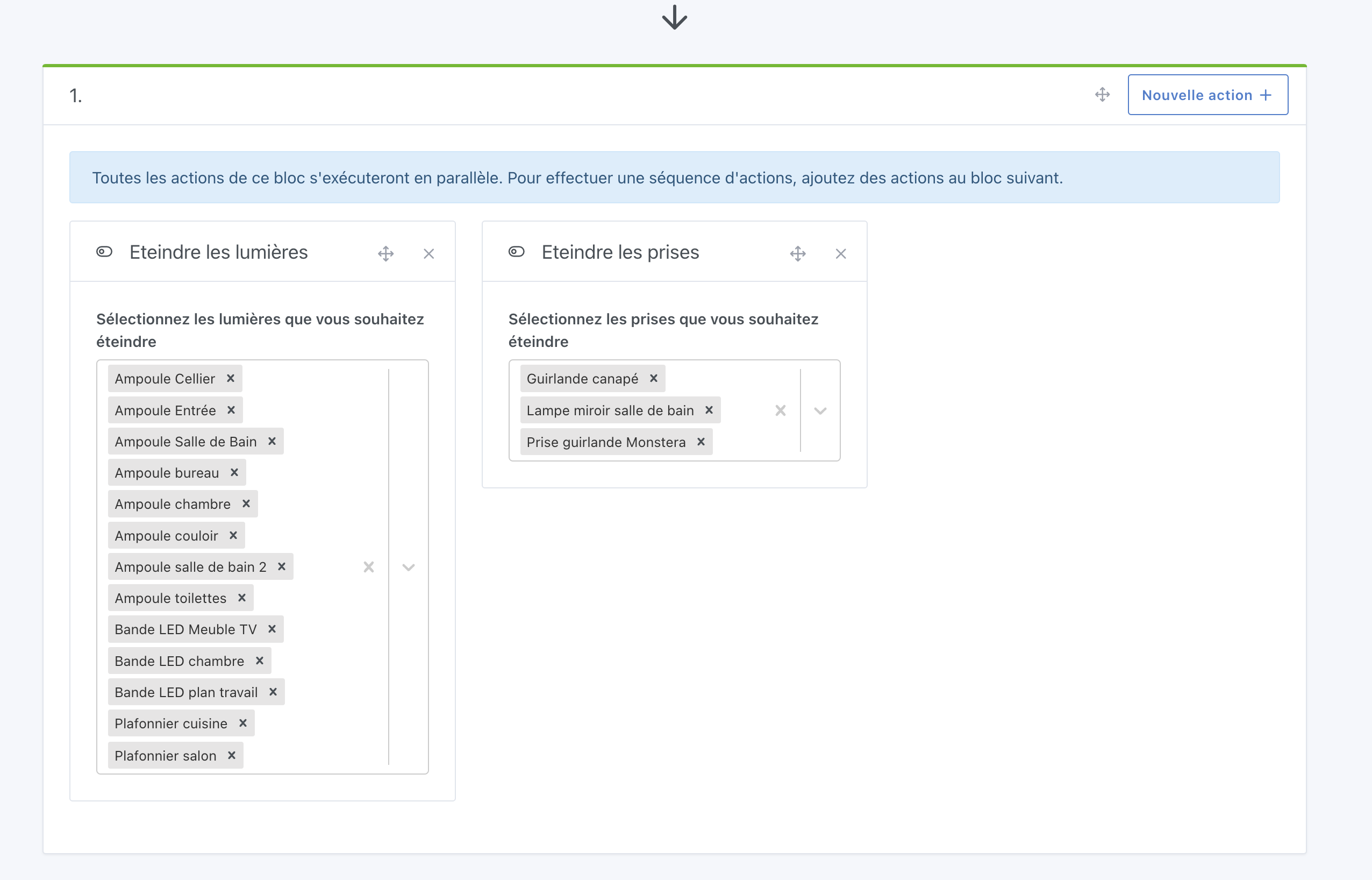
For that, I think there are three new concepts that could meet this need:
- A scene action that would allow retrieving all devices that have a given capability
- A « loop » action that would iterate over that list
- Finally, the « If… Else… Then » Condition that we’re currently developing here.
After that, there might be a missing piece to contact your « virtual person », it’s up to you to tell us more about this need.
@StephaneB thanks for thinking about the topic! It’s nice to see mockups and that kind of thinking, it’s really the hardest part of development work
However, for your « condition on multiple devices », I don’t think that answers the need, because you check that all devices satisfy all the conditions, whereas here, we want to know which devices satisfy which conditions.
Not all your batteries will die at the same time, and not all the windows are open at the same time!
That’s not bad! After that, the big question about this type of scene action is whether we prefer to make it super generic or super specific?
For example, for lights we did something specific — do we extend the concept to light brightness, or do we go for a generic approach like you propose? We should list the functionalities eligible for this kind of control and then decide, I think
Hello @pierre-gilles
It’s a text-to-speech that informs us of various things thanks to Gladys (windows/doors not closed at bedtime, depending on indoor/outdoor temperature, announcement of the time and upcoming calendar events, automatic outdoor watering, or not, depending on humidity… In short, anything that can provide immediate information without needing your smartphone nearby…) via POST requests in scenes (technically, the POST request contains the text+variables to be spoken, it is sent to an STT container that transmits the audio stream to the various speakers in the house, via PulseAudio).
Indeed, that’s a bad example, since I already use this function, sorry…
Regarding multiple testing in the same scene, with adapted actions, you perfectly describe the idea
We had already discussed this topic, and I’m sticking to my POST request that « does the job ».
Agreed
We disagree more, especially since there are quite a few of them…
Have a nice rest of the day,
Jean
You’re right, the mockup doesn’t meet Jean’s need to then be able to browse the devices. I’ll make another proposal… But I find this action « Condition on multiple devices » would be useful, and here’s a new mockup with the option to choose « all devices » or « at least one device »:

If the mockup is clear enough for you, I’d make a feature request to see if it interests people or not. OK with you?
Well actually I think it’s relevant that for the most common properties, a very specific action makes sense (outlets on/off and lights on/off, which already exist). But for the rest, having a more generic action allows handling « everything else »… If that works for you, I’ll take the mockup to make a feature request in which we can list the features/properties to be considered. OK?
I’ve thought about this, and I think we could manage with an action I called « Continue for each device » that would work like this:

What do you think, @jean_bruder and @pierre-gilles? And everyone else too 
If we implement the action « Run for each device » that will launch the execution of the following action blocks in parallel, I wonder whether we should also have an action « Wait for all devices » to ‹ gather › all those executions launched in parallel before continuing the scene with a single execution of the following blocks. Do you see what I mean?
Good evening @StephaneB
Wow, that’s exactly what I need to process a set of things
Good evening @StephaneB
Exactly, that’s very sensible because if actions are parallelized, for sending a message or for identical processing it won’t cause issues, but given my use (sending a voice message), it will be inaudible 
Except that in what I built as a prototype, you have access to a device’s name and to the property’s value precisely because we’re in the part that runs for a specific device, in parallel with the others. If we add a « Wait for all devices » action, we will no longer have knowledge of each device…
Actually, I don’t see how to build an action that exactly meets your need: what you would want, if I understand correctly, is to loop over all devices inside a single action, and for that action to build a text string concatenating all the device names, and then send it to your speaker…
But on the other hand with the « Continue for each device » that I propose, you could have that info in text, properly notified in Telegram.
And I think you could even, by going through Node-RED, build a flow that ‹ patches together › the voice message you’re trying to generate…