I put « pile » in the answer!!
A timer?
But I’m not sure that will be easy for me.
I don’t have coding skills.
I would have loved to complete this file to give it lots of phrases/expressions… But I don’t know how to go about it.
I only know GitHub from a user’s perspective, I’m not a developer, I don’t understand PR/commit/pull thing/others..
Can someone explain it to me? That way I’ll feel more useful, rather than just making comments ^^
I reassure you, I also didn’t know much and I didn’t dare either.
If you want to add code to a file, when saving you can open a PR with explanations. Everything is indicated on GitHub.
I know that Gladys doesn’t tell the time yet, but if we ask her, she gives us the time.
Hello everyone, it would also be necessary to be able to exchange with Gladys about the presence, with the support of the following sentences:
Who is at home?
I’m back
I’m out
Regarding this, when I connect locally to Gladys (i.e., without going through the gateway), I still appear on the Dashboard as if I had never been seen at home…
@Olivier1 Indeed, presence management is still under development  I hesitated but I really should have disabled this box before the feature was ready!
Not a bad idea for managing presence in the chat
I just made my first PR and I updated the chat in French for now, I will do the English part.
I added:
- shi fu mi
- jokes
- heads or tails
- give a number between 0 and 10
- responses when you say hello or hello Gladys
If you want other expressions, don’t hesitate to share them.
Thanks to @VonOx for helping me set up the development space and his explanations.
The tests after modification because I added things no longer pass with CircleCI.
I can’t figure out why I’ve tried several times but it’s the same.
Could you take a look @pierre-gilles?
At the bottom of your PR, you have a block of information about the continuous integration results.
You can click the « Details » button on the line of the test that fails. Here, it’s the server tests.
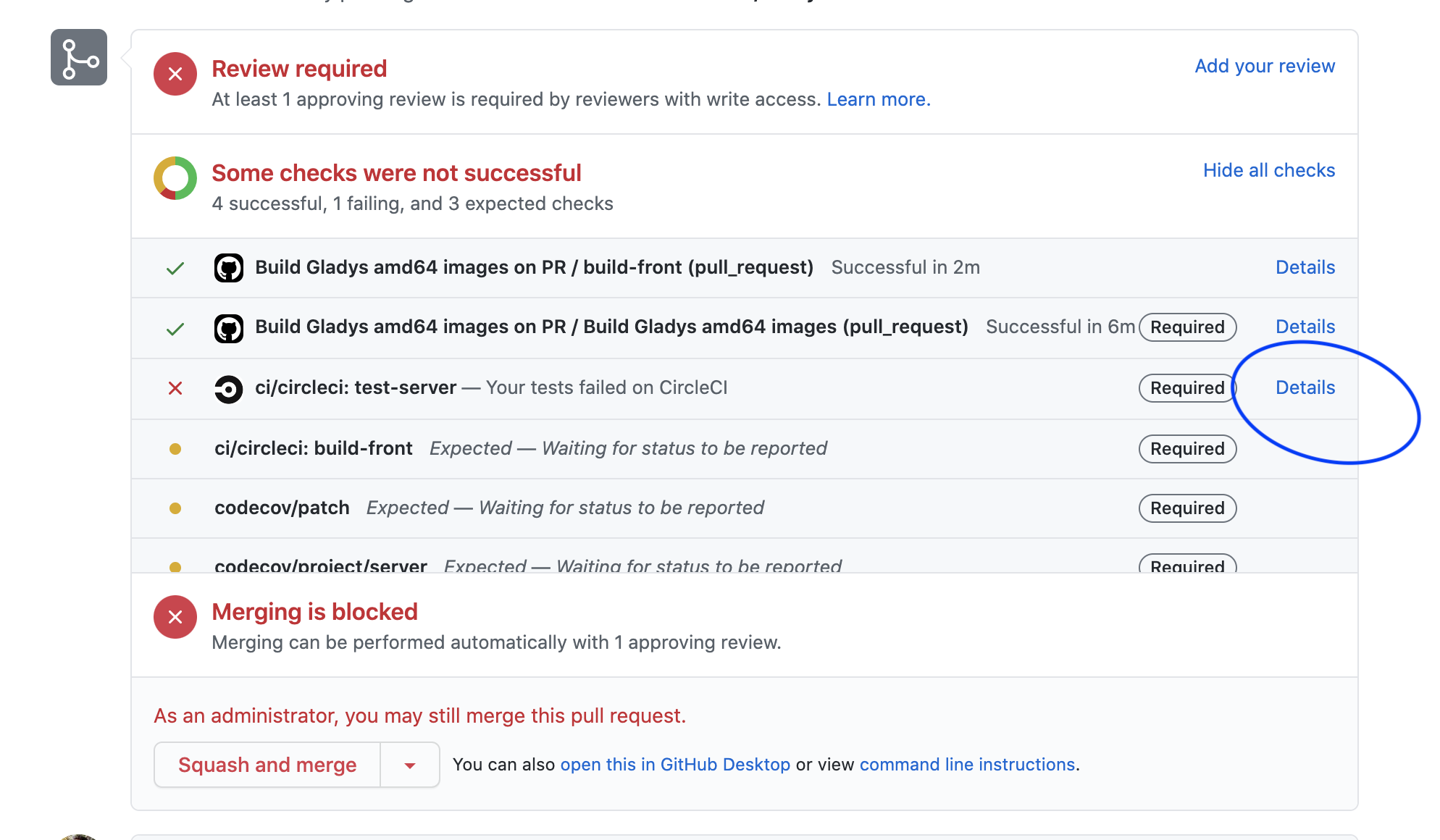
By clicking on « details », you arrive on CircleCI.
As you can see, all steps (prettier, eslint) pass, except the last one, the tests themselves. You click on the red line to see what went wrong:
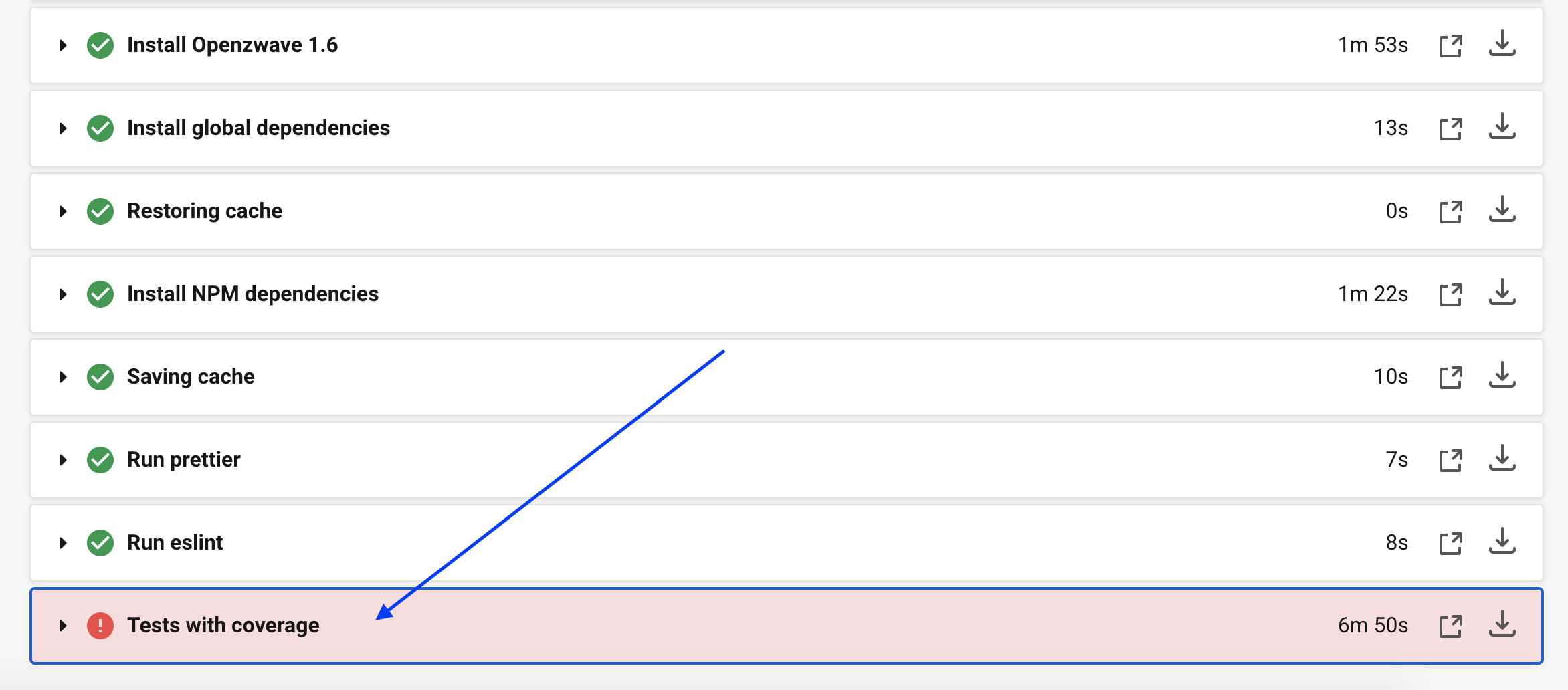
2 tests out of 996 have failed:
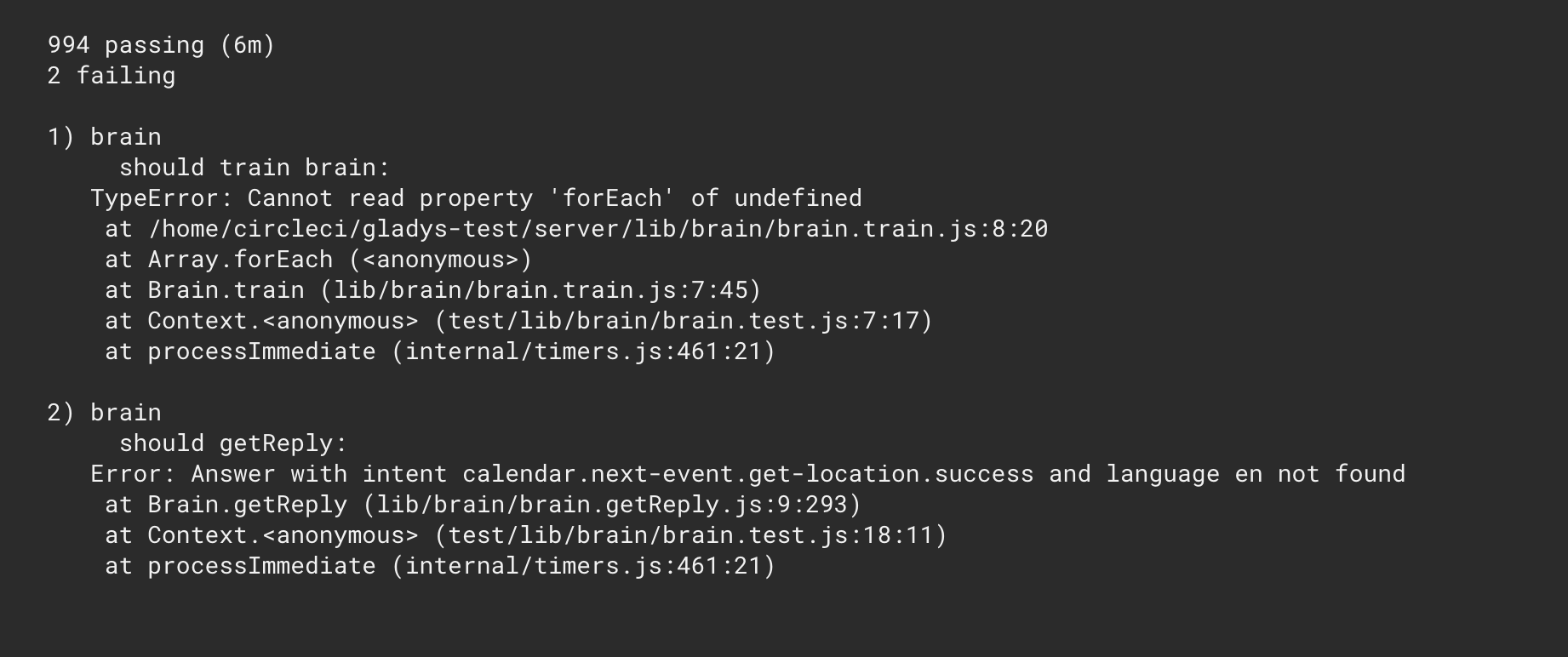
By running the tests locally, you should have the same error. You can check the problematic files to see what’s not working.
That’s exactly what I did this weekend, but I can’t figure out where the problem is coming from.
I extracted the error file but I don’t have any more information.
Maybe you can tell me what’s wrong in a glance.
linux-vins@Asus-lcm:~$ cat /home/linux-vins/.npm/_logs/2020-11-29T07_46_15_254Z-debug.log
0 info it worked if it ends with ok
1 verbose cli [ ‘/usr/bin/node’, ‘/usr/bin/npm’, ‘run’, ‘test’ ]
2 info using npm@6.14.8
3 info using node@v12.20.0
4 verbose run-script [ ‘pretest’, ‘test’, ‘posttest’ ]
5 info lifecycle gladys-server@~pretest: gladys-server@
6 verbose lifecycle gladys-server@~pretest: unsafe-perm in lifecycle true
7 verbose lifecycle gladys-server@~pretest: PATH: /usr/lib/node_modules/npm/node_modules/npm-lifecycle/node-gyp-bin:/home/linux-vins/Gladys/server/node_modules/.bin:/home/linux-vins/.vscode-server/bin/e5a624b788d92b8d34d1392e4c4d9789406efe8f/bin:/usr/local/sbin:/usr/local/bin:/usr/sbin:/usr/bin:/sbin:/bin:/usr/games:/usr/local/games:/mnt/c/Program Files/WindowsApps/CanonicalGroupLimited.Ubuntu20.04onWindows_2004.2020.812.0_x64__79rhkp1fndgsc:/mnt/c/Program Files (x86)/Intel/TXE Components/TCS/:/mnt/c/Program Files/Intel/TXE Components/TCS/:/mnt/c/WINDOWS/system32:/mnt/c/WINDOWS:/mnt/c/WINDOWS/System32/Wbem:/mnt/c/WINDOWS/System32/WindowsPowerShell/v1.0/:/mnt/c/Program Files/Intel/TXE Components/DAL/:/mnt/c/Program Files (x86)/Intel/TXE Components/DAL/:/mnt/c/Program Files/Intel/TXE Components/IPT/:/mnt/c/Program Files (x86)/Intel/TXE Components/IPT/:/mnt/c/WINDOWS/System32/OpenSSH/:/mnt/c/Program Files/PuTTY/:/mnt/c/Program Files/LLVM/bin:/mnt/c/Program Files/Docker/Docker/resources/bin:/mnt/c/ProgramData/DockerDesktop/version-bin:/mnt/c/Users/vince/AppData/Local/Microsoft/WindowsApps:/mnt/c/Users/vince/AppData/Local/atom/bin:/mnt/c/Users/vince/AppData/Local/GitHubDesktop/bin:/mnt/c/Users/vince/AppData/Local/Microsoft/WindowsApps:/mnt/c/Users/vince/AppData/Local/Programs/Microsoft VS Code/bin:/snap/bin
8 verbose lifecycle gladys-server@~pretest: CWD: /home/linux-vins/Gladys/server
9 silly lifecycle gladys-server@~pretest: Args: [ ‘-c’, ‘npm run eslint’ ]
10 silly lifecycle gladys-server@~pretest: Returned: code: 0 signal: null
11 info lifecycle gladys-server@~test: gladys-server@
12 verbose lifecycle gladys-server@~test: unsafe-perm in lifecycle true
13 verbose lifecycle gladys-server@~test: PATH: /usr/lib/node_modules/npm/node_modules/npm-lifecycle/node-gyp-bin:/home/linux-vins/Gladys/server/node_modules/.bin:/home/linux-vins/.vscode-server/bin/e5a624b788d92b8d34d1392e4c4d9789406efe8f/bin:/usr/local/sbin:/usr/local/bin:/usr/sbin:/usr/bin:/sbin:/bin:/usr/games:/usr/local/games:/mnt/c/Program Files/WindowsApps/CanonicalGroupLimited.Ubuntu20.04onWindows_2004.2020.812.0_x64__79rhkp1fndgsc:/mnt/c/Program Files (x86)/Intel/TXE Components/TCS/:/mnt/c/Program Files/Intel/TXE Components/TCS/:/mnt/c/WINDOWS/system32:/mnt/c/WINDOWS:/mnt/c/WINDOWS/System32/Wbem:/mnt/c/WINDOWS/System32/WindowsPowerShell/v1.0/:/mnt/c/Program Files/Intel/TXE Components/DAL/:/mnt/c/Program Files (x86)/Intel/TXE Components/DAL/:/mnt/c/Program Files/Intel/TXE Components/IPT/:/mnt/c/Program Files (x86)/Intel/TXE Components/IPT/:/mnt/c/WINDOWS/System32/OpenSSH/:/mnt/c/Program Files/PuTTY/:/mnt/c/Program Files/LLVM/bin:/mnt/c/Program Files/Docker/Docker/resources/bin:/mnt/c/ProgramData/DockerDesktop/version-bin:/mnt/c/Users/vince/AppData/Local/Microsoft/WindowsApps:/mnt/c/Users/vince/AppData/Local/atom/bin:/mnt/c/Users/vince/AppData/Local/GitHubDesktop/bin:/mnt/c/Users/vince/AppData/Local/Microsoft/WindowsApps:/mnt/c/Users/vince/AppData/Local/Programs/Microsoft VS Code/bin:/snap/bin
14 verbose lifecycle gladys-server@~test: CWD: /home/linux-vins/Gladys/server
15 silly lifecycle gladys-server@~test: Args: [
15 silly lifecycle ‘-c’,
15 silly lifecycle ‘cross-env NODE_ENV=test ./node_modules/mocha/bin/mocha --recursive ./test/bootstrap.test.js “./test/**/*.test.js” --exit’
15 silly lifecycle ]
16 silly lifecycle gladys-server@~test: Returned: code: 1 signal: null
17 info lifecycle gladys-server@~test: Failed to exec test script
18 verbose stack Error: gladys-server@ test: cross-env NODE_ENV=test ./node_modules/mocha/bin/mocha --recursive ./test/bootstrap.test.js “./test/**/*.test.js” --exit
18 verbose stack Exit status 1
18 verbose stack at EventEmitter. (/usr/lib/node_modules/npm/node_modules/npm-lifecycle/index.js:332:16)
18 verbose stack at EventEmitter.emit (events.js:314:20)
18 verbose stack at ChildProcess. (/usr/lib/node_modules/npm/node_modules/npm-lifecycle/lib/spawn.js:55:14)
18 verbose stack at ChildProcess.emit (events.js:314:20)
18 verbose stack at maybeClose (internal/child_process.js:1022:16)
18 verbose stack at Process.ChildProcess._handle.onexit (internal/child_process.js:287:5)
19 verbose pkgid gladys-server@
20 verbose cwd /home/linux-vins/Gladys/server
21 verbose Linux 4.19.128-microsoft-standard
22 verbose argv “/usr/bin/node” “/usr/bin/npm” “run” “test”
23 verbose node v12.20.0
24 verbose npm v6.14.8
25 error code ELIFECYCLE
26 error errno 1
27 error gladys-server@ test: cross-env NODE_ENV=test ./node_modules/mocha/bin/mocha --recursive ./test/bootstrap.test.js “./test/**/*.test.js” --exit
27 error Exit status 1
28 error Failed at the gladys-server@ test script.
28 error This is probably not a problem with npm. There is likely additional logging output above.
29 verbose exit [ 1, true ]
I think there is a problem with your development environment, these logs are not the execution logs of the tests.
Did you follow the tutorial: https://gladysassistant.com/fr/docs/api/setup-development-environnement ?
Are you in the « server » folder when you run the « npm test » command?
I set up his environment for him (it’s fine)
He gave us the npm log
As soon as I can, I will add:
- What’s the temperature in…
- …
However, for °C and °F, I don’t think these come from the chat.
I tested several things.
I tried to do a
npm star in the server folder directly in Ubuntu but when it gets to the calendar it crashes and it even crashes my computer.
I must have broken something again because the first time my PR was validated and all the tests passed.
It’s when I added additional features that it no longer passes.
No, I don’t know, it needs to be reported on GitHub so as not to lose the issue.
Do you prefer to keep:
- « it is 16°C in the Garage room » or
- « it is 16°C in Garage » or
- « it is 16°C in the Garage » but there it is necessary to give the room name as « the Garage », « the kitchen », « the bedroom »… instead of « Garage », « kitchen », « bedroom »… in the Gladys parameters.
Or look up the gender in a dictionary to display it… 
How is your device configured? Is it an MQTT device? What unit did you set when creating it?
Can you create another topic? Here we talk more about discussions
That would break recognition, not feasible.
We need to figure it out:
- Respond without quoting the room. « It’s XX°C »
- Respond taking into account the gender of the room (masculine? feminine?), we can very well make a dictionary of room types (bedroom, living room, kitchen, garage, office, etc…), and return one or the other response (« le », « la ») according to the gender of the word. If the word is not recognized, fallback to option 1) or the current option. Be careful, if one day we manage German there are 3 genders. English has no gender.
And a dictionary already including the gender? (the bedroom, the living room, the kitchen, the garage, the office, etc…) wouldn’t that be easier? Even for other languages?
On the other hand, how do you handle for example the parental bedroom, the « first name »'s bedroom, the « first name »'s office?