Hello!
Do you mean that what is in the red circle below will indeed be the feature’s custom name, and not the feature’s standard label?

Yes, that’s the right name!
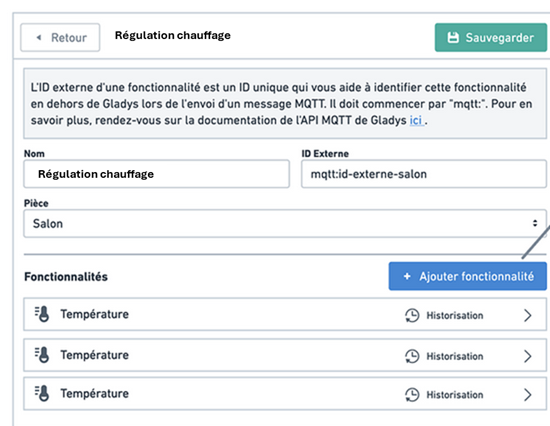

@mutmut I updated the screens with your feedback! ( Still the same link: MQTT Virtual devices view )
- Added the feature icon on the « device list » view. If the device has more than 3 features, display a note « and X more… »
- Display a clickable text « Show all parameters » on a feature, to see the "minimum
@pierre-gilles Very good from my point of view!
I would still add the units to choose, for example for temperature to choose in C or F (I didn’t see it in your additions).
Good catch! Added!
I like the idea of having the min/max/units hidden by default (which means they’re optional, not mandatory to set?).
But then I’d do the same for the two fields ‹ Custom MQTT Topic › and ‹ MQTT JSON Message › which are optional.
Good idea! It’s fixed.
Ah, I wouldn’t have put in the optional display the field ‹ MQTT topic to publish › (nor, for that matter, the field ‹ MQTT topic to listen to › that you don’t show in your mockup and that appears when ‹ is a sensor › is unchecked), because those elements are always useful.
Oops, you’re right, fixed!
I REALLY LOVE what you did!! It’s exactly what I could imagine when I created the topic! Great design work @pierre-gilles 
Okay, since there haven’t been any more responses I assume we’re good on the functional spec 
Next step: the content, and it’s a good thing I need YOU! 
For this screen:

I’ll need all the content to fill it.
To be exhaustive and create something understandable by everyone, I suggest you help me fill in this document.
There are 3 fields to fill:
- Section: Which section to place the feature on the screen (Sensors, Smart plugs, Lights, etc…)
- Name: The name of the feature. It should be short and precise.
- Description: A description of the feature, clear and with a consistent length and format.
Please use a spellchecker (ChatGPT is perfect for that)
The document is here, and open for editing by everyone:
If you lack inspiration, remember that everything currently in this selector needs to end up in this document:

(This selector comes from the MQTT integration → Click on a device → To add a new feature)
Thanks to everyone who helps out!
If you’re unsure about a section name, we can discuss it here
PS: For the English and German translations, ChatGPT will do the job.
Are we really starting from scratch in your file, or do you first inject the existing Section and Name, and do you mainly need us to contribute to defining the Description?
We’re starting from scratch
Should the name be clear without the section? For example, we’re going to have several Switches (for outlets, lights) and if we call the feature « Switch » it could be confusing. It would be better to call it « Outlet Switch » and « Light Switch » 
Good question! I don’t think so, no need to duplicate the information, right
I added 3 or 4 lines to the file, I hope I did it correctly!
Hello,
je me suis fait aussi quelques lignes et je dois dire que j’ai du mal avec certains termes de section comme outlet ou light.
J’ai donc ajouter Switch/Control pour voir si c’est plus compréhensible (je n’ai pas tout pété dans le tableau pour que chacun puisse donner son avis et avoir une vue d’ensemble).
Pour moi turn on the light c’est mettre un interrupteur sur On, mais il y a très probablement qq chose de sous-jacent que je n’ai pas.
Ensuite j’ai mis 2 lignes à la fin qui me tiennent à coeur mais je pense que ce sera de la new feature.
-
Pour faire simple, j’aimerais pouvoir créer un « MQTT device »
Teleinformation (Téléinformation)et quand je clique pour le créer, ça m’ajoute toutes les fonctionnalités d’index de la téléinfo en mode Standard et/ou Historical. Ensuite j’ajoute juste mes topics personnalisés dans les différentes rubriques (et si je passe de Historical à Standard, ça me transfère les data … oui oui je rêve très fort ).
). -
Le second serait de créer un « MQTT device » de type
Modedans lequel je pourrais créer des fonctionnalités (soit manuellement ou en automatique, à voir) et lorsque j’affiche ce Mode sur le dashboard, je retrouve une drop-down list de toutes mes fonctionnalités que je pourrais sélectionner.
Je vais peut-être un peu loin mais je vois que l’on a des modes pour le chauffage et sûrement d’autres que je ne connais pas encore. Certes ces modes sont génériques (ce que l’on veut dans Gladys) mais avoir la possibilité de se créer des listes de manières simple et guidée me paraissent intéressantes.
Si je reprends l’exemple du mode Chauffage, les modes vont de 1 à 5 (si je me rappelle bien) et ensuite on gère tout dans les scènes. Avec mon idée, on pourrait directement lancer des actions simples (via nos topics personnalisés) sans passer par des scènes.
What don’t you understand? ^^ A prise is a prise, and a lumière is a lumière  Basically each section describes the physical object, which allows the user to start from the need « what am I modeling? », and then look in a small set of features.
That one is less likely to be misunderstood!
Yes →
Hello everyone 
Quick follow-up on this topic, I still need some help!
Could someone take the lead to organize this discussion? The development part is really trivial, so I can handle that, but I mainly need help structuring and coordinating the non-technical side.
As long as the list of features isn’t finalized, I can’t start development.
Thanks in advance for your help! 