hello
maybe a subject already addressed?
today gladys allows you to recover weather data via openweather by Api (although… I created an openweather account yesterday, and still no sync…)
On the other hand in // I have a complete weather station (wireless, connects via rf to its indoor base which in turn connects via wifi and my internet box to feed the WeatherUnderground website), and the question I ask myself is: would it be possible to interface this station directly to my gladys server?
Hello @Einstein8854!
Do you have an error message on the home screen? What do you mean by « still no sync »?
What brand is this station? Does this station have an API?
Hello, regarding the OpenWeather issue, on Gladys welcome I have a red message « The request to the OpenWeather API has failed. Is your Gladys instance connected to the internet? » The connection must exist since my server is connected to the internet via my box and I synchronize my calendar.
For my weather station, it’s brand « brandson », it must be a sub-brand, looks like Bresser…, connects to external sensors via RF 868MHz, then from the board to the box via WiFi so I have an IP and Mac address, and via the box connects to WeatherUnderground which potentially provides an API to retrieve the data, but for me the idea would be that having the station at home I do not go through a third party to retrieve and manipulate, store my data.
Did you do it like in this tutorial?
Gladys is not currently compatible with this model.
You might be able to use Node-RED to make up for the lack and to query the API of this weather station, and send the values to Gladys via MQTT. After that, you need to have some knowledge, it’s not a simple product to use Node-RED.
If you’re interested, I made a video on the subject:
Subject: Re,
Yes, I did follow the procedure you mentioned. The only thing I don’t remember seeing is the « API data usage » screen from OpenWeather.
On Gladys, I don’t recall having entered the coordinates of my house, except for a location on the map.
As for Red Note, I’ll take a look and probably try it out.
Hi,
I’m not following your YT procedure.
I installed Node-RED, OK.
However, I’m stuck in Gladys.
MQTT doesn’t seem to be installed when I look in integration and therefore it’s not possible to configure it to make the gateway between Gladys and Node-RED.
Hi Pierre-Gilles,
So while waiting for your return, I did a bit of searching on the net and found an exchange you had about MQTT as part of a Gladys update (Bullseye if I remember correctly) on Raspberry Pi.
And in the exchange, you were asking for the log.
So I did something similar, and I see an error 301? on the line At modem during the MQTT startup…
And in parallel, on the OpenWeather subject, I see a message « bad longitude » in the log!
Also, I was wondering if there might not be a permission issue on my Ubuntu server in the context of Gladys, I see all the terminal commands running in SUDO mode… both Gladys, Docker, Node-RED…
Sylvain
Have you seen the error details?
Here are the 500 last lines of the log, it’s heavy and laborious:
 { cod: '400', message: 'wrong longitude' }

2022-02-15T14:50:53+0100 <error> index.js:20 (process.<anonymous>) uncaughtException catched: uncaughtException
2022-02-15T14:50:53+0100 <error> index.js:21 (process.<anonymous>) Error: getaddrinfo EAI_AGAIN containers
    at GetAddrInfoReqWrap.onlookup [as oncomplete] (dns.js:71:26) {
  errno: -3001,
  code: 'EAI_AGAIN',
  syscall: 'getaddrinfo',
  hostname: 'containers'
}
2022-02-15T14:53:34+0100 <error> index.js:20 (process.<anonymous>) uncaughtException catched: uncaughtException
2022-02-15T14:53:34+0100 <error> index.js:21 (process.<anonymous>) Error: getaddrinfo EAI_AGAIN containers
    at GetAddrInfoReqWrap.onlookup [as oncomplete] (dns.js:71:26) {
  errno: -3001,
  code: 'EAI_AGAIN',
  syscall: 'getaddrinfo',
  hostname: 'containers'
}

2022-02-15T14:54:22+0100 <error> index.js:20 (process.<anonymous>) uncaughtException catched: uncaughtException
2022-02-15T14:54:22+0100 <error> index.js:21 (process.<anonymous>) Error: getaddrinfo EAI_AGAIN containers
    at GetAddrInfoReqWrap.onlookup [as oncomplete] (dns.js:71:26) {
  errno: -3001,
  code: 'EAI_AGAIN',
  syscall: 'getaddrinfo',
  hostname: 'containers'
}
2022-02-15T15:01:51+0100 <info> calendar.requests.js:52 () CalDAV : Found calendar Personnel
2022-02-15T15:01:51+0100 <info> calendar.syncUserCalendars.js:38 (CalDAVHandler.syncUserCalendars) CalDAV : Found 1 calendars.
2022-02-15T15:02:01+0100 <info> gateway.checkIfBackupNeeded.js:9 (Gateway.checkIfBackupNeeded) Instance not connected to Gladys Gateway, not backing up.
2022-02-15T15:02:01+0100 <info> device.calculateAggregate.js:38 (DeviceManager.calculateAggregate) Calculating aggregates device feature state for interval hourly
2022-02-15T15:02:06+0100 <info> device.calculateAggregate.js:105 (ChildProcess.<anonymous>) device.calculateAggregate: Finishing processing for interval hourly
2022-02-15T15:02:06+0100 <info> device.calculateAggregate.js:38 (DeviceManager.calculateAggregate) Calculating aggregates device feature state for interval daily
2022-02-15T15:02:11+0100 <info> device.calculateAggregate.js:105 (ChildProcess.<anonymous>) device.calculateAggregate: Finishing processing for interval daily
2022-02-15T15:02:11+0100 <info> device.calculateAggregate.js:38 (DeviceManager.calculateAggregate) Calculating aggregates device feature state for interval monthly
2022-02-15T15:02:16+0100 <info> device.calculateAggregate.js:105 (ChildProcess.<anonymous>) device.calculateAggregate: Finishing processing for interval monthly
2022-02-15T15:31:51+0100 <info> calendar.requests.js:52 () CalDAV : Found calendar Personnel
2022-02-15T15:31:51+0100 <info> calendar.syncUserCalendars.js:38 (CalDAVHandler.syncUserCalendars) CalDAV : Found 1 calendars.
2022-02-15T15:42:01+0100 <info> index.js:16 (Object.start) Starting MQTT service
2022-02-15T15:42:01+0100 <warn> service.start.js:44 (Service.start) Unable to start service mqtt Error: (HTTP code 301) unexpected -
    at /src/server/node_modules/docker-modem/lib/modem.js:301:17
    at getCause (/src/server/node_modules/docker-modem/lib/modem.js:331:7)
    at Modem.buildPayload (/src/server/node_modules/docker-modem/lib/modem.js:300:5)
    at IncomingMessage.<anonymous> (/src/server/node_modules/docker-modem/lib/modem.js:275:14)
    at IncomingMessage.emit (events.js:412:35)
    at endReadableNT (internal/streams/readable.js:1334:12)
    at processTicksAndRejections (internal/process/task_queues.js:82:21) {
  reason: undefined,
  statusCode: 301,
  json: <Buffer >
}
2022-02-15T15:42:06+0100 <error> index.js:20 (process.<anonymous>) uncaughtException catched: uncaughtException
2022-02-15T15:42:06+0100 <error> index.js:21 (process.<anonymous>) Error: getaddrinfo EAI_AGAIN containers
    at GetAddrInfoReqWrap.onlookup [as oncomplete] (dns.js:71:26) {
  errno: -3001,
  code: 'EAI_AGAIN',
  syscall: 'getaddrinfo',
  hostname: 'containers'
}
sylvain@synapsat10:/var/lib/node-red$
Edit (Pierre-Gilles): I edited your message to make it more readable and to remove sensitive information.
For OpenWeather, as the error message suggests, there seems to be an issue with your longitude. This is the position of your home on the map (which you must have selected during setup).
Perhaps try repositioning your home on the map, saving, and seeing if that resolves the issue.
Then, for MQTT, how did you first launch Gladys? What system and version are you on? Gladys is not compatible with Debian Bullseye, for example.
re,
I’m taking your time here…
On OpenWeather, I reconfigured it three times via the card… so I’m having trouble seeing the reason for this anomaly
For the Gladys installation, I did it by following the tutorial in the link below:
I’m on an old HP Celeron 2.66GHz, 3GB of RAM, 40GB HD
No VM but on Ubuntu 21.10 OS
Orange Livebox network (but chaotic ADSL bandwidth, deep rural area… we’re waiting for fiber in the coming months)
The installation seems to have gone well following the tutorial, no blocking error messages.
And given the startup and especially the agenda sync, it seemed not bad (not having any measurement or control module yet).
Well, weather and signal problem but I’m sure the solution is close…)
So as I told you, a lot of commands in sudo,
and as an old computer scientist, I use vi more than nano.
Another element, this post is also my OpenVPN server.
Sylvain
Great news, OpenWeather works
just a little more effort for MQTT, Signal…we’re making progress
Ubuntu 21.10 is not an LTS version
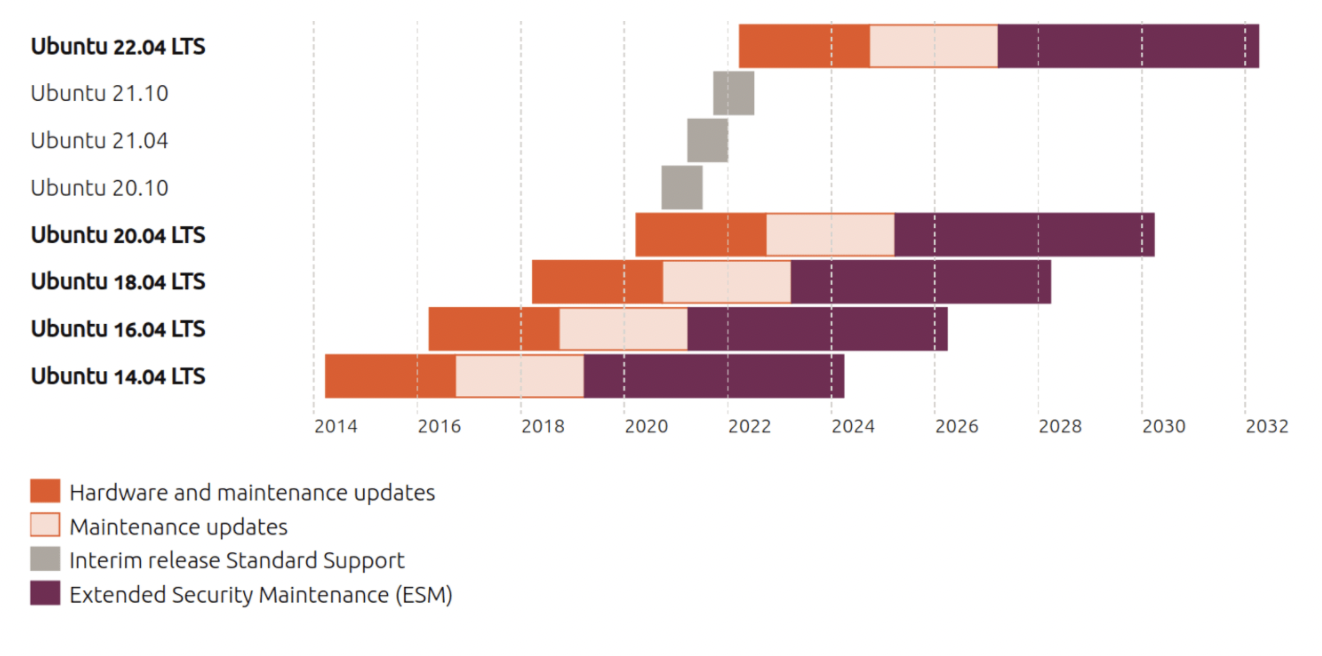
I admit I’ve never tested Gladys with this version! On 20.04, it runs without issues I believe, but I’m not sure about 21.10
To give you more information, the MQTT integration should launch a mosquitto container in parallel with Gladys. However, I know that on Debian 11, for example, this part has some issues.
I’m not sure, but in my opinion, there is a problem/incompatibility with your system I think
I would like to migrate to 22.04 LTS, but I haven’t seen it yet
Being a geek on the edge, my principle is to always use the latest development versions, which are not necessarily validated and stable (a practice I also have with Firefox, Thunderbird, LibreOffice…)
Not necessarily, I’m a bit of a geek but I don’t want to be bothered with every update, so LTS only for me  .
.
21.10 is deployed with cgroups v2, not currently compatible. (Same issue as with Debian Buster)
At the same time, I’m annoyed to downgrade my Ubuntu. I will try to avoid breaking my configuration.
Today, I almost have one Linux PC per family (Debian with LinuxCNC, Ubuntu, Fedora, SUSE, LinuxMint, and since Sunday I reinstalled a Slackware (my first Linux…) with version 15…)
And only 3 Windows (1 on Windows 11, 2 on Windows 10)
Anyway, joking aside, I would like to be able to install this MQTT, I wanted to home automate my house for a long time, I’m starting now especially since I have a lot of small electronic equipment potentially integrable (weather, gate, shutter, garage, light, chicken coop, video…)
The MQTT integration can be used manually.
To do this, you need to specify the connection information for a Mosquitto broker that you will have installed manually (Docker or other).
I’ll get back to it tomorrow,
but I saw while searching that mqtt works with 21.10.
However, I saw two approaches
one directly in ubuntu via apt…
and a second one in a container in docker (there is also eclipse-mosquito to mention in the installation)
for interfacing with gladys and zigbee, what do you think is the best approach?
docker I suppose, but there too I’m discovering, in my history as an old computer scientist it’s an architecture that intrigues…
I also managed to make the link with telegram…
will also remain the voice command without going through the cloud and voice assistants like siri, alexa…(I’m allergic.., everything must be local and in my hands.)
hello,
next!
so only your suggestions, I installed in docker an MQTT container (although I think I have 2, which may be in conflict).
I followed different procedures on the internet: one eclipse-mosquitto which in the end seemed a bit shaky, then a second MQTT which seems more coherent through what I have done recently on docker to install gladys.
now the question is the next step: how do I get my mqtt installation recognized by Gladys and do zigbeemqtt in gladys.
I dig but slowly…