The API returns an authentication token (JWT Token) to be included in the headers (Authorization: Bearer <TOKEN>).
Data Retrieval:
Discovery of the plants/systems associated with the account.
Retrieval of telemetry metrics from your installation (instantaneous and indexed).
Refresh Frequency:
No need to query the API every second: the ISYPOWER box sends its data to the cloud every 3 minutes. Polling every 2 to 3 minutes is therefore recommended to avoid account banning / rate-limiting.
Here is the external integration to follow a solar installation from Isypower (Materfrance, formerly Izypower) in Gladys.
What it does
It connects to Isypower Cloud with the application’s email and password, and reads your power plants, micro-inverters, and batteries every 3 minutes (the rate at which the boxes send their data). This is a cloud integration: the data goes through Materfrance’s cloud, just like in the application. There is no native Isypower integration in Gladys.
Features
One device per power plant: solar production, home consumption, exchange with the grid (positive when buying, negative when selling), battery levels and power, and cumulative indices: production, energy bought from the grid (which powers consumption and cost in Gladys), energy sold, energy stored and restored.
One device per battery: level, stored energy, power, temperature, emergency outlet, and the control mode (intelligent, manual, schedule) and manual mode (standby, charge, discharge) in dropdown lists.
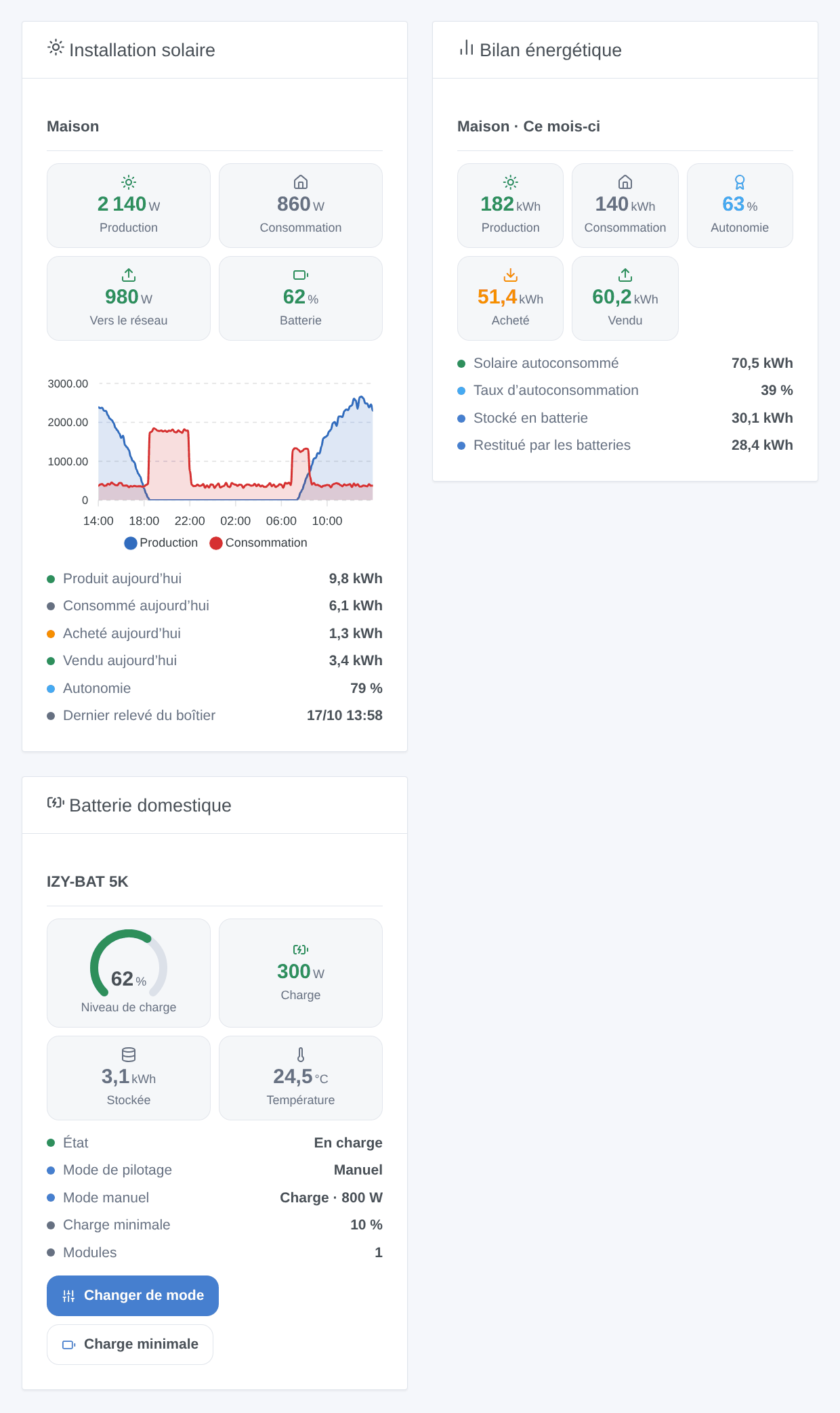
3 widgets: « Solar Installation » (power + curves of the last 24 hours), « Energy Balance » (day, month, year, since installation), « Home Battery » (with buttons to change mode and set minimum charge).
4 triggers: the battery is charging / discharging / stopping, a device goes offline or comes back, firmware update available, power plant silent for 20 minutes.
3 scene actions: change a battery’s mode (with power in manual), set its minimum charge, read the energy balance of a period.
Scene examples:
Every evening at 9 p.m. → read the day’s balance → send the summary on Telegram (« Home, today: 9.8 kWh produced, 6.1 kWh consumed… »).
Start of peak hours → battery in manual discharge at 800 W; end of peak hours → back to schedule.
A micro-inverter offline or the power plant silent → notification.
Installation
From Gladys store: available within the day, pending indexing.
Or from the repository URL: https://github.com/William-De71/gladys-isypower.
Gladys 5.2.0 minimum.
Configuration:
Enter the Isypower Cloud email and password, save.
In « Discovery », create the power plant and batteries.
Add widgets and create scenes.
Screenshots
Generated illustration from the integration code, not a screenshot.
Real screenshots coming soon
I don’t have an Isypower account: real screenshots (configuration, discovery, devices) will be added as soon as a user tests it.
Known limitations
Never tested on a real account: I don’t have an Isypower installation. The API is not documented; it is used as done by the Home Assistant izypower_cloud integration. Only the connection error responses have been verified on the real server.
The direction of the battery power from the power plant (positive when charging) is deduced from the Home Assistant integration: to be confirmed.
Not yet managed: individual battery modules, smart meter injection limitation, charging stations (EVSE), emergency outlet and calibration in writing, the application’s fast « live » mode.
A slave battery follows its master: only the modes of the master (or an autonomous battery) are modifiable.
Feedback
Thanks in advance for your feedback and don’t hesitate if something is missing.