Hello,
However, to get the logs, we use the command pm2 logs.
This may only be for this use.
Hello,
@spenceur is right… If you use pm2, it means you are on Gladys 3, otherwise the command is docker log gladys
No, I didn’t know the v3.
I directly installed the v4 in July.
Indeed, I remembered my first attempts to get the logs and Pierre-Gilles indicated the command for the v4 to me: docker logs gladys
Thanks for the information.
I found out how to properly stop Gladys when I try the installation on a USB key: docker stop glagys
For you, you just need a MySensors integration in fact  In Gladys 4, the philosophy is to provide a plug-and-play solution rather than a « hyper-generic one that suits everyone and requires advanced configuration ». For MySensors, I think we need to code an integration (based on the MQTT integration).
Do you think you have the skills for that?
@Reno by the way, when you restart the zigbee2mqtt integration, we can have a call if you want to make a small list of what remains to be developed and review the existing work together.
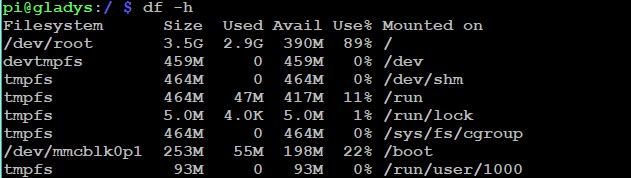
Either your SD card is not a 32GB one, or the partition is not extended (raspiconfig)
Hello Vincent,
Thanks!
Indeed, with a raspi-config to extend the partition, I get 25GB of space on root.
What’s a shame is that for the beta user, no pun intended  , this is not done automatically during the installation of Gladys.
This is also not mentioned in the installation documentation, which seems logical given that normally you don’t have to get your hands dirty.
I started directly with V4 beta with this 32GB card.
I will now wait to see if Gladys updates.
Can we force the update?
I answer myself: no need, update already done 2 minutes later.
Hello,
there is already a ticket on this subject, to be included in the RC:
https://github.com/GladysAssistant/Gladys/issues/834
Nickel Alex, thanks 
Hello everyone!
New week, I’m back
I see that the forum was active over the weekend, that’s great.
On GitHub, this morning I:
- Merged the PR from @AlexTrovato which removes the loading bar from cameras when an image is already loaded
- Reviewed the PR from @Sescandell on Z-Wave dimmers and asked for changes.
- Asked for clarification from @VonOx about his Docker PR to build the v4 image instead of beta.
My short-term goals:
My top priority for the beginning of September is to build a Raspbian Gladys v4 image that uses a Docker image on the v4 tag and no longer the beta tag.
Once the image is built, I will encourage everyone to switch to this new image as there will be no more updates on the beta tag.
Regarding the todos to finish before the RC release, there are:
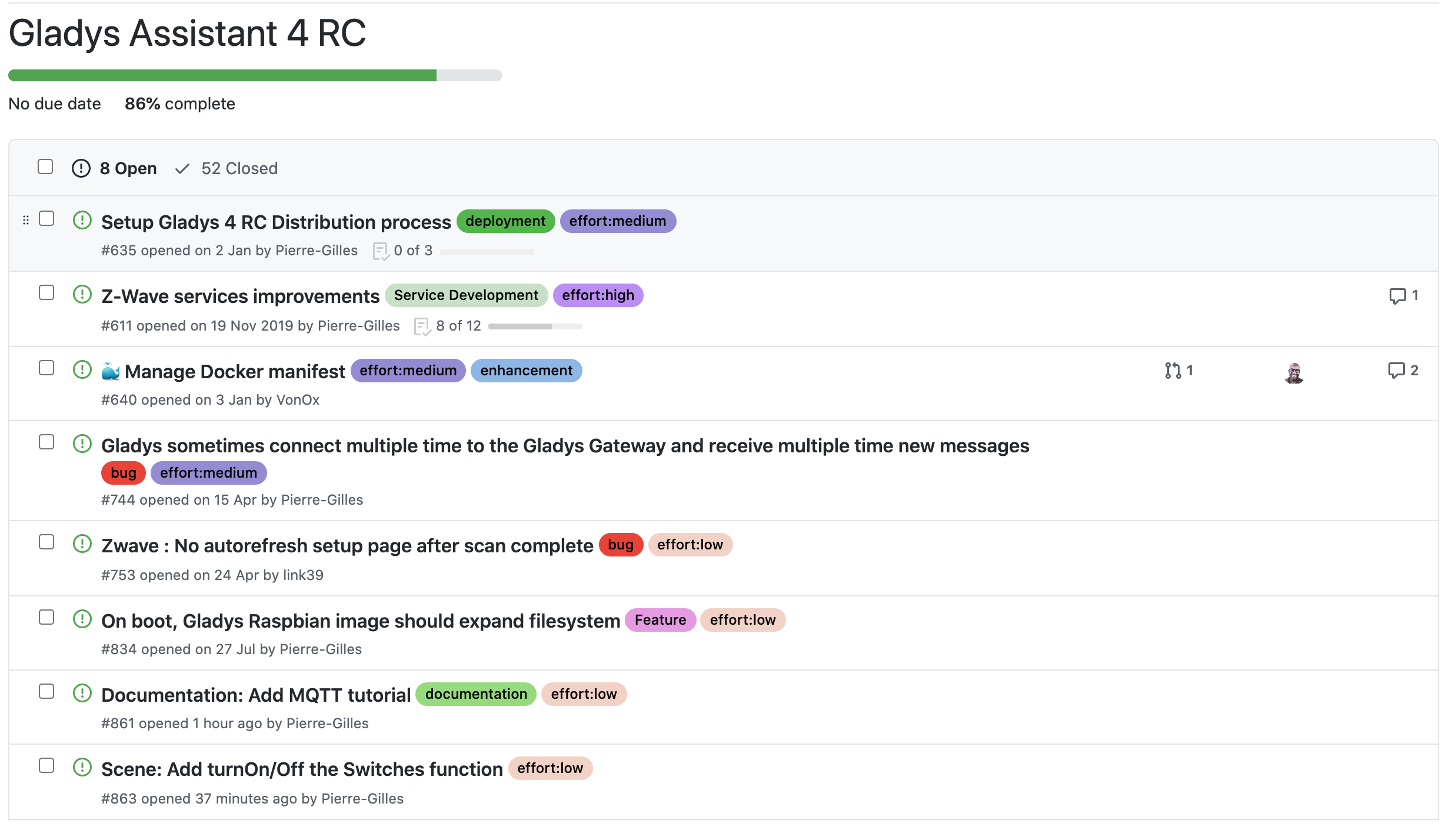
In short, mainly Z-Wave fixes and documentation
Hello @pierre-gilles,
Regarding the documentation, I think we need to enrich the information for installing Gladys with Docker.
It’s not clear.
Before installing Docker on Raspberry Pi, there are other things to do first, you can’t type the following command line:
curl -sSL https://get.docker.com | sh
sudo usermod -aG docker pi
on a blank card that is in the Raspberry.
Which command are you thinking of? What is not clear?
To install Docker, do you not need the Raspberry Pi operating system?
Can you not install Docker on a blank card, right?
Not necessarily, you need to connect to an already installed system.
We can add a line to explain that this tutorial is for those who already have a running system
Then, this tutorial is only for people who want to manually install Gladys, most people who don’t have the skills/desire to do SSH can use the ready-made Raspbian image, and will never have to do SSH throughout the lifetime of their Gladys product
I wanted to have you say that,
but I think it would be interesting to add it and mention that it’s for experienced users.
That’s good @Serge, the MQTT documentation with a very rich tutorial is available
Hi @pierre-gilles,
Great idea!
I’ll review the latest developments (especially the MQTT server via Docker) and list the remaining tasks by this weekend, then I’ll send you a message to schedule the call.
Hello @pierre-gilles,
To access the documentation, it might be nice to add a link on the relevant pages.
Example:
I want to create a scene. I don’t know how it works. There is a link to the « Create Scenes » page in the documentation. This page opens in a new tab.
That’s a great idea 