How are you trying to connect? Give us more information
No! Everything is fine Having only one type of Hue bulb at home, I have only been able to develop for this type of bulb so far, I was waiting for the community feedback to develop the rest. For this, I will need your help.
Could you open your browser console (right-click on the page => inspect element => « network » tab)
Then reload the Philips Hue page and try to find the request « GET /api/v1/service/philips-hue/light ». Then you send me the response in PM (it should look like a big json array)
This will allow me to make your bulbs compatible!
Thanks for your help!
How could you create an account without a language?? ^^ Normally it’s English by default! Where does your installation come from?
I left the field blank when creating my account.
For my installation, I retrieved the new Raspbian image that you provided in the installation documentation.
@pierre-gilles: The v4 image is installed as described in the installation document, no anomalies to report. Container starts automatically on reboot. I usually see a TCP/80 port via netstat, but I see nothing From a browser on my phone, I try an HTTP, then HTTPS connection to gladys, no response. Nmap does not detect any HTTP/HTTPS port … Help
@jean_bruder If you connect via SSH and run docker ps, do you see Gladys running?
You connect by using: http://gladys.local or http://192.168.xx.xx we agree? You are on the same network as your Rasp? If you run docker logs gladys via SSH, any specific issues?
I installed the v4 beta on a rpi3B+ without any issues, using the image for rpi.
Then I checked that in the « Integrations » tab, the « Devices » are indeed available, 7 in total. Is this the correct number of devices available with the Beta?
I successfully integrated the weather device « Dark Sky » without any problems.
Then I tried to integrate the camera device with a D-Link DCS-312L, but even though the connection test works and I can see the camera image, I always get a message « There was an error saving the camera. »
It seems you have the latest version.
Just for vocabulary info, in the integrations tab, we now talk about « Services » and even more surprisingly, integrations
For now, Netatmo is not supported.
Regarding your camera issue, I don’t know what to tell you.
Check with @pierre-gilles, maybe a bug to report.
docker ps
CONTAINER ID IMAGE COMMAND CREATED STATUS PORTS NAMES
b605c0ca8777 gladysassistant/gladys:4.0.0-beta-arm « docker-entrypoint.s�� » 43 hours ago Restarting (132) 40 seconds ago gladys
Small bug surely! Can you tell me the error you have in the browser console to help me fix the bug? (Right-click on the page => Inspect element => Network => look at the POST device request which should be in red, and you give me the response)
There is no Netatmo service yet, but I think there was one for v3? We would need to find the creator of the service to ask if he can migrate it to Gladys 4!
I am not a Sonoff expert, I redirect you to @AlexTrovato who coded the service I think your MQTT channel is not correct in my opinion
Which version of the Raspberry Pi are you using?
We agree, you are under an ARM processor?
If you are not under ARM (for example, under x64/x86 processor), you need to launch another image (cf Gladys doc => A privacy-first, open-source home assistant | Gladys Assistant)
@pierre-gilles: No, I don’t work on RPi, but other lightweight systems (https://www.pine64.org/devices/single-board-computers/rock64/), whose CPU is indeed an ARM (Rockchip RK3328 Quad-Core ARM Cortex A53 64-Bit). Hence my misunderstanding? … I did follow the Docker-specific installation document, specifically for ARM CPUs. Any ideas? Thanks
Yes, yes, that’s very good! I will wait for the next beta versions as I don’t have any other integrations to test at the moment. If someone develops a Netatmo Weather Station module for v4, I would be happy to test it.
What have you tried to do? At the user-presence level in Gladys 4, only the API is functional (see this API route => Gladys Assistant REST API documentation), nothing else is in place for now ^^
Editing the file /etc/wpa_supplicant/wpa_supplicant.conf + restarting the pi’s network service doesn’t work?

 From a browser on my phone, I try an HTTP, then HTTPS connection to gladys, no response. Nmap does not detect any HTTP/HTTPS port … Help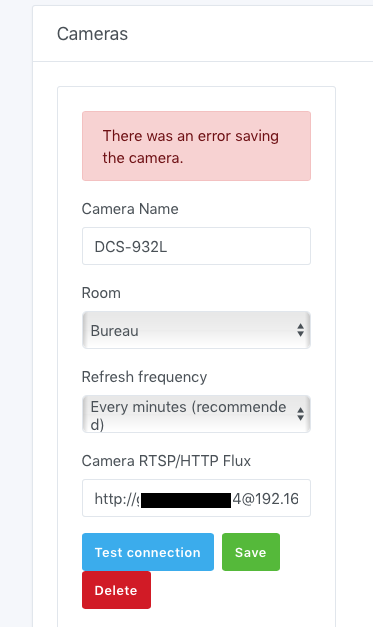
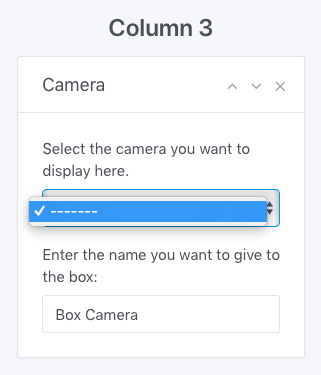


 oops, it actually works! In the link I indicated « http://IP_Address/image/jpeg.cgi » whereas by entering « http://IP_Address/video.cgi » it works.