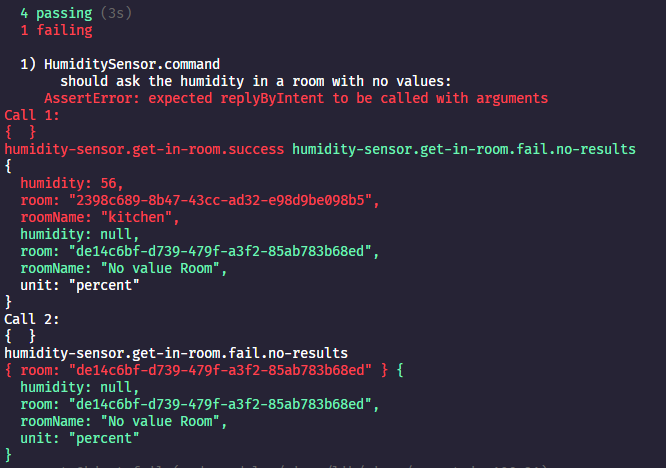
Ok, I’ve done this: probably messy but well
it('should ask the humidity in a room with no values', async () => {
    const brain = {
      addRoom: fake.returns(null),
      removeRoom: fake.returns(null),
    };
    const stateManager = new StateManager(event);
    const deviceManager = new Device(event, messageManager, stateManager, {});
    const serviceManager = new ServiceManager({}, stateManager);
    const room = new Room(brain);
    await room.create('test-house', {
      name: 'No value Room',
    });
    const roomFound = await room.getBySelector('no-value-room');
    const device = new Device(event, {}, stateManager, serviceManager);
    await device.create({
      id: '7bbe2ed8-e7c7-4b89-8421-b52fea5491ef',
      name: 'HUMIDITY DEVICE',
      selector: 'humidity-device',
      external_id: 'humidity-device-external',
      service_id: 'a810b8db-6d04-4697-bed3-c4b72c996279',
      room_id: roomFound.id,
      created_at: '2021-02-12 07:49:07.556 +00:00',
      updated_at: '2021-02-12 07:49:07.556 +00:00',
      features: [
        {
          id: '984d23b0-3508-4d9e-ba91-63cfc3f9e536',
          name: 'Test humidity sensor null',
          selector: 'test-humidity-sensor-null',
          external_id: 'humidity-sensor:2',
          category: 'humidity-sensor',
          type: 'humidity',
          unit: 'percent',
          read_only: false,
          has_feedback: false,
          min: 0,
          max: 100,
          last_value: null,
          last_value_changed: new Date().toISOString(),
          device_id: '7bbe2ed8-e7c7-4b89-8421-b52fea5491ef',
        },
      ],
    });
    const message = {};
    await deviceManager.humiditySensorManager.command(
      message,
      {
        intent: 'humidity-sensor.get-in-room',
        entities: [
          {
            sourceText: 'No value Room',
            entity: 'room',
          },
        ],
      },
      {
        room: roomFound.id,
      },
    );
    assert.calledWith(messageManager.replyByIntent, message, 'humidity-sensor.get-in-room.fail.no-results', {
      room: roomFound.id,
      roomName: 'No value Room',
      humidity: null,
      unit: 'percent',
    });
  });
I think I’m close
The log:
2021-03-12T14:00:11+0100 <debug> device.notify.js:20 (DeviceManager.notify) Notify device humidity-device creation
2021-03-12T14:00:11+0100 <warn> device.notify.js:33 (DeviceManager.notify) Service a810b8db-6d04-4697-bed3-c4b72c996279 was not found.
2021-03-12T14:00:11+0100 <debug> humidity-sensor.getHumidityInRoom.js:21 (HumiditySensorManager.getHumidityInRoom) Getting average humidity in room de14c6bf-d739-479f-a3f2-85ab783b68ed
2021-03-12T14:00:11+0100 <debug> humidity-sensor.command.js:37 (HumiditySensorManager.command) NoValuesFoundError: No humidity values found in this room.
    at HumiditySensorManager.command (/home/vonox/repos/GladysFork/server/lib/device/humidity-sensor/humidity-sensor.command.js:26:17)
    at async Context.<anonymous> (/home/vonox/repos/GladysFork/server/test/lib/device/humidity-sensor/humidity-sensor.test.js:113:5)
    1) should ask the humidity in a room with no values
The result is there => NoValuesFoundError: No humidity values found in this room.
But
Again this context issue I thought I understood, how to read this output?
EDIT: in green what is expected and in red what was produced/received?
 on the PR concerned. but being a noob, I can’t figure it out
 When it’s just for a single test, it’s better to avoid creating global seeds