I present to you an external integration to follow your GitHub repositories from Gladys.
What it does
Each followed repository becomes a device in Gladys, and your account too. The integration is inspired by the GitHub integration of Home Assistant and adds scene triggers and widgets. It goes through the GitHub API (cloud) with a read-only personal access token: it contacts nothing else and never writes to GitHub. It is for those who publish code or want to be notified of new versions of a project they use.
Features
Device per repository: stars, forks, subscribers, open issues and pull requests, merged pull requests, discussions, downloads of the latest version, and in text the latest version, the last tag, commit, issue, pull request and discussion.
Account device: subscribers, subscriptions, public repositories and gists.
7 scene triggers: version published (version / pre-release filter), issue opened, pull request opened, discussion started, new commit, new star, checks (CI) passed or failed.
1 scene action: read the figures of a repository (for a message or a condition).
3 widgets: a repository, recent activity, the account with the remaining API quota.
Some scene examples:
a new version of Gladys is released → Telegram message with {{triggerEvent.data.summary}};
the CI of my project fails → the desk lamp turns red;
my repository receives a star → a small sound on the speaker.
Installation
From the store: it will be available later today, pending indexing.
Or now from the repository URL: Integrations → Install an integration → https://github.com/William-De71/gladys-github.
You need Gladys 5.1.0 at minimum.
Configuration:
create a fine-grained token on GitHub (read-only access to « Public repositories » or your private repositories);
paste it in the configuration and list the repositories to follow (owner/name, separated by commas);
click on « Test the connection », then add the devices in the Discovery tab.
Screenshots and diagrams
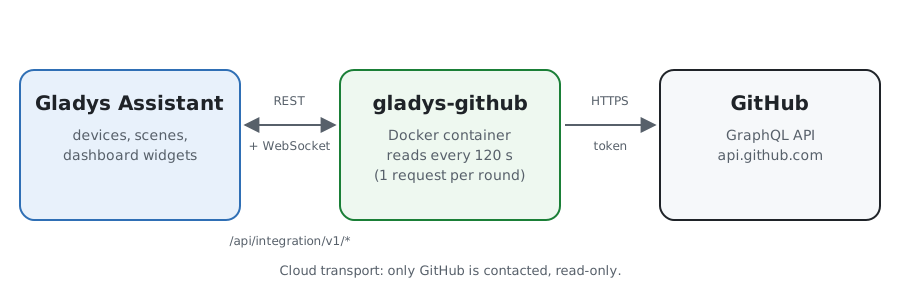
Architecture diagram (illustration)
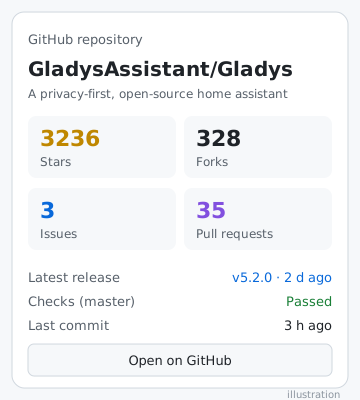
These images are illustrations, not real screenshots. [Location: real screenshots of the configuration, discovery, widgets and a scene to add.]
Known limitations
GitHub does not push anything without a public webhook: the integration queries the API every 2 minutes by default (from 60 s to 1 h). This is also the delay of the triggers.
At most 5 elements of each type are read per pass: a very large burst between two passes only triggers the most recent ones.
GitHub only gives the number of stars, not the author.
Nothing that happens while Gladys is stopped is replayed on restart.
Tested against the real GitHub API and the fake Gladys of the SDK. I have not yet installed it in a real Gladys instance: your feedback is welcome.
Feedback
A GitHub issue or a reply in this thread. Indicate the version of Gladys, that of the integration and the logs of the integration (ideally with DEBUG=gladys-integration-sdk).
Thanks for this plugin.
I would have liked to follow all my integrations, but entering them one by one is not practical ^^
I followed the documentation, but I get this error when I enter my PAT and test the connection:
[2026-10-13T07:23:24.628Z] [WARN] GitHub read failed: GitHub refused the query: Resource not accessible by personal access token
Thanks for the feedback! Both points are addressed in v0.2.0 (update available from Integrations → GitHub, or reinstall from the repository URL).
The error « Resource not accessible by personal access token »
A fine-grained token is not allowed to read certain information (e.g., account subscribers or CI checks). GitHub then rejected the entire request. Now, the integration detects the
information refused by the token, removes it from its request, and reads the rest normally: only the affected counters are not displayed. The log indicates what was removed, for example:
Not readable with this token, left out: viewer.followers
If you have this line, copy it to me: it will tell me exactly which field GitHub refuses to fine-grained tokens, and I can clarify the documentation.
Follow all your integrations at once
In « Repositories to follow », you can now write a pattern instead of listing repositories one by one:
prohand/*: all repositories in the account (or organization);
prohand/gladys-*: only those whose name starts with gladys-;
you can mix with full names: prohand/gladys-*, GladysAssistant/Gladys.
Forks and archived repositories are ignored. The limit remains 20 repositories: beyond that, those named in full go first, then the most recently updated (the « Test connection » button signals this). The list is
read every hour, so a new integration will appear on its own in the Discovery tab within the hour.
The 20 limit comes from the constant MAX_REPOSITORIES = 20 (src/github-api.js:26). This is a design choice: GitHub does not enforce this number. Here’s what justifies it.
One request per pass. All followed repositories are read in a single GraphQL request. For each repository, it retrieves the counters, the 5 latest issues, PRs, releases and commits, the last discussion and the
last tag. The more repositories there are, the heavier and slower the request becomes. GitHub cuts off requests that are too long (about 10 s on their side, 20 s timeout on ours). If it cuts off, the entire pass fails, not just one
repository.
The load on Gladys. Each repository becomes a device with 14 features. With 20 repositories, we already have 280 features, whose states are published with each pass (every 120 s by default). This ends up
cluttering the Discovery, the database, and the widgets.
The GitHub quota. A token has 5,000 points per hour. The cost of a request increases with the number of connections requested (releaseAssets(first: 50) in each release, for example). With 20 repositories, we stay at
a few percent of the quota, even at 60 s. This leaves room for other uses of the same token.
A point to correct along the way: the code comments (src/github-api.js:7-9) and the documentation say that a request costs « 1 point regardless of the number of repositories ». This is probably false. According to GitHub’s calculation rule (requested connections ÷ 100), 20 repositories would rather cost 3 or 4 points per pass. I haven’t verified this, lacking the ability to query the API here. We can measure it by adding cost in rateLimit { … }. Even in
this case, we stay under 5% of the quota.
If you need more than 20, the limit can be increased (30 to 50, for example). It would then be necessary to measure the actual cost and duration of the request, or split it into several requests per pass.
I took the measurements: I ran the real integration query on 100 public repositories, in two sets. The first groups repositories of average size (« gladys » repositories), the second very large active projects.
It’s not the GitHub quota that’s blocking. The query costs about 1 point per batch of 10 repositories. Even with 100 repositories read every 2 minutes, we would stay under 7% of the 5,000 points per hour.
What’s blocking is the duration of the query. Each repository adds about 200 to 250 ms, and GitHub cuts off a query after about 10 seconds:
20 repositories => 4 to 6 s => OK
40 repositories => 7.5 to 9 s => OK, but at the limit
60 repositories => 10 to 11 s => GitHub 502/504 errors
100 repositories => ~11 s => almost always fails
With very large active repositories, it’s even worse: from 15 to 20 repositories, GitHub returns part of the data empty (RESOURCE_LIMITS_EXCEEDED), especially the download counters of the releases.
Simply increasing the limit would therefore cause entire passes to fail. The right solution is to split each pass into several small queries of about ten repositories. Each would take about 5 s and cost 1 point. This would allow us to go up to 50 repositories while staying around 3% of the quota. This would also fix the problem of empty data on large repositories.
I’ll take care of this in a future version, I’ll keep you posted!
It’s live with v0.3.0: the integration can now follow up to 50 repositories instead of 20.
As I explained, the limit wasn’t due to the GitHub quota but the request duration: GitHub cuts off a request after about 10 seconds. Now, each pass reads the repositories in batches of 10, one small request per batch, one after the other.
Tested on the real GitHub API with 50 repositories
At 120-second intervals, that’s about 3% of the 5,000 points per hour that GitHub grants to a token.
This also fixes a bug: with many large active repositories, GitHub would return some data empty without warning, particularly the release download counters. This no longer happens with batches of 10.
The prohand/* patterns also benefit from the new limit. Beyond 50 repositories, those you’ve named in full go first, then the most recently updated ones.
Update the integration and let me know if everything comes back for you!