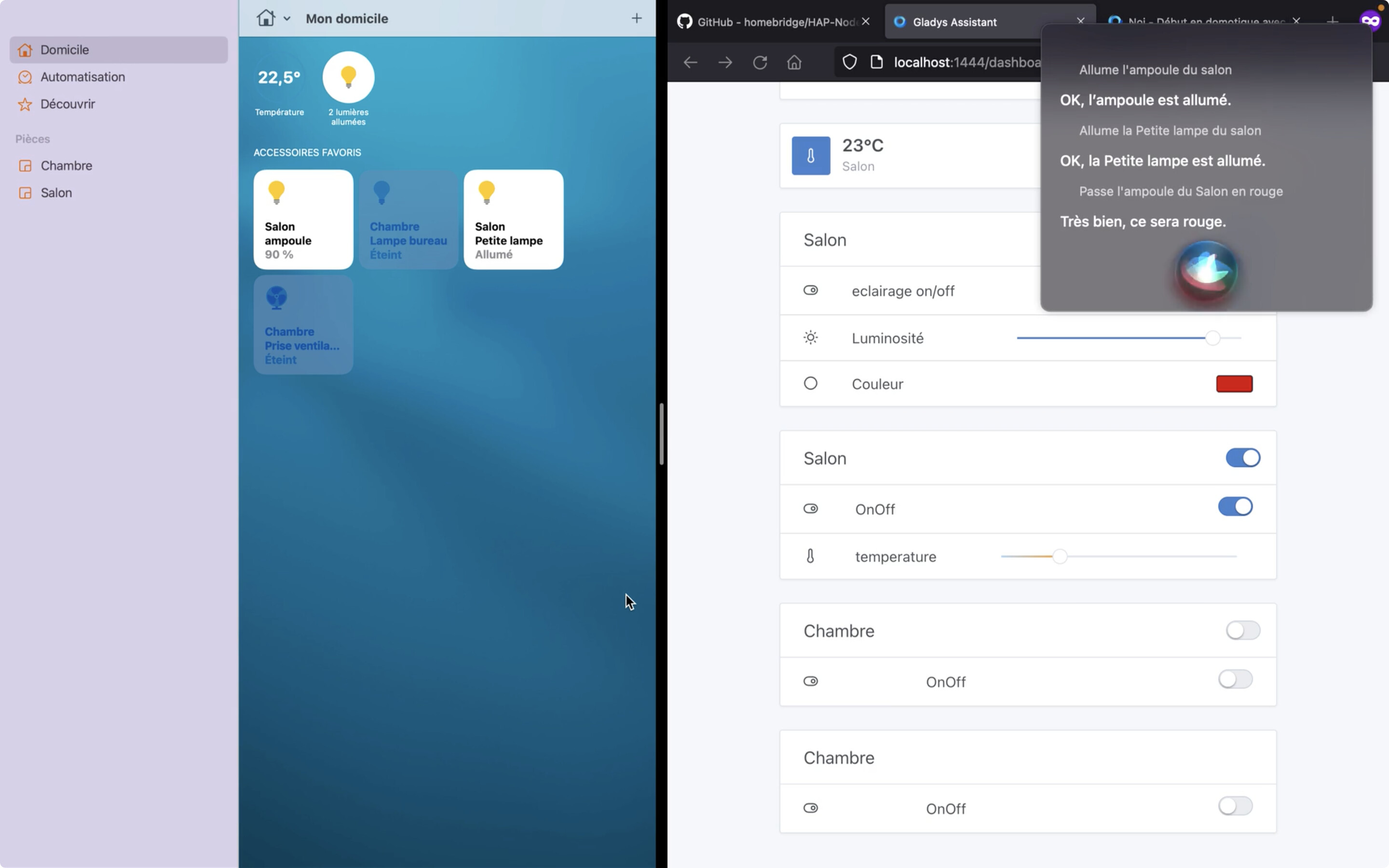
Hi everyone, on the way back from vacation I worked on Gladys’ compatibility with HomeKit (and therefore with Siri) for Apple aficionados (imagine your Gladys controllable with your watch). I may be naive but over the past few years I’ve trusted Apple more than Amazon/Google for data privacy (especially when it comes to voice recognition).
bulbs with on/off, brightness, colors and color temperature
switches with on/off
temperature sensors
For a first version this should be enough; I’ll add more as requests come in.
I’ve only tested on virtual devices; I’ll need help testing on real devices once the docker image is available.
Technically speaking, the integration turns Gladys into a HomeKit-compatible bridge (a bit like Philips Hue, Xiaomi bridges…), so you just need to pair Gladys with your Home app to see all devices connected to Gladys (those currently supported) in your HomeKit network. I use Hap-Nodejs to reproduce the HomeKit protocol in Node.js (for those familiar with the Homebridge software, it’s their library).
On the code side, I still need to improve the structure, add the front-end part and check that it works well when using a docker image. I hope to be able to offer you a PR soon but things look promising!
I have a small organizational question for those already testing developments with Zigbee devices. Do you use a separate Zigbee USB stick or do you use the one from your production on your test PC? And the same for devices: do you have some extra development devices, or do you manage to use your devices in dev and production at the same time?
Hello @bertrandda,
A quick question to test because I don’t know anything about Apple. It’s always been a mystery to me and a source of frustration because I can’t do what I want with ‹ it ›.
I have an iPad lying in a drawer — is that enough to test, or do I need something else?
Have a nice day!
Once in it, I recommend creating a new virtual home; if the tests lead to changing things in the integration, you will be able to delete this virtual home completely at once and not device by device. See here to add a home https://support.apple.com/fr-fr/guide/ip
My iPad is compatible.
However, is it possible/complicated for you to build me a test Docker image?
I have no idea how to test a PR.
If not possible, I’ll look into it later, but I will look into it
For now only the code in dev mode works, I created a Docker image a few days ago but it is not functional. I need to debug all of it, the devices aren’t being added to the Home app.
I’ll let you know when everything is ready to test
Hi @GBoulvin, on which OS do you want to test the docker image? Currently I’m testing from Docker on macOS and there’s a connection error when adding Gladys to HomeKit. After quite a bit of reading around homebridge and hap-nodejs it seems to be due to the --network=host parameter which doesn’t work on mac/Windows.
If you’re on a Linux system, can you test the image and try to pair Gladys with your Home app and confirm that it works please? The image is available on Docker bertrandda/gladys:homekit.
I’m continuing to investigate getting this to work on mac/Windows via Docker, from what I understand it must be an mDNS issue. When the HomeKit protocol makes an accessory available (here the Gladys Bridge) it’s supposed to send an mDNS query to let HomeKit apps know it’s on the network. I can see the mDNS query on Wireshark when I’m in dev, but as soon as I use Docker the mDNS query doesn’t seem to be detected on the local network, as if it’s blocked inside the container. If anyone has knowledge on the subject (Docker or mDNS) is it possible to get a bit of help please?
Hi!
Rest assured, it works!
Hardware:
RPi 2 with its default Bullseye 32-bit OS.
Installation of the Docker image proposed above was successful, no issues.
Tested: only Tasmota, plugs and lamps.
How?
Added two Tasmota devices
Enabled the Apple integration
Started the ‹ Home › app on the iPad
Scanned the QR code generated by the Gladys integration
Great news, thanks for your feedback @GBoulvin. There is indeed an issue caused by network=host on Mac/Windows. I’ll add the connection steps to the documentation.
For the error that appears Sans réponse, it seems to be because the iPad/iPhone (when it is asleep) does not stay permanently connected to the HomeKit network, so it needs a few seconds to reconnect. However, if you have a HomePod or an Apple TV, they can serve as a HomeKit hub, since they are devices that stay always connected at home, so the HomeKit network is never interrupted (https://www.reddit.com/r/HomeKit/comments/t55bw4/comment/hz3zf9a/?utm_source=share\u0026utm_medium=web2x\u0026context=3).
Tested on RPI4 (classic Gladys installation, replacing the docker image with the one from @bertrandda)
I have the following error at startup Unable to start the service
2022-10-03T10:08:01+0200 <warn> service.start.js:44 (Service.start) Unable to start service homekit TypeError: Cannot read property 'service' of undefined
    at HomeKitHandler.buildService (/src/server/services/homekit/lib/buildService.js:27:47)
    at /src/server/services/homekit/lib/buildAccessory.js:23:26
    at Array.forEach (<anonymous>)
    at HomeKitHandler.buildAccessory (/src/server/services/homekit/lib/buildAccessory.js:22:27)
    at /src/server/services/homekit/lib/createBridge.js:34:62
    at Array.map (<anonymous>)
    at HomeKitHandler.createBridge (/src/server/services/homekit/lib/createBridge.js:34:41)
    at Object.start (/src/server/services/homekit/index.js:25:5)
    at Service.start (/src/server/lib/service/service.start.js:33:7)
Argh sorry @cicoub13 I forgot a check when creating the HomeKit gateway, I’ll fix that and update the image for you quickly. Thanks for testing it anyway.
Great @bertrandda, thanks for pushing this forward
I largely agree with your thoughts regarding privacy, at least as far as the protocol is concerned. I almost chose the HomeKit protocol for my smart heads.
Do you think it will be possible to use HomeKit only with Gladys, without any Apple device?
There you go @cicoub13, the image has been updated — it should work for you now as well.
Hi @lmilcent, I’m not sure I understand what you’re asking. The point of HomeKit is to work with Apple’s Home app (for manual control) or with Siri (voice control). These two apps are only available on Apple devices; if you don’t have one I don’t think it’s useful to leave this service enabled on your Gladys. Normally the HomeKit network doesn’t allow you to add other devices to Gladys. I don’t know if you’ve tried out Google Home or Alexa, but it should be the same: you add your devices on Gladys (via Zigbee, Z-Wave, Bluetooth…) on one side, then you open the connection with Alexa/Google Home/HomeKit and these three services can interact with your Gladys devices. So in short, without an Apple device it will work but it won’t be of any use.
@lmilcent actually you’re getting the integration backwards! The point of the HomeKit integration is to make Gladys devices controllable on iPhone and via Siri, a bit like the Alexa or Google Home integration.



 Unable to start the service