Let's talk about Gladys V4

I quite like CSS :stuck_out_tongue:

Aaaahhhh yeah, that screen is pretty clean! I hesitated with the connections because I’m afraid it might become a mess, but after all, if we design it well, there’s no reason it shouldn’t work!

I’m up for giving it a try if you want!

The links are just visual, nothing selectable by the user, we don’t want a tangled mess :stuck_out_tongue:

Absolutely if you’re up for it :smiley:

Hello everyone!

Today I worked on 2 things.

1/ The Gladys startup process in production

I did a small Docker build poc (just locally, no multi-arch, just a simple build)

The goal was to raise simple points:

  • How and when are DB migrations performed?
  • How are assets and the frontend served by express
  • When is the frontend built?
  • Some work on optimizing the build size

In short, I spent some time but it works well now. I’m happy with the result!

The main goal being:

  • Nothing is done on the user’s side, EVERYTHING is done at build
  • The user has nothing to do, Gladys restarts and manages the migrations itself
  • The user does not have to define environment variables. It is optional for some cases

2/ The dashboard design

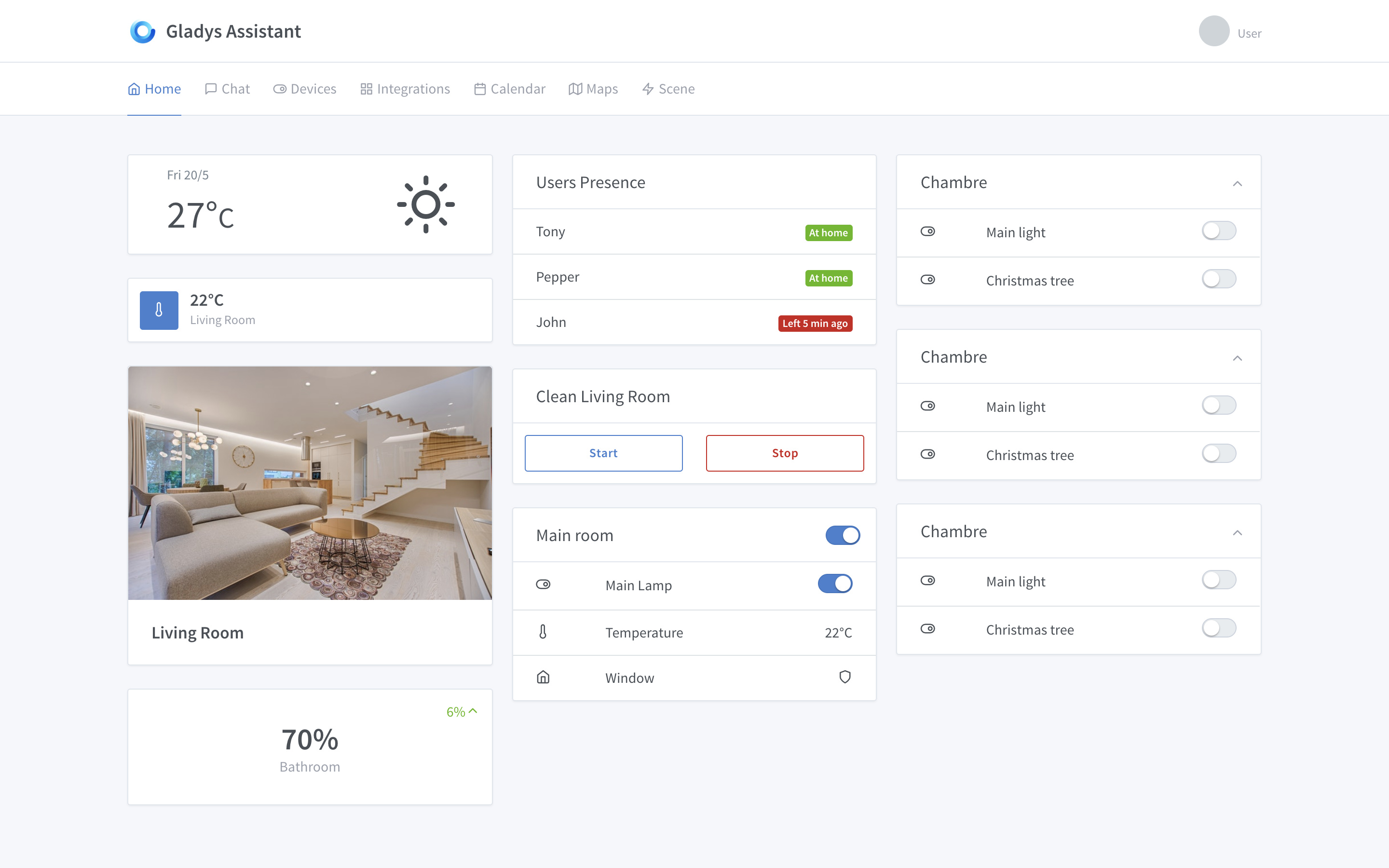
This afternoon I did (a little) CSS

I spent a bad afternoon, haha :joy:

For now, I’ve started with a 3-column grid like on the Gateway.

I’ve defined a set of boxes, for now it’s just a first draft.

I find that some boxes have too much « white » but I don’t know how to fill that.

Of course all this is available on the demo site =>

Hello,
In my opinion, you can never have too much white. I think it’s great. Now multi-theming could address this taste issue.
Good job :wink:

Frankly, well done because I find it great! It’s not necessarily too « white », it’s just well and clean.

A small clarification on, for example, the room temperature, it would be interesting to be able to associate a dimmer with it to have the exact room temperature and the setpoint temperature.

What I see is the possibility of clicking on it and having a dimmer (like on the iPhone for brightness, for example).

Otherwise, I like it :slight_smile:

Great idea!

We’ll see how we can fit this in this small box, it could just be a + and - button to increase/decrease the brightness.

You make me think, we don’t have in Gladys for now this notion of current state and desired state.

I don’t know what form it could take, is it just a state change that takes a long time or a property to store somewhere… If someone has feedback on how other platforms do it, I’m interested! :slight_smile:

Thanks! :slight_smile:

Thanks too, it’s nice! :stuck_out_tongue:

Let’s see how we could fit this into this small box, it could just be a + and - button to increase/decrease the brightness.

Be careful not to overdo it though. You can for example have a small icon where you click on it and a modal opens for example.

You remind me, we don’t have in Gladys for the moment this notion of current state and desired state.

Indeed, I saw with my netatmo that for example I can set a setpoint and the device’s goal is to follow this setpoint. Similarly for example for opening/closing shutters, all these things that take a few seconds.

Is it just a state change that takes a long time or a property to store somewhere

It all depends on what you want to do, if the goal is to give the user a metric or just a status like « in progress », « closing in progress »…

Hello,

Generally, everything is the same, with a few details: the sequences indeed, and also an integrated wake-up light feature, and other On/Off functionalities related to the time. But that would be specific parameterization in the module.

In fact, there are many controls for a bulb, in the case of RGBW you have at least 5: RGB color and brightness, White temperature and brightness, and On/Off. Which therefore makes 5 lines in the IHM which quickly takes up space when you multiply the bulbs.
You can either hide controls or use a module group (template) like for example:

(o)  ------o-------   o
 |                    |
 o   ---o----------  (o)

The vertical switch on the left would allow switching from color to white, the one on the right would be an on/off button. the seekbar at the top for the hue or temperature depending on the first button, and the one below, for the brightness in color and white.

The color to white switch button would only replace the visible controls, from one mode to another without affecting the bulb itself. (thus switching from color control to white would not immediately put the bulb in white until the user has intervened)

The template system could be adapted to other cases of « complex » connected objects. This would thus gain clarity in the IHM.

If you have other ideas for complex objects, I’m interested! (I’ll try to make quick diagrams to give you a more visual preview :slight_smile: )

In the case of a temperature, one can imagine a seekbar with a semi-transparent marker for the current value, a full marker for the desired value. Between the two, the seekbar would have a movement from the first to the second to symbolize that there is an operation to go from one state to another. You could even tint the section of the seekbar red to say that you are heating and conversely blue to cool down :slight_smile:

You can be, it’s great! :+1:

Are you planning to keep the icon of a switch (to the left of the lines) for everything that is on/off, or are you going to put the icon of the type of object controlled (a tree/a garland, a bulb etc.)?

Well, on the other hand, white is bad, I would have Dark Reader activated all the time :stuck_out_tongue: so a night mode (gray and/or black) would be cool! :smiley:

Hello everyone!

Today, a small debate to discuss HTTPS in Gladys 4.

I’ve been thinking about it, and here are the different cases I’ve identified:

Case #1: First installation of Gladys

The user accesses their Raspberry Pi via the Raspberry Pi’s IP on their local network, connecting via HTTP for the first time. This approach has no significant risk; they are local and it’s the first connection.

Case #2: « General public » user

By « general public user, » I mean someone who may not have the necessary knowledge and does not necessarily want to get their hands dirty. They are simply passionate about technology, looking for a home automation solution that respects their privacy, and want a stable and secure installation of Gladys.

Recommended solution: Access to Gladys via the Gateway for remote access, and locally via HTTP for local access. After all, nothing prevents them from using the Gateway even at home, given that in Gladys 4 the Gateway interface and the local interface will be the same.

Case #3: Advanced user

This user can use the Gateway like the general public user, but will surely want direct access from the outside in order to be able to tinker with their installation even remotely.

Recommended solution: External connection via a domain + Let’s Encrypt.

I propose to stop using self-signed certificates with IP access as it is currently done, which is not clean. Today, with Let’s Encrypt, it’s super simple to have a free certificate. I think it’s up to the project to make architectural choices that promote clean and secure behavior.

The idea is therefore to integrate into Gladys the process of retrieving + renewing certificates.

There is a great NPM package called Greenlock that seems to do the job for what we want to do here. It even integrates with Express :slight_smile:

The question of remote services and MQTT

From what we have defined, MQTT will play a central role in communication between Gladys core and remote services.

What I propose: When the user configures MQTT (in the Gladys interface, not CLI), they have three options:

  • MQTT runs without TLS
  • MQTT runs with TLS and self-signed certificates automatically generated by Gladys.
  • MQTT runs with TLS + a domain/subdomain + Let’s Encrypt certificates generated by Gladys

What do you think?

So far, I hadn’t thought about the tree, but I’m not closed to the idea, we could completely add custom icons (optional) :slight_smile:

For the dark mode, we depend on the tabler theme I use, the theme creator communicated that he would launch the dark theme with version 1.0.0 of tabler :slight_smile:

Telepathy, I hadn’t read this topic yet :sweat_smile:

https://community.gladysassistant.com/t/nouvelle-version-de-gladys-gladys-v3-13-0/4447/2?u=vonox

@VonOx I saw your message about build optimization, keep me updated that’s great!

I wonder if it wouldn’t be faster to use CircleCI instead of TravisCI.

I use CircleCI in quite a few projects and it’s really powerful.

I’ll need to switch everything to CircleCI so that builds only happen if the tests pass.

I’m not saying we should switch to CircleCI, I think we should benchmark first :slight_smile: CircleCI is powerful but we need to see if it’s faster in this specific case!

Yes, I misspoke. If it’s conclusive, we’ll need to move everything to Circle CI :wink:

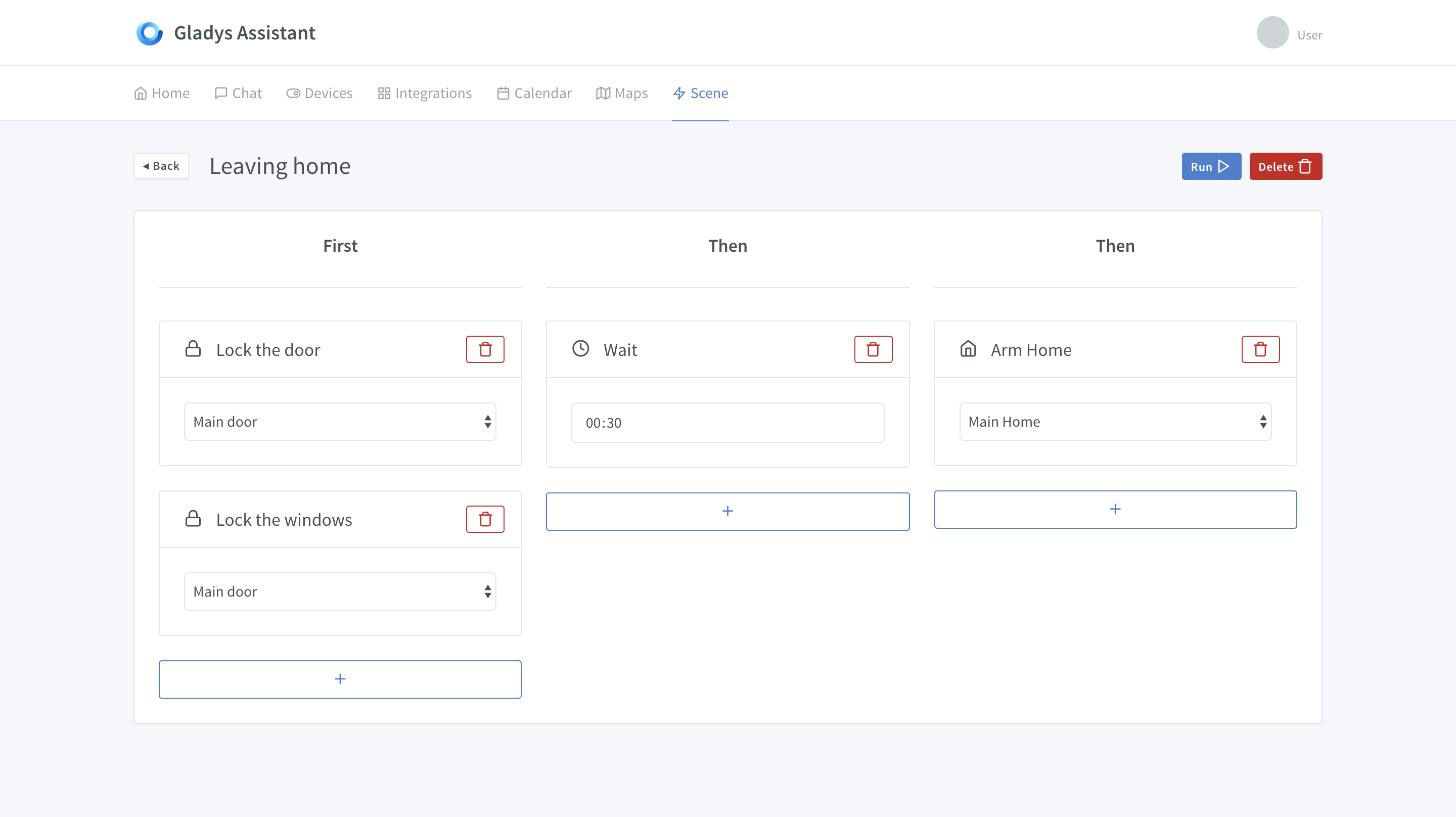
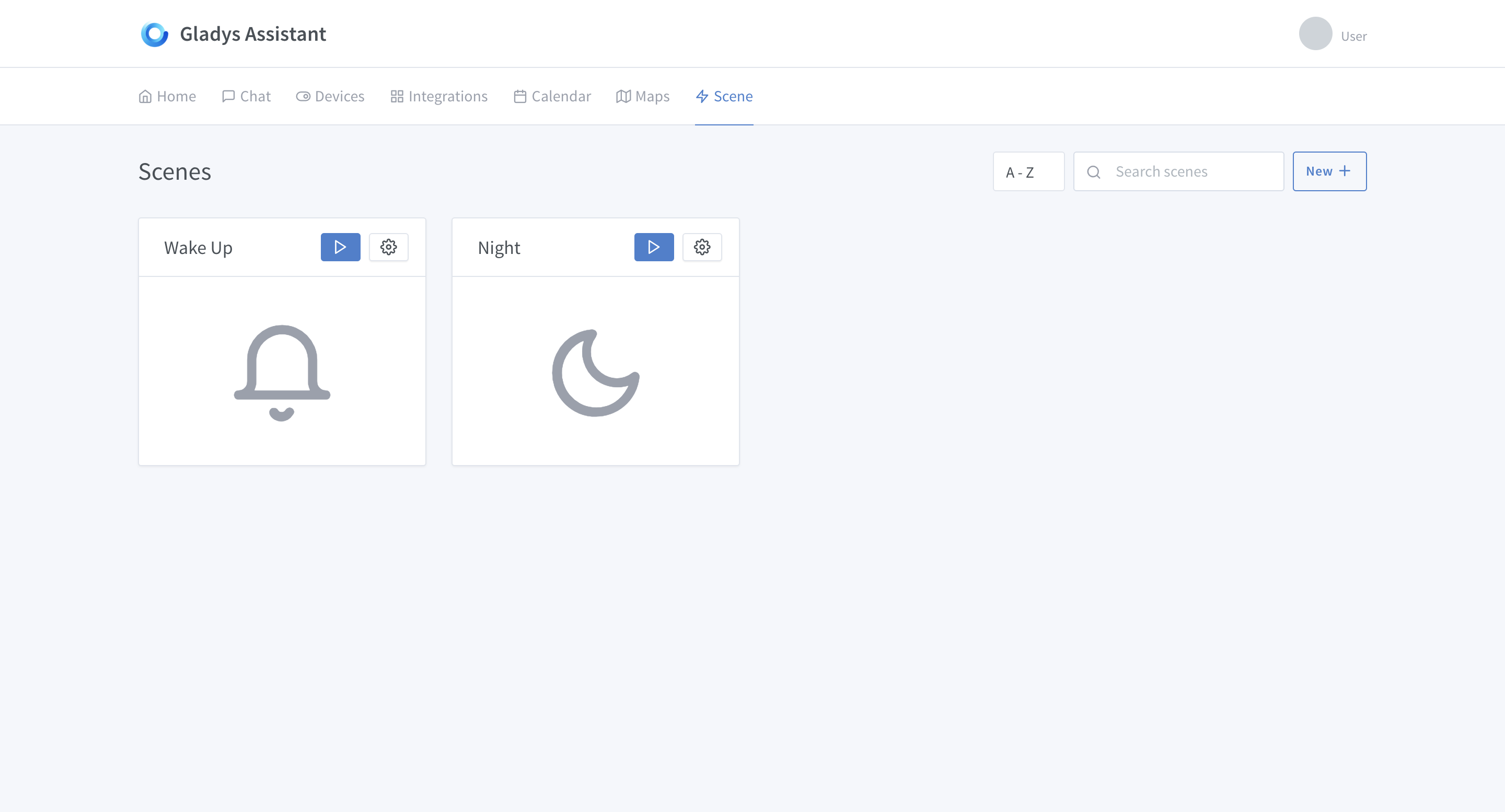
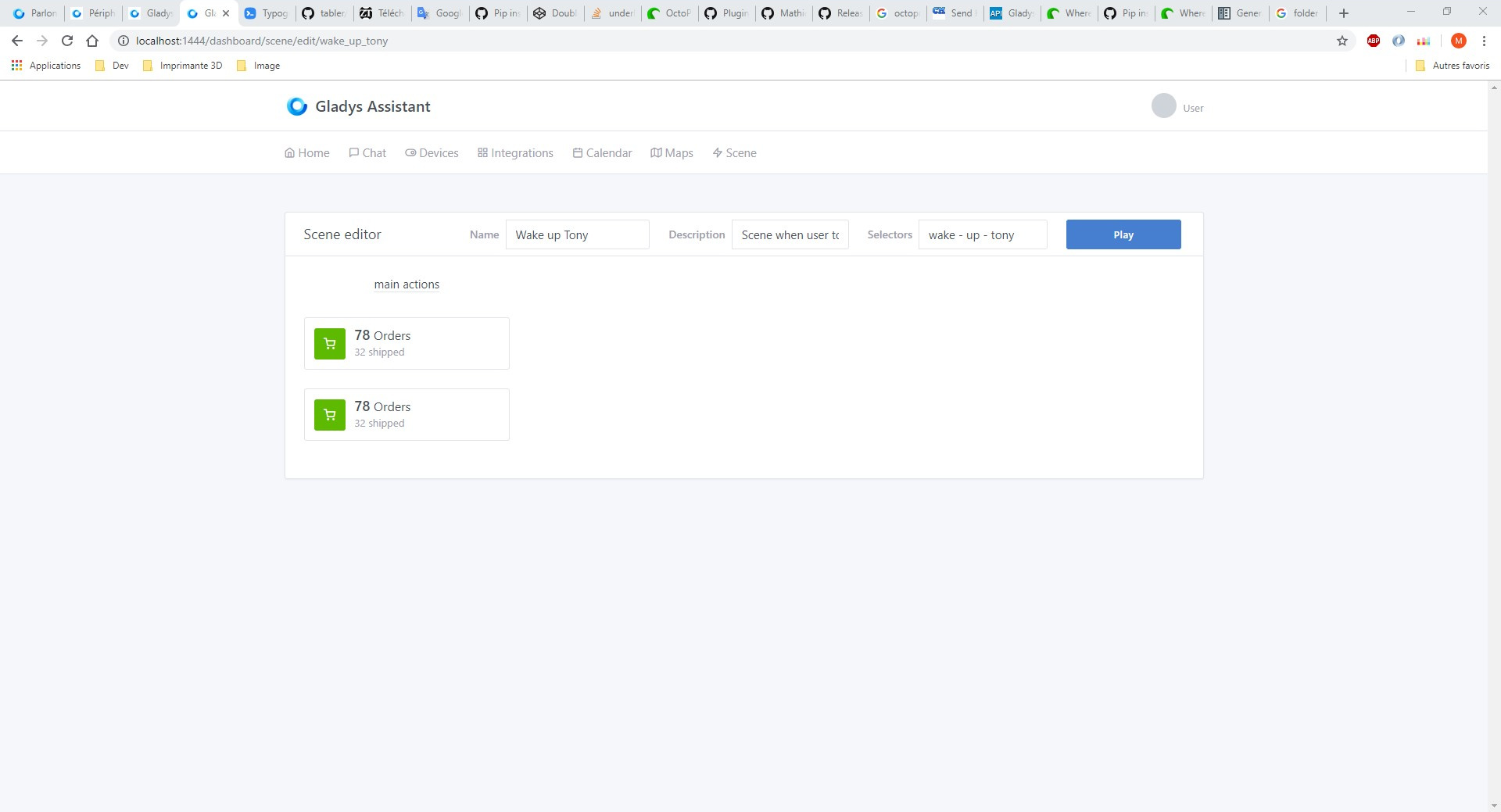
@MathieuA Okay, I’ve started the implementation, this is real HTML now!

Scene editing

Scene list

Don’t hesitate if you have feedback :slight_smile:

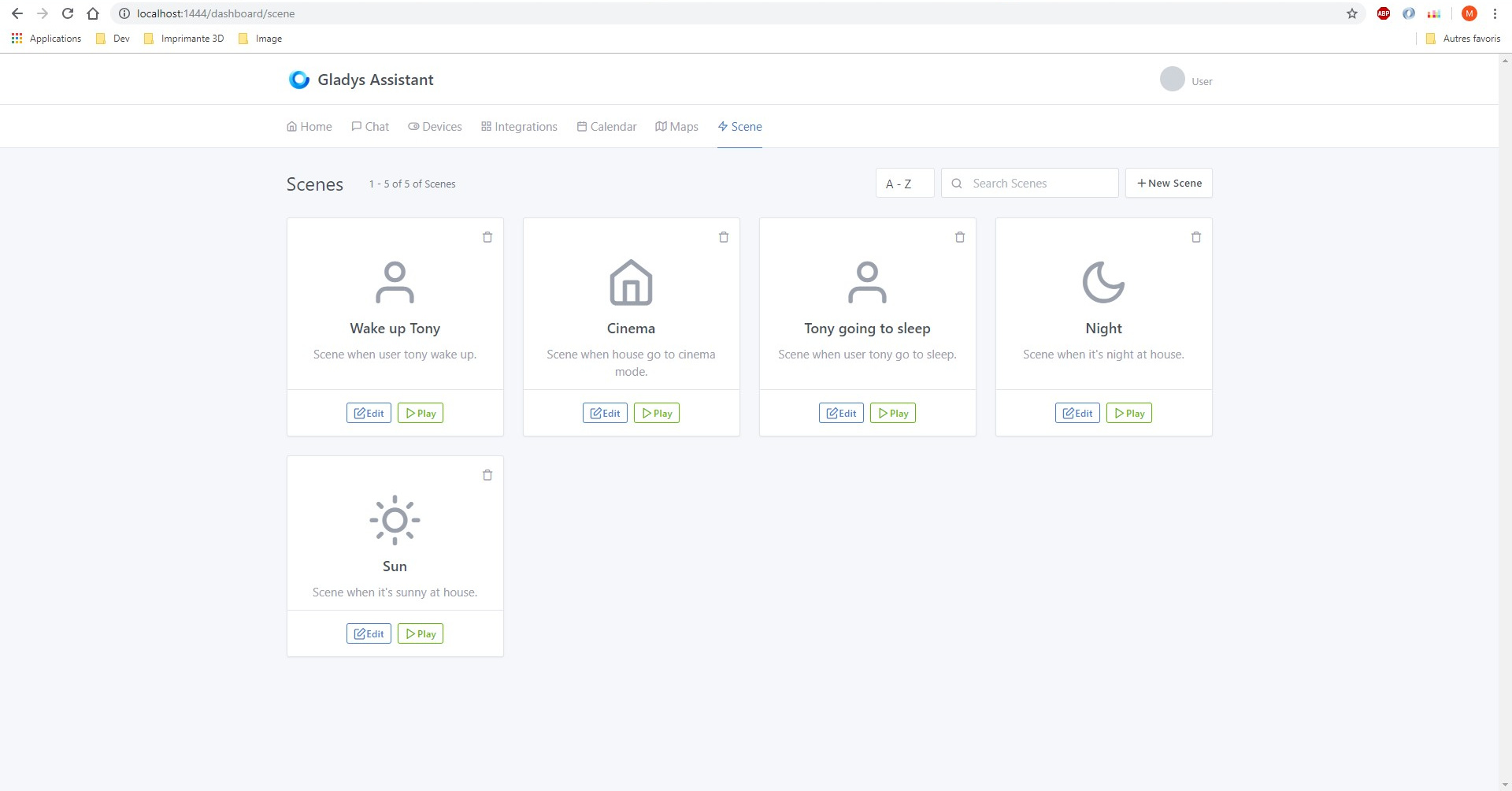
I started too yesterday @pierre-gilles :stuck_out_tongue:

It’s not very advanced but some things are functional ^^
Do you want me to make a PR so you can get what I’ve done?

I’d be happy to have you send me the HTML for the list view!

That’s not bad what you’ve done :slight_smile:

No need to play PR, files in DM will be enough I’d say.

For the scene editing view, I feel like I’ve gone a bit further, what do you think?

Bah I guess I didn’t just do HTML XD
I added a list of scenes, the delete button is functional as well as the search… I went all out like you with the integrations :stuck_out_tongue:

I’ll be honest, I’m not a fan, I find it a bit bulky ^^

Edit: the html

Summary
import { connect } from 'unistore/preact';
import actions from '../../actions/scenes';
import style from './style.css';

const SceneList = connect('scenes,currentUrl,totalSize', actions)(
  ({ scenes, currentUrl, totalSize, search, play, edit, remove }) => {

    const removeScene = (scene) => () => remove(scene);
    const editScene = (scene) => () => edit(scene);

    return (
      <div class="container">
        <div class="page-header">
          <h1 class="page-title">
                Scenes
          </h1>
          <div class="page-subtitle">1 - {scenes.length} of {totalSize} of  Scenes</div>
          <div class="page-options d-flex">
            <select class="form-control custom-select w-auto">
              <option value="asc">A - Z</option>
              <option value="desc">Z - A</option>
            </select>
            <div class="input-icon ml-2">
              <span class="input-icon-addon">
                <i class="fe fe-search" />
              </span>
              <input type="text" class="form-control w-10" placeholder="Search Scenes" onInput={search} />
            </div>
            <div class="ml-2">
              <a href="#" class="btn btn-secondary"><i class="fe fe-plus" />New Scene</a>
            </div>
          </div>
        </div>
        <div class="row row-cards">
          { scenes.map((scene) => (

            <div class="col-sm-6 col-lg-3">
              <div class="card h-100">
                <div class="card-body p-3 text-center">
                  <div class="text-right text-green">
                    <a href="#" class="icon" data-toggle="card-remove" onClick={removeScene(scene)}><i class="fe fe-trash" /></a>
                  </div>
                  <div class={style.scene_icon}><i class={`fe fe-${scene.icon}`} /></div>
                  <h4>{scene.name}</h4>
                  <div class="text-muted">{scene.description}</div>
                </div>
                <div class="card-footer">
                  <div class="btn-list text-center">
                    <button class="btn btn-outline-primary btn-sm" onClick={editScene(scene)} id={scene.selector}><i class="fe fe-edit" />Edit</button>
                    <button type="button" class="btn btn-outline-success btn-sm" onClick={play} id={scene.selector}><i class="fe fe-play" />Play</button>
                  </div>
                </div>
              </div>
            </div>
              </div>
          ))}
        </div>
      </div>
    );
  });

export default SceneList;

And the CSS ^^

Summary
.scene_icon{
    font-size: 4rem !important;
    margin: 0;
    color: #9aa0ac !important;
}

Ah! Good, send me the files I’ll figure it out :slight_smile: :slight_smile:

Ah? I like it :stuck_out_tongue:

I like the idea that you can see the entire scenario directly and edit it like that, without necessarily having to go into a series of modals.

For now there are 0 modals in Gladys 4 you must have noticed! I’m not against modals but I would like there to be far fewer than in Gladys 3 where almost everything was modal ^^