Hello to all Netatmo enthusiasts ^^
1st point: I’ve resumed some programming (Netatmo doorbell installation) and I’ve mixed my version that has been running at home for a year and a half, the modifications that @damalgos made recently, and updated to v4.8.3. It’s running again with a few bugs still to fix.
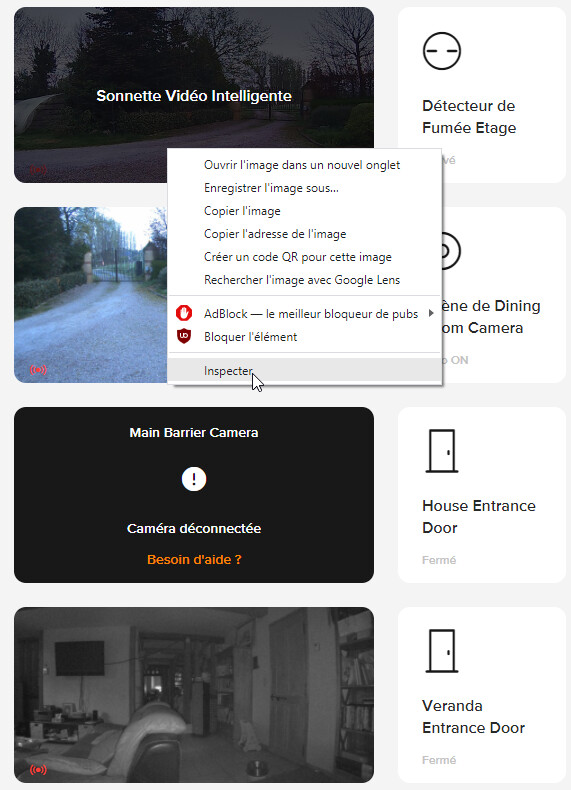
2nd point: For those who have Netatmo Presence (Outdoor) or Welcome (Indoor) cameras and would like to access them from Gladys without the ongoing integration (which unfortunately is taking a long time to appear due to the numerous complex changes requested), I have just found a way to access the live stream via the IP address (which bothers me a bit actually as there is no login/password to enter!!) and which allows you to always have the stream even in case of an internet outage (I’m thinking of you @Tlse-vins but maybe you already found a way to do it ^^) :
-
Step 1: Go to your Netatmo Security dashboard and log in,
-
Step 2: Right-click on the camera whose stream you want to retrieve and select « Inspect »
-
Step 3: Retrieve the first code that is between the two slashes « / » (between the two red arrows below) and save it.
-
Step 4: Retrieve the IP address of your camera on your local network and then replace the terms in the addresses below:
- For a high-quality stream: http://‹ LOCAL-CAM-IP ›/‹ RETRIEVED-CODE ›/live/files/high/index.m3u8 (ex: http://192.168.0.188/9911c3xxxxxxxxxxxxxxxx7251xxx8bd/live/files/high/index.m3u8)
- For a 720p stream in jpeg directly (no reconversion): http://‹ LOCAL-CAM-IP ›/‹ RETRIEVED-CODE ›/live/snapshot_720.jpg
-
Step 5: Add a camera in Gladys and enter this URL, test, enjoy ^^
-
Step 6: Repeat the above steps as needed to add more cameras!!