I misspoke. In Gladys, switch and motion are device types used to determine how to communicate with the device. To detect the type of a device, I rely on the fields present in the Rflink message.
For example, if the message contains « RGBW=… » then the type will be detected as Light.
If the message contains « HUM=… » then it will be detected as a humidity sensor.
However, for certain types of devices, I can’t find a way in the message transmitted by Rflink to know, for example, if it’s a socket or a door opening sensor. That’s why I asked you if you thought all motion sensors sent a CHIME property.
(node:32) UnhandledPromiseRejectionWarning: TypeError: Cannot read property ‹ includes › of undefined
at RFlinkManager.message (/src/server/services/rflink/lib/events/rflink.message.js:248:47)
at ReadLineParser. (/src/server/services/rflink/lib/commands/rflink.listen.js:9:10)
at ReadLineParser.emit (events.js:311:20)
at addChunk (_stream_readable.js:294:12)
at readableAddChunk (_stream_readable.js:271:13)
at ReadLineParser.Readable.push (_stream_readable.js:209:10)
at ReadLineParser.Transform.push (_stream_transform.js:152:32)
at ReadLineParser._transform (/src/server/services/rflink/node_modules/@serialport/parser-delimiter/lib/index.js:35:12)
at ReadLineParser.Transform._read (_stream_transform.js:191:10)
at ReadLineParser.Transform._write (_stream_transform.js:179:12)
at doWrite (_stream_writable.js:441:12)
at writeOrBuffer (_stream_writable.js:425:5)
at ReadLineParser.Writable.write (_stream_writable.js:316:11)
at SerialPort.ondata (_stream_readable.js:714:22)
at SerialPort.emit (events.js:311:20)
at addChunk (_stream_readable.js:294:12)
at readableAddChunk (_stream_readable.js:275:11)
at SerialPort.Readable.push (_stream_readable.js:209:10)
at /src/server/services/rflink/node_modules/@serialport/stream/lib/index.js:385:12
(node:32) UnhandledPromiseRejectionWarning: Unhandled promise rejection. This error originated either by throwing inside of an async function without a catch block, or by rejecting a promise which was not handled with .catch(). To terminate the node process on unhandled promise rejection, use the CLI flag --unhandled-rejections=strict (see Command-line API | Node.js v25.9.0 Documentation). (rejection id: 6)
(node:32) [DEP0018] DeprecationWarning: Unhandled promise rejections are deprecated. In the future, promise rejections that are not handled will terminate the Node.js process with a non-zero exit code.
It works! My opening detector is now detected (still as a switch, however, but normal given our recent exchange)
I can now see the messages.
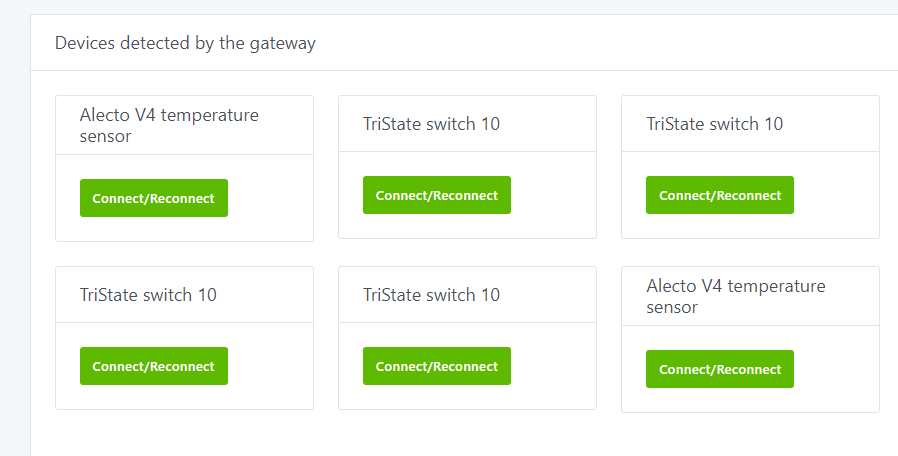
I notice a strange behavior. Today, when a new device is detected, clicking the Connect/Reconnect button does not work; I have to manually refresh the page to see it appear at the top.
Note: I abandoned the tests with Docker otherwise I would not have been able to see the latest corrections you made.
@joeypic, after Gladys’ afternoon of operation, the list of devices to create is enormous. Even though I added the device in Gladys (Connect/Reconnect), it is listed multiple times
I can’t understand this. It didn’t happen before, and now I have this issue suddenly, even though I haven’t touched the front end for two weeks. However, in my code, it should refresh the list when you click Connect.
I’m making progress in my tests. I’ll add my neighbors’ devices
After adding the devices to the dashboard, they remain without value (No value recorded). For a LaCrosse weather station that transmits a message 20;05;LaCrosse;ID=0c06;TEMP=0116; (temperature in hexadecimal by the way, I don’t know if you have planned the conversion to decimal?), I notice that there is no associated feature (no icon either in the Integrations section).
Therefore, the error message below may explain why I don’t have any value displayed on the dashboard:
2020-04-12T14:19:45+0200 rflink.newValue.js:12 (RFlinkManager.newValue) RFlink : value temperature of device rflink:0c06:temperature:undefined changed to 0114
2020-04-12T14:19:45+0200 device.newStateEvent.js:20 (DeviceManager.newStateEvent) NotFoundError: DeviceFeature not found
at DeviceManager.newStateEvent (/home/philippe/gladys-rflink/server/lib/device/device.newStateEvent.js:16:13)
at EventEmitter.emit (events.js:311:20)
at Event.emit (/home/philippe/gladys-rflink/server/lib/event/index.js:8:16)
at RFlinkManager.newValue (/home/philippe/gladys-rflink/server/services/rflink/lib/events/rflink.newValue.js:33:23)
at RFlinkManager.message (/home/philippe/gladys-rflink/server/services/rflink/lib/events/rflink.message.js:350:16)
at ReadLineParser. (/home/philippe/gladys-rflink/server/services/rflink/lib/commands/rflink.listen.js:9:10)
at ReadLineParser.emit (events.js:311:20)
at addChunk (_stream_readable.js:294:12)
at readableAddChunk (_stream_readable.js:271:13)
at ReadLineParser.Readable.push (_stream_readable.js:209:10)
at ReadLineParser.Transform.push (_stream_transform.js:152:32)
at ReadLineParser._transform (/home/philippe/gladys-rflink/server/services/rflink/node_modules/@serialport/parser-delimiter/lib/index.js:35:12)
at ReadLineParser.Transform._read (_stream_transform.js:191:10)
at ReadLineParser.Transform._write (_stream_transform.js:179:12)
at doWrite (_stream_writable.js:441:12)
at writeOrBuffer (_stream_writable.js:425:5)
at ReadLineParser.Writable.write (_stream_writable.js:316:11)
at SerialPort.ondata (_stream_readable.js:714:22)
at SerialPort.emit (events.js:311:20)
at addChunk (_stream_readable.js:294:12)
at readableAddChunk (_stream_readable.js:275:11)
at SerialPort.Readable.push (_stream_readable.js:209:10)
at /home/philippe/gladys-rflink/server/services/rflink/node_modules/@serialport/stream/lib/index.js:385:12 {
message: ‹ DeviceFeature not found ›
I have another error message in the logs:
(node:6791) UnhandledPromiseRejectionWarning: TypeError: Cannot read property ‹ includes › of undefined
at RFlinkManager.message (/home/philippe/gladys-rflink/server/services/rflink/lib/events/rflink.message.js:380:21)
at ReadLineParser. (/home/philippe/gladys-rflink/server/services/rflink/lib/commands/rflink.listen.js:9:10)
at ReadLineParser.emit (events.js:311:20)
at addChunk (_stream_readable.js:294:12)
at readableAddChunk (_stream_readable.js:271:13)
at ReadLineParser.Readable.push (_stream_readable.js:209:10)
at ReadLineParser.Transform.push (_stream_transform.js:152:32)
at ReadLineParser._transform (/home/philippe/gladys-rflink/server/services/rflink/node_modules/@serialport/parser-delimiter/lib/index.js:35:12)
at ReadLineParser.Transform._read (_stream_transform.js:191:10)
at ReadLineParser.Transform._write (_stream_transform.js:179:12)
at doWrite (_stream_writable.js:441:12)
at writeOrBuffer (_stream_writable.js:425:5)
at ReadLineParser.Writable.write (_stream_writable.js:316:11)
at SerialPort.ondata (_stream_readable.js:714:22)
at SerialPort.emit (events.js:311:20)
at addChunk (_stream_readable.js:294:12)
at readableAddChunk (_stream_readable.js:275:11)
at SerialPort.Readable.push (_stream_readable.js:209:10)
at /home/philippe/gladys-rflink/server/services/rflink/node_modules/@serialport/stream/lib/index.js:385:12
(node:6791) UnhandledPromiseRejectionWarning: Unhandled promise rejection. This error originated either by throwing inside of an async function without a catch block, or by rejecting a promise which was not handled with .catch(). To terminate the node process on unhandled promise rejection, use the CLI flag --unhandled-rejections=strict (see Command-line API | Node.js v25.9.0 Documentation). (rejection id: 6)
(node:6791) [DEP0018] DeprecationWarning: Unhandled promise rejections are deprecated. In the future, promise rejections that are not handled will terminate the Node.js process with a non-zero exit code.
Hello @joeypic and thank you for developing this module
I increasingly want to replace my home automation installation on a V3 RPI3 that is more than overloaded and shows slowdowns due to the RFlink system and its too many requests per minute. So today I tried to install the docker image @peb which is 4 hours old on an RPI4 to test your module.
So it’s my first day with docker, I installed peb’s image in the same way as the official beta by just replacing the line gladysassistant/gladys:4.0.0-beta-arm
with pebou/gladys:4.0.0-beta-integration-rflink. Is this what I am supposed to do?
After that I have a server running smoothly so I think I did it right, but I have several issues regarding the addition of my 433MHz devices, which make me think that I may not be on the latest version of the module (I saw similar problems solved earlier)?
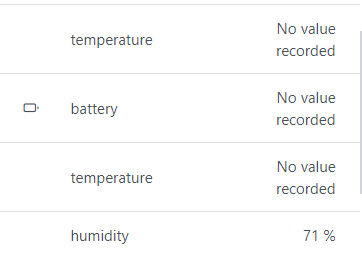
The connection to my Ardu MEGA is not a problem, port selection and gladys reboot and it’s good to go. Directly, several sensors have been recognized and I have added them without any issues. In the dashboard they do not take any values, everything remains at No value recorded except one sensor that displays its humidity (why? )
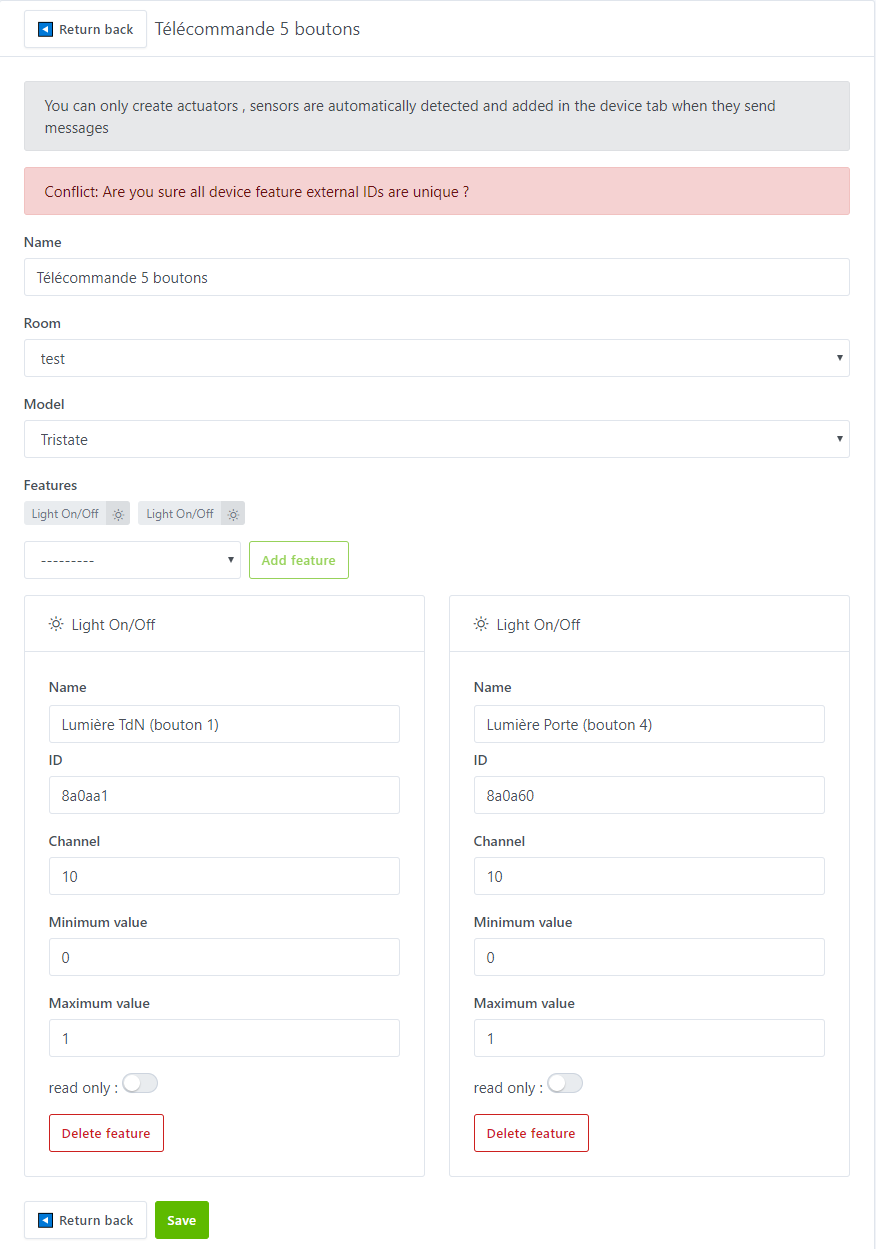
Later, I tried to add my 5-outlet remote control, which is in TriState protocol. Impossible to detect it automatically, it does not appear. I then tried a manual addition, by putting several buttons in a single device, but I did not succeed because of « ID conflict ». I conclude that each ON/OFF button must be created separately?
Here is what I tried:
And at this point I don’t know by what magic I see in the detected devices one of my TriState buttons that appeared. And with it I control my outlet well. However, it is impossible to add the other 9 via detection In the debug, the line still concerns temperature sensors (well I didn’t see anything else even when I press my buttons)
So if I’m wrong somewhere I’m all ears for your corrections
I admit I have no idea how docker works but there are specialists on the forum.
I just fixed the problem by adding (I added humidity, light and pressure sensors)
What would be useful is to check if the RFlink receives a message. In the settings tab of the service you see the last message received, press your remote control (refresh the page because I haven’t put that in auto),
If your RFLINK receives a message but you don’t have a device added, then send me the logs. If your RFLINK doesn’t even detect the message (the Arduino LED doesn’t blink) then the problem is not with the service (I would be very surprised)
Thank you again for your feedback, I was starting to go in circles because I had none (if you have time, you could send me the list of your devices and the Rflink code that corresponds to them via PM please?)
No problem, so my RFLink box is well-tuned since I’ve been using it for more than a year and a half. Reception and transmission work quite well (reception 4 out of 5 times but it’s still good).
So when I try to detect my remote control via the RFLink software, it works, they appear every time I press my remote control:
On the other hand, on the gladys module side, it’s almost impossible to make them appear. The debug tab doesn’t help either, the last line received is 20;13;Alecto V4;ID=57d8;TEMP=00c2;HUM=79; but it doesn’t change when I press my TriState buttons. I notice the same thing with a presence detector in EV1527 which took a long time before I finally found it in the list of detected devices.
I had a bit of magic or two TriState buttons suddenly appeared in the list… I don’t explain they are like « appeared 30 minutes after I pressed the buttons » lol. But the others are not detected.
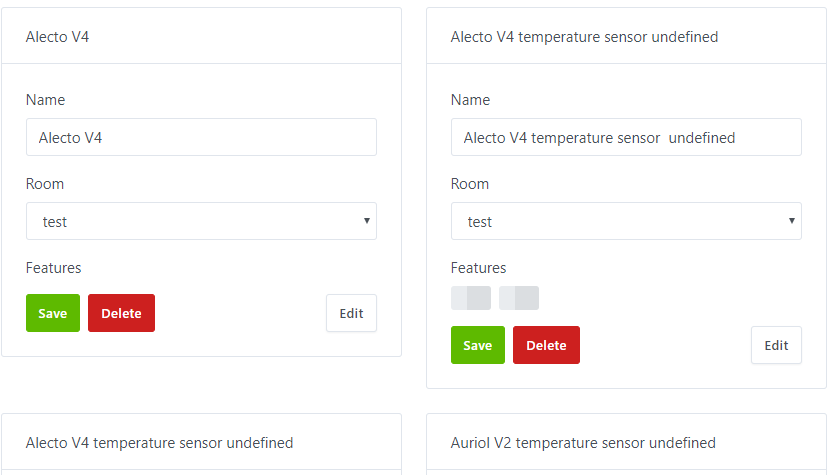
I also see that for the temperature sensors, they are almost all called « XXX XXX undefined ». This may be normal but I prefer to report it
Initialising OpenZWave 1.6.974 binary addon for Node.JS.
OpenZWave Security API is ENABLED
ZWave device db : /etc/openzwave
User settings path : /src/server/services/zwave/node_modules/openzwave-shared/build/Release/../../
Option Overrides : --Logging false --ConsoleOutput false --SaveConfiguration true
2020-05-02T16:52:36+0200 index.js:16 (Object.start) Starting zwave service
2020-05-02T16:52:36+0200 index.js:20 (Object.start) Starting Dark Sky service
2020-05-02T16:52:36+0200 index.js:19 (Object.start) Starting telegram service
2020-05-02T16:52:36+0200 index.js:13 (Object.start) Starting usb service
2020-05-02T16:52:36+0200 service.start.js:16 (Service.start) Service zwave is not configured, so it was not started.
2020-05-02T16:52:36+0200 service.start.js:16 (Service.start) Service telegram is not configured, so it was not started.
2020-05-02T16:52:36+0200 service.start.js:16 (Service.start) Service mqtt is not configured, so it was not started.
2020-05-02T16:52:36+0200 index.js:63 (Server.) Server listening on port 90
(node:31) UnhandledPromiseRejectionWarning: TypeError: Cannot read property ‹ includes › of undefined
at RFlinkManager.message (/src/server/services/rflink/lib/events/rflink.message.js:377:21)
at ReadLineParser. (/src/server/services/rflink/lib/commands/rflink.listen.js:9:10)
at ReadLineParser.emit (events.js:310:20)
at addChunk (_stream_readable.js:286:12)
at readableAddChunk (_stream_readable.js:264:11)
at ReadLineParser.Readable.push (_stream_readable.js:209:10)
at ReadLineParser.Transform.push (_stream_transform.js:152:32)
at ReadLineParser._transform (/src/server/services/rflink/node_modules/@serialport/parser-delimiter/lib/index.js:35:12)
at ReadLineParser.Transform._read (_stream_transform.js:191:10)
at ReadLineParser.Transform._write (_stream_transform.js:179:12)
at doWrite (_stream_writable.js:403:12)
at writeOrBuffer (_stream_writable.js:387:5)
at ReadLineParser.Writable.write (_stream_writable.js:318:11)
at SerialPort.ondata (_stream_readable.js:695:22)
at SerialPort.emit (events.js:310:20)
at addChunk (_stream_readable.js:286:12)
at readableAddChunk (_stream_readable.js:268:9)
at SerialPort.Readable.push (_stream_readable.js:209:10)
at /src/server/services/rflink/node_modules/@serialport/stream/lib/index.js:385:12
(node:31) UnhandledPromiseRejectionWarning: Unhandled promise rejection. This error originated either by throwing inside of an async function without a catch block, or by rejecting a promise which was not handled with .catch(). To terminate the node process on unhandled promise rejection, use the CLI flag --unhandled-rejections=strict (see Command-line API | Node.js v25.9.0 Documentation). (rejection id: 3)
(node:31) [DEP0018] DeprecationWarning: Unhandled promise rejections are deprecated. In the future, promise rejections that are not handled will terminate the Node.js process with a non-zero exit code.
rflink:57d8:undefined
rflink:5718:undefined
I didn’t quite understand what you wanted to know in the PM but I would be happy to give you the information
PS: I did the update with Peb’s Docker image from the beginning of the afternoon. And I’m going to start all over again with a brand new gladys to see if the behavior is the same.
The logs make me think your version is not up to date
I really hope it’s just your setup that’s not up to date because I’m starting to get scared, everything works perfectly for me (the undefined in the name I fixed not long ago).
I resumed testing this Sunday, May 3rd, with a git pull from your repo around 11:30 a.m.
Have you seen my message from last April 12th, earlier in this thread? Since I haven’t seen a reply, I’m not sure you noticed it^^
Here’s what I found today:
New device detection brings back already added devices; as a result, when trying to add the device by clicking on « Connect/Reconnect » it removes other devices I might have added (?) and above all, it overwrites the settings of the device that was already added.
When identifying a new device, the log always returns [object Object]: rflink.addNewDevice.js:11 (RFlinkManager.addNewDevice) adding device: [object Object]
The state updates don’t seem to work all the time: see logs below + another case with my door sensor described in the point after the logs
here are the logs:
2020-05-03T11:31:09+0200 rflink.listen.js:10 (ReadLineParser.) Rflink: message received: 20;02;X2D;ID=100cdb3;SWITCH=00;CMD=ON;RC=0000;S=83;EXT=Tybox;BAT=OK;
rflink:0e28a0:0e
2020-05-03T11:31:39+0200 gateway.forwardWebsockets.js:14 (Gateway.forwardWebsockets) Gateway: not connected. Prevent forwarding event.
2020-05-03T11:31:39+0200 rflink.message.js:28 () d.external_id: rflink:100cdb3:00
2020-05-03T11:31:39+0200 rflink.message.js:29 () msg.id: 100cdb3
2020-05-03T11:31:39+0200 rflink.newValue.js:12 (RFlinkManager.newValue) RFlink: value battery of device rflink:100cdb3:battery:00 changed to OK
2020-05-03T11:31:39+0200 device.newStateEvent.js:20 (DeviceManager.newStateEvent) NotFoundError: DeviceFeature not found
at DeviceManager.newStateEvent (/home/philippe/gladys-rflink/server/lib/device/device.newStateEvent.js:16:13)
at EventEmitter.emit (events.js:311:20)
at Event.emit (/home/philippe/gladys-rflink/server/lib/event/index.js:8:16)
at RFlinkManager.newValue (/home/philippe/gladys-rflink/server/services/rflink/lib/events/rflink.newValue.js:52:21)
at RFlinkManager.message (/home/philippe/gladys-rflink/server/services/rflink/lib/events/rflink.message.js:347:16)
at ReadLineParser. (/home/philippe/gladys-rflink/server/services/rflink/lib/commands/rflink.listen.js:9:10)
at ReadLineParser.emit (events.js:311:20)
at addChunk (_stream_readable.js:294:12)
at readableAddChunk (_stream_readable.js:271:13)
at ReadLineParser.Readable.push (_stream_readable.js:209:10)
at ReadLineParser.Transform.push (_stream_transform.js:152:32)
at ReadLineParser._transform (/home/philippe/gladys-rflink/server/services/rflink/node_modules/@serialport/parser-delimiter/lib/index.js:35:12)
at ReadLineParser.Transform._read (_stream_transform.js:191:10)
at ReadLineParser.Transform._write (_stream_transform.js:179:12)
at doWrite (_stream_writable.js:441:12)
at writeOrBuffer (_stream_writable.js:425:5)
at ReadLineParser.Writable.write (_stream_writable.js:316:11)
at SerialPort.ondata (_stream_readable.js:714:22)
at SerialPort.emit (events.js:311:20)
at addChunk (_stream_readable.js:294:12)
at readableAddChunk (_stream_readable.js:275:11)
at SerialPort.Readable.push (_stream_readable.js:209:10)
at /home/philippe/gladys-rflink/server/services/rflink/node_modules/@serialport/stream/lib/index.js:385:12 {
message: ‹ DeviceFeature not found ›
}
2020-05-03T11:31:39+0200 rflink.newValue.js:12 (RFlinkManager.newValue) RFlink: value switch of device rflink:100cdb3:switch:00 changed to ON
2020-05-03T11:31:39+0200 device.newStateEvent.js:20 (DeviceManager.newStateEvent) NotFoundError: DeviceFeature not found
at DeviceManager.newStateEvent (/home/philippe/gladys-rflink/server/lib/device/device.newStateEvent.js:16:13)
at EventEmitter.emit (events.js:311:20)
at Event.emit (/home/philippe/gladys-rflink/server/lib/event/index.js:8:16)
at RFlinkManager.newValue (/home/philippe/gladys-rflink/server/services/rflink/lib/events/rflink.newValue.js:52:21)
at RFlinkManager.message (/home/philippe/gladys-rflink/server/services/rflink/lib/events/rflink.message.js:377:16)
at ReadLineParser. (/home/philippe/gladys-rflink/server/services/rflink/lib/commands/rflink.listen.js:9:10)
at ReadLineParser.emit (events.js:311:20)
at addChunk (_stream_readable.js:294:12)
at readableAddChunk (_stream_readable.js:271:13)
at ReadLineParser.Readable.push (_stream_readable.js:209:10)
at ReadLineParser.Transform.push (_stream_transform.js:152:32)
at ReadLineParser._transform (/home/philippe/gladys-rflink/server/services/rflink/node_modules/@serialport/parser-delimiter/lib/index.js:35:12)
at ReadLineParser.Transform._read (_stream_transform.js:191:10)
at ReadLineParser.Transform._write (_stream_transform.js:179:12)
at doWrite (_stream_writable.js:441:12)
at writeOrBuffer (_stream_writable.js:425:5)
at ReadLineParser.Writable.write (_stream_writable.js:316:11)
at SerialPort.ondata (_stream_readable.js:714:22)
at SerialPort.emit (events.js:311:20)
at addChunk (_stream_readable.js:294:12)
at readableAddChunk (_stream_readable.js:275:11)
at SerialPort.Readable.push (_stream_readable.js:209:10)
at /home/philippe/gladys-rflink/server/services/rflink/node_modules/@serialport/stream/lib/index.js:385:12 {
message: ‹ DeviceFeature not found ›
}
My door sensor states are not recorded: Atlantic;ID=3e6835;SWITCH=01;CMD=ON; and 20;10;Atlantic;ID=3e6835;SWITCH=01;CMD=OFF;
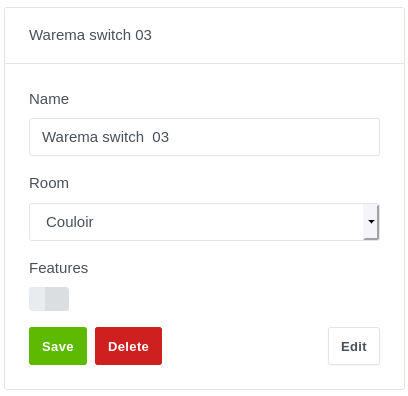
The message 20;17;Warema;ID=ffd5;SWITCH=03;CMD=UP; leads to creating a device without a feature.
Ah yes, I fixed the « no value » issue for almost all sensors, but I still don’t have the feature logo displayed next to it (yet I’m providing everything needed to Gladys)
For device detection, I’ve fixed almost everything, but I still occasionally have a device that passes even though it’s already added, so I’ll keep going.
For the logs, it’s true that it’s not very useful . I’ll remove that.
For state updates, the code is simple and works all the time for me, but my RFLINK doesn’t always detect everything (I think I’ll add an external power supply for the modules because I have 2 receivers and a transmitter on my Arduino, the provided USB might not be enough).
For your detector, I’ll take a look.
The problem is not that my service doesn’t handle OFF, it’s that cheap sensors don’t send OFF messages.
Maybe I should add an option directly in the service that resets the value of door opening detectors to 0 regularly since cheap ones send a message when a door is opened but not when you close it.
Same for motion sensors (no message when there’s no more movement)
Anyway, thanks for your feedback and the commands, I’d like some information about your X2D peripheral (what are the fields: RC=, S=, EXT=)
I’m doing my best to create a stable service, and for now, it’s not yet perfect, that’s the only negative point because there are many features .
If it interests someone, I’m also modeling a case for RPI + RFLINK that I’ll print in 3D.
 .
. (still as a switch, however, but normal given our recent exchange)



 In the debug, the line still concerns temperature sensors (well I didn’t see anything else even when I press my buttons)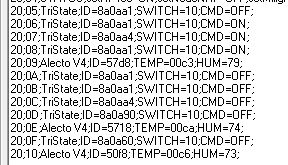
 (yet I’m providing everything needed to Gladys)