Interesting need, is the average history really required, or would a comparison work as well? For example, if you say « If the fridge temperature is less than or equal to 1.5°C over the last two hours, » would that work?
For me, it’s a bit different in this way. I could know if there was a peak (high or low) but not if the fridge is too cold in general.
Only the average will allow me to know if it is too cold over 2 hours for example.
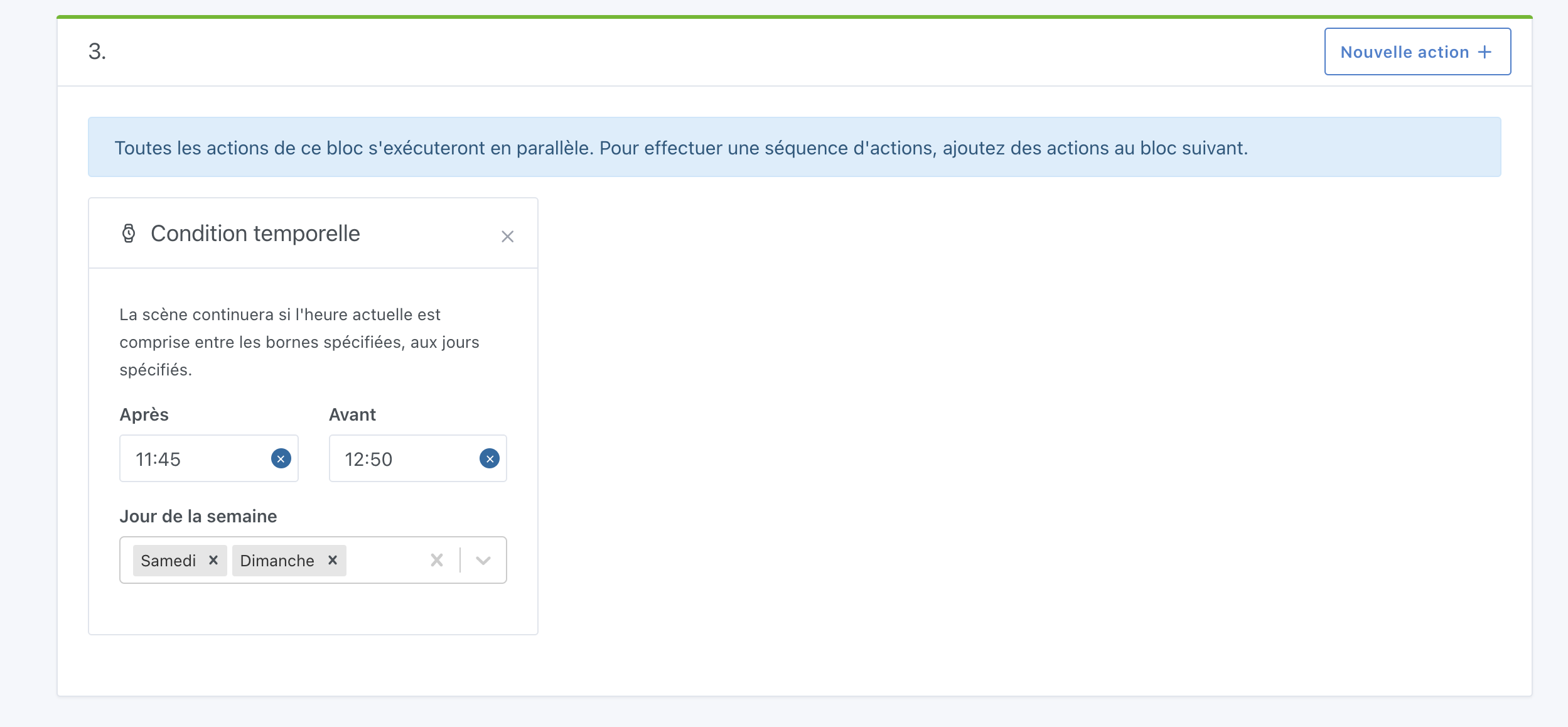
Time Condition
- Case N°1 → OK
- Case N°2 → If a condition is not met, it is true by default.
In the example of time conditions, « After 9:00 » and « Before » will be true. At 8:00, you will not be after 9:00, but before . Will the condition be validated or not?
Sun Condition
It’s clear and limpid, I don’t see any other cases for the moment.
Improving an existing sensor
This addresses one of my issues 
1. Now, motion sensors must send a « no motion detected » state right after a « motion detected ».
→ According to the web interface of the Zigbee2Mqtt project, my Xiaomi Aqara Zigbee sensors do send this state.
But for those identified as not sending this state, can Gladys (or the service) do it for them after 20 seconds as seems to be the case with my sensor?
4. To be defined: What happens if the condition is valid for 4 hours? […] a potentially infinite execution of the scene?
→ I actually had this need: to limit the number of scene executions in a day.
Concrete example, which would be resolved at the same time as this issue: my motion sensor (in the mailbox) generates 2x events and my scene is executed twice.
Home Assistant offers a « bouncer », I think, to only take into account one of the two events.
I also thought of proposing in the scenes, at the level of the triggering condition, a new possibility to limit the number of executions. 1x / hour, 1x / minute, 10x / days, etc.
No, « After 9:00 » the condition is true if it is after 9:00 that’s all
I was thinking more of doing it directly after the movement, in a return to 0 mode after a movement.
This question @VonOx I would be interested to know how it works on the home assistant side?
You can already do this with the condition « Run only when the threshold is crossed (and not on every value sent) » on the « device state change » box.
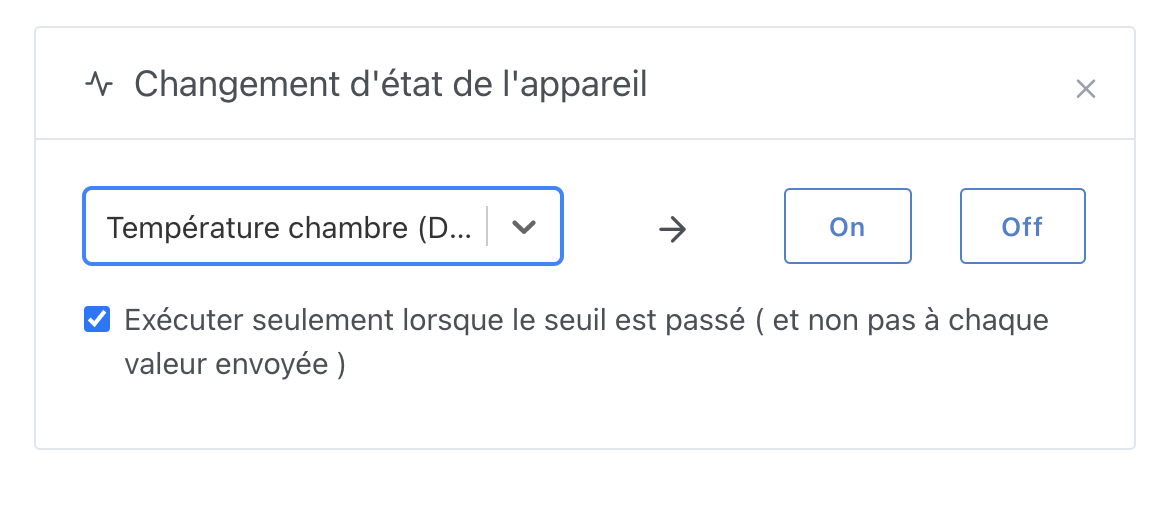
This condition ensures that only changes in values are taken into account. If there are two of the same value, the scene will be executed only once
I agree that this can be practical! After all, in this case, I don’t think this is the solution. I think the « device state change » box handles the case on its own.
Hmm, I’m not sure that answers my question. This is just to know if a scene can be started twice at the same time. I’m talking about another case.
Imagine you have a trigger « If a motion sensor does not detect movement for 30 minutes », and you have the following event reception:
- 12:01: reception of movement
- 12:03: no movement
- 12:05: no movement
- 12:07: no movement
- […]
- 12:19: no movement
- 12:32: no movement
- 12:33: no movement
- 12:35: no movement
[…] - 13:01: no movement
- 13:03: no movement
When will the scene execute?
In theory, the condition would be met at 12:31 (exactly 30 minutes after the first movement), except that at 12:33, the condition is still valid (there has indeed been no movement since), and the same at 12:34, and the same at 12:35…, and the same at 13:03
So the scene would run an infinite number of times as long as there are no movements?
Because, in itself, I see this « 30 minutes without movements » as a sliding window… I don’t know if that’s very clear 
Hello @pierre-gilles,
My opinion on the matter, having many needs on this point:
Usually, you try to develop in the « equipment » context. A device for you (and for everyone here I think) has always been a « physical » equipment with what it consists of.
A motion detector as physical equipment is a device composed of a motion detector, a tempo, and often, but not necessarily, a light detector (but the question of the latter is not there).
In home automation, the goal is to be able to adjust the tempo in the interface. In my humble opinion, this option should therefore be set in the device’s file. Then this tempo should, like for physical equipment, reset to zero (i.e., no motion detected) the device’s value if no other motion is detected within that time frame.
Then in the scenes, everything is possible:
Device: kitchen detector - tempo: 30 min
Example #1 = 2 scenes
Kitchen detector goes to 1
Scene 1 / Trigger 1: 12:01: Kitchen detection (rising edge = rising to 1)
Action: Turn on Light
End
30 minutes later, if no movement is detected in the meantime, Kitchen detector goes to 0
Scene 2 / Trigger 1: 12:31: No kitchen detection (falling edge = falling to 0)
Action: Turn off Light
End
Example #2 = 2 scenes same as Example #1
Kitchen detector goes to 1
Scene 1 / Trigger 1: 12:01: Kitchen detection (rising edge = rising to 1)
Action: Turn on Light
End
Last motion detection at 12:25, Kitchen detector goes to 0 at 12:55
Scene 2 / Trigger 1: 12:55: No kitchen detection (falling edge = falling to 0)
Action: Turn off Light
End
Device: barrier detector - tempo: 5 min
Example #3 = 1 scene - we want the action to have the opposite effect at a fixed duration
Barrier detector goes to 1
Scene 1 / Trigger 1: 12:01: Barrier detection (rising edge = rising to 1)
Action: Open the barrier
Action: Wait 10 min
Action: Close the barrier (even if another detection has appeared and regardless of whether the detector has returned to 0)
End
Note: In this example, if the barrier has been closed in the meantime and another movement is detected before the 10 minutes, the barrier opens again. This scene must necessarily stop the previously launched scene.
Device: baby room detector - tempo: 30 min
Example #4 - taking up your previous example:
Baby room detector goes to 1 at bedtime
Scene 1 / Trigger 1: Every 30 minutes
Condition 1: between 10 a.m. and 12 p.m. and between 2 p.m. and 4 p.m.
Condition 2: if no movement is detected in the baby’s room
Action: Send a message: « Warning, no movement detected for 30 minutes »
End
With this method, everything becomes possible with the motion detector. I remain convinced that a tempo should be addressed directly to the device. No addition would be necessary in the scenes for motion detection except for an option in addition to the checkbox « execute once » which could be « On each new execution, stop the running scene. »
Hope this will help.
I agree with @Terdious, that’s what I would like to implement in my rooms.
@Terdious replied earlier but indeed on these sensors it’s a sliding time. The condition is also true once the time has passed but we don’t care, we just need to trigger once.
In this case, this type of scene is really simple to do in HA

The PR for the temporal condition is available on GitHub:
https://github.com/GladysAssistant/Gladys/pull/1151
Ok, thanks for the feedback So, does my proposal seem good to you? We’ll need to think about the implementation next, not simple on this trigger 
Hello @pierre-gilles,
This afternoon I wanted to create a scenario:
« If no one is at home, it’s dark, and someone comes in, then turn on the entrance light. »
BUT:
- I can’t detect the presence of each person in the household (no way to do it)
- This implies knowing when there is no one left at home and the front door opens
After thinking about it, I thought about creating a Gladys user « Occupants » for which I could manage the presence based on my home sensors, namely presence sensors and door opening sensors.
Except that for this to be effective and responsive, I saw things like this:
- In case of movement in the house or opening of the front door (if previous presence) => Presence
- (Check every minute) If in the last 15 minutes there is no door or presence movement => Absence
For this, it is clear that it is necessary to consult the history of values over a defined period, as the « Check Presence » block does.
 Given the new features since this feature was requested, what would need to be reworked before you can start developing this feature (you or someone else for that matter)?
Or what is your vision on this if it has evolved on this subject?
Other remark (unrelated):
→ It would be necessary to add a description of the operation of the « Control a device » block, I am not sure I understand what it does.
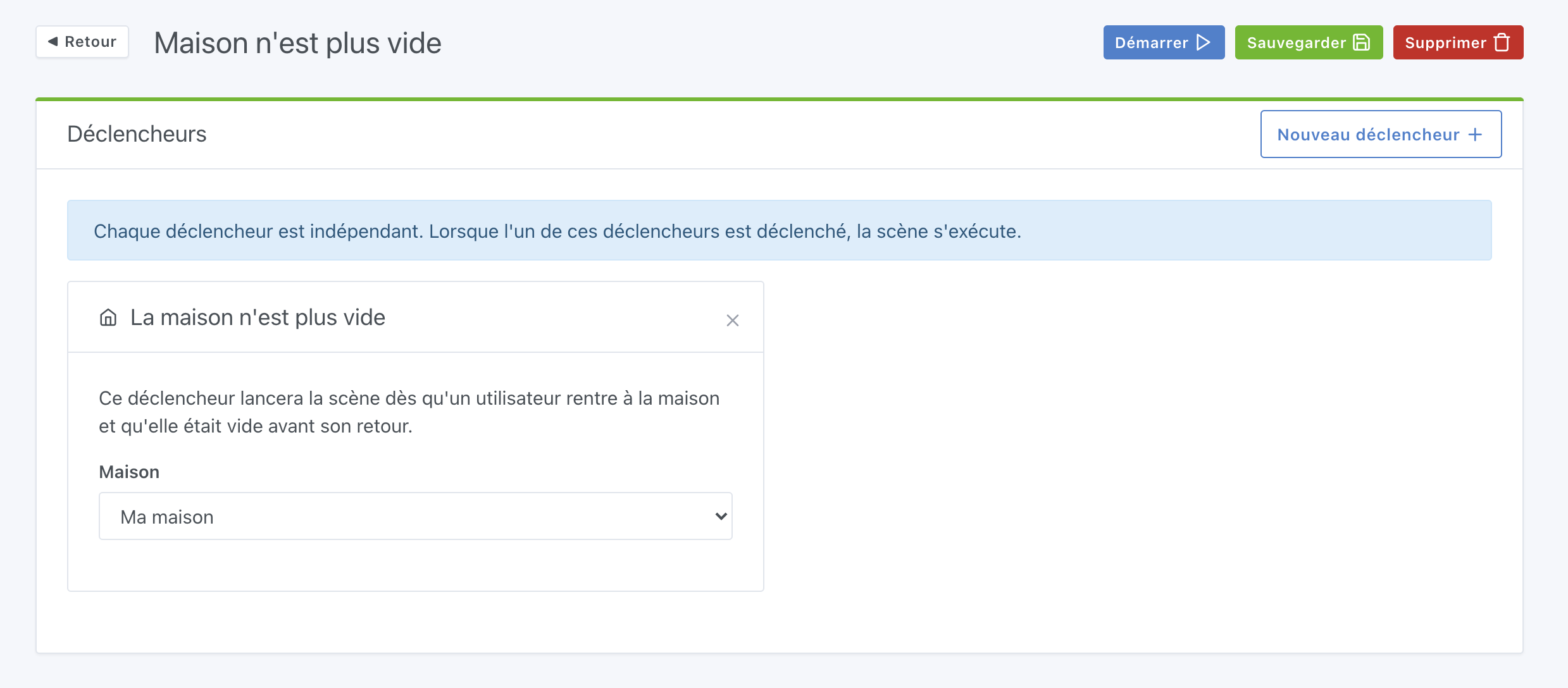
Where I’m stuck is the part
- if movement in the last 30 minutes, then someone is at home
I don’t see how to implement this detection.
Ah ok sorry, I understand better, you don’t want to manage individual presence, you just want to detect like a motion sensor in a building lobby (which activates when you enter, and as soon as there is no more movement after X time, turns off the light)
Indeed, as it stands, this is not possible (it might be possible by tinkering, but in any case, in a simple/clean way, it’s not possible)
There are several feature requests that require this development, this one (after well the title is no longer explicit), and that one:
I think it just lacks time to do the development (spec/dev) PRs are welcome.
Okay, I see. Ultimately, for you, it’s not so much a question of accessing a device’s values over time but rather adapting the scenes to address my very specific issue.
Currently, this is indeed what addresses my issue, but in general, it remains a useful feature and, in my opinion, it should be implemented.
Unless another method allows you to do essentially the same thing, in which case we can close this feature request and open a new, more detailed one?
The feature request I linked above?
Yes, that’s what I meant. The feature request you linked matches my very specific need.
However, there will certainly be cases where we need to access the old values of a sensor to calculate an average, for example, or to check how long a value has not been detected.
Therefore, this feature still seems relevant to me, as described in my very first message.
I think we need to be much more precise in feature requests in this case, I would suggest closing this request and if you have specific requests to reopen other requests
No one will vote for this request as it is quite vague, the title needs to be understandable by the community.
Okay, I will open a new, more precise request.
[EDIT]
The request already existed for the calculation part around the values: