Or just one block below:
- One block that turns on and waits
- One block that turns off
Or just one block below:
Everything depends on the type of sensor you have.
With a simple motion sensor, you will have to move in front of your sensor to turn your light back on.
There are also presence detectors, but much more expensive; these detect presence without necessarily having to move in front of the sensor.
I think @gsr_oyo is talking about the basic Aqara sensors, otherwise he would have specified the FP1 or FP2 (millimeter-wave) which allow ultra-fine detection.
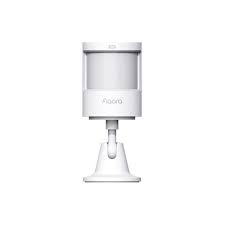
Are we talking about sensors like this?
That’s what I thought, but I still wanted to clarify.
Indeed, these are FP1 sensors 
So first try recreating the blocks to separate the actions as suggested, and keep us posted.
For the HomeKit part, it’s probably the same as for the contact sensors: they only show in the Home app if they detect something. In your case you should make sure Gladys detects the motion and then check the app in the Security tab.
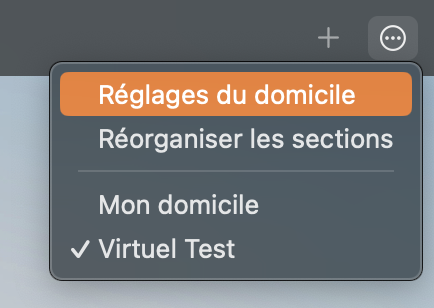
You can also go to the HomeKit menu → Home Settings
Then in Sensors check if the motion sensor appears
They don’t appear in the security section. I’ll test the scenes more precisely this weekend. A bit busy after the storm that passed yesterday
Thanks again for your help!
Did you see my video on the subject? I made a video dedicated to the FP1 and to light management in general 
Hi @cicoub13
I wanted to know what the status of this PR is: feat(homekit): Add motion sensors by cicoub13 · Pull Request #1914 · GladysAssistant/Gladys · GitHub?
Hello. No progress since the last time. I’ll look into it again at the end of the week.
If I can’t get it to work, we’ll close the PR.
If you need help I can help you debug, we can call each other if necessary.
Sorry for the late reply.
I was able to test it following your video. It works perfectly in Gladys, but I have no visibility of the sensors in the Home app to create automations.
Even with the restart
Hello everyone. Any news about integrating these sensors into « Home » so I can include them in the scenes I create in the Home app?
That would allow me to avoid having some scenes in Home and others directly in Gladys
Thanks for your help
I’ll let @cicoub13 respond to you about the current development
If you ever need help or hardware, I can assist. I’m a HomeKit user with a fairly large Gladys setup, with motion sensors
Hello, with the external zigbee2mqtt connection I was able to test the Aqara motion sensor via HomeKit on my dev environment. The update occurs correctly but not the notification (which allows the real-time display of the new data in the Home app and which is quite important for a sensor that is supposed to trigger a HomeKit scene).
I wonder if this isn’t a more global problem of the new HomeKit architecture (released a few months ago) that would require the use of a hub for real-time data. I hardly ever use it so it’s impossible to know since when it’s been like that, but on my Gladys in production I have this issue: when I modify something in Gladys, the data no longer appears immediately in the Home app — I have to switch apps and then go back to Home to display the updated data.
Could some HomeKit users with Gladys try to say whether the live update (5-6 seconds delay regardless of device type) still happens correctly for them and specify whether they have a hub or not (HomePod or Apple TV) and whether they’ve already done the HomeKit architecture update (Mettre à jour l’app Maison d’Apple - Assistance Apple (FR))?
Hi!
I confirm this behavior.
If the iPad’s Home app is in the foreground, no update occurs when I change a value via Gladys.
The refresh only happens when the App is opened or when it comes to the foreground.
I don’t have a hub.
No idea if it was like that before because I don’t use the App as such. It is only used through Siri…
I use HomeKit with a hub (Apple TV in my case, bought used on leboncoin :p)
I’m on the latest HomeKit architecture
I do get the live update (there is indeed a small 5-second delay)
Thanks to both of you for your feedback. So, according to that and this reddit post https://www.reddit.com/r/HomeKit/comments/zsir3n/explanation_on_new_homekit_architecture/ the hypothesis is confirmed.
In that case, I think the development done by @cicoub13 is functional, and it’s the new behavior of HomeKit that is causing the problem.
Cyril, you should reopen your PR and rebase your branch with the latest Gladys code. @pierre-gilles will be able to test and confirm that the sensor works properly directly with the hub. If that is the case, it might be worth noting in the Gladys documentation that if you don’t have a hub on the HomeKit network it is not recommended to use security-related sensors (water leak, door opening, motion…) in HomeKit scenes
Thanks @bertrandda for digging around! I just re-opened the PR, and tested with my HomeKit hub — it works perfectly
Thanks @cicoub13 for the PR, I’m merging it into master!