Hello, I am interested in the simplicity of Gladys but I have some gaps and many questions
So here it goes, I am looking for a simple system to control my Zigbee and WiFi devices. That’s why I bought a Lidl Gateway, but I couldn’t find a way to have a Dashboard on my PC. That’s why I thought about buying a Raspberry and a Zigbee key (SONOFF – USB Zigbee 3.0 Dongle) and control everything on Gladys. Fortunately, there is a tutorial here, otherwise, it would be hell!
As usual, home automation and simplicity don’t go hand in hand (what a shame, it discourages more than one). In short, to find a Raspberry, I don’t know how you do it?! It’s out of stock everywhere! Is there any other SIMPLE solution? Then I wanted to connect my heating, which has a pilot wire, to Gladys. Is it possible with simplicity?
Also, is it possible to plug my Zigbee key into my PC simply and control my devices on Gladys?
Thank you for the attention you will give to my message
It’s true that Gladys’ strength is to offer the simplest possible home automation.
The idea of using a Raspberry Pi goes in this direction, allowing you to configure almost nothing manually.
You can use something other than a Raspberry Pi without any problem, some people use Synology NAS I think.
But if you are not technical at all, the simplest solution will be to find a Raspberry Pi 4, there should be some on leboncoin?
It’s true that it’s not available anywhere, I even saw some at €155 on Amazon
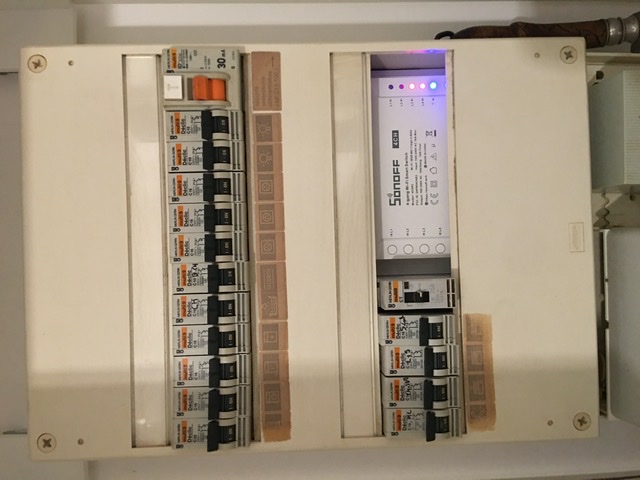
As I have the pilot wires for each room at the meter, I installed a Sonoff 4CHR3 to create 4 zones.
It is flashed with Tasmota (flashed with a Raspberry Pi via the GPIO) and I just modified the base configuration to invert the state of the relays. (The control order is 220V for eco and 0V for comfort)
This was the most economical solution for me, but you can also install the mini Sonoff relays on each radiator.
The advantage of the pilot is that you still have control over the radiator in case of need.
It works very well, I installed a lightweight Ubuntu on it, then Gladys, Docker, Node-RED, and everything works perfectly. It consumes a bit more than the Pi4 but is more powerful and at the same price range if you consider it already has a 64GB eMMC and will be just as reusable as a TV box afterward!
But once again, this won’t be turnkey, you’ll need to perform some actions like installing Linux, Docker, and then Gladys.
And that’s what he seemed to be looking for, something practical to deploy. If that’s the case, I think the Raspberry Pi is the simplest option.
Otherwise, what you propose is interesting for a tech enthusiast!
Oh, I followed 2 tutorials, one to install Ubuntu Lite 2D…the one by @pierre-gilles to install Gladys/Docker/Node-red and given the current price of the complete Pi4 pack plus SSD, it’s about the same or even cheaper! The Beelink is fanless, consumes little power, has Wi-Fi, Bluetooth, 4GB of RAM, and 64GB of eMMC. In short, it’s almost equivalent to the Pi4. I originally opted for the Pi, but since then I’ve changed my mind!
This is a bit off topic, but maybe we can build a Linux ISO to install with Docker + Gladys. It would be Gladys OS lol. If I’m not mistaken, that’s what the Gladys Raspy image does.
Yes, that would be totally possible, but it would require a different type of image for each hardware, I think, due to the drivers.
So one image for Raspberry Pi, another for Beelink, another for another model, etc.
I really like the idea of Beelink, which could be more powerful and stable for almost the same price. The great strength of Raspberry Pi is the graphical tools you can use under Windows to install it, almost without any computer skills.
Thank you so much for all your messages! Yes, I think the simplest solution will be to use the Raspberry Pi as lmilcent suggested. Good idea by the way for leboncoin, I hadn’t thought of that. However, I find everything else too complex and not easily accessible for everyone, which is a shame! I will look into it again when the technology is simpler. For now, I control all my devices with Smart Life and in the future with Gladys and my Raspberry Pi, I hope. By the way, on Gladys, will I be able to control my 2 Wi-Fi bulbs?



 pity …