[Introduction] Gnome

Hello, I’m Patrice, forty years old from the northeast of France.
Passionate about electronics, automation, computing, and … but with increasingly limited skills (I no longer practice and wasn’t an expert either)…
I’ve been following the Gladys project for a while, like since 2016-18 I would say… maybe earlier because I vaguely remember internet searches for Jarvis that led me to discover an article where Pierre-Gilles presented his creation…
But I never really got started, except for a first test after buying the latest Raspberry Pi 2 (or 3) without going too far (the purchase was to test lots of things), my skills being limited as well as my time … and my motivation… even though the interest was there.

For a few months now, I’ve been asking myself questions about automating a bit more and moving more things to a Gladys-like system or other.
Apart from small Arduino projects, relegated to the drawers in the cellar, the thing that most resembles home automation and the idea of a Jarvis at home is Alexa, which I turned to at the time preferring a « ready-made » thing even though the goal was simple (alarm, radio, …).

But the idea keeps coming back to me and I’ve started thinking again about a bit of home automation tailored more to my needs and desires than a non-upgradeable product…

I want an all-in-one, central system with voice commands complemented by a small touchscreen allowing the main controls.
It should be able to manage and display:
- calendar / alarm / reminders from multiple accounts (Google, Outlook, …)
- daily calendar / weather
- planned route of the day (Waze or equivalent)
- tracking and monitoring (comparison against a reference, for example) of electricity, water, gas consumption, …
- act as a media center (at least local MP3s and internet radios)
- battery measurement (future solar panels + battery), water tank level, …
- control lights, power outlets and other electrical devices via relays for example
- control roller shutters
- control a gate (vehicle detection, intercom, electric strike opening, …)
- camera recording (local storage)
- camera management (motion detection) and possible mail/ftp/… sending
- detect nearby Bluetooth devices (manage presence of residents and their preferences…)
- record histories and produce hourly/daily/monthly/annual reports (with CSV export for example)
- various automations between the calendar, weather, camera detection, switches, voice command and different actuators/controllers/…
- switch the display to a large screen (TV-style) for more information and/or video playback, …
- Alexa (parcel delivery for example, since everything else is described above I think)
- Be able to control and receive alerts by phone (notably in case of forgotten lights for example, or be informed in case scenarios are triggered such as motion detection)
[edit]
- status of doors and windows (both for information when leaving and for alarm)
- humidity/smoke/CO2/CH4/… sensors
- tracking data from other connected devices (scales, watches, …)
- access to Linky
-
[/edit]

From a hardware point of view, I’m not decided yet, but I plan to start with a Raspberry Pi 2 (or 3) and its touchscreen (which I should have in a drawer) if that is sufficient and otherwise invest in a new, undefined system.
For sensors and actuators, reuse of some connected power outlets or bulbs is possible but ideally adding relays when I redo the electrical work later to limit wireless communication… and many purchases to make.

As you can guess my project is not yet fully finalized but I’m starting to put on paper what I want to do in order to be able to discuss with you and I will start little by little while hoping not to be limited in the future…
So, I’m open to all your advice, particularly on hardware investments to keep all potential and reduce consumption even while expanding Gladys’ capabilities… Everything I will need and everything I should think about during house renovation work…

Thanks in advance to everyone

EDIT: I add a few feature ideas that could interest me in the future based on my readings and discoveries about Gladys

4 Likes

Hi and welcome,

The Raspberry Pi 2, I think it’s too limited.
I had a Pi 4 that I parted with to switch to a mini-PC that has more memory.

I recommend a tablet for the touchscreen part. Otherwise, almost everything you describe, Gladys is capable of

Hi @Gnome and welcome to Gladys!

An ambitious project in any case ^^

I recommend you start gradually:

1. First, install Gladys.

It can be on a mini-PC, a Raspberry Pi. I don’t know if you’ve seen my latest video:

A mini-PC is often the best option to have a solid setup. A Raspberry Pi also does the job, but indeed a Pi 2 will be a bit underpowered, I think.

2. Start with a few simple sensors/plugs/bulbs.

I recommend the Zigbee protocol with a Zigbee USB dongle like this one:

https://www.domadoo.fr/fr/interface-domotique/6315-sonoff-cle-usb-zigbee-30-antenne-externe-20dbm-v2-zbdongle-e.html?domid=17

You mentioned smart plugs, for example you have this plug with power consumption monitoring:

https://www.domadoo.fr/fr/peripheriques/6165-nous-prise-intelligente-zigbee-30-mesure-de-consommation-5907772033517.html?domid=17

Or this one, cheaper but without power consumption monitoring:

https://www.domadoo.fr/fr/peripheriques/5880-sonoff-prise-intelligente-16a-zigbee-30-version-fr.html?domid=17

Some sensors to start with:

https://www.domadoo.fr/fr/peripheriques/5319-sonoff-capteur-de-temperature-et-d-humidite-zigbee-30-snzb-02-6920075776102.html?domid=17

https://www.domadoo.fr/fr/peripheriques/5320-sonoff-capteur-d-ouverture-de-portefenetre-zigbee-30-snzb-04-6920075776126.html?domid=17

  1. Then you can expand (camera, etc…)

But in my opinion, doing it step by step is the best way to get a foothold in Gladys!

Don’t hesitate if you have any questions!

Hello and thanks for the welcome,

Tlse-vins, I doubt that it’s a Raspberry Pi 2, but maybe more a 3… But in any case, for the moment I can’t find it anymore… (long live tidying up)

What made me lean toward a Raspberry Pi rather than a PC was the power consumption… Then again, I may be wrong…
A PC has many advantages from a connectivity and storage point of view (on a Raspberry Pi, I would have had to add a powered USB switch,…)

Pierre-Gilles, first of all thank you for all your work and your commitment (even if you weren’t the only one, you were the impetus and the driving force)
I watched the video (several times even) and will probably switch to a mini-PC (at least to start)… The main question remains which one (you’ll tell me, « what does it matter, they’re all sufficient or almost » lol), because compared to the Raspberry Pi, there’s a lot of choice…
→ One thing that could be interesting (I haven’t found it) would be to make a table of « minimum » and « recommended » specifications for a mini-PC
Having become very ignorant about PC specifications over the past 10-20 years, this could reassure people like me at the time of purchase (not everyone has a mini-PC lying around)
As for the sensors, I don’t plan to buy everything at once… I’ll first get a sufficiently capable mini-PC, not too power-hungry (electricity), nor noisy, nor… in order to install (Linux is not my strong suit, but the site documents the installation well), then gradually connect components and form my own opinion

:wink:

1 Like

Hi @Gnome and welcome :slight_smile:
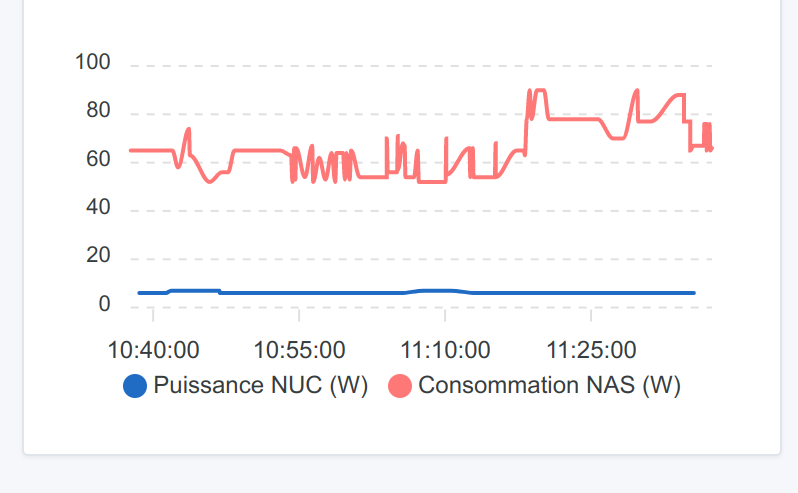
To give you an idea, here is what my NAS and my NUC (on which Gladys is installed) consume, respectively

The NUC constantly oscillates between 6 and 7W

3 Likes

Guim31, thanks for this data…
I hadn’t thought it would be to that extent… Hence why the mini PC is a good alternative… even, it should be the preferred option…

After that, this brings me to other questions:
0- favor having the maximum number of integrated connections (Wi‑Fi, Bluetooth, …)
\t- Are there any « essential » connections, or at least ones to look for?
\t- Is there any benefit to a dual Wi‑Fi card?

1- I would like to be able to use multiple views (a « small » permanent one for controls on a touchscreen, quick information, intercom, … and, secondly, a « large » on-demand one on a TV or PC monitor for camera display / media center / … with wireless keyboard/mouse)
\t- 1.1 the « multi-view » would be managed from V4 if I understood correctly, but can these views have different resolutions?
\t- 1.2 if we go for a mini PC with multiple video outputs, will Gladys be able to manage the outputs at the same time and show different views on them?
\t- 1.3 a small (<8-10" I think) touchscreen to recommend or any feedback on the ideal size?

Since I’m going to buy this mini PC, I want to know if video connectivity (notably having 2 video outputs) is something to take into account or not

2- USB ports: how many should be planned so as not to add a powered USB hub?
if you count keyboard, mouse, Zigbee, Z-Wave, RF433, RF868, … should we plan for 6-8 USB ports minimum??? How do you handle this?

3- processor/RAM…: what minimum/recommended processors (i3, i5)? what amount of RAM should be favored (>4 GB)?

Hello @Gnome
You can use a Beelink BT3 Pro — it’s a great mini PC, fanless so inaudible, small, well equipped enough (4GB + 32GB or 64GB eMMC), with Wi‑Fi etc.

and with a bit of searching you can find really cheap listings on LBC like this one for example -€70
https://www.leboncoin.fr/informatique/2314163922.htm
I personally have 3 of them (Jeedom, HA (Home Assistant) and of course Gladys), which lets me use Gladys and, for those who don’t yet run Gladys, Jeedom, or HA (and also to compare them — and it’s true that Gladys is by far the easiest to use, and coupled with Node-RED you can manage a lot of things) — well, these 3 mini‑PCs have never had any problems!
They’re all running Linux Lite 6.2 and I connect to them via RDP to manage them.
A Sonoff zigbee2mqtt dongle as recommended by @pierre-gilles and there you go!
In short, a great little machine for Gladys but not only if you want!

2 Likes

No & no. For Wi‑Fi it’s up to you whether you prefer to have Gladys connected over Wi‑Fi or via Ethernet to your router for even more network stability.

Maybe it wasn’t explained well, but Gladys won’t manage any of that at all :smiley:

Gladys is a server that exposes a web application, so then you open a browser on any machine (a tablet, your smartphone, a computer, etc…), and you open Gladys’ URL and you’ll have Gladys there, in that device’s resolution :slight_smile:

I don’t recommend using the machine you plan to buy to install Gladys on and attach a touchscreen to it.

The server you’ll have to run Gladys, put it in a drawer/near your router/near your meter/wherever you want, but don’t connect anything to it.

If you want remote touchscreens, buy one or several cheap Android tablets online (these days a tablet costs next to nothing), stick the tablet to the wall where you want and open the browser to Gladys’ URL to display the dashboard of your choice.

Few people have that many dongles! Even keyboard and mouse — I think the vast majority of Gladys users don’t have them; as I told you, Gladys is a server, everything happens remotely.

Gladys is relatively lightweight so frankly everything works. I’d still recommend having 2 or 4 cores minimum (prefer 4 over 2), and for RAM, take 4GB to be safe.

The most important point however is the disk, because Gladys ingests a lot of data and must store it, aggregate it, and then you need to be able to query it quickly to display it on the dashboard. A good SSD is clearly recommended :slight_smile:

1 Like

Yes, yes, the fact that it’s a server is well explained but I was zoning out…
I think there are a lot of things I need to test to form my own opinion
So, where can I quickly find a mini PC

For the SSD drive it’s logical and well highlighted (especially compared to an SD card on a Raspberry Pi). For the RAM, logical.
However, the idea of favoring a multi-core processor to handle as many commands as possible simultaneously didn’t immediately make sense to me… even though it’s logical

Thanks

1 Like

I should add that in my experience I’ve seen a noticeable improvement in responsiveness since I switched to my NUC (previously I was on an RPi4).
The 8 GB of RAM gives plenty of room, and as someone who has about 50 Zigbee devices I can tell it was important!

My setup :

My NUC is in my garage and is connected to a monitor / a keyboard (which has a touchpad), but I use those very little; I usually manage everything from my laptop via SSH.

In the end, on the NUC there is therefore 1 USB for the keyboard and 1 USB for my Zigbee2mqtt dong

1 Like

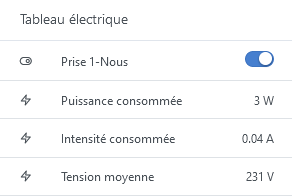
For info, the consumption of my BT3Pro on Linux Lite… and I’m connected to the Gladys interface!

2 Likes

Thanks for all the feedback…
It’s true that some use almost no

My two cents regarding camera management: if you want to install Frigate, I VERY strongly recommend going with a Google Coral rather than relying on your future machine’s CPU!!

1 Like

For your information, I’m on an RPi4 with 4GB RAM and a 250GB SSD

1 Like

Guim31, I didn’t know Google Coral, I just went to check it out and I’m even more lost… lol
GBoulvin, the problem I have is that I struggle to compare all the configs people used (knowing that often they were second-hand or whatever). For example, an ARM processor from an RPi4 (Raspberry Pi 4) — what is that equivalent to? And beyond that, how do you know which Intel or AMD processor would be suitable, or even better than needed, without going too far and losing out on energy efficiency…
I’ve become pretty bad at computers

I’m going to wait to find a sale on a mini PC (not too powerful either but above all not too noisy) and take the plunge at lower cost at least so I can move forward and test… and thus better define my needs

1 Like

A Google Coral is just a thing you plug into your computer: either via USB or in NVMe form (like SSDs, basically).

The idea is that it’s a small device whose specialty is processing certain computations, especially when it comes to video.

So this little add-on allows you to handle higher-quality images but above all with much smoother performance! Very useful for surveillance cameras

1 Like

So you can go for this kind of machine, refurbished
https://www.amazon.fr/Fujitsu-Esprimo-Q0920P0048DE-Ordinateur-certifié/dp/B0854LM164/ref=asc_df_B0854LM164/?tag=googshopfr-21\u0026linkCode=df0\u0026hvadid=454946550926\u0026hvpos=\u0026hvnetw=g\u0026hvrand=17030226896947458933\u0026hvpone=\u0026hvptwo=\u0026hvqmt=\u0026hvdev=c\u0026hvdvcmdl=\u0026hvlocint=\u0026hvlocphy=9055923\u0026hvtargid=pla-905569500939\u0026psc=1

or

which will be a touch more powerful, but as with everything, more power means a bit more consumption

In both cases, it will almost certainly be necessary to put Linux on it instead of Windows, which is much more resource-hungry!

1 Like

Maybe a bit more expensive, but I found this Beelink with a great configuration:

  • Intel 11th-generation quad-core processor
  • 8GB of RAM
  • 128GB SSD
  • 4 USB 3.0 ports
  • 1 Gigabit Ethernet port
  • Wi-Fi 5, Bluetooth 4.0

For [€163 on Amazon new](https://www.amazon.fr/Beelink-Business-W

2 Likes

Yes, I confirm, my Gladys is still running on the same Beelink and it works very well!

2 Likes

I should be able to pick up a Mele Quieter3C (N5105 + 8GB of RAM + 512GB SSD) at a good price (currently being negotiated)…
I find its advantage is being quiet (fanless) and having a good 4-core low-power processor (10W TDP)
More to come soon

2 Likes