At first I tried with Swift, but with very little time and starting from scratch with iOS development, it was too much work to really get into it (even though honestly the little I did I liked and I quickly managed to make a first app proof of concept)
Then I moved on to Ionic 2, there clearly it’s my area of expertise, and in 2 hours I had a nearly complete working app ^^ The big advantage I found is that I can reuse the same components as in the dashboard (for example the nice weather box I can reuse in the app it works great ^^)
I’ll post some screenshots soon, but for now I’m a bit swamped with Gladys in terms of schedule
Hi,
Question for later, what to do when you have 2 houses?
Indeed, the app is oriented towards one house, which is good because it avoids having too many devices at the same time.
But what to do if you want to manage a second house?
Another question, how to handle non-binary devices? I can’t change the state.
Hello!
Indeed, for the moment the app can’t handle multiple houses and apart from changing the settings there isn’t much of a solution…
But it will come ^^
How so? You should have a seekBar, so you just need to slide it to the desired value!
Actually, your devicetypes appear in the app as sensors because they are incorrectly typed in Gladys!
The problem comes from the module and not from the app (or even Gladys)!
In short, you have binary devicetypes that are typed randomly… (without being mean)
For example, the ok button can only have two states, either 0 or 1, so it should have been typed as binary but it is typed as ok (which is totally absurd ) that’s why the app displays them to you like this. It simply doesn’t understand what the type ok is.
To fix the problem, you can go to the database and manually modify it, but the best would be to correct it directly in the module ^^
I understand well. But what should we put if not binary?
And if we put binary on everything, it also messes things up because you don’t know which is which? Indeed, currently the identifier is not used for display.
It would be necessary to implement a push-type function in Gladys to solve the problem, thus having four types of device types, namely binary, multilevel, switch (if you can call it that) and sensor. I’ll look into it right away
Regarding the tracking on the dashboard, an update is on the way (I’m working on it right now) and there will be the tag of each device type displayed instead of the room where it is located! This should be a bit more useful for tracking them ^^
But for the moment, apart from a bit of patience, I can’t advise you anything else
no worries, it was mostly about bringing things back up
Indeed, a « toggle » would be needed as some elements are just one-time actions.
Another thing that would be cool is a kind of dropdown menu. For example, for my Roomba module, it would be great to choose the mode in which it is set. But that’s harder to implement.
How is multilevel managed (what to put to manage it?)
I’m thinking about it then ^^
With @C4rlit0, we’ve more or less finished our project, so I’m looking for features to implement along the way, while waiting for @pierre-gilles to validate all this ^^
And indeed, the dropdown menu could be nice for some use cases
I suggest opening an issue on the project’s GitHub so we don’t forget
You just need to put « multilevel » in the type field ^^
tien, I just tried and it will be a mess to put it in binary because the function gladys.deviceState.createByIdentifier cannot differentiate the different binary device types.
The function deviceState already includes the id of the devicetype to which the state belongs… So why couldn’t it differentiate them? And most importantly, what does the identifier have to do with a type?
lol,
currently, when we receive a state change for a device, we do return gladys.deviceState.createByIdentifier() but inside, there is no deviceType id, so if 2 deviceType have the same type, how can it update?
First of all, the identifier has nothing to do with the type ^^
And this function does not take into account the type of the devicetype because it doesn’t care
And if you look closer, you will see that it searches the DB for the devicetype that has the identifier you passed to it as a parameter and as soon as it finds it, it retrieves its ID to save it quietly!
But be careful not to confuse ID and Identifier! These are two different things!
And the type has nothing to do with it either! ^^
you need the device identifier as well as the service (normal) but also the device type, so if there are multiple identical types in the same device it will mess up
First, it’s a unique type request, so you can only get one object in return!
Then, I didn’t notice that the type was used, but the request takes into account THREE parameters, so it will search the database for a devicetype that has the same identifier, the same type (so to speak), and the same service as what you provided!
So, there’s a low chance that you’ll get the wrong devicetype.
However, if you set the same type, the same service, and the same identifier for multiple devicetypes, it will only return the first one it found (so not necessarily the one you want), but since the identifier of each devicetype must be UNIQUE, there shouldn’t be a problem ^^
 (even though honestly the little I did I liked and I quickly managed to make a first app proof of concept)
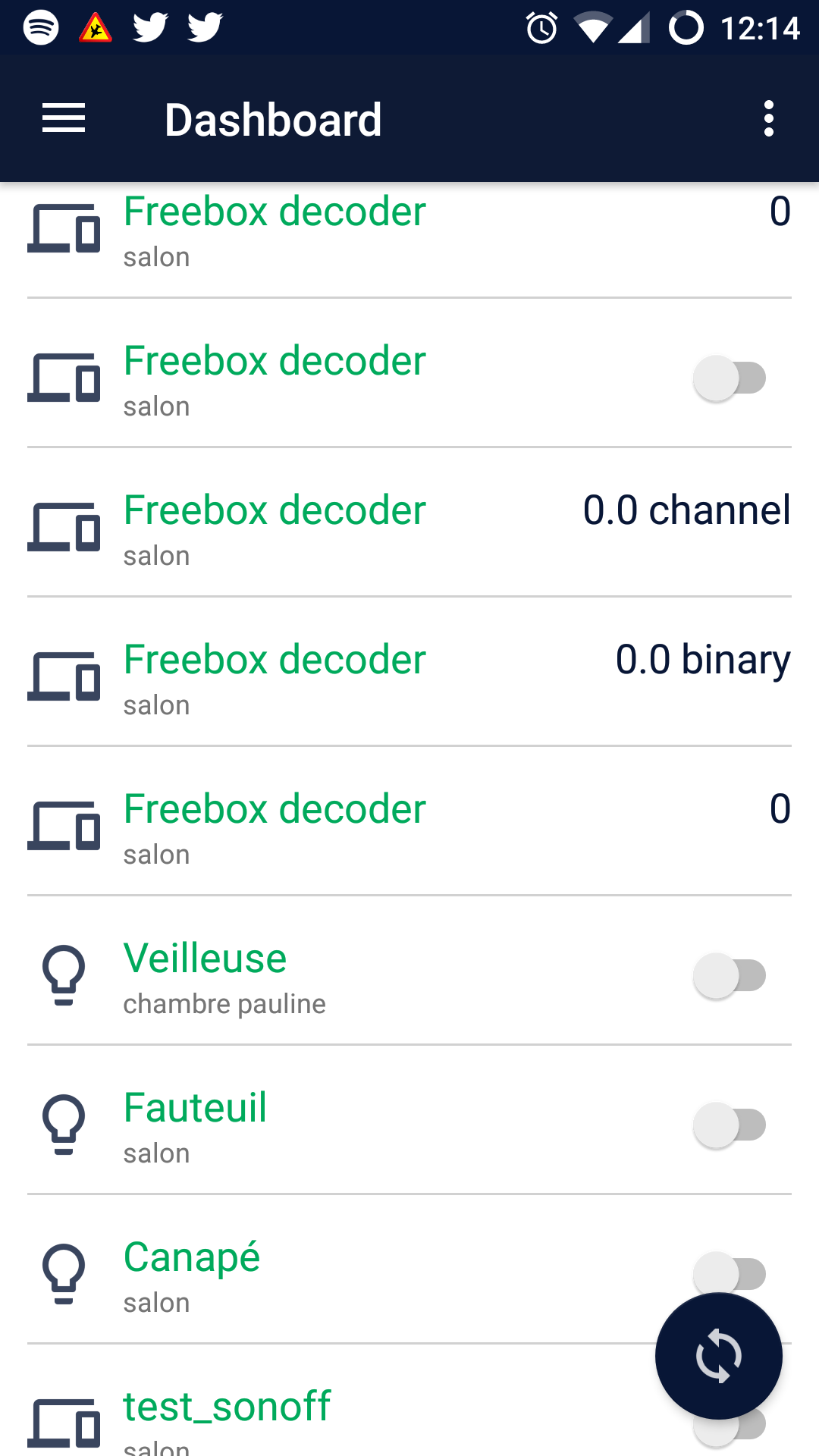
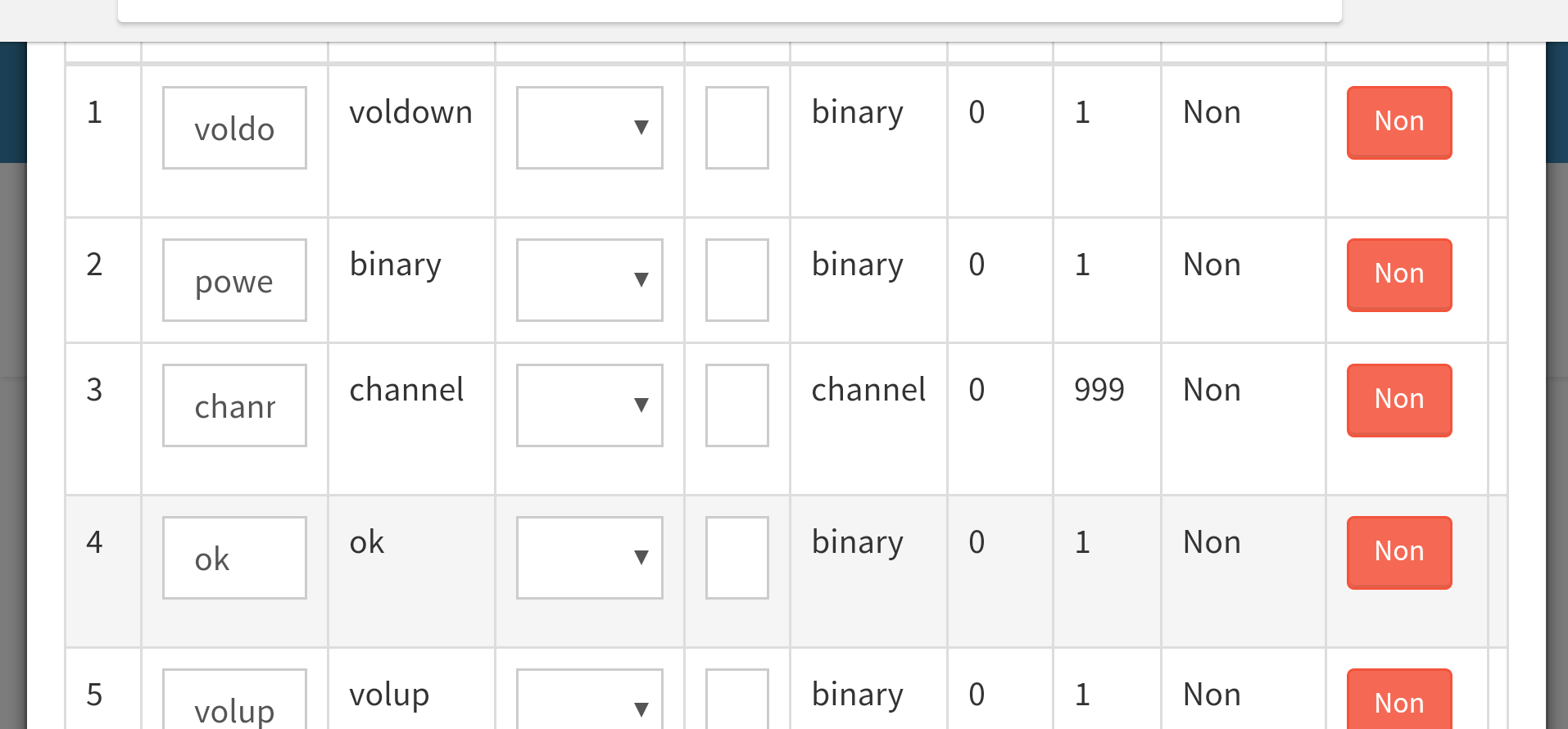
 ) that’s why the app displays them to you like this. It simply doesn’t understand what the type ok is.


