Zigbee discovery malfunction ("Gladys is not accessible"). Related to Node-red service change?

Hello,

I need your help to fix a small issue in my Gladys-Zigbee-MQTT setup. Thanks in advance :wink:

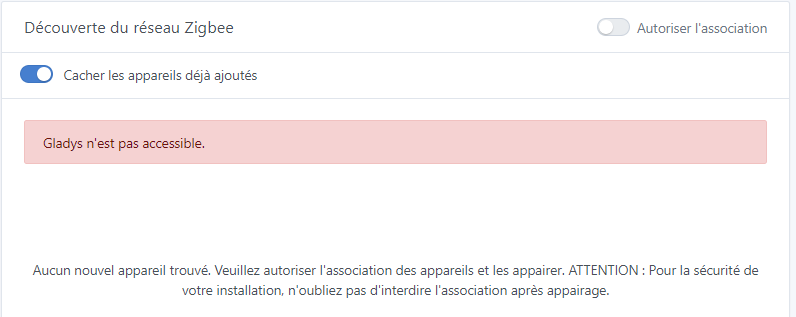
The Zigbee devices already configured work fine, but I can no longer add new Zigbee devices. The « Zigbee Discovery » page (http://192.168.0.105/dashboard/integration/device/zigbee2mqtt/discover) shows the error « Gladys is not accessible ». Yet all the indicators on the « Zigbee2mqtt service configuration » page (http://192.168.0.105/dashboard/integration/device/zigbee2mqtt/setup) are green.

The problem seems to coincide with a recent change: I switched from the Node-RED I initially set up (accessible at http://192.168..:1880) to the one now integrated into Gladys (accessible at http://192.168..:1881).

Could my issue be caused by that? What can I do to resolve it?

I should mention that the Zigbee page (http://192.168..:8080) is accessible, and that I was able to see the new Zigbee device I want to retrieve in Gladys displayed there.

I also notice from the page http://192.168.0.105/dashboard/integration/device/zigbee2mqtt/discover which shows this error « Gladys n’est pas accessible » that a click on the « Autoriser l’association » button does have an effect on the Zigbee service, because the notifications « Zigbee : allowing new devices to join » and « Zigbee : disabling new devices » are indeed displayed on the page http://___:8080

Hello. The problem has been known for a few days (latest zigbee2mqtt update). I think we’ll fix that on Monday (if we can do a Gladys release).
You have the details here Zigbee2mqtt 1.35 - Erreur affichage devices - #4 par cicoub13

Thanks @cicoub13. I had done some research but didn’t come across this topic.
So I’ll wait until it’s fixed.

Hello, I have never used Node-RED and I encountered the same problem again around noon today.

hello,
on Zigbee network discovery the same message also « Gladys is not accessible », while in the configuration and settings menus of the zigbee2mqtt integration everything is green!
but couldn’t the problem come from the koenkk/zigbee2mqtt container? it was apparently updated 6 days ago?

The error is mentioned here Zigbee2mqtt 1.35 - Erreur affichage devices - #4 par cicoub13

A fix has been made, now we just have to wait for the release.

2 Likes

FYI Gladys Assistant v4.34.0 was successfully deployed yesterday and I can confirm that it does fix the issue! :slight_smile:

Thanks @cicoub13 for the fix!

3 Likes

It’s not useful, but I confirm too :wink:. Thanks!

1 Like