With the integration of a siren in zigbee2mqtt, I am forced to use an external tool to send a message with its payload to test the siren.Send an MQTT message would allow, in the case where the device is not integrated, to send it a command.
Hizo
May 22, 2024, 7:04am
2
Hi,
I’m totally for it but no more votes
Actually, I thought of this feature for you because I’m a bit slow at integrating your siren.
Will_71
November 8, 2024, 12:29am
4
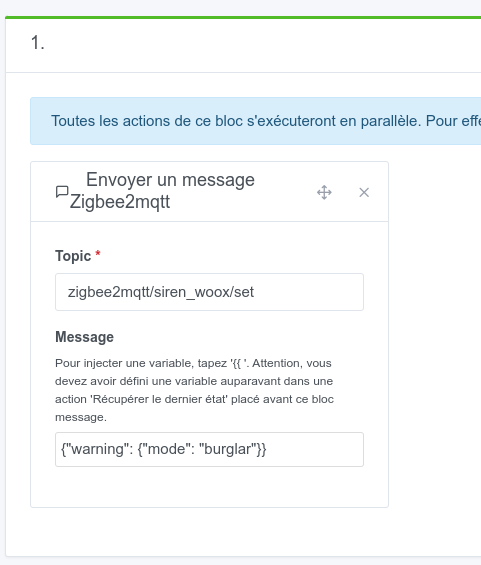
I worked on my request and added an action in scenes to send a msg to zigbee2mqtt.@Hizo .
One missing feature is the ability to control the siren.
For that, with the new action Send a zigbee2mqtt message, I can send the command directly to the siren.
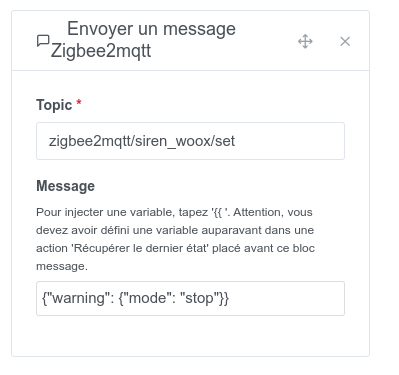
The same thing to stop it
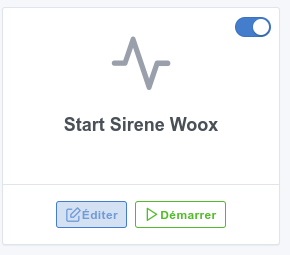
I added scene activation to the dashboard:
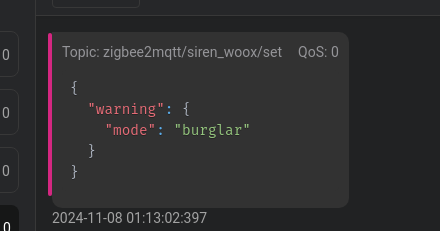
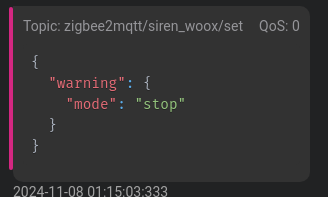
When starting the Start scene, in software like MQTTX the topic is correctly sent
Same for the stop
And physically the siren triggers and stops.
@pierre-gilles , here is the PR
master ← William-De71:add_scene_action_send_zigbee2mqtt_message
ouvert 12:23AM - 08 Nov 24 UTC
### Pull Request check-list
To ensure your Pull Request can be accepted as fa… st as possible, make sure to review and check all of these items:
- [X] If your changes affects code, did your write the tests?
- [X] Are tests passing? (`npm test` on both front/server)
- [X] Is the linter passing? (`npm run eslint` on both front/server)
- [X] Did you run prettier? (`npm run prettier` on both front/server)
- [X] If you are adding a new features/services, did you run integration comparator? (`npm run compare-translations` on front)
- [X] Did you test this pull request in real life? With real devices? If this development is a big feature or a new service, we recommend that you provide a Docker image to the community ([french forum](https://community.gladysassistant.com/)/[english forum](https://en-community.gladysassistant.com/)) for testing before merging.
- [ ] If your changes modify the API (REST or Node.js), did you modify the API documentation? (Documentation is based on comments in code)
- [ ] If you are adding a new features/services which needs explanation, did you modify the user documentation? See [the GitHub repo](https://github.com/GladysAssistant/v4-website) and the [website](https://gladysassistant.com).
- [ ] Did you add fake requests data for the demo mode (`front/src/config/demo.js`) so that the demo website is working without a backend? (if needed) See [https://demo.gladysassistant.com](https://demo.gladysassistant.com).
NOTE: these things are not required to open a PR and can be done afterwards / while the PR is open.
### Description of change
Add new action "Send Zigbee2MQTT message" to scene
An image is being built: willde71/gladys-test:zigbee2mqtt-msg
Excellent @_Will_71 !!
Heads up, small coverage issue — there are missing tests for the scene action
Thanks. Yes, I saw it. I’ll take care of it over the weekend.
guim31
November 8, 2024, 7:54am
7
That’s really nice! I have a few devices that aren’t recognized by Gladys, so this is a good solution to make up for the lack of certain features
@pierre-gilles , I’ve added the missing tests in the PR.
Looks good to me! Could you just create a PR on the documentation side (v4-website/docs/scenes at master · GladysAssistant/v4-website · GitHub ) to add a short explanatory note about this scene action? Thanks!
Will_71
November 9, 2024, 11:16pm
11
@pierre-gilles here’s the PR for the doc
master ← William-De71:scene_send_zigbee2mqtt_msg
ouvert 11:15PM - 09 Nov 24 UTC
add new action send a zigbee2mqtt message in doc
This feature is available in Gladys Assistant 4.49:
Salut à tous !
Nouvelle version de Gladys aujourd’hui, avec des fonctionnalités vraiment sympa [Screenshot 2024-11-04 at 17.19.46]
Cette condition …
I’m closing this thread to free up votes



 Great job !
