@Sescandell
chat-gpt : so here the device (which must be a switch) when it receives a command « change from 0 to 1 » sets the device to 1 then sends back « command executed, set to 1 » or a similar message
In the context of Z-Wave devices, has_feedback probably refers to a feature that allows determining whether a device has received feedback after sending a command.
The Z-Wave protocol is designed to be bidirectional, which means devices can not only receive commands but also send feedback to indicate whether a command was successfully executed or whether an action was performed. This feature is often used to ensure the reliability of commands and to obtain information about the state of devices.
Thus, when has_feedback is used in the context of a Z-Wave device, it generally indicates whether that device is capable of providing feedback after executing a command. This can be useful for home automation or monitoring systems, where it is important to know whether commands sent to devices were actually executed.
My question may have lacked context: this is a property on the Gladys side and not specific to Z-Wave (zWave).
I quickly went through the code. I see a usage on a saveState, but I didn’t trace further. Pierre Gilles should be able to answer. Otherwise I’ll follow up on it.
@Sescandell le has_feedback means that the device at the end sends a status feedback after Gladys has sent it a command.
This allows Gladys to know whether it should record the value locally when controlling, or whether it should wait for the device to send an event saying « I’ve been controlled ».
Example of has_feedback = true:
I control a smart plug from Gladys → Gladys sends a command to the plug → the plug sends a « state changed » event to Gladys → Gladys
Yes I saw the coverage… but these are cases the linter forces me to add for « nothing »… I’ll see what I do to handle them. I think in this scenario I’ll return a value undefined, and if undefined that will imply « unknown request » and therefore « cancellation of the request ». That’s what seems most logical to me.
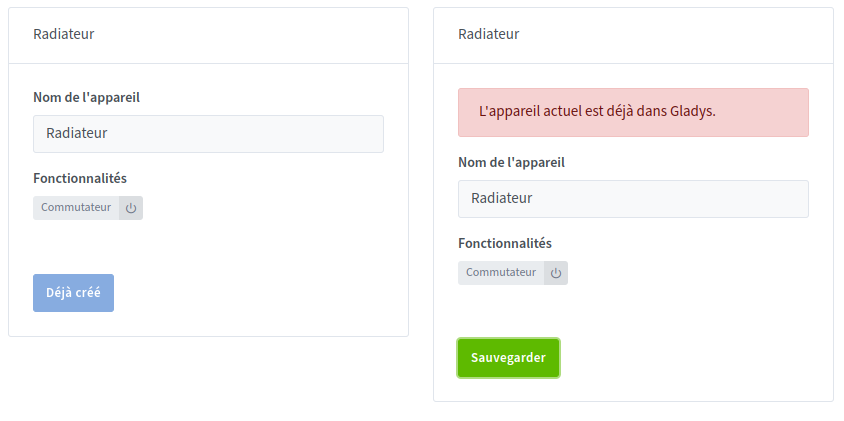
Small bug to report on the Z-Wave integration, I have one Z-Wave device per room to manage each radiator. In zwavejs-ui I therefore declared the name as Radiator and the location as the room.
Except that in Gladys I only have radiators displayed (normal), but it’s hard to know which is which. Maybe add the location somewhere so we can differentiate each device? But I’m afraid that will cause a duplicate with the Gladys room. What do you think @pierre-gilles ?
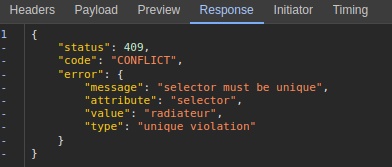
Back to the bug, I get a message when I try to add my radiators to Gladys
@Sescandell Thanks for the PR on temperature + power, it looks great to me I merged it and it will be included in the next Gladys release! I’ll merge the website when the release is live
@_Will_71 Your PR is good for me too, but there’s a small conflict with @Sescandell’s PR that I merged just before — can you take a look?
 : so here the device (which must be a switch) when it receives a command « change from 0 to 1 » sets the device to 1 then sends back « command executed, set to 1 » or a similar message