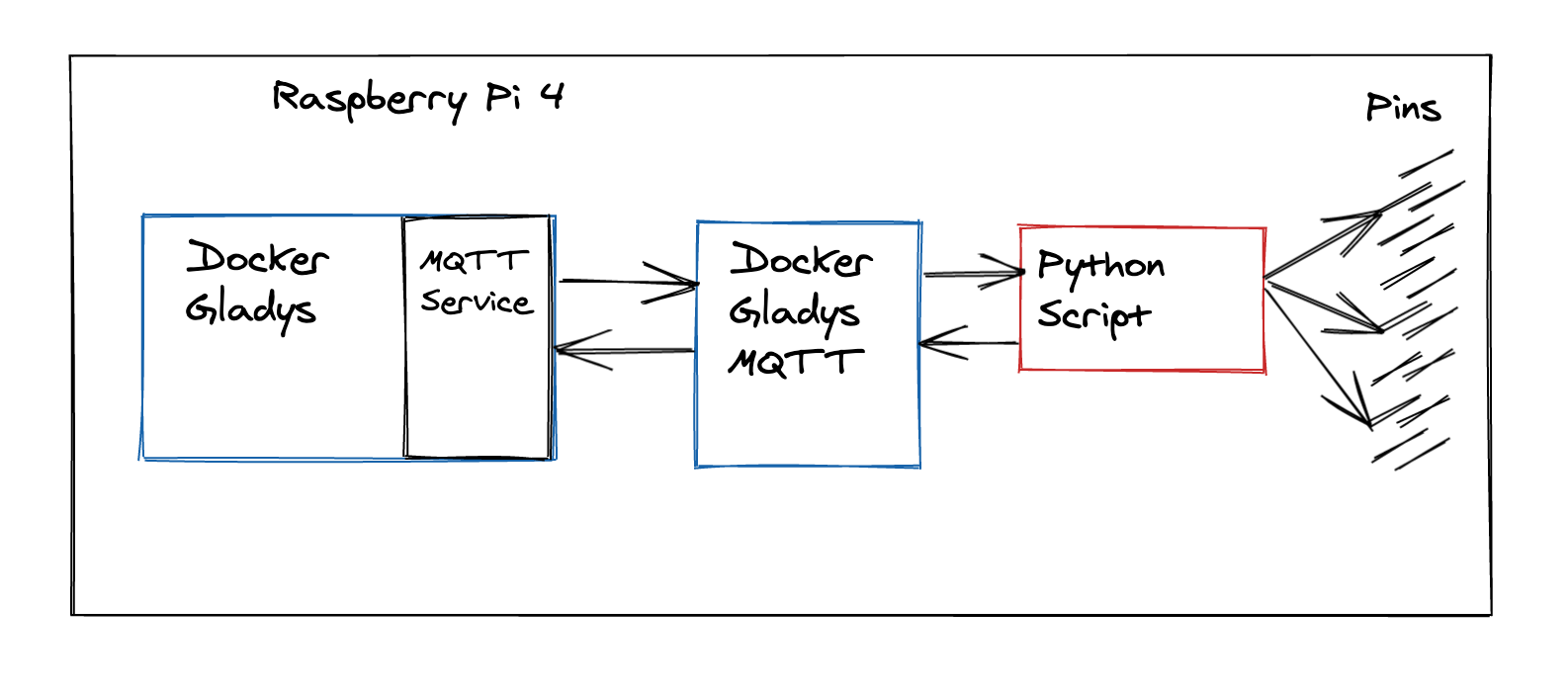
I’m new to the Gladys project, which I’ve been watching from afar for a few years.
This is an assistant I would like to use, but under certain conditions.
I have a nice wooden desk with semi-transparent white epoxy resin that contains a strip of addressable LEDs.
I’m about to order an RB4 to install the assistant on it, but I need to know if it’s possible to create a scene that would run a Python script directly from the RB?
Indeed, since these are addressable LEDs, the command is a bit different (after reading the component’s datasheet, I estimated that using the board’s PWM would be very practical), which is why I would need Python to manage all this.
Additionally, I have a small electronic model that manages power, and I don’t want to put it on the network as this would require the purchase of additional compatible communication equipment… The goal is to control the pins (always via a Python script)
You can definitely do this with the MQTT integration.
You can create an « MQTT » device of type « light » in Gladys, and give it the characteristics it has (on/off + brightness + color for example), and Gladys will provide you with MQTT topics to listen to in your Python script.
Then on the Python side, you need to use an MQTT library to connect to the MQTT broker and listen on the topics provided by Gladys.
Every time the state changes on Gladys, a message will be published on the MQTT topic and you will receive the message in your script
Thanks for your quick reply, I’ll have to look into the MQTT API then, noted!
This reminds me of an OS called ROS (for Robot Operating System that I used on a robot at school to make the different peripherals communicate with the same subscription system to topics, so in the idea I see how it works)
But it’s still quite vague in my mind, the « famous » .py will be well stored on the raspberry?
Because I imagine that when the RB starts, it directly launches the Gladys interface (if we imagine that we are on the HDMI output)? Or is it always an interface like the Rasbian desktop?
In this hypothesis, we are therefore in agreement that the RB can itself be considered as an MQTT device? And if we push the theory a bit, several « devices » (which could control different PINs) can be described in different Python scripts? (With 1 script = 1 device)