Gladys 4 - Service CalDAV

Hello everyone,

At the request of Pierre-Gilles and to avoid confusion with the CalDAV module of the old version of Gladys, a new topic is launched.

For newcomers, this service allows you to synchronize the calendar of your Gladys instance with a CalDAV-compatible scheduling service (Google Calendar, iCloud, Nextcloud…).

You will find help in the Gladys documentation to configure this service:

For information, at the time of writing this message, 3 topics are underway:

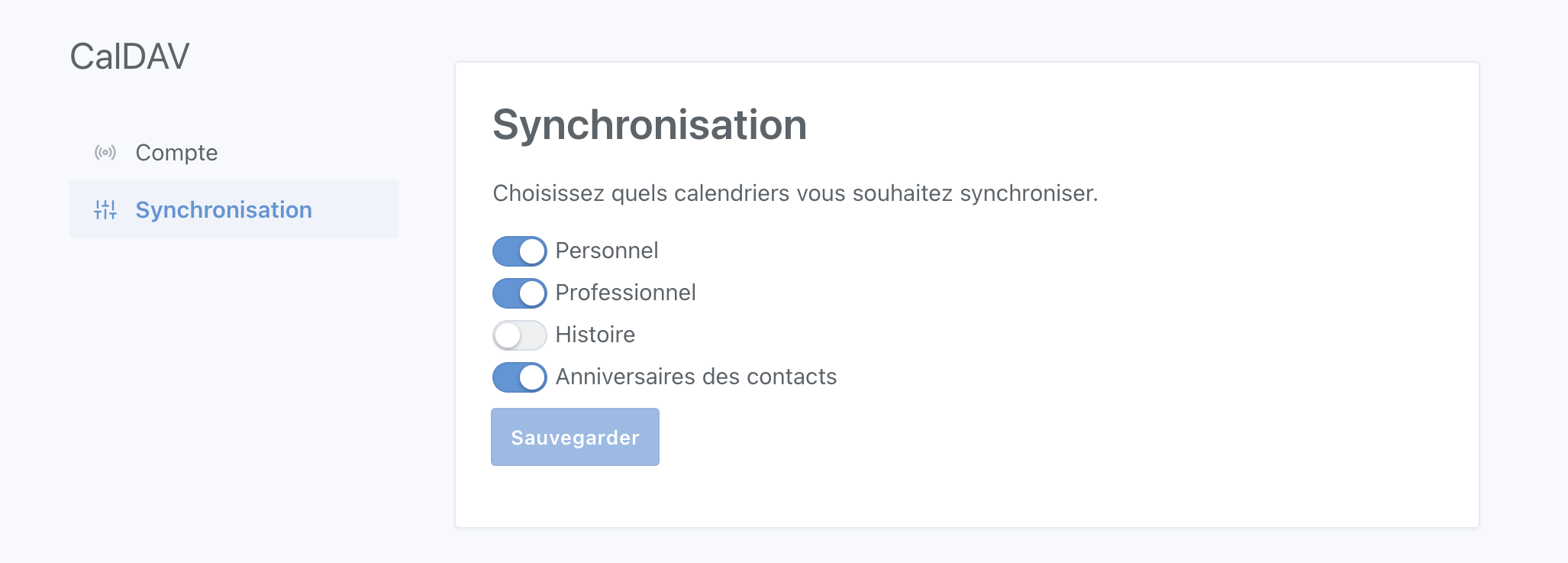
Hello everyone, for your information, I just proposed a PR for selecting the calendars to synchronize.

https://github.com/GladysAssistant/Gladys/pull/1091

It will be in a new tab in the service configuration page

Hello @bertrandda! Great, that looks awesome :slight_smile:

Another topic regarding the Caldav service. We were talking about it here → Point stabilité, mise à jour des dépendance & qualité de code, it would be cool if we could remove the « moment » dependency used in the Caldav service front-end, a dependency that is deprecated and quite heavy.

This is a topic independent of this PR of course, but we should look into it at some point :slight_smile:

10/10 for the pun :stuck_out_tongue_winking_eye:

I hadn’t even seen it haha ^^

Yes, I saw it. I will study a solution, but as Vincent said at the time, I had left it for a moment because the react-big-calendar library was not compatible with dayjs.

Hello, I am trying to connect my iCloud calendar, but I get the following error:

{
    "status": 409,
    "code": "CONFLICT",
    "error": {
        "message": "selector must be unique",
        "attribute": "selector",
        "value": "films-series-",
        "type": "unique violation"
    }
}

due to:

2021-05-17T09:41:06+0200 <info> calendar.syncUserCalendars.js:38 (CalDAVHandler.syncUserCalendars) CalDAV: Found 10 calendars.
2021-05-17T09:41:06+0200 <error> index.js:48 (Timeout.syncAllUsers [as _onTimeout]) UniqueConstraintError [SequelizeUniqueConstraintError]: Validation error
    at Query.formatError (/src/server/node_modules/sequelize/lib/dialects/sqlite/query.js:409:16)
    at Query._handleQueryResponse (/src/server/node_modules/sequelize/lib/dialects/sqlite/query.js:72:18)
    at Statement.afterExecute (/src/server/node_modules/sequelize/lib/dialects/sqlite/query.js:246:27) {
  errors: [
    ValidationErrorItem {
      message: 'selector must be unique',
      type: 'unique violation',
      path: 'selector',
      value: 'films-series-',
      origin: 'DB',
      instance: [t_calendar],
      validatorKey: 'not_unique',
      validatorName: null,
      validatorArgs: []
    }
  ],
  fields: [ 'selector' ],
  parent: [Error: SQLITE_CONSTRAINT: UNIQUE constraint failed: t_calendar.selector] {
    errno: 19,
    code: 'SQLITE_CONSTRAINT',
    sql: 'INSERT INTO `t_calendar` (`id`,`user_id`,`service_id`,`name`,`selector`,`external_id`,`description`,`sync`,`notify`,`ctag`,`sync_token`,`color`,`created_at`,`updated_at`) VALUES ($1,$2,$3,$4,$5,$6,$7,$8,$9,$10,$11,$12,$13,$14);'
  },
  original: [Error: SQLITE_CONSTRAINT: UNIQUE constraint failed: t_calendar.selector] {
    errno: 19,
    code: 'SQLITE_CONSTRAINT',
    sql: 'INSERT INTO `t_calendar` (`id`,`user_id`,`service_id`,`name`,`selector`,`external_id`,`description`,`sync`,`notify`,`ctag`,`sync_token`,`color`,`created_at`,`updated_at`) VALUES ($1,$2,$3,$4,$5,$6,$7,$8,$9,$10,$11,$12,$13,$14);'
  },
  sql: 'INSERT INTO `t_calendar` (`id`,`user_id`,`service_id`,`name`,`selector`,`external_id`,`description`,`sync`,`notify`,`ctag`,`sync_token`,`color`,`created_at`,`updated_at`) VALUES ($1,$2,$3,$4,$5,$6,$7,$8,$9,$10,$11,$12,$13,$14);'
}
Hello @Thomas_Parquier, it seems you have several calendars with the same name. I will look into fixing this by modifying the calendar slug generation. In the meantime, could you try renaming one of the two calendars on iCloud that starts with « Films séries »?

Indeed, that’s what I told the moderators on another channel…

The problematic calendar comes from Reminders… I had several reminder lists with the same slug…

I renamed the lists, but it had no effect. However, it could be a cache issue (since I also deleted a list, yet it is still returned by the iCloud API).

Hello,
I have a small question about the CalDAV service … how often is the sync done?
I was able to add my calendars without any problems, but it seems they are not updating.
The changes made are well synced on my other devices, but not in Gladys. Is there somewhere I can see if there is a communication issue or something else?
Thanks in advance.

I have run a number of tests again, and do not systematically encounter the problem… I will therefore dig deeper on my side to start…

CalDAV calendars are synchronized every 30 minutes. You can also manually trigger it to test by clicking the green button at the bottom of the integration page image.

If you have access to the logs, I might be able to help you find out what’s wrong.

Hello,
I did a reset + sync, and everything is in order.
To follow :slight_smile:

However, I have a follow-up question: When I click on a calendar event, nothing happens. Is this normal?

Yes, that’s normal, we have no associated action. It might be something to consider, but the main goal of synchronizing calendar events is to associate them with scenes (which seems to be in development). We don’t aim to modify our events in Gladys; you do that from your mobile app/dedicated service.

Do you have any ideas for actions to take when clicking on an event?

Actually, I wondered about this because when you hover over an event with the mouse, the cursor turns into a hand like on a link. So by reflex I click, but nothing happens.
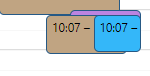
In my personal case, there are days when all sorts of things are noted in the calendar, which means that some events are partially or almost completely hidden behind others, so I thought that at least it would allow the one you click on to come to the forefront, or to display it better.
But it’s true that if the purpose of the calendar is only to be able to plan scenes, I’m straying from it. In my mind, the display of the calendar on a screen could have allowed me to remove the schedules stuck to the refrigerator :sweat_smile:

calendrier

Hello,

I have a shared calendar (from another account) in my Google account, but it is not retrieved in the list of available calendriers. However, there is no issue with the external calendar ‹ Public Holidays ›. Would anyone have this case and a solution? I don’t know if Google’s ‹ cal › service allows this. Given that it is deprecated, is there another solution to connect to the Google agenda?

Thanks in advance,

Hello @Romuald_Pochet,

For information, we discussed calendar sharing a bit here [Caldav] Configuration multicomptes but it’s more for internal sharing.
Regarding your issue, since the CalDAV protocol is quite complex, not everything may be perfectly handled yet.
I will try to reproduce your case to see if a fix is possible. Is it a Google account sharing a calendar with another Google account? When you click on « Synchronize » on the CalDAV integration configuration page, do you get an error?

Hello,

Yes, it is indeed a calendar from another account shared with my account. It is located in ‹ Other calendars › (like holiday calendars). In the CalDav service, the method ‹ requestCalendars (const listCalendars = await xhr.send(req, homeUrl);) › does not return this calendar.

But no error.

It appears that Google does not enable shared calendar synchronization by default. Could you please go to Google calendar syncselect and check the calendar you want to synchronize? Once checked, restart the synchronization and let us know if it makes any difference.