Gladys Assistant 4.47: DuckDB 1.1, Zigbee2mqtt heating and more!

Hello everyone!

I returned safely from Japan at the start of the week, and I’m publishing today the developments from the last two weeks :smile:

  • DuckDB 1.1.1: DuckDB released updates to fix bugs identified since their 1.0 release. At Gladys, one of these bugs prevented some users from reimporting their Gladys Plus backups. Although I couldn’t reproduce this restore issue, I believe the 1.1.1 update should fix it. I saw on a DuckDB GitHub issue that other users were encountering the same problem.
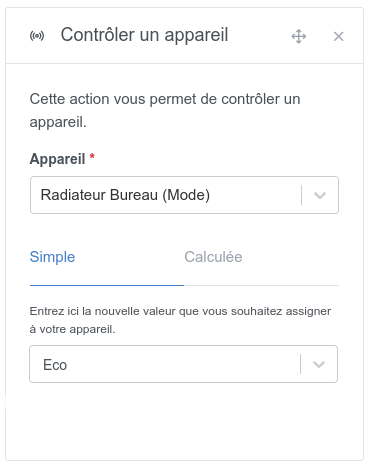
  • Zigbee2mqtt Heating: Devices of the « pilot wire » type are now supported in the Gladys integration:

Thanks @cicoub13, @_Will_71 for the development and @Prof_Techno for the testing!

  • Lixee TIC Zigbee2mqtt: The « EASF03 » feature is now supported! Thanks @_Will_71
  • Camera: Switched to a native ffmpeg approach instead of using the « ffmpeg-fluent » library which was completely outdated. This should fix memory leak issues.
  • HomeKit: Support for power strips. Thanks @bertrandda
  • Scene: Improved tablet responsiveness for the « scheduled trigger »

The full CHANGELOG is available here.

How to update?

If you installed Gladys with the official Raspberry Pi OS image, your instances will update automatically within the next few hours. It can take up to 24 hours, don’t panic.

If you installed Gladys with Docker, make sure you are using Watchtower (see the documentation)

Getting started with Gladys?

Take advantage of the official starter kit!

  • €259.97 instead of €439.97
  • A futuristic mini-PC (16 GB RAM, 512 GB NVMe SSD, low-power Intel N100 processor)
  • The official training to get started with a bundle of video tutorials and exclusive articles
  • 1 year of access to Gladys Plus
9 Likes

Great job once again!! Thanks to all the devs and testers who worked on this new release :wink:

2 Likes

Thank you all for your work.

1 Like

Great work, thanks to everyone who contributed to these developments, I’ll test the heating function as soon as I return from my trip. :+1:

1 Like

Another fantastic job, well done everyone!

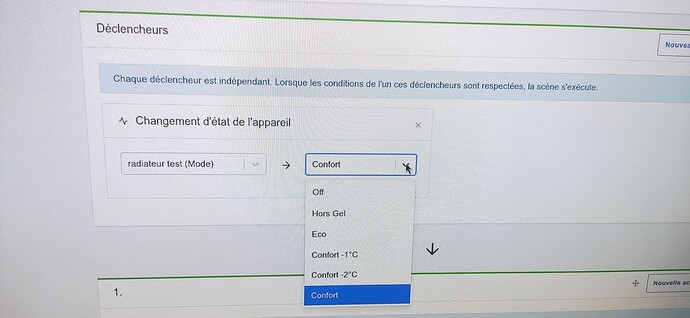
For heating control, I was thinking more of buttons to press to change the heating mode. It’s more responsive than selecting from the list.
[Avoir des appareils adaptés au Chauffage](https://community.gladysassistant.com/t/avoir-des-appareils-adap

Hello. 6 buttons felt like too many on a single line (3 fit).

If you want to make design suggestions, I’ll take a look :slight_smile:

Regarding the « it jumps », is it only on this list? Which browser are you using?

1 Like

Personally I don’t use the comfort -2°C (this corresponds to the underfloor heating comfort), nor the comfort -1°C.

There were 4 buttons, as in the image I included in my message requesting devices suitable for heating.

For the « it skips », that’s the only list I use.
The Dashboard selection one doesn’t do it.
Browser

Hello,

Ok for your case, I don’t use these commands either, but other people use the 6 commands so they all need to be included.

2 Likes

I agree with you, but it’s a shame that « he who can do more can’t do less »…
If we could customize it according to our usage that would be great.

Requesting a feature and not being able to use it is a bit frustrating.
So I’ll continue to create scenes for my own use.

I find the dropdown menu solution very suitable, especially since, let’s be honest, this heating mode isn’t something you change every 5 minutes :sweat_smile:

You can’t use it?

Since I don’t have a Zigbee device, I don’t know how to use one.
I’m creating a scene with
Device state change
« Kitchen Heating Mode » equals « I don’t know which value to put »
Comfort? Eco?
The device I created varies between 0 and 1.
Maybe I should have set -2 and… I don’t really know.

@_Will_71 is working on it here Ajout du composant chauffage 6 ordres dans les scènes

Yes, thanks @cicoub13
By the way, does my created MQTT device need to range from 0 to 5? Or do we not care. 0 and 1, as I set them,

Gladys will read and send values between 0 and 5 for the 6 supported modes. If you want to use all the modes one day, you have to do the same with MQTT

In fact,
I think that, since my Z-Wave devices are not recognized as heating devices, I don’t have access to the different modes like in the photo:

My Qubino Flush Pilot ZMNHJD have the following native features reported to Gladys:

  • Dimmer
  • Switch (currentvalue)
  • Switch (restoreprevious)
  • Temperature (if you add a sensor)

Development is ongoing and does not include Z-Wave.

I also have a Qubino on Z-Wave and the commands are handled differently.
Qubino returns a value between 0 and 99.
And they are already handled by Gladys but with a slider.

Yes, I use them with my multiple scenes.
Oh well, I’ll skip this feature.
I will now try to manage the vacation modes « present », « absent », « summer », « winter » for my schedules.