Gladys Assistant 4.49: Delayed triggers in scenes!

Hello everyone!

New Gladys release today, with some really nice features :grinning_face_with_smiling_eyes:

Trigger with delay in scenes

It is now possible to add a delay before a scene is triggered based on a sensor value.

For example, if you have a motion sensor, and you want to check that there is no motion for at least 5 minutes before turning off the light, you can now do this:
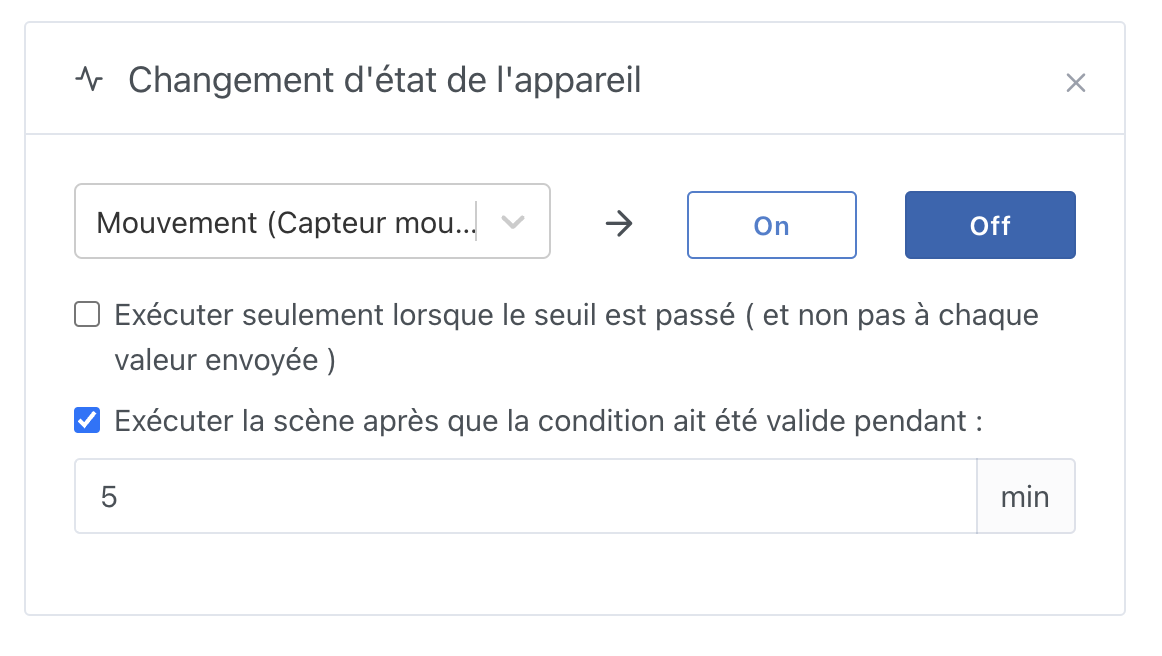
This additional condition works with all types of conditions, even if it’s a condition like “If the temperature is above 25°C for 30 minutes.”

This lets you avoid taking actions too hastily if a value briefly goes out of range and then recovers.

What happens under the hood in the motion sensor example:

  • As soon as an “OFF” value is received, Gladys starts a 5-minute timer
  • During the 5 minutes, if an “ON” value is received, it cancels the timer
  • During the 5 minutes, if an “OFF” value is received, nothing happens (and the currently running timer keeps running)
  • After 5 minutes, if nothing has canceled the timer, the scene executes

Addition of a « Push button Â» feature

You can add a new type “Push button” in the MQTT integration:
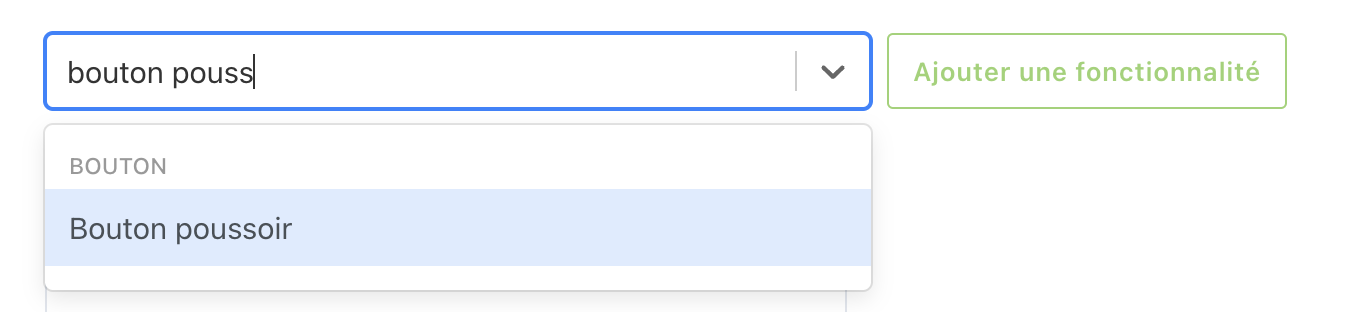
On the dashboard, this button will appear like this:

On the MQTT side, it will always send the value “1”.

Send a Zigbee2mqtt message in scenes

Do you have a Zigbee device managed by Zigbee2mqtt but not yet by Gladys?

Before it’s integrated into Gladys, you can now control that device from scenes:
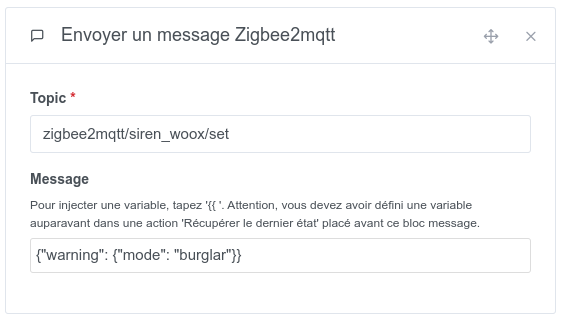
Documentation: Envoyer un message Zigbee2Mqtt | Gladys Assistant

(Please still tell us about it on the forum so we can integrate it!)

Thanks @_Will_71 for the development :folded_hands:

Lixee TIC: Specific features

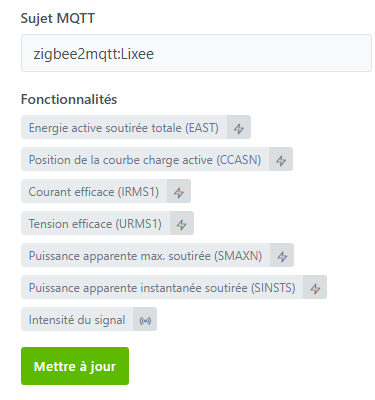
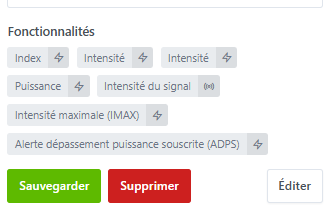
@_Will_71 worked to make the Lixee TIC features display more clearly in Gladys:

At the next Gladys update, all old features will be migrated automatically to the new ones!

Please let us know if the migration does not go as planned.

« Ask the AI Â» in scenes

This update adds the necessary building blocks allowing ChatGPT in scenes to not respond to you when it’s not required.

For now, the feature is not enabled, I’m waiting for the update to roll out before enabling it on the Gladys Plus side.

Miscellaneous improvements:

  • Zigbee2mqtt: Added the Develco iomzb 11 by @_Will_71
  • The Zigbee coordinator is now hidden in Zigbee2mqtt (thanks @cicoub13)
  • Fix for an English and German translation issue on the triggers « User enters/leaves the house Â»
  • Security fix on the get users that allowed instance users to list some private attributes of a user (No impact for instances where users are a trusted circle).
  • Fix for a bug on the « Device state change Â» trigger when a presence sensor was replaced by another.

The full CHANGELOG is available here

How to update?

Make sure you use Watchtower for automatic updates. See the documentation.

With Watchtower, Gladys will update automatically.

5 Likes

Too many great things in this update!! :+1:
Thanks to everyone for the work!

I’ll be able to better manage the automatic lighting of my porch at night based on my motion sensor (which tended to switch off too easily while I was still in front of my door), the timer will really help me!

1 Like

I think the Lixee migration didn’t go well.
I updated the device from the Zigbee Discovery page (maybe that was my mistake).
I had to reconfigure my dashboards and I feel like I’ve lost the old data (well, I think the values are on the old feature).
I can’t debug right now, I’ll look into it tomorrow.

Were you by any chance using a Gladys Plus frontend on 4.49 that was communicating with your instance which stayed on 4.48?

The migration is automatic on the instance side, there is nothing to do in the interface: it’s a DB-side migration that swaps the old types for new types

→ Selectors don’t change, so neither scenes nor dashboards need to be modified

I just checked on my side and the migration completed successfully without any data loss.

However, it’s true that the integration offers an update following the addition of features for the Lixee TIC. By clicking on it I also lost my dashboard and data.

Sorry about this, I’ll look into it as soon as I can to fix it, but in the meantime you should not perform the update from the zigbee2mqtt integration.

2 Likes

That’s an awesome feature, it would have really changed my life :slight_smile:
Can’t wait to try it!

@pierre-gilles, @cicoub13,
In the migration I update the name, category and type for each features.
But if we apply the update that can be found in zigbee2mqtt, the selector, external_id and id are changed.
The modified id is therefore different from the device_feature_id in the t_device_feature_state table and we therefore cannot retrieve the data.

To avoid an id change, I tried a migration and updated the selector and external_id of each features. After the zigbee2mqtt update this time my ids are preserved and the data for each features is correctly retrieved.

However on the dashboard I lose the display
 :sleepy:

I need your help to point me in the right direction.

If my branch with the migration of the selector and external_id is ready I could make a PR.

This is a problem — the selector, external_id and id

Because it has new features that I announced.

So, should I click or not? :sweat_smile:

It’s better to avoid it. We are preparing a procedure or a fix to resolve the issue.

3 Likes

Do not press Update.
A fix will be provided.

2 Likes

Thank you for your answers :slight_smile:

Hi everyone!

Regarding this issue with the Lixee TIC, we’d like to get an idea of the number of Lixee TIC users so we know what to do with @_Will_71 and @cicoub13 :slight_smile:

This bug is fairly complex and an automatic migration of Lixee TIC devices is not trivial.

Note: If you already pressed the button, unfortunately no automatic migration is possible :confused: however we can help you manually migrate your data.

So I suggest the following poll:

Do you have a Lixee TIC in Gladys?
  • Yes, and I’m an advanced user
  • Yes, and I’m a beginner user
  • Yes, but I’ve already clicked the migration button :confused:
  • No
0 votant

Sorry again for the inconvenience, we’ll do our best to help you in any case :slight_smile:

1 Like

I don’t know if I started a migration or not and I have this.

You need to check the Zigbee Discovery tab in the zigbee2mqtt integration
image

You’ll have an Update button like in the image that @prohand shows a bit higher up.
But for now, avoid

1 Like

Hello! The TEMPO Red days (jours TEMPO Rouges) are here and Gladys sadly shows a wheel that spins endlessly for my updated LIXEE :frowning: . Any news of a fix? Losing previous data and/or rebuilding the dashboards is perfectly acceptable. Thanks in

Hi @thierry06 !

@_Will_71 is working on an automatic migration for those who haven’t pressed the button.

If you pressed the button, there’s no choice — there can’t be an automatic fix; you just need to re-edit your dashboard and any scenes you may have. Sorry for the inconvenience :confused:

I have something but I haven’t been able to retry on my side.
With my new job I have less time at the moment.
However, I could, if someone is up for testing, propose an image. But we would need someone who knows how to make copies of the database to get data from lixee without touching the prod database!
On my side I think I can do a trial this weekend.

1 Like