What is my profile?
I hadn’t really been interested in home automation before tackling the complete renovation of our house. However, starting from scratch (i.e., just four walls and a roof) provides a great playground!
Moreover, DIY has always appealed to me, and I love getting my hands dirty!
What were my needs?
Given my basic level, a relatively simple implementation was necessary (otherwise, the work wouldn’t have progressed because I would have spent too much time playing around and testing various things  ).
).
And I didn’t want to pay a monthly subscription.
Furthermore, tackling the complete renovation of the house quickly led me to the conclusion that wired solutions would be more reliable and cheaper than wireless for our basic needs, namely automating:
- Roller shutters (6)
- The water heater
- Radiators (5)
- The gate
- Load shedding in case of overconsumption
I also wanted feedback on:
- The outdoor temperature, the ground floor, and the upper floor
- Real-time electricity consumption (for load shedding)
And possibly, creating a DIY alarm system.
I also had in mind the idea of being able to automate other things (lights, outlets, etc.) and have different feedback from various devices (opening of doors and windows, for example), but I had set that aside, thinking that all of this would be managed via wireless and implemented over the following years based on real needs, finances, and the WAF 
But that was before I discovered GLADYS! Indeed, since this discovery, my project has become much more extensive than I had initially imagined! (The low costs decided me, the simplicity did the rest , but I will come back to that)
How did I get into home automation?
Home automation is fantastic! Automating certain daily tasks is a non-negligible comfort!
When I was a kid, TV reports said that all the houses of the year 2000 would do a lot of things on their own… It made you dream! Like flying cars!
Well, time passed, and when the year 2000 arrived… Cars still drove, and home automation, well, it was still a bit of the future.
In 2014, I started looking on the internet for existing solutions to automate the newly purchased house that was to be renovated 100%.
What materials did I choose?
As mentioned earlier, I wanted my basic needs to be reliable.
So I chose wired technology as a base and discovered the company GCE-Electronics, which then marketed the IPX800v3, the X880 extensions, and the Ecodevice 1.
Advantages: wired, cheap, autonomous, and the icing on the cake: FRENCH!
To control the IPX remotely, I then installed Imperihome on my smartphone.
However, once the wired home automation base was cabled and functional, I wanted to make everything a bit more „intelligent."
The IPX800v3 being an autonomous card based on timers and actions triggered on demand, but also controllable via HTTP requests, I searched the web for a home automation assistant that would allow me to add more advanced functions to my installation.
And that’s how I discovered GLADYS! A home automation assistant with… Infinite possibilities? Maybe not… (Although…) But before exhausting its possibilities, believe me, you will have to get up (very) early!
For every need, there is a solution because Gladys is compatible with a whole range of home automation protocols, including low-cost ones!
Well, I had a Raspberry 2 lying around in the drawer, I took it out and installed Gladys.
After that, I spent some time on Gladys and, given the possibilities that were opening up to me, and the derisory costs of the technologies that Gladys could manage, I literally cracked…
So I bought things to automate my windows, my mailbox, my smoke detectors, my lamps, various outlets, etc.
In short, I will detail in the next chapter how all this is organized, but here is the list of materials managing the house:
- 1 IPX800v3 card dedicated to home automation
- 2 X880 extensions dedicated to home automation
- 1 IPX800v3 card dedicated to the alarm
- 1 Ecodevice v1
- 1 Raspberry Pi 2
- 1 Xiaomi Gateway
- 2 Xiaomi smoke detectors
- 3 Xiaomi push buttons
- 2 Xiaomi motion detectors
- 15 Xiaomi opening sensors
- 1 Xiaomi switch
- 1 Z-wave dongle
- 2 FDG-212 modules
- 2 DIO 433Mhz transmitters
- 4 Chacon 433MHz outlets
- 1 Bluetooth dongle
- 2 NUT key fobs
- 2 IP cameras
- 1 Milight gateway
- 2 Milight bulbs
- 3 Sonoff simple relays
On the software side:
- Gladys
- Imperihome
Cost of the installation and WAF:
Money and WAF are the nerve of the war in home automation
My installation cost me around €1200, and the WAF is good. So 
Implementation of the wired part:
Here is the wiring diagram
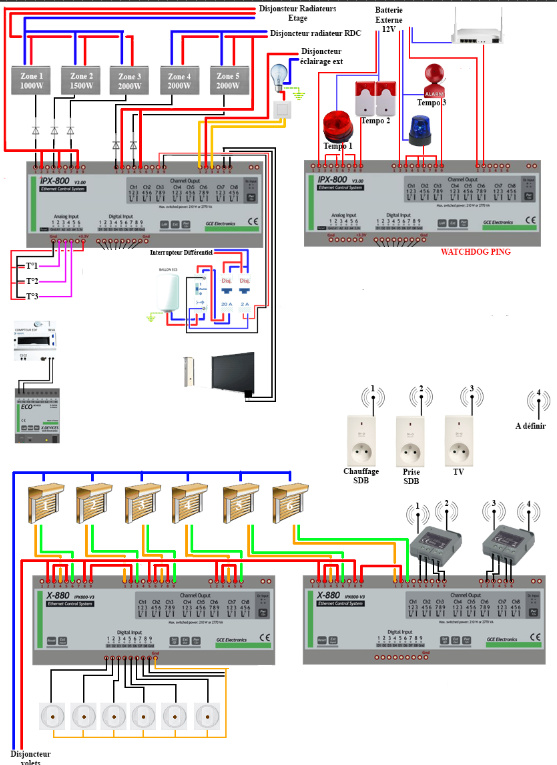
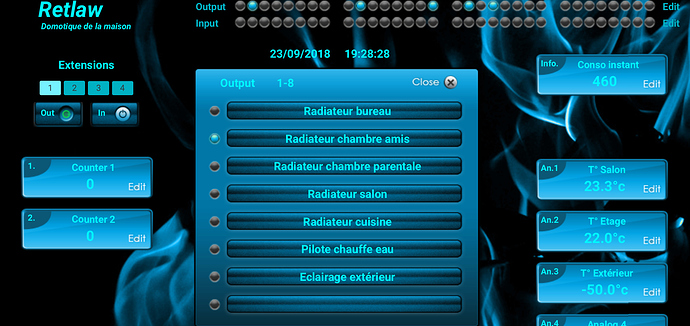
All of this is controllable locally via physical buttons and remotely via Imperihome (or the IPX800 web interface)
The web interface of my IPX800 (customized)
And a photo of the integration into the electrical panel:
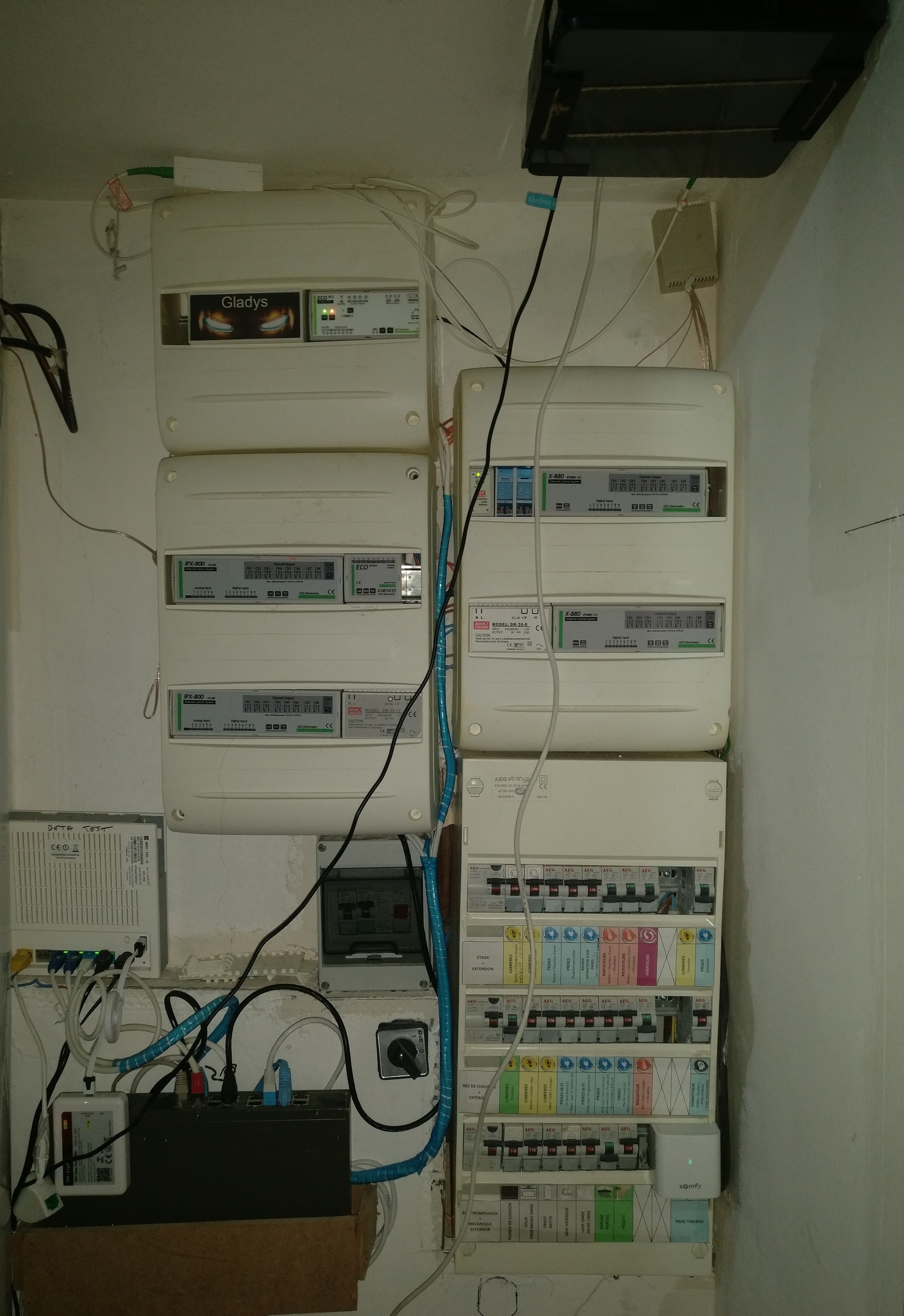
(sorry for the mess in the photo, ADSL to fiber transition in progress
)
Implementation of load shedding:
The Ecodevice is connected to the teleinformation of my electricity meter to have real-time electricity consumption.
If the consumption exceeds the threshold I have chosen (7000W in this case as I have a Tempo 9Kw subscription), the Ecodevice automatically asks the IPX800 to cut off the radiators to avoid the meter cutting off.
Implementation of the wireless part:
433Mhz:
As you saw in the diagram above, I connected 2 DIO 433Mhz transmitters to 4 outputs of the IPX800. Each transmitter can control 2 devices.
Thus, by activating the IPX800 outputs to which the transmitters are connected, I can control 4 Chacon outlets.
Zigbee:
The Xiaomi gateway receives information from the smoke detectors, opening sensors, buttons, and motion detectors.
The Gateway is connected to Gladys via the home WiFi.
Z-wave:
2 FDG212 boxes are integrated behind 2 switches in the dining room and the stairs/hallway to be able to control them remotely if necessary (via the dongle connected to the RPi and managed by Gladys)
Bluetooth:
2 key fobs on our keychains so that the installation knows if we are present or not (via Bluetooth dongle on RPi and managed by Gladys)
IP cameras:
2 IP cameras are connected to the home WiFi, and I have feedback from these in the IPX800 and Imperihome interface.
Milight:
To automate the living room lights, I installed a Milight gateway and 2 Milight bulbs.
I synchronized the gateway with Gladys, and since then, I can control them via Imperihome and Gladys.
I also installed a Xiaomi switch to control the office light.
WiFi:
I can control 3 WiFi outlets and 3 Sonoff relays via Gladys, Imperihome, or the IPX800.
And now, the most important part, the brain of the house: GLADYS!
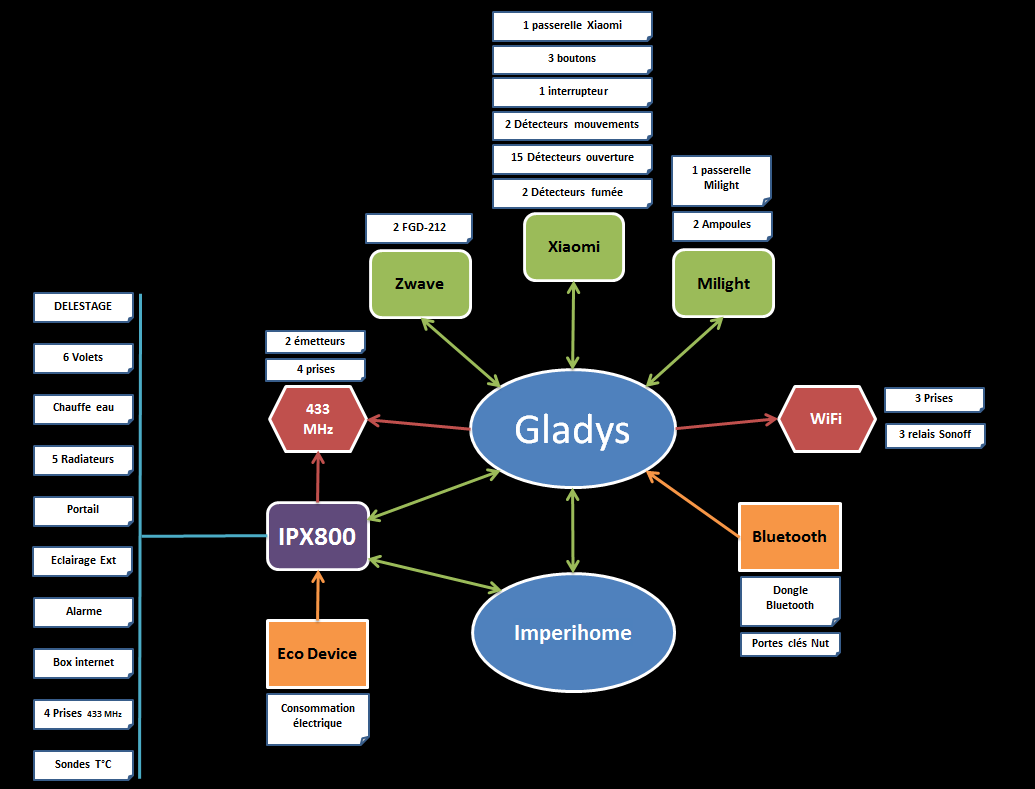
As I said earlier, all of this is fine, but it lacks a bit of intelligence. And Gladys is just for that! It’s a bit like the conductor of the house that receives and sends information based on programmed events and scenarios.
Once the Xiaomi Gateway is linked to Gladys, all Xiaomi devices are automatically integrated into Gladys. The same goes for the Z-wave part and Bluetooth.
Gladys communicating with Imperihome, I therefore have real-time status feedback of the different devices on the Imperihome interface.
A diagram summarizing how all this interacts:
Examples of automation:
- The ground floor shutters open automatically when the sun rises (Gladys knows where I live, so it knows the sunrise time)
- The bedroom shutters open at the time decided the day before by the user (thanks, Gladys). If no time is set, they open at noon.
- All shutters close automatically at sunset (thanks again, Gladys)
- If the house is in “Vacation” mode (via Gladys), the water heater does not turn on (no need to heat water if no one is in the house!)
- When a smoke detector goes off, its own alarm triggers and a notification + email is sent to the users.
- Two minutes later, the outdoor siren goes off (a different siren from the regular alarm) and the shutters open. This alerts the neighbors who can keep an eye out in case of absence, and if there is a fire, the firefighters don’t have to bother with the shutters.
- I heat with wood, and the radiators are mainly used to keep the house in frost-free mode during winter vacations. If the day’s color is red: no radiator activation during peak hours and no activation during off-peak hours if the temperature is above 10 degrees.
- The staircase/hallway light turns on automatically when motion is detected and turns off automatically after 30 seconds (can also be controlled by a switch)
Example of Xiaomi button usage in the house:
- Living room Xiaomi button: 1 click = turns on the light, 2 clicks = dining room light at 20%, long click = turns off the light
- Arcade stand Xiaomi button: 1 click = turns off the arcade stand TV and HiFi system, 2 clicks = turns on the arcade stand TV and HiFi, long click = dining room light at 20%
- Bedroom Xiaomi button: 1 click = turns on the TV, which will turn off after 1 hour. If the TV is on, it will turn off after an hour. 2 clicks = opens/closes the bedroom shutter. Long click = turns off the hair straightener outlet and bathroom heater (very useful from bed when my wife sends an SMS after rushing out, „I don’t know if I turned off the hair straightener/bathroom heater“
- Bathroom Xiaomi button: 1 click = turns on/off the hair straightener outlet (timed), 2 clicks = turns on the heater, long click = turns off the heater.
What could be the future evolutions of my installation?
Create a special Google vacation calendar. Thus, Gladys can put the house in vacation mode autonomously (because for now, I trigger the mode manually while Gladys could do it alone… Might as well take advantage of it!)
Gladys handles voice recognition, so why not take advantage of it? I think I will look into this question in the coming months to replace some Xiaomi buttons.
I will see how to retrieve the information from Météo France „rain in less than an hour“ to automatically close the shutters in case of rain if no one is at home.
Customize the Imperihome interface to make it more user-friendly (background, icons, etc.)
Make the internet box power pass through an IPX800 output to force a reboot in case of a crash (via regular line testing by the IPX800 thanks to pings every 5 minutes. 3 failed pings = internet down = box reboot)
Gladys allows integrating many things, I haven’t yet thought about other future craziness
To conclude, a small personal experience feedback:
The biggest mistake I made was not installing a remote switch for the lights during my electrical installation. I can’t control them directly via the IPX (so I have to go through Z-Wave = I won’t automate all the lights in the house.) So if someone is doing a complete renovation: think about remote switches!
When 2 Chacon outlets (or 2 WiFi outlets) are placed next to each other, their use is often chaotic. As if they interfere with each other.
So you need to put a WiFi outlet and a 433Mhz one for it to work perfectly.


 For that, you already have Skype/Facetime/What’s App/and plenty of alternatives, even decentralized and open-source, why would you want to add that in Gladys? ^^