ok.
the files in question: syslog, messages and kern.log, the name without suffix (« tout court ») is the current file, older files are suffixed with .1, .2 etc, then with .gz (the files are compressed to take up less space)
example on a Raspberry Pi that’s been running for months, continuously.
root@piwigo:/var/log# ls -larlt syslog*
-rw-r----- 1 root adm 734411 Jan  9  2022 syslog.2
-rw-r----- 1 root adm 528729 Jan 23  2022 syslog.4
-rw-r----- 1 root adm 475204 Jan 30  2022 syslog.3
-rw-r----- 1 root adm 112998 Dec 11 00:00 syslog.4.gz
-rw-r----- 1 root adm 111543 Dec 18 00:00 syslog.3.gz
-rw-r----- 1 root adm 114919 Dec 25 00:00 syslog.2.gz
-rw-r----- 1 root adm 890876 Jan  1 00:00 syslog.1
-rw-r----- 1 root adm 771513 Jan  5 09:09 syslog
root@piwigo:/var/log# ls -larlt messages*
-rw-r----- 1 root adm 142 Dec  4 00:10 messages.4.gz
-rw-r----- 1 root adm 141 Dec 11 00:10 messages.3.gz
-rw-r----- 1 root adm 250 Dec 18 06:19 messages.2.gz
-rw-r----- 1 root adm 148 Dec 25 00:10 messages.1
-rw-r----- 1 root adm 148 Jan  1 00:10 messages
root@piwigo:/var/log# ls -larlt kern.log*
-rw-r----- 1 root adm  8944 Nov  3 10:03 kern.log.4.gz
-rw-r----- 1 root adm 15127 Nov 10 23:18 kern.log.3.gz
-rw-r----- 1 root adm 24649 Nov 11 16:38 kern.log.2.gz
-rw-r----- 1 root adm   145 Nov 14 19:58 kern.log.1
-rw-r----- 1 root adm     0 Nov 20 00:00 kern.log
If it’s the Sonoff key that causes the crash, it would be useful to boot the Raspberry Pi without the key to access its files.
pi3 1GB
gladys uses Docker etc., 1 GB might be tight, right?
are there any sizing charts or recommendations for Gladys, like (maybe a question for @pierre-gilles?)
minimum configuration: pi3 - x GB
with x devices / scenes: recommended memory y GB
etc
from experience there’s never enough memory; the CPU is « just » that it’s slower or faster
The output of the command free would be interesting (Display amount of free and used memory in the system)
If a Unix system crashes there’s always a reason.
I’m willing to read the files
Phil
So, to summarize your options:

* **Beginners and most people** ⇒ Raspberry Pi OS Bullseye (32-bit).
* **No Internet on the Pi** ⇒ Raspberry Pi OS Bullseye Full (32-bit).
* **Advanced users without a screen** ⇒ Raspberry Pi OS Bullseye Lite (32-bit).
* **Adventurous users with a recent model** ⇒ Same but in 64-bit.
* **Cautious users** ⇒ Legacy.
Personally I have several Pis purring along without any problem .. 64-bit version only on Pi 4s
Phil
Friday evening (6/01/23) I tried to access the Gladys interface via the IP address but it was impossible. I tried on my PC and my smartphone with Firefox and Chrome and with Putty. Always the same: The connection failed.
Same on Saturday, Sunday and today.
EDIT 3 (14/01/23): It’s been more than a week since I haven’t had access to the Gladys interface, except via Gladys Plus… I’m away for a week starting tomorrow. If someone wants to try to help me, it’s either today or starting next Saturday.
However it’s accessible via Gladysplus
EDIT: and ping responds.
I switched to a mini-PC last week.
EDIT 2 (9/01/23): On the mini-PC side, Ubuntu works, access to Gladys at 192.168.. works, ping to the Windows PC works.
The logs:
Darn, I made a 35-page PDF with docker ps and the container logs. It’s not possible to upload it.
How to put it? A link to my Dropbox?
EDIT 4 (14/01/23): docker restart gladys (in a terminal on the mini PC) changes nothing
EDIT 5 (23/01/23): I’m back if someone can help me.
It looks like connections to the mini PC running Linux are blocked.
As it is, it’s hard to guess what’s happening, but it must be a network issue at your place, I think; otherwise Gladys Plus wouldn’t work and access to Gladys from your mini PC wouldn’t either.
Are you on the same local network? I remember one of your posts where you said you had several local networks.
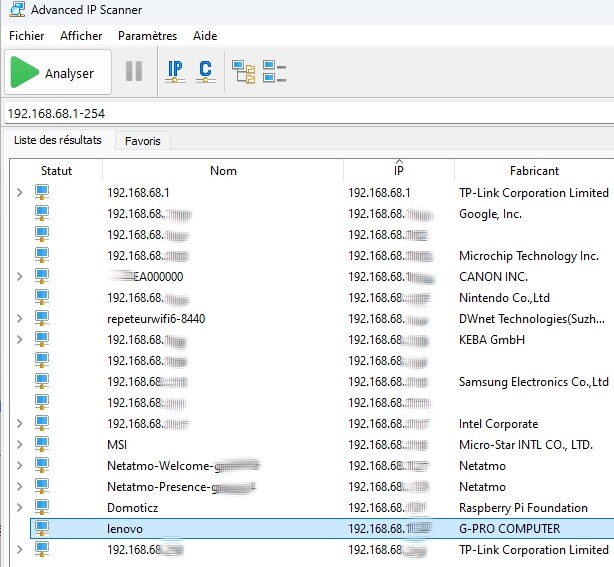
Yes, Gladys is on an address at 192.168.68.1..
my PC: 192.168.68.1..
my smartphone: 192.168.68.1..
Gateway: 192.168.68.1
The subnet mask is the same for all.
After installing Gladys on the mini-PC, it worked, and one day, it stopped.
Yes, on the mini-PC that hosts Gladys it’s set to automatic.
I’ve set the IP on the router.
As for the ping,
I just connected the PC via Ethernet (it was on Wi‑Fi until now) but nothing changes.
Ping result:
Statistiques Ping pour 192.168.68.1..:
Packets: Sent = 4, Received = 4, Lost = 0 (loss 0%),
Approximate round trip times in milliseconds:
Minimum = 2ms, Maximum = 5ms, Average = 3ms
On the mini-PC, I set either the IP address fixed on the router (192.168.68.1..), or localhost.