Hello,
This morning, Gladys is down.
No connection from my smartphone, my PC, nor via SSH, nor on the network (not found on the malivebox app, only present at the Wi-Fi IP address).
There was apparently no power outage last night.
This isn’t the first time this has happened.
Before, I had a Raspberry Pi v2B and I already had issues.
I took the SD card to put it on my RPi v3 B+ and I had the same problems.
Taking the SD card made with a v2 to put on a v3 didn’t appeal to me, so I did a clean install on the RPi v3 B+.
Here is my current setup:
Image used: gladys-4.0.0-beta-6.img
Support: Raspberry v3 B+
32 GB µSD card
Official Raspberry Pi case (red and white)
Ethernet connection
1 ZWave Z-StickGen5 key
3 Qubino ZMNHJD1 ZWave modules for radiators
2 Qubino ZMNHCD1 ZWave modules for roller shutters
1 RFXCom transmitter/receiver connected while waiting to be able to use it.
1 IP camera
1 USB webcam
Telegram
OpenWeather
1 scene to close the 2 VR in the evening
Direct power supply from a power outlet.
Before, I went through an external battery connected to a UPS. As Gladys was regularly down, I plugged it directly into the mains.
The only solution is to unplug the power supply and plug it back in for the system to restart.
If you can’t find anything on your network, it’s not a software issue but a hardware one. The Raspberry Pi must be turned off or it has crashed and is no longer connected to the network.
What is the power supply of your Pi?
The power supply plays an important role in the stability of the board. Moreover, you also have a few peripherals that consume current (1 USB key, an RFXCom receiver and a USB webcam).
With my old RPI, I also had issues with the SD card, which was not very good nor very stable.
Thank you for following up.
This is the official power supply.
However, the fact that I see Gladys on WiFi made me think that it might be because my RPi is connected to a hub.
I unplugged it and connected it directly to a CPL.
We’ll see if it fails again.
Edit: same thing on 21/09
I unplugged my USB hub, powered by current, which was connected to the RPi.
I unplugged the RFxCOM as I can’t use it for now.
I removed the cover of the case.
I connected the USB webcam and the Z-Wave USB key directly.
The RJ45 cable goes directly to a CPL.
Wait and see Edit: same on 22 and 23.
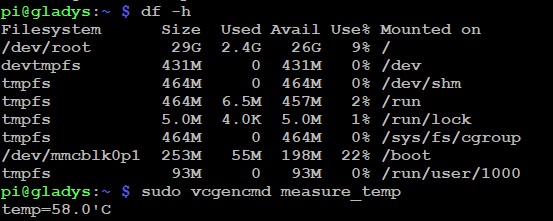
Temperature 51°C.
I remove the entire case, but I think it’s useless.
And once your system is down, is it impossible to recover it?
This smells like an SD card with fried sectors
SD cards wear out quite easily if you use them a lot, and sometimes randomly certain sectors are fried, which randomly breaks your installation. You could try with another SD card?
Actually, I unplug the power supply and then plug it back in and it starts again.
To manage my heating, I recreated a Domoticz installation on an RPi 2B and connected my Z-Wave key to it. It is therefore no longer connected to Gladys.
The scene I set up on 7/10 at 13:40 sends me a message via Telegram every 30 minutes, without any interruption for 3 days.
I’m still waiting a bit. I will be on vacation next weekend and will test reconnecting the Z-Wave key to Gladys to see what happens.
Well, actually no, it’s not the Z-Wave key as the messages stopped after 15:40 today…
As I mentioned earlier, all your symptoms resemble a defective SD card. I don’t see any other reason why the entire system could have died spontaneously.
Ok @pierre-gilles, what memory size do you recommend? 16 GB (I have it in stock, but it seems too little), 32 GB, 64 GB?
Another question: can I clone the current card? I think not, because if there are defective sectors, they will be copied. Is that right?
For me, 16GB should be more than enough and it’s better to do a full installation.
After that, if you want to recover your current configuration, you just need to copy your old database to your new installation. If it’s not the same version of Gladys, you may need to migrate the database.
Ok, but how do we do that?
I’m on Gladys v4.
I saw in a forum message, dated 2019 so probably on v3, that I had to go to var/lib/mysql, but I don’t have that directory.
I use WinSCP to explore the contents of the SD card.
Thanks in advance.
I took a 16GB one that I tested with h2testw: no defects
I just reconfigured my setup for testing.
It’s an Rpi 3b+, so with Bluetooth.
I’ll see how it goes.
Edit:
Gladys set up on 21/10 at 11:30 am and just Telegram to test if it works for a long time (sending a message every hour)
Last night, still perfect → Added IP camera and USB camera + Open weather
Last Telegram message this morning at 7:17 am???
This is tiring me out!
I’m going to reinstall, the 6th or 7th time, and add only one camera to see.