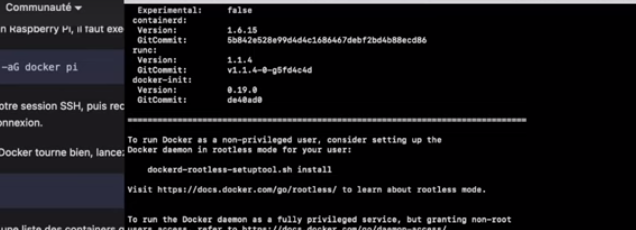
I think you installed Docker in « rootless » mode, but Gladys needs root privileges for several aspects.
For me, that’s one of the leads that could have caused so many errors.
There is no need to be root. As explained in @pierre-gilles’s video he launched his VM as root but it’s unnecessary! In the case of a normal installation with a normal user you just need to add the user to the docker group.
I did it last week and it works very well.
And in the video you can see the explanation of the command you ran after doing the CURL even though normally it is not necessary to do that
I think this group change is preventing the database from opening.
It was to test since it REFUSED to touch the folder, as indicated in one of my messages:
docker: Error response from daemon: error while creating mount source path '/var/lib/gladysassistant': mkdir /var/lib/gladysassistant: permission denied.
Could the problem come from this command?
docekrd-rootless-setuptool.sh install
It’s true that I didn’t re-test by skipping it + restarting ssh after adding the group. But I understand that if my user wants to use it without root privileges, the command must be run.
hizo@hizo-minipc:~$ curl -sSL https://get.docker.com | sh
# Executing docker install script, commit: c2de0811708b6d9015ed1a2c80f02c9b70c8ce7b
+ sudo -E sh -c apt-get update -qq > /dev/null
+ sudo -E sh -c DEBIAN_FRONTEND=noninteractive apt-get install -y -qq apt-transport-https ca-certificates curl > /dev/null
+ sudo -E sh -c install -m 0755 -d /etc/apt/keyrings
+ sudo -E sh -c curl -fsSL "https://download.docker.com/linux/ubuntu/gpg" | gpg --dearmor --yes -o /etc/apt/keyrings/docker.gpg
+ sudo -E sh -c chmod a+r /etc/apt/keyrings/docker.gpg
+ sudo -E sh -c echo "deb [arch=amd64 signed-by=/etc/apt/keyrings/docker.gpg] https://download.docker.com/linux/ubuntu jammy stable" > /etc/apt/sources.list.d/docker.list
+ sudo -E sh -c apt-get update -qq > /dev/null
+ sudo -E sh -c DEBIAN_FRONTEND=noninteractive apt-get install -y -qq docker-ce docker-ce-cli containerd.io docker-compose-plugin docker-ce-rootless-extras docker-buildx-plugin > /dev/null
+ sudo -E sh -c docker version
Client: Docker Engine - Community
 Version:           24.0.2
 API version:       1.43
 Go version:        go1.20.4
 Git commit:        cb74dfc
 Built:             Thu May 25 21:51:00 2023
 OS/Arch:           linux/amd64
 Context:           default

Server: Docker Engine - Community
 Engine:
  Version:          24.0.2
  API version:      1.43 (minimum version 1.12)
  Go version:       go1.20.4
  Git commit:       659604f
  Built:            Thu May 25 21:51:00 2023
  OS/Arch:          linux/amd64
  Experimental:     false
 containerd:
  Version:          1.6.21
  GitCommit:        3dce8eb055cbb6872793272b4f20ed16117344f8
 runc:
  Version:          1.1.7
  GitCommit:        v1.1.7-0-g860f061
 docker-init:
  Version:          0.19.0
  GitCommit:        de40ad0

================================================================================

To run Docker as a non-privileged user, consider setting up the
Docker daemon in rootless mode for your user:

    dockerd-rootless-setuptool.sh install

Visit https://docs.docker.com/go/rootless/ to learn about rootless mode.


To run the Docker daemon as a fully privileged service, but granting non-root
users access, refer to https://docs.docker.com/go/daemon-access/

WARNING: Access to the remote API on a privileged Docker daemon is equivalent
         to root access on the host. Refer to the 'Docker daemon attack surface'
         documentation for details: https://docs.docker.com/go/attack-surface/

================================================================================

hizo@hizo-minipc:~$ docker ps
permission denied while trying to connect to the Docker daemon socket at unix:///var/run/docker.sock: Get "http://%2Fvar%2Frun%2Fdocker.sock/v1.24/containers/json": dial unix /var/run/docker.sock: connect: permission denied

hizo@hizo-minipc:~$ exit
logout
Connection to 1xxx closed.

ssh 'hizo@192.168.1.12

hizo@hizo-minipc:~$ docker ps
permission denied while trying to connect to the Docker daemon socket at unix:///var/run/docker.sock: Get "http://%2Fvar%2Frun%2Fdocker.sock/v1.24/containers/json": dial unix /var/run/docker.sock: connect: permission denied
So we’re still at the same point… that is to say that the Docker installation does not work without privileges… docekrd-rootless-setuptool.sh install therefore seems necessary…
Yes, but it’s shown during the Docker installation.
If I got fooled, others could get fooled too.
I really understood that if I wasn’t root, I needed to do it.
Ok, I understand better, so are you proposing to add a note in the Doc that would « advise » to only follow the commands in the Gladys Doc and not take into account commands coming from installed dependencies?
Yes, just put some kind of warning after the command curl -sSL https://get.docker.com | sh
because it suggests the command docekrd-rootless-setuptool.sh install which should not be run.
This is not related to dependencies but to the installation of Docker.
However, I would tend to list the dependencies required for the installation of Docker in the docs as well.