hello,
since this morning I have a small Node-RED issue.
following an update triggered by Watchtower, Gladys and Node-RED were updated but problem: Node-RED does not restart or rather restarts in a loop roughly every 30s so …
sylvain@synapsat11:~$ docker ps -a
CONTAINER ID   IMAGE                       COMMAND                  CREATED       STATUS                             PORTS      NAMES
ae9ff8d75062   nodered/node-red:latest     "npm --no-update-not…"   4 hours ago   Up 21 seconds (health: starting)              node_red
e32af69a242b   gladysassistant/gladys:v4   "docker-entrypoint.s…"   4 hours ago   Up About an hour                              gladys
3f196abc60a0   koenkk/zigbee2mqtt:latest   "docker-entrypoint.s…"   13 days ago   Up About an hour                              gladys-z2m-zigbee2mqtt
20a06c81944b   eclipse-mosquitto:2         "/docker-entrypoint.…"   7 weeks ago   Up About an hour                              gladys-z2m-mqtt
e47dbe21ea17   eclipse-mosquitto:2         "/docker-entrypoint.…"   7 weeks ago   Up About an hour                              eclipse-mosquitto
e2eed4ce7108   containrrr/watchtower       "/watchtower --clean…"   7 weeks ago   Up About an hour                   8080/tcp   watchtower
I’ve been having the same problem as you since yesterday!
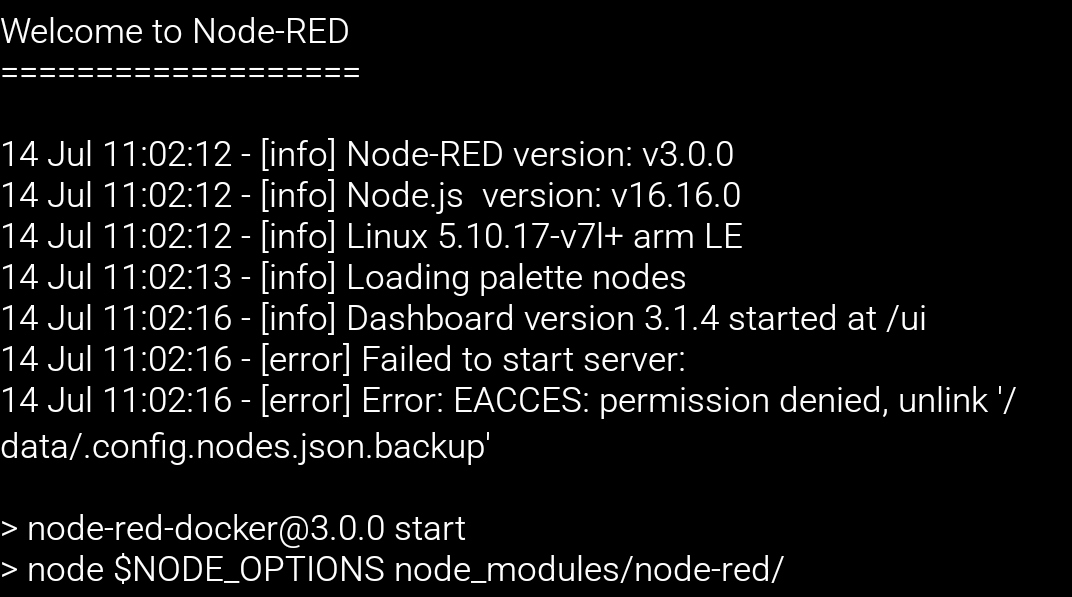
I looked at the Node-RED logs and it’s a permissions issue… The thing is I have no idea how to fix this problem.
Good evening,
Following an update that I interrupted without paying attention (I think because the dashboard stopped displaying) and I hurried to reboot everything — serious mistake
After that a total reinstall of Gladys, easy with Gladys Plus but in the meantime the backup key had been changed without my noticing, so fortunately there was still a 3-month backup that had the old key
So Gladys restored, everything is fine with a bit of updating.
Now Node-RED, I just reinstalled Node-RED and so like for you it reboots every ~5 sec or so. I look in /var/lib/node-red, and there the folders " /lib node_modules , package.json et setting. js are not created.
here are my Node-RED logs:
> node-red-docker@3.0.0 start
> node $NODE_OPTIONS node_modules/node-red/red.js $FLOWS "--userDir" "/data"

node:internal/fs/utils:345
    throw err;
    ^

Error: EACCES: permission denied, copyfile '/usr/src/node-red/node_modules/node-red/settings.js' -> '/data/settings.js'
    at Object.copyFileSync (node:fs:2817:3)
    at copyFile (/usr/src/node-red/node_modules/fs-extra/lib/copy/copy-sync.js:73:6)
    at onFile (/usr/src/node-red/node_modules/fs-extra/lib/copy/copy-sync.js:59:25)
    at getStats (/usr/src/node-red/node_modules/fs-extra/lib/copy/copy-sync.js:51:44)
    at handleFilterAndCopy (/usr/src/node-red/node_modules/fs-extra/lib/copy/copy-sync.js:36:10)
    at Object.copySync (/usr/src/node-red/node_modules/fs-extra/lib/copy/copy-sync.js:29:10)
    at Object.<anonymous> (/usr/src/node-red/node_modules/node-red/red.js:129:20)
    at Module._compile (node:internal/modules/cjs/loader:1105:14)
    at Object.Module._extensions..js (node:internal/modules/cjs/loader:1159:10)
    at Module.load (node:internal/modules/cjs/loader:981:32) {
  errno: -13,
  syscall: 'copyfile',
  code: 'EACCES',
  path: '/usr/src/node-red/node_modules/node-red/settings.js',
  dest: '/data/settings.js'
}
node-red-docker@3.0.0 start
does this line indicate the version of Node-RED, because before we were on something like 2.1?
Could this not be related to that, this installation problem?
If anyone has an idea I’m open to suggestions, because I spent the day on it.
There is indeed a new version of Node-RED that has just been released
Their Wiki suggests starting the container as root: If you are seeing permission denied errors opening files or accessing host devices, try running the container as the root user.
The example given adds the -u parameter in the container startup command:
yeah, my Node-RED install was done based on @pierre-gilles’ YouTube video.
so after investigating the logs and the aforementioned error message I’m a bit stuck because the Docker box is somewhat of a black box for containers, and uninstalling/reinstalling Node-RED doesn’t really appeal to me (loss of customizations and flows created…)
hello @VonOx ,
merci the problem did indeed come from that, but could you explain it to me because I’m still skeptical :
the original installation of Node-RED following the procedure of @pierre-gilles worked fine and was using -u root
and now with this update, given the
Thanks Vincent
Luckily you’re here , it’s up and running again for me; I just need to restore the flows and then fight with zigbeeMqtt2, which isn’t starting again either.
ok,
your reply reassures me! but so, for a Node-RED install is the -u root recommended by @pierre-gilles no longer valid?
I had checked the Node-RED site but didn’t see that (I probably phrased my question badly…)
is this migration related to Gladys (as with Node.js v16) or is it due to Node-RED?
small side question: regarding the Xiaomi Aqara particle/temp/humidity sensor, did you get any more information about the particle values (ppb) not being reported?
Pierre Gilles’s tutorial was up to date at the time it was written.
Node-RED is independent from Gladys and geared toward advanced users; if something doesn’t work on the Node-RED side, it’s not Gladys that should be blamed.
The only source of truth will be the Node-RED documentation.
For your other issue, open a dedicated thread, otherwise we’ll get lost.
I agree with you about the tutorial created by Pierre Gilles, but maybe the tutorials should include a small addendum for new users?
Regarding the particle feature, at the beginning of June I made an Air Quality feature request for Aqara Xiaomi TVOC where you had replied and I thought it had been integrated into the latest Gladys release but apparently that’s not the case (testing/merge issue…?)
hi again,
I’m still stuck with Node-RED and RFLink, apparently Node-RED doesn’t have access to the port /dev/ttyUSB1, where my RFLink is connected.
here is the error message generated by Node-RED
+1
I managed to access Node-RED (thank you very much @GBoulvin) but it’s impossible to select the COM port of the Arduino board.
I have the USB0 port dedicated to Zigbee (when the dongle is plugged in) but no other USB option.
I only have ACM0 and AMA0 → error!
I tested by adding another Arduino board → ACM1 but same error!
Help please ..


 , it’s up and running again for me; I just need to restore the flows and then fight with zigbeeMqtt2, which isn’t starting again either.