[NODE-RED] Need help with a Tuya device configuration

Hello everyone,

I’m trying to integrate my Tuya devices but I’m really struggling to understand the Node-RED part.
On Google, I can’t find any French documentation that talks about Tuya and Node-RED, so here I am, struggling to do anything, even something simple.
My Tuya dev account is created, the Gladys project too, my devices are listed in the Tuya Gladys project, on Node-RED I installed node-red-contrib-tuya-local, I connected 2 to test, a plug and a lamp. But nothing comes out of the logs I added, not even the status.

But then what should I do? I’m completely lost…

Thanks in advance for your answers.

Your flow isn’t doing anything!

To test, you can use an « Inject » node to manually trigger your flow.

I do this in the YouTube tutorial at 30:10:

Yes, I understood that it wasn’t executing anything. I wanted to know what to display for the status and information of the outlet or the lamp. I had just misconfigured the node logs; I needed to set it to full message object.

As a result, I now have this output for my lamp:

14/10/2021, 14:39:11
node: 3687cb8bf3be182f
msg : Object
object
data: object
name: "lampe salle a manger"
ip: ""
id: "663086742cf432d659e1"
available: true
commandByte: 10
payload: object
devId: "663086742cf432d659e1"
dps: object
20: true
21: "white"
22: 1000
23: 503
25: "000e0d0000000000000000c80000"
26: 0
101: true
_msgid: "63e2f64480093509"

I will now see how to control it from Node-RED and then from Gladys.

Hallelujah, after 6 hours of headache and research I finally managed to interact with my socket from Node-red!!! It’s really frustrating to be so bad at this, believe me…

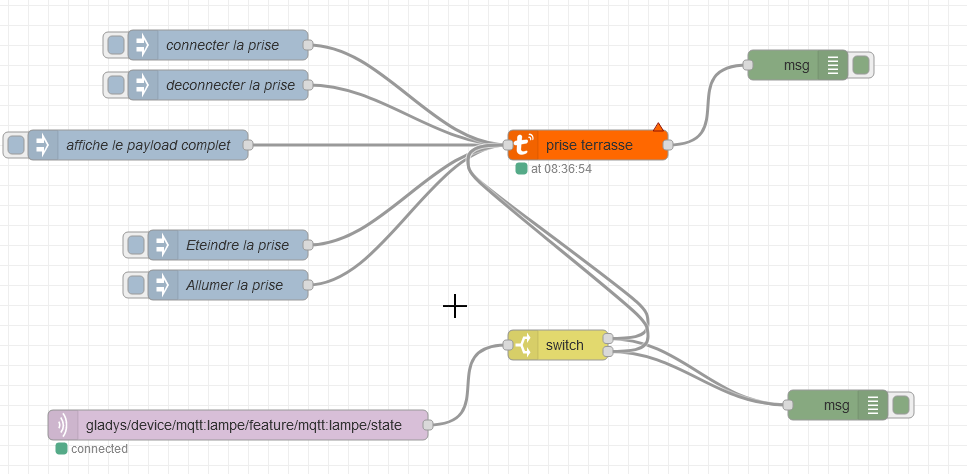
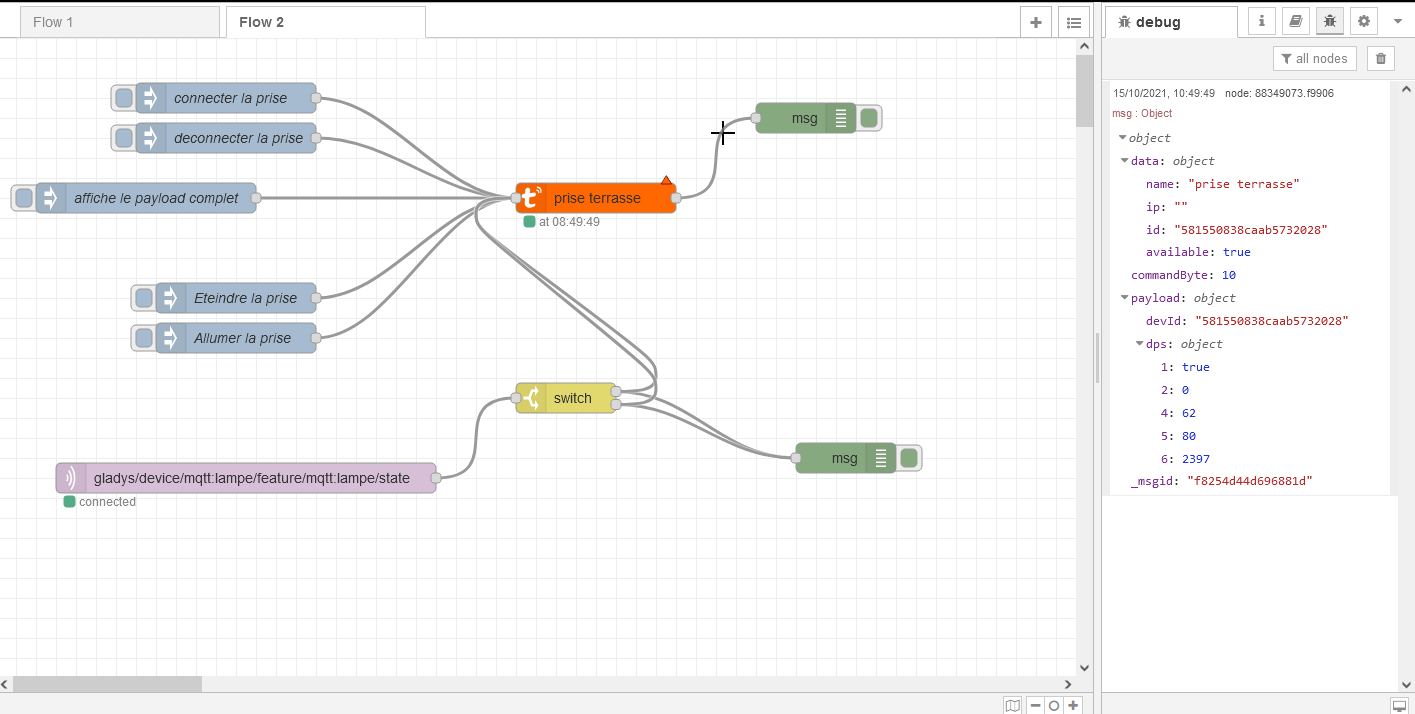
Small screenshot

I can now connect/disconnect it, turn it off/on and also display the complete payload. I don’t know if that’s what we call it…

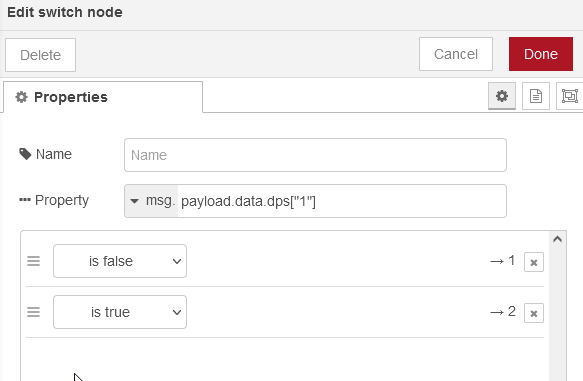
Now my goal is to be able to control it directly via Gladys, so I took the MQTT device from your video @pierre-gilles and I modified the switch node like this, completely randomly because I don’t understand.


I deploy and when I go to Gladys to play with my switch, nothing happens on the Node-red side, not even a little log to guide me, I just have the message saying that my socket is well connected, with the payload.

Thanks in advance for your help.

Ps: if other @contributors have ideas I’m also interested :slightly_smiling_face:

Share your flow @Jean34 :slight_smile:

[
    {
        "id": "42b606a5c2d7d8a8",
        "type": "tab",
        "label": "Flow 5",
        "disabled": false,
        "info": ""
    },
    {
        "id": "54e533d94ae6c687",
        "type": "tuya-local",
        "z": "42b606a5c2d7d8a8",
        "devName": "Prise seche linge",
        "devIp": "",
        "devId": "5815508324a160258032",
        "devKey": "6c7af9cbbf81ed1c",
        "protocolVer": "3.3",
        "renameSchema": "",
        "filterCB": "",
        "x": 610,
        "y": 220,
        "wires": [
            [
                "30a6844d7119f859"
            ]
        ]
    },
    {
        "id": "f6ef28b5a7693097",
        "type": "inject",
        "z": "42b606a5c2d7d8a8",
        "name": "connecter la prise",
        "props": [
            {
                "p": "payload"
            },
            {
                "p": "topic",
                "vt": "str"
            }
        ],
        "repeat": "",
        "crontab": "",
        "once": false,
        "onceDelay": 0.1,
        "topic": "",
        "payload": "connect",
        "payloadType": "str",
        "x": 270,
        "y": 100,
        "wires": [
            [
                "54e533d94ae6c687"
            ]
        ]
    },
    {
        "id": "8f6df0ddf94393c0",
        "type": "inject",
        "z": "42b606a5c2d7d8a8",
        "name": "deconnecter la prise",
        "props": [
            {
                "p": "payload"
            },
            {
                "p": "topic",
                "vt": "str"
            }
        ],
        "repeat": "",
        "crontab": "",
        "once": false,
        "onceDelay": 0.1,
        "topic": "disconnect",
        "payload": "disconnect",
        "payloadType": "str",
        "x": 270,
        "y": 140,
        "wires": [
            [
                "54e533d94ae6c687"
            ]
        ]
    },
    {
        "id": "90b6719d6856355e",
        "type": "inject",
        "z": "42b606a5c2d7d8a8",
        "name": "affiche le payload complet",
        "props": [
            {
                "p": "payload"
            },
            {
                "p": "topic",
                "vt": "str"
            }
        ],
        "repeat": "",
        "crontab": "",
        "once": false,
        "onceDelay": 0.1,
        "topic": "",
        "payload": "request",
        "payloadType": "str",
        "x": 190,
        "y": 200,
        "wires": [
            [
                "54e533d94ae6c687"
            ]
        ]
    },
    {
        "id": "fc5be531ebfb9055",
        "type": "inject",
        "z": "42b606a5c2d7d8a8",
        "name": "Eteindre la prise",
        "props": [
            {
                "p": "payload"
            },
            {
                "p": "topic",
                "vt": "str"
            }
        ],
        "repeat": "",
        "crontab": "",
        "once": false,
        "onceDelay": 0.1,
        "topic": "",
        "payload": "{\"set\": false, \"dps\" : 1}",
        "payloadType": "json",
        "x": 280,
        "y": 300,
        "wires": [
            [
                "54e533d94ae6c687"
            ]
        ]
    },
    {
        "id": "75fb5f027cdb8ce4",
        "type": "inject",
        "z": "42b606a5c2d7d8a8",
        "name": "Allumer la prise",
        "props": [
            {
                "p": "payload"
            },
            {
                "p": "topic",
                "vt": "str"
            }
        ],
        "repeat": "",
        "crontab": "",
        "once": false,
        "onceDelay": 0.1,
        "topic": "",
        "payload": "{\"set\": true, \"dps\" : 1}",
        "payloadType": "json",
        "x": 280,
        "y": 340,
        "wires": [
            [
                "54e533d94ae6c687"
            ]
        ]
    },
    {
        "id": "30a6844d7119f859",
        "type": "debug",
        "z": "42b606a5c2d7d8a8",
        "name": "",
        "active": true,
        "tosidebar": true,
        "console": false,
        "tostatus": false,
        "complete": "true",
        "targetType": "full",
        "statusVal": "",
        "statusType": "auto",
        "x": 840,
        "y": 200,
        "wires": []
    }
]

Why don’t you do it like in the tutorial?

Either Gladys sends « 0 » (turn off), or Gladys sends « 1 » (turn on).

There’s nothing to modify on that side.

Avoid mentioning all project contributors for your personal issue. The « @ » is there so we can exchange ideas on development-related topics with all contributors, but they are already overloaded and it has nothing to do with development ^^

(Also, the use of this « @ » is restricted, but since you are a moderator, you were able to do it)

I did exactly as in the tutorial but it didn’t work, and no logs…

Anyway, it’s annoying, I’ll come back when there’s the tuya integration, I’m going back to HA in the meantime.

I will no longer solicit contributors in the future

After that, I can help you if needed @Jean34 for your flow, I don’t have any Tuya devices and I don’t want to develop an A to Z integration in Gladys 4 but I can help you with Node-RED if needed. That way, I would see how a Tuya device works, it can be useful and at least the basics will already be present with Node-RED

And I’m not a contributor :stuck_out_tongue:

Huh? Can you show us your Node-RED scenario? We agree that the part « MQTT Message sent by Gladys → received in Node-RED » was working well? Is it the switch side of Node-RED that was stuck?

You are clicking on deploy between each test, right?

Sorry if you took it the wrong way, I didn’t mean to say that we shouldn’t be asked: no problem with that, it’s normal to ask for help on the forum :slight_smile:

It’s just the use of the « @ » in general, it’s a bit like people who do a reply all on an email chain of 200 people, it’s not super cool :joy: (the @ sends an email to all the people on this list, since here it’s not related to development if we abuse the @ the contributors will disable notifications and will no longer come to the forum :confused: )

@spenceur thanks but I’m stopping here… Really, thanks anyway for your offer…

@pierre-gilles I understand a bit your message, I know I’m bad at home automation, but it’s not like I just arrived and made requests in all directions without even trying to think… In short, after a few days of reflection, as mentioned earlier, I’m stopping with Gladys.

I wish you all, devs and regular members, the best in the world.

You can close my topic @pierre-gilles.

Sorry if you took it the wrong way @Jean34, that wasn’t the intention.

I know you’re not here to overburden everyone and that you’re a long-time member, I just wanted to remind everyone about the effect of some global « @ » mentions, but without any malice or anything, I might have been clumsy in my wording. Sorry :folded_hands:

Regarding Node-RED, I talked about this platform but it’s definitely much more complicated than Gladys, it requires much more than just home automation knowledge, it’s full-on visual programming!

Honestly, it took me a good week of practice before making this YouTube tutorial to appear « fluent » in the video, and I agree that it’s not very intuitive when you start (like the notion of « payload » is not easy to understand, especially when you’re not a developer)…

So on that, don’t feel bad, it’s not easy at all, and some integrations are quite obscure… it can drive you crazy.

If you ever want to come back, don’t hesitate, you’re welcome.

If you want us to look at your problem together in a video call, you’re also welcome.

Sorry again!

Good evening,
I’m trying to install my TUYA devices with Node Red, but I’m facing a problem I don’t know how to solve.
To install TUYA on Node Red, you first need to install the CLI tool by typing this command:
npm i @tuyapi/cli -g
This tool allows you to read the codes of TUYA devices connected to the Tuya app.
So I tried to write it with Putty on my Raspi, preceding it with sudo, so
sudo npm i @tuyapi/cli -g.
But Putty returns:
sudo: npm: command not found. Is this related to Docker?

I think it needs to be installed where Node Red is? :thinking:
Thanks in advance

Nothing to do with Docker :wink:, you need to install Node.js before you can install an npm package.

Are you sure about that? Isn’t it just in the UI?

[quote=« pierre-gilles, post:15, topic:6603 »]
Are you sure about that? Isn’t it just in the UI?
[/quote] Good evening Pierre Gilles
I read that in the documentation for the « node-red-contrib-tuya-local » palette.

« All the methods below require you to install the CLI tool before continuing.
Install it by running npm i @tuyapi/cli -g. If it returns an error, you may need to prefix the command with sudo. (Tip: using sudo to install global packages is not considered a good practice.) »

Good evening VonOx
Is Nodejs not in the Gladys image? And do I install it on my RPI?

Yes, it’s in the image Gladys, but since it’s unrelated, we’ll avoid modifying the container.

You install Node on the host, you will have the utility available (you need it to retrieve the information from the Tuya devices).

I agree :grinning:

You install node on the host, you will have the utility available (you need it to retrieve the information from the tuya devices)
Sorry for my ignorance :roll_eyes: What do you mean by the host?

The Raspberry Pi, the Docker host (the one that runs the containers)

For example, in my case, it’s not a Raspberry Pi, it could be a Mac, a Windows PC, or any Linux machine.