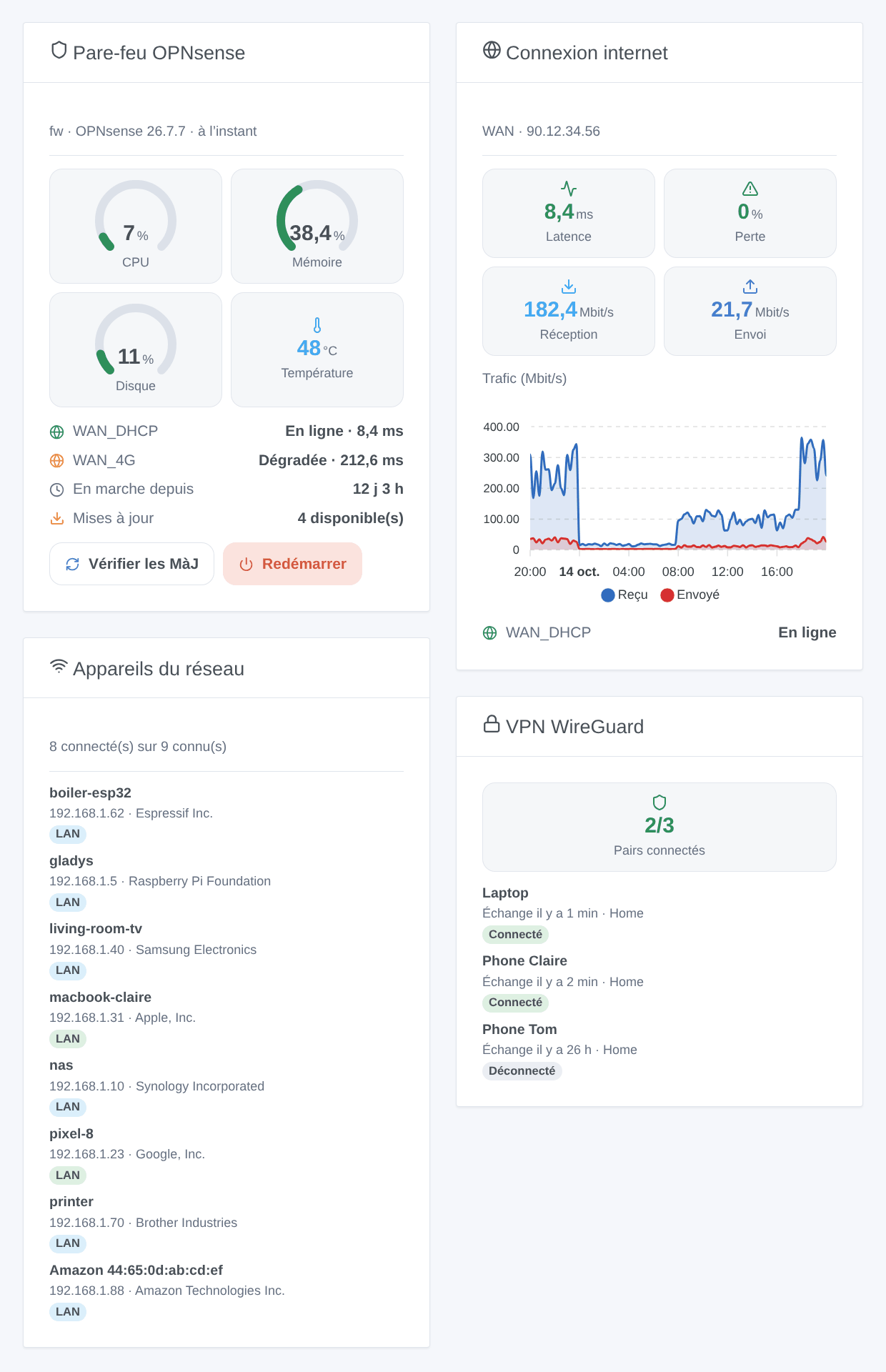
For those whose network goes through an OPNsense firewall, here is an external integration that brings it into Gladys.
What it does
It reads the OPNsense API on your local network (local transport), with a dedicated API key, every 30 seconds. Nothing is sent to a cloud. Gladys does not have a native OPNsense integration; on the presence side, it complements Bluetooth by seeing phones connected to Wi-Fi.
Gateways (status, latency, loss) and interfaces (throughput, link, IP address).
Firewall rules of a category (gladys by default) in the form of switches.
Presence of network devices (ARP table and DHCP leases), usable with the « Check Presence » action.
6 triggers: gateway, device arrived or left, new device, VPN peer, service, update available.
6 actions: read status, Wake-on-LAN (through VLANs), alias, restart a service, check for updates, reboot.
4 widgets: firewall, internet connection, network devices, WireGuard VPN.
Examples of scenes:
when the main gateway goes offline → send me « Internet is down »;
when a new device appears on the network → send me its name, manufacturer, and IP;
every evening at 9 p.m. → add the kids’ tablet to a blocked alias, remove it at 7 a.m.
Installation
From the store: search for « OPNsense ». Available within the day, pending indexing.
Or from the repository URL: https://github.com/William-De71/gladys-opnsense.
Gladys 5.1.0 minimum (widgets and scenes).
Configuration:
In OPNsense, create a dedicated user with the rights listed in the documentation, then an API key (file key.txt).
In Gladys, enter the OPNsense address, key, and secret; leave « Verify Certificate » unchecked with the original self-signed certificate.
Click « Test Connection », then run Discovery and add the desired devices.
Required OPNsense rights
Lobby: Dashboard; System: Gateways; Status: Interfaces; Reporting: Traffic; Diagnostics: ARP Table; Services: Dnsmasq DNS/DHCP or DHCP: Kea(v4); VPN: WireGuard: Status; Status: Services; System: Firmware (update search); Firewall: Rules [new] and Firewall: Categories (switches); Diagnostics: PF Table IP addresses (alias); Diagnostics: Reboot System; Services: Wake on LAN (os-wol plugin). A missing right only disables its function.
Known limitations
Written according to the OPNsense 26.7 API and tested against a fake OPNsense: your feedback on real installations is welcome.
Only rules from the new rule editor can be toggled, not automatic rules.
Presence relies on the ARP table: a phone in standby sometimes disappears for a few minutes (hence the absence delay), and a changing random MAC address messes up tracking.
Wake-on-LAN requires the os-wol plugin. No OpenVPN or IPsec for now, only WireGuard.
Feedback
Via a GitHub issue or in response to this thread, with the versions of Gladys, the integration, and OPNsense, and the logs (DEBUG=gladys-integration-sdk).
[2026-10-21T11:49:21.463Z] [INFO] Starting the OPNsense integration 0.1.0...
[2026-10-21T11:49:21.555Z] [INFO] [gladys-sdk] connected to Gladys (http://172.30.0.1:80)
[2026-10-21T11:56:01.082Z] [INFO] Configuration updated: OPNsense read every 30 s
[2026-10-21T11:56:01.314Z] [WARN] OPNsense reading failed: The API user lacks a privilege for diagnostics/system/system_time
With this message:
I created a dedicated account (without checking admin) with only these privileges:
For info, the privilege « diagnostics/system/system_time » does not exist
Thanks @prohand, it is indeed a bug on my side. The missing permission is called « Lobby: Dashboard » in the list (it’s the one that covers diagnostics/system/system_time, hence the unfindable name).
In the meantime, adding it to your user is enough.
With the next version, the integration will also work without this permission: gateways and network devices will work with only those you have checked. Only the firewall health (CPU, memory, disk…) will require « Lobby: Dashboard », and the status will clearly indicate this.
Thanks for your feedback. Here’s how the « New device on the network » trigger works.
How it works
Every 30 seconds (adjustable interval), the integration reads the ARP table of OPNsense and the DHCP leases (Dnsmasq or Kea).
It keeps a list of all previously seen MAC addresses in a file, /data/known-hosts.json. This file is outside the session folders; it cannot be opened here. This file is not deleted when the integration or Gladys restarts.
When a MAC address not in this list appears, the scene is triggered once. The address is added to the list immediately and will never trigger the scene again.
On the very first startup, all already present devices are registered without triggering anything. Otherwise, you would receive an alert for each of your devices.
The scene gives you: the MAC address, the IP, the hostname, the manufacturer, the interface (LAN, VLAN…), and a ready-made summary for a message. Example scene: « When a new device appears → send a message with the summary ».
« After how much time is a device no longer considered new? »
Immediately: a device is « new » only once, the first time its MAC is seen. There is no delay. A device that leaves and comes back weeks later does not retrigger the scene. To track arrivals and departures, there is another trigger, « Device arrived or left », for devices added in Gladys.
Two remarks:
In the integration configuration, the « Forget known devices » button clears the list. The next pass then recreates a starting list without triggering any alerts. The list is also cleared if you change the OPNsense address, in case it’s another firewall.
Be careful with random MAC addresses of phones (iOS and Android, enabled by default on each Wi-Fi network). If a phone changes its address, it is seen as a new device. To avoid this, disable the private address on your own Wi-Fi for your devices.
An option « New devices » in the widget
This is not possible for now: the widget only offers « Connected devices », « Devices left » and « All known devices ». But it’s a good idea, I’ll note it for a next version. For example, we could display devices seen for the first time in the last 24 hours.
To replace Pi.Alert, the scene « New device on the network » followed by a message send should already cover this need.
If you want, I can add the « New devices » option to the « Network devices » widget. It would be a new value for the « Display » setting, without touching the settings already saved by users. It would also need to keep the first encounter date of each address.
Thanks for the explanations
If we create the « New Devices » option in the « Network Devices » widget, the widget would always be empty because a device is new only once.
So is this option relevant?
Thank you for the screenshots, they helped me identify the issue.
Your permissions are correct. Up to OPNsense 25.1, the « Lobby: Dashboard » permission allows the systemTime address, whereas the integration requires system_time, the notation adopted by OPNsense since 25.7. OPNsense compares the address letter by letter: it therefore refused the call, even with the correct permission.
The next version will try both notations and keep the one that works. The errors should disappear from your logs without changing your permissions. The time, system information, load, disk, and firewall temperature will also be sent to Gladys.
Could you tell me which version of OPNsense you are using (at the top of the dashboard, or in System > Firmware)? I would like to confirm that it is indeed a version prior to 25.7.
An unchecked function is never requested from OPNsense again, so no more « not accessible » lines in your log. By default, everything remains checked: nothing changes for those who do not touch the option.
With your three permissions, you will only need to leave Firewall Health, Gateways, and Network Devices checked, and save.
Functions that only run on demand (restart, action on aliases, Wake-on-LAN) are not in the list: they only query OPNsense when a scene or button triggers them.
For information, until now the integration retried each refused function once per hour, hence these lines that kept reappearing.