Hello everyone,
Taking out the right trash bin on the right night without thinking about it: this external integration brings the waste collection dates for your address into Gladys.
What it does
It relies on Waste Collection Schedule, the library for Home Assistant users: nearly 1,000 sources (municipalities and organizations from around thirty countries, including Bordeaux, Nantes, Angers, Montpellier, Toulouse…, and any ICS calendar link), executed as-is in the container.
The collections arrive in Gladys’ calendar: one calendar per source (« Waste Collection – Home ») for each user who activates the integration, with one event per collection and per type of waste.
Cloud transport: your Gladys queries the source every 12 hours; your address only goes to it. Gladys does not have a native integration equivalent.
Features
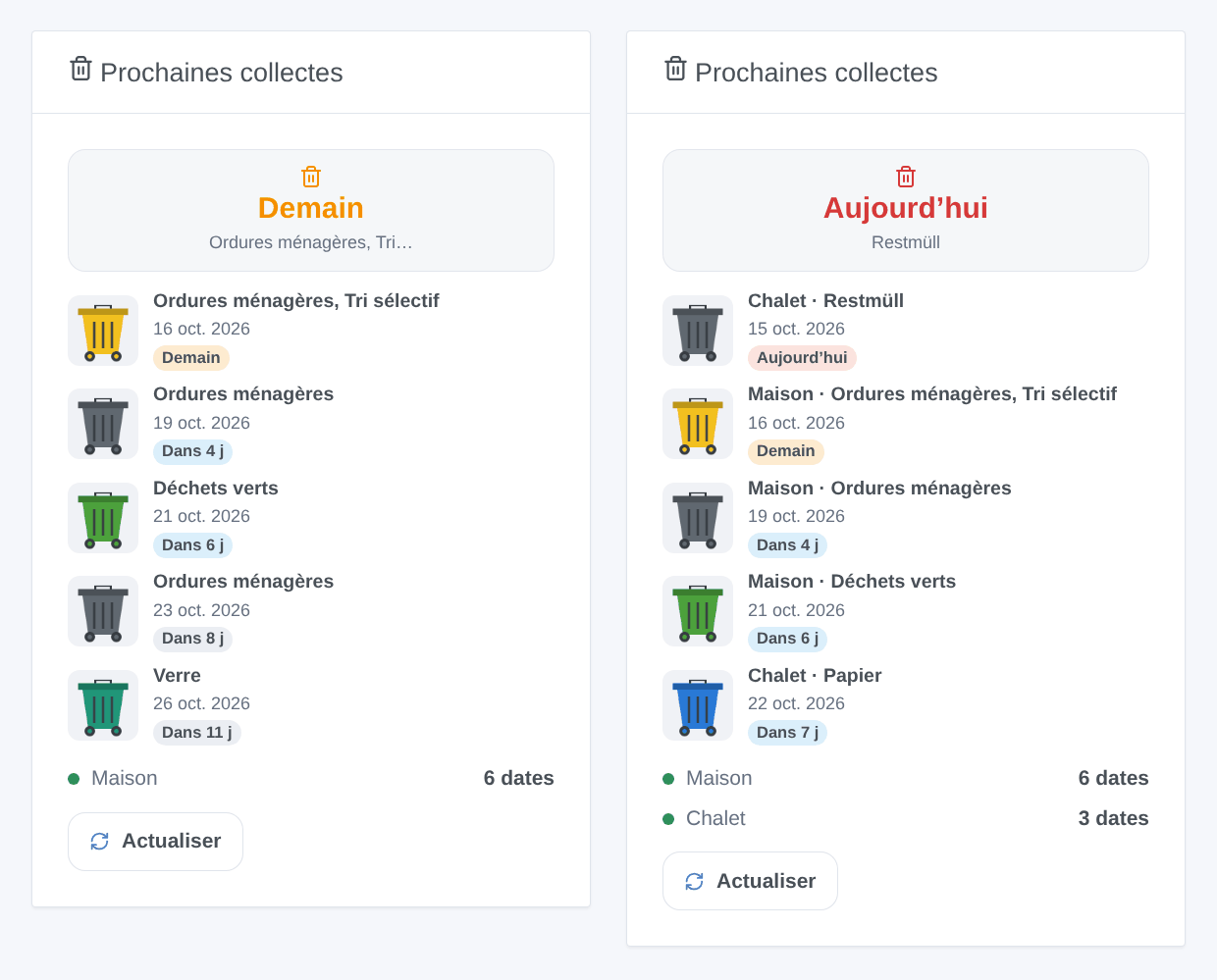
Next Collections widget, scene triggers collection tomorrow (evening reminder), type of waste collected tomorrow, collection today and update failure, actions read next collection and update dates, up to three sources.
- Waste collection tomorrow → message « Tomorrow: {{triggerEvent.data.waste_types}}, remember to take out the bins ».
- Type of waste collected tomorrow, « Glass » → the entrance light turns green for 10 minutes.
- Gladys calendar trigger, 30 minutes before the « Sorting » event → a reminder to the household.
All features
- Up to three sources (second home, or a second source for the same address).
- Widget: the next collection, the next few days with a bin of the right color, the status of each source, a Refresh button.
- Configuration buttons Find a source (by municipality, organization or country) and Test calendars.
- Rename and hide waste types; texts in French, English, German and Spanish.
- A reminder is only sent once per collection, even after a restart. The widget and triggers work even if no one activates the calendar.
Installation
Available in the store later today, pending indexing (or now from the repository URL: Integrations → Install an integration). Gladys 5.2.0 minimum.
- Configuration → Find a source with the name of your municipality: the response gives the source and the arguments to copy.
- Enter the source, its arguments (for example
{"city": "Bordeaux", "address": "20 Cours Pasteur"}) and a name, save, then Test calendars. - Each user clicks on Enable for me in My calendars (and Share with the household to use it in scenes).
- Add the widget to a dashboard.
In pictures
Technical operation
A Node.js container (Gladys SDK) launches for each update a short Python process that executes the Waste Collection Schedule source, one at a time (256 MB for the whole). The calendars are republished when the source changes and once a day (35-day window in the past to 400 days in the future). Automatic release by Conventional Commits, multi-architecture image published before the manifest announces it, and a workflow that proposes each new version of Waste Collection Schedule.
Known limitations
- Tested in real life with only a few sources (Bordeaux Métropole, Nantes Métropole, an ICS stream). A broken source in Waste Collection Schedule is also broken here.
- No devices: the « days remaining » are obtained with the scene action « Read next collection ».
- The arguments are entered in JSON (or
key=value): « Find a source » helps, but it is not a step-by-step assistant.
Your feedback
Here or in a GitHub issue, with the versions of Gladys and the integration, the source and the logs (ideally with DEBUG=gladys-integration-sdk).
Apache 2.0 license. Thanks to Steffen Zimmermann and the contributors of Waste Collection Schedule.


 (Grand Sud Tarn et Garonne)


