Well, in any case on my side, I really like the result. And combined with the other adjustment to rounding, it’s going to be great!
I’ll prepare that for you…
@pierre-gilles, I think you should replace the end of your code with this:
    // Optional: Constrain the step size
    const nbTheoreticalStep = (maxY - minY) / f;
    let stepSize = f; // Default step size

    // Adjust number of steps for better visuals
    if (nbTheoreticalStep > 5) {
      stepSize = f * 2;  // if too much steps, increase step size
    } else if (nbTheoreticalStep < 3) {
      stepSize = f / 2; // if too few steps, reduce step size
    }

    return { minY, maxY, stepSize };
@StephaneB It’s been updated!
Still at the same URL:
https://fix-chart-min-max.gladys-plus.pages.dev
Open to new feedback then 
It’s good on almost all my graphs. Except two, actually.
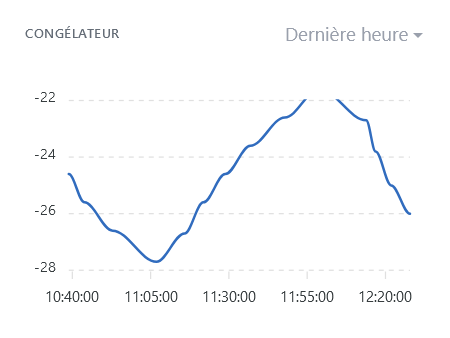
On this one, the graph is cut off at the top. But I know where it comes from: it’s a case where the theoretical number of steps is 7 and the adjustment makes it go to 3.5, and that causes an issue… I’m looking into it to suggest a code fix
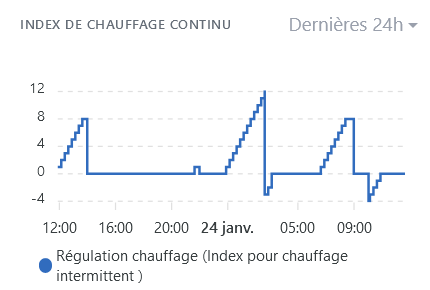
On that one, however, I don’t understand how the calculation results in a scale -4;0;4;8;12. It’s neat, but with the code I expected -10;0;10;20. I’ll try to understand, and I’ll get back to you…
@pierre-gilles For the first chart, the code below should be better. Basically, when the amplitude of the x-axis is not an exact multiple of the step, we ‹ shift › the x-axis range up or down.
    // Optional: Constrain the step size
    const nbTheoreticalStep = (maxY - minY) / f;
    let stepSize = f; // Default step size

    // Adjust number of steps for better visuals
    if (nbTheoreticalStep > 5) {
      stepSize = f * 2;  // if too much steps, increase step size
	  if !(isInteger((maxY - minY) / stepSize) {
		// If the range is not a multiple of step size, minY or maxY must be adjusted.
		// Adjustement is choosen for a good centering of the graph
	    if ((maxY - maxVal) < (minVal - minY)) {
		  maxY = maxY + stepSize / 2;
		} else {
		  minY = minY - stepSize / 2;
		}
	  }
    } else if (nbTheoreticalStep < 3) {
      stepSize = f / 2; // if too few steps, reduce step size
    }

    return { minY, maxY, stepSize };
@pierre-gilles, I just went through the ApexCharts options. Wouldn’t what we’re coding here actually have been handled directly by the ‹ forceNiceScale › option?
Another detail: if the graph’s values are negative and positive (I’ll take -28 to +26 as an example), we’ll have the following values on the axis: -30 -10 10 30. And I think it’s a shame not to see zero.
My favorite AI tool tells me we can do this with annotations (to have a light dashed line at y=0):
var options = {
  // ... other chart options ...
  annotations: {
    yaxis: [{
      y: 0,
      borderColor: '#00E396',
      strokeDashArray: 5, // Creates a dashed line
      borderWidth: 1,     // Line thickness
      opacity: 0.7,       // Line opacity (optional)
      label: {
        show: false       // Hides the label
      }
    }]
  }
};
What do you think?
The idea would be to add it only if minY is negative and maxY is positive, because it’s not useful if everything is ‹ far › from zero…
I just tested forceNiceScale, I don’t see any difference with the option currently in prod!
Your code isn’t valid, for your information here is the code currently on the PR:
calculateYAxisRange = () =\u003e {
    const { series } = this.props;
    // Extract all values from all series
    const allValues = series.flatMap(serie =\u003e serie.data.map(([, value]) =\u003e value));

    const minVal = Math.min(...allValues);
    const maxVal = Math.max(...allValues);

    const range = maxVal - minVal;
    const f = Math.pow(10, Math.floor(Math.log10(Math.abs(range)))); // Scaling factor

    const minY = Math.floor(minVal / f) * f;
    const maxY = Math.ceil(maxVal / f) * f;

    // Optional: Constrain the step size
    const nbTheoreticalStep = (maxY - minY) / f;
    let step = f; // Default step size

    // Adjust number of steps for better visuals
    if (nbTheoreticalStep \u003e 5) {
      step = f * 2; // if too much steps, increase step size
    } else if (nbTheoreticalStep \u003c 3) {
      step = f / 2; // if too few steps, reduce step size
    }

    return { minY, maxY, step };
  };
I’d like you to modify this piece of code and then send it to me
PS: too bad you can’t test directly ^^ I don’t know if you have a Github account, but you can launch a Gladys environment with a single click from Github, that would avoid the back-and-forth
This time, it should work. I tested in Codepen, and spotted my 3 mistakes 
calculateYAxisRange = () => {
    const { series } = this.props;
    // Extract all values from all series
    const allValues = series.flatMap(serie => serie.data.map(([, value]) => value));

    const minVal = Math.min(...allValues);
    const maxVal = Math.max(...allValues);

    const range = maxVal - minVal;
    const f = Math.pow(10, Math.floor(Math.log10(Math.abs(range)))); // Scaling factor

    let minY = Math.floor(minVal / f) * f;
    let maxY = Math.ceil(maxVal / f) * f;

    // Optional: Constrain the step size
    const nbTheoreticalStep = (maxY - minY) / f;
    let step = f; // Default step size

    // Adjust number of steps for better visuals
    if (nbTheoreticalStep > 5) {
      step = f * 2;  // if too much steps, increase step size
      if (! Number.isInteger((maxY - minY) / step)) {
        // If the range is not a multiple of step size, minY or maxY must be adjusted.
        // Adjustement is choosen for a good centering of the graph
        if ((maxY - maxVal) < (minVal - minY)) {
          maxY = maxY + step / 2;
        } else {
          minY = minY - step / 2;
        }
      }
    } else if (nbTheoreticalStep < 3) {
      step = f / 2; // if too few steps, reduce step size
    }

    return { minY, maxY, step };
};
I have a GitHub account, created when you asked me to open an issue but I haven’t done anything else with it.
When you say ‹ launch a Gladys environment in one click ›, is that to get a dev environment to run on my Windows computer, or is it a full online ‹ sandbox ›?
Actually, the computer isn’t mine but my company’s, I can’t install quite whatever I want on it
Tinkering with little things online (like here for example this bit of code, by testing it in codepen.io, I can do that…)
Thanks! I just updated the PR, this is how it looks with the data you gave me:
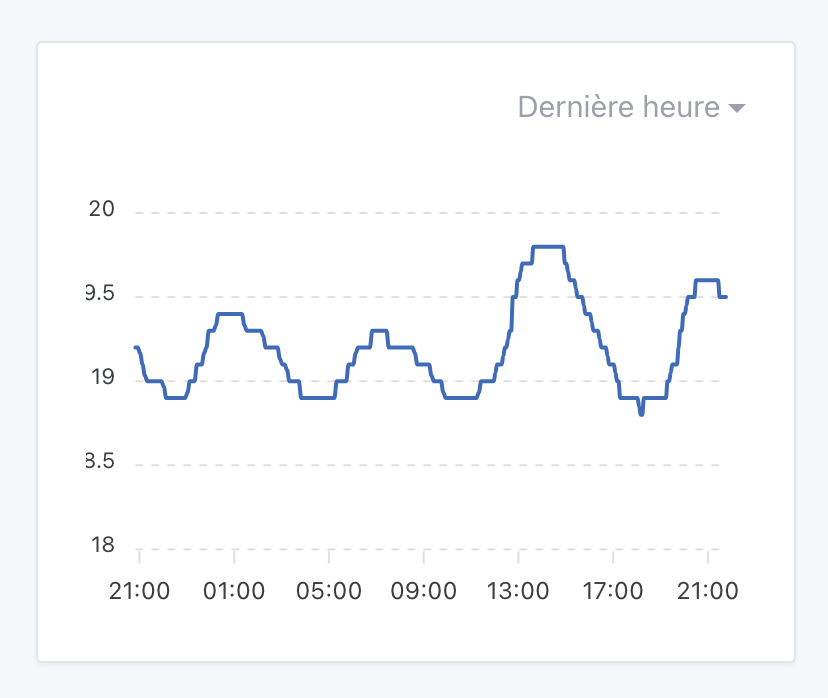
Still available at the same URL: https://fix-chart-min-max.gladys-plus.pages.dev
It’s a development environment entirely in the browser, like CodePen. It’s called « GitHub Codespaces », there is a free plan with 120 core-hours free per month
The Gladys repo is well configured to support this tool; it launches in one click here:

Then you’ll end up in a VS Code in your browser, and it’s a ready-to-go environment that lets you do the same as locally (all dependencies are already there)
Everything is explained in the Gladys documentation:
Otherwise, I recommend the live coding sessions I did on YouTube, where I explain on video everything I do
[quote=« pierre-gilles, post:32, topic:9297 »]
It’s a dev environment entirely in the browser, like CodePen. It’s called « GitHub Codespaces », there’s a free plan with 120 core-hours free
Tested with your URL (very handy, by the way!), and it renders all those charts really well with readable scales!! In my opinion, it’s ready to be merged
It’s good for me (electricity, temperature, air quality) over several time intervals 
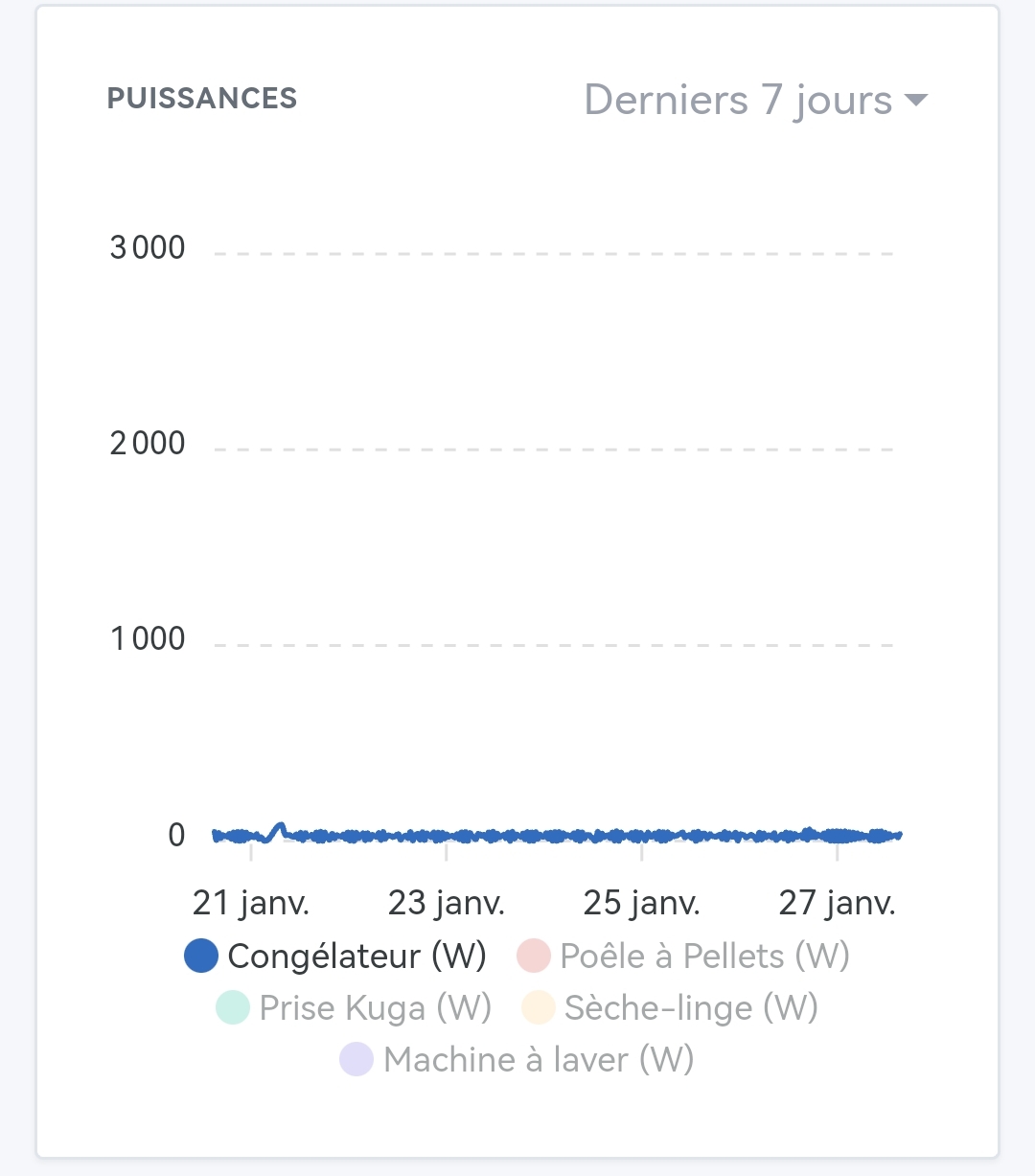

Indeed, previously this was handled by ApexChart but now we have to re-code that whole behavior since we’re manually managing the min/max. There is a legendClick event that allows doing that.
I’m willing to take care of redoing everything, but I’m starting to ask myself: is what we’re doing really useful? 
I feel like we’re re-coding externally everything ApexChart already does, and for now I admit I’m just copy-pasting what @StephaneB gives me without questioning it, but at the moment I see almost no difference with what’s in prod ^^
@StephaneB does what you propose really seem better to you?
I still haven’t understood what the problem actually was.
Some examples of charts that I find are really more readable, because the y-axis has become ‹ logical › :
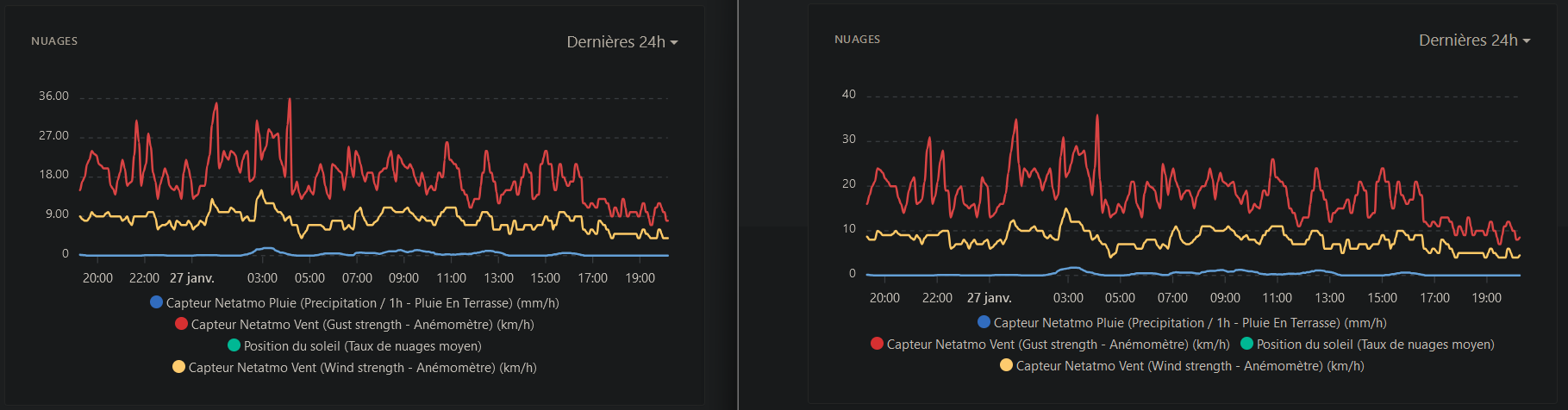
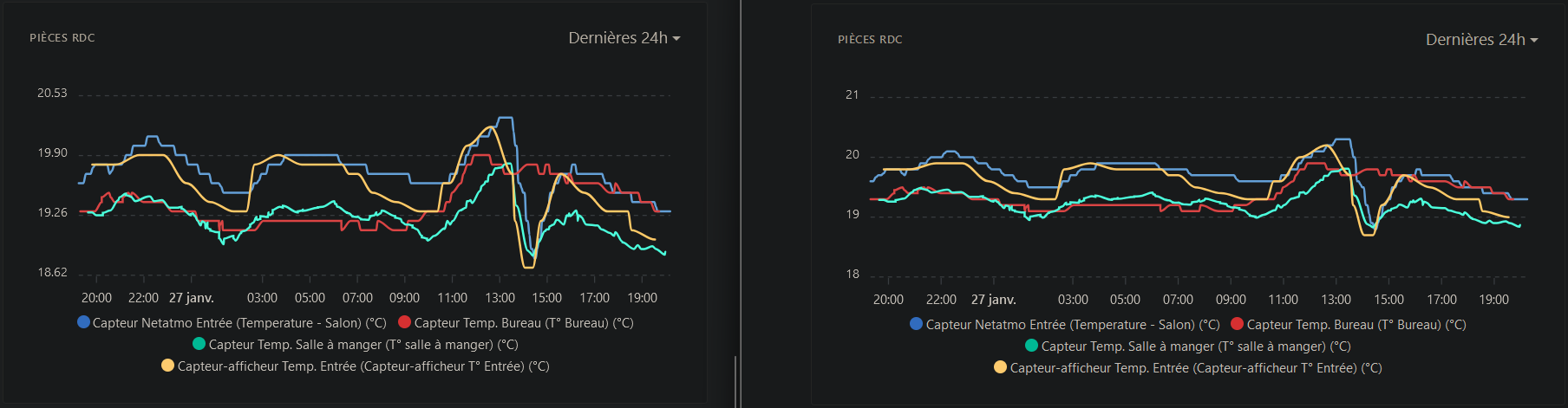
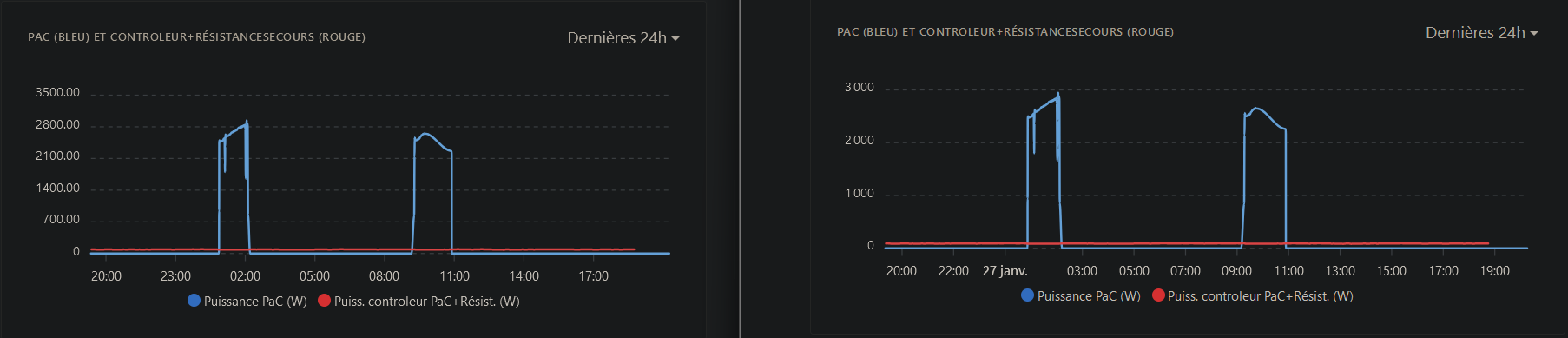


I hardly ever remove curves. When I have a case like the one @GBoulvin shows, with devices that aren’t at all on the same scale of values, I prefer to make two graphs so they remain readable.
But I of course understand the concern…
If on the left it’s prod, you’re comparing two different things there so it’s hard to compare. I’ve made