I tried to install a Sonoff Zigbee dongle and use the Zigbee2mqtt service but it doesn’t seem to be working:
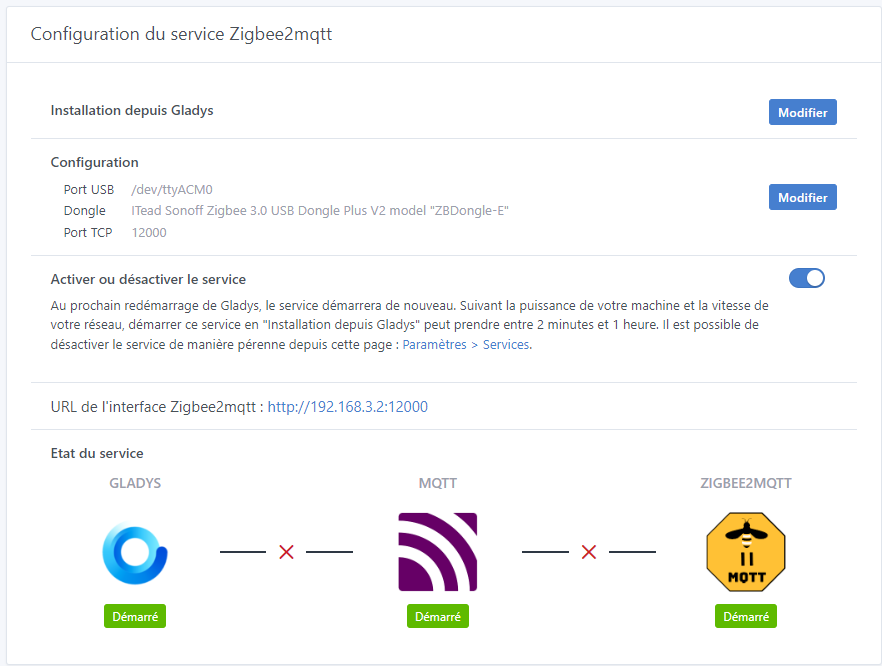
The configuration page http://192.168.3.2:12000/ is also unavailable…
What can I do?
I tried to install a Sonoff Zigbee dongle and use the Zigbee2mqtt service but it doesn’t seem to be working:
What can I do?
docker logs gladys-z2m-zigbee2mqtt
[2024-08-02 14:09:01] info:     z2m: Logging to console, file (filename: log.log)
[2024-08-02 14:09:01] info:     z2m: Starting Zigbee2MQTT version 1.39.1 (commit #e132316)
[2024-08-02 14:09:01] info:     z2m: Starting zigbee-herdsman (0.55.3)
[2024-08-02 14:09:03] warning:  zh:ezsp: Deprecated driver 'ezsp' currently in use, 'ember' will become the officially supported EmberZNet driver in next release. If using Zigbee2MQTT see https://github.com/Koenkk/zigbee2mqtt/discussions/21462
[2024-08-02 14:09:03] error:    zh:ezsp:uart: Error: <-- CRC error: bf7e|bf|ffff
[2024-08-02 14:09:03] error:    zh:ezsp:uart: Error while parsing to NpiFrame 'Error: <-- CRC error: bf7e|bf|ffff
    at Frame.checkCRC (/app/node_modules/zigbee-herdsman/src/adapter/ezsp/driver/frame.ts:87:19)
    at SerialDriver.onParsed (/app/node_modules/zigbee-herdsman/src/adapter/ezsp/driver/uart.ts:167:19)
    at Parser.emit (node:events:517:28)
    at Parser._transform (/app/node_modules/zigbee-herdsman/src/adapter/ezsp/driver/parser.ts:50:26)
    at Parser.Transform._write (node:internal/streams/transform:175:8)
    at writeOrBuffer (node:internal/streams/writable:392:12)
    at _write (node:internal/streams/writable:333:10)
    at Parser.Writable.write (node:internal/streams/writable:337:10)
    at SerialPort.ondata (node:internal/streams/readable:809:22)
    at SerialPort.emit (node:events:517:28)'
[2024-08-02 14:09:07] info:     z2m: zigbee-herdsman started (resumed)
[2024-08-02 14:09:07] info:     z2m: Coordinator firmware version: '{"meta":{"maintrel":"3 ","majorrel":"6","minorrel":"10","product":8,"revision":"6.10.3.0 build 297"},"type":"EZSP v8"}'
[2024-08-02 14:09:07] info:     z2m: Currently 0 devices are joined:
[2024-08-02 14:09:07] info:     z2m: Zigbee: disabling joining new devices.
[2024-08-02 14:09:08] info:     z2m: Connecting to MQTT server at mqtt://localhost:1884
[2024-08-02 14:09:08] error:    z2m: MQTT error: Connection refused: Not authorized
[2024-08-02 14:09:08] error:    z2m: MQTT failed to connect, exiting...
[2024-08-02 14:09:08] info:     z2m: Stopping zigbee-herdsman...
[2024-08-02 14:09:09] info:     zh:controller: Wrote coordinator backup to '/app/data/coordinator_backup.json'
[2024-08-02 14:09:09] info:     z2m: Stopped zigbee-herdsman
Using '/app/data' as data directory
Starting Zigbee2MQTT without watchdog.
docker logs gladys-z2m-mqtt
1722607922: New connection from ::1:59344 on port 1884.
1722607922: Client gladys-main-instance-816862 disconnected, not authorised.
1722607924: New connection from ::1:59346 on port 1884.
1722607924: Client mqttjs_e19f996c disconnected, not authorised.
Hello @pierre-gilles !
The dongle is out of the box, I haven’t touched the firmware…
Do I need to update it?
(Otherwise I had chosen the wrong dongle at first; I chose the P and switched to the E which is the right one…)
That might be a lead ^^
The Zigbee2mqtt website can be a good source of advice: https://www.zigbee2mqtt.io/
Their forum too: Koenkk/zigbee2mqtt · Discussions · GitHub
The GitHub issues: GitHub · Where software is built
Which hardware are you on otherwise?
The USB port needs to be properly powered (Pi ports are sometimes underpowered, for example)
Ah! There’s a good chance that’s it — I’m on a Raspberry Pi 3…
You have all of Zigbee2mqtt’s advice on this page:
https://www.zigbee2mqtt.io/guide/installation/20_zigbee2mqtt-fails-to-start.html
You have, in particular, this advice for Raspberry Pi:
dmesg | grep volt doesn’t return anything for me…
Some things to try:
OK I’ll look into that, thanks!
By the way, is it normal to have the « unauthorised connection » entries in the different logs?
Ah, you’re right, I hadn’t gone further than the first issue!
In fact that might be the problem, it looks a lot like another recent issue I saw here:
You may have put Zigbee2mqtt into an unstable state by selecting the wrong dongle, maybe purging everything to start from scratch would be wiser:
Ok thanks, I’m on it ^^
That was it! :

