Let's talk about Gladys V4

@pierre-gilles

I just thought of something, indeed when you arrive on the xiaomi service or others you don’t necessarily know how it works. It would be great to plan tutorials (either on the page or on a website). The tutorial allows the user to understand how to set up the service and especially for Xiaomi the developer mode on the gateway for example.

It would be necessary to perhaps plan this possibility on the front but I don’t know how yet.

This is already the case :slight_smile: To be updated with v4, but basically we have this page on the site:

https://gladysassistant.com/fr/compatibilities/

It’s crowdsourced, you have a spreadsheet editable by everyone, I trust the community :slight_smile:

For me it’s in the service. A good product should have a solid onboarding, no need to send the user to tutorials. The Xiaomi is so simple as a service, everything can be in the onboarding.

We explain step by step: 1) put your Xiaomi gateway in developer mode, 2) etc…

Yes, I know this page.
I was thinking more within Gladys. But you may be right, we shouldn’t overload Gladys.

You can indeed link Gladys to this page, well spotted!

I don’t want to send them to tutorials from other sources or other pages but to have, for example, a small modal that allows following the global steps to initialize the gateway. This allows having something generalized to all other services. It’s an integrated feature.

Yes, that’s what I mean by « onboarding » :slight_smile: Not in a modal, but in a page (you’ll note there are no modals in Gladys 4 for now)

I’ll let you guess what we’re working on at @NilkOne right now! :wink:

Yes indeed, we can do that. For example, if no Xiaomi device is detected, put the tutorial on a dedicated page.

I’ll think about it on my side!

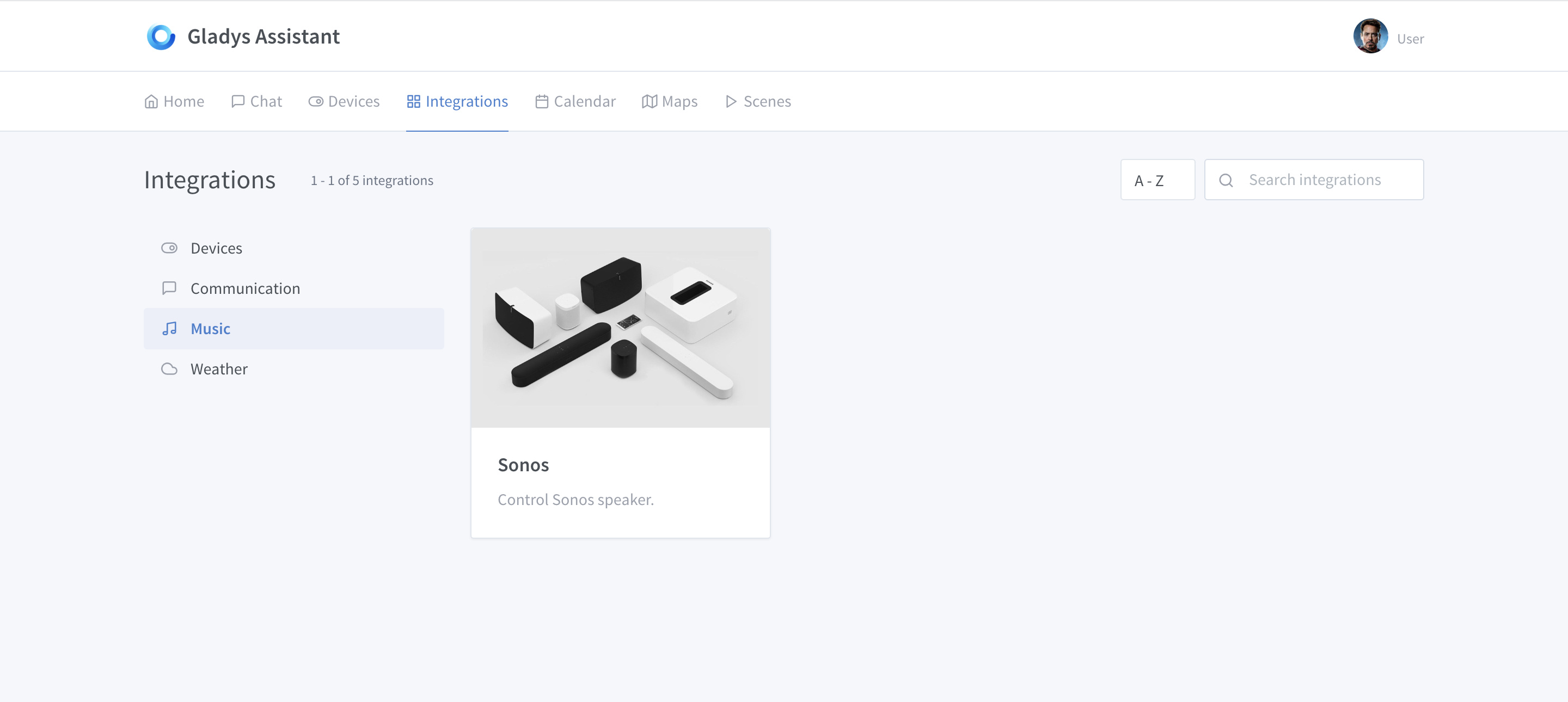
AAhhh ahhh the Sonos !!! :heart_eyes::heart_eyes::heart_eyes:

I don’t know how Xiaomi 360 works, if you ever find out how to make them compatible, let us know :slight_smile:

I’m happy!! (With a Toulouse accent)

Hello,

It seems to me that there was a place where this was mentioned but I can’t find it anymore.

Will the notion of scripts be taken up in gladys v4? I don’t see this part in the demo.

The script part will be a type of action in the scenes!

Indeed, for now, this is not yet developed.

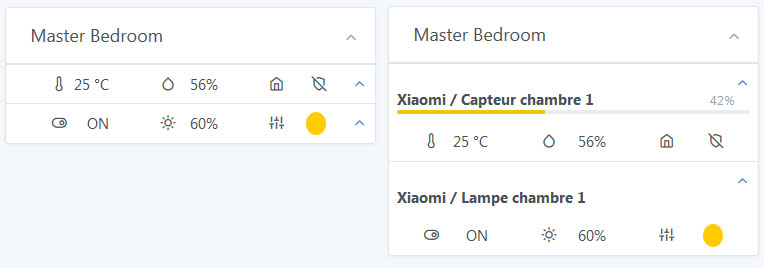
I did a rendering test this would give this

<div class="card " style="display: inline-block; min-width: 300px;">
  <div class="card-header">
    <h3 class="card-title">Master Bedroom</h3>
    <div class="card-options">
      <a href="" class="card-options-collapse" data-toggle="card-collapse">
        <i class="fe fe-chevron-up"></i>
      </a>
    </div>
  </div>
  <div class="border-top p-2">
    <a href="#collapseName1" class="float-right" data-toggle="collapse"><i class="fe fe-chevron-up"></i></a>
    <div id="collapseName1" style="margin:1rem 0;" class="collapse show">
      <div class="device-title">
        <div class="clearfix">
          <div class="float-left"><strong>Xiaomi / Bedroom Sensor 1</strong></div>
          <div class="float-right">
            <small class="text-muted">42%</small>
          </div>
        </div>
        <div class="progress progress-xs">
          <div class="progress-bar bg-yellow" role="progressbar" style="width: 42%" aria-valuenow="42" aria-valuemin="0" aria-valuemax="100"></div>
        </div>
      </div>
    </div>
    <div class="container">
      <div class="row justify-content-around">
        <div class="col-3">
          <i class="fe fe-thermometer"></i><span class="float-right">25 °C</span>
        </div>
        <div class="col-3">
          <i class="fe fe-droplet"></i><span class="float-right">56<span>%</span></span>
        </div>
        <div class="col-3">
          <i class="fe fe-home"></i><span class="float-right"><i class="fe fe-shield-off"></i></span>
        </div>
      </div>
    </div>
  </div>
  <div class="border-top p-2">
    <a href="#collapseName2" class="float-right" data-toggle="collapse"><i class="fe fe-chevron-up"></i></a>
    <div id="collapseName2" style="margin:1rem 0;" class="collapse show">
      <div class="device-title">
        <div class="clearfix">
          <div class="float-left"><strong>Xiaomi / Bedroom Light 1</strong></div>
        </div>
      </div>
    </div>
    <div class="container">
      <div class="row justify-content-around">
        <div class="col-3">
          <i class="fe fe-toggle-right"></i><span class="float-right">ON</span>
        </div>
        <div class="col-3">
          <i class="fe fe-sun"></i><span class="float-right">60<span>%</span></span>
        </div>
        <div class="col-3">
          <i class="fe fe-sliders"></i><span class="float-right"><div style="background-color:rgb(255,204,0);" class="w-100 px-2 rounded-circle">&nbsp;</div></span>
        </div>
      </div>
    </div>
  </div>
</div>

Since I don’t have any Xiaomi devices, or any others for that matter,
(just my own http peripherals)
I don’t know all the possible actions.
I don’t see how to visually represent them (the action itself)
the box expands to display the command… not convinced

yes I agree

Why not like a dimmer but I don’t see how to visually represent them (the action itself)

Do you think we should have a box for Yeelight, another for Hue, and another for MiLight? I imagined that a light box could manage any technology, but maybe that’s not possible.

Hue, saturation, brightness would make 3 bars :D. When you click on the settings button of your box, couldn’t it display 3 progress bars to adjust the color? After all, there’s also the color in Kelvin that can vary on some bulbs I think ^^

@luke, @Jacky why do you need to display the battery level on the main dashboard?
I understand having it available in the « Xiaomi » view or getting a notification when the battery is low, that’s very useful, but on the dashboard box I struggle to understand the need. What is your use case?

Since I don’t have any peripherals, I suggest a view based on the comments.
For @VonOx, the battery level is important.
I think indicating it only when the level is low is sufficient.

For a visual where there is only the room title + a lamp (so small visual), I have trouble seeing where to put, how to display the 2 or 3 bars (a finger takes up space)
modal: no
the box that expands?

I like what Apple has done on HomeKit, it opens a kind of full-screen control (in this case, it’s a bit of a modal), and it allows for more complete control

I also think it’s not very useful. The battery, it’s useful to know when you need to change it, the rest of the time what’s the point of knowing that you went from 97% to 96%? As long as there is an alert when the battery is low, otherwise it’s not necessarily useful.

I also think we benefit from making a generic box. Except in certain specific cases, the interest of Gladys is to group the uses and have a unified experience.

In terms of rendering, I always like the idea of grouping but I’m not a fan of the placements, it needs to remain light and clean.

I totally agree with you!

Yes, I also think that’s too much. That’s why I suggested another panel for the configuration.

Uh… Don’t take it the wrong way… I’m just trying to understand your needs. I thought Luke also needed it, that’s why I was asking both of you.