I find Helldog’s proposal very interesting
Hello everyone, the CalDAV service is almost ready, I’m finishing the last fixes and it should be good soon. The service allows you to configure and test synchronization with a CalDAV calendar, but I have a question for you about regular synchronization. On Gladys 3, we had a cron job that launched a synchronization script every x minutes, do we keep this system with the scenarios or do we do it differently? Since this question is not specific to CalDAV, we need to find a unique way with the future other calendar services.
@bertrandda: Great! 
No! In Gladys 4, we have a turnkey solution that works out of the box, clean.
In the first instance, you can set a setInterval on the service side with a fixed synchronization time. If the synchronization frequency is really important, you can create an optional variable where you store the synchronization frequency, with a select box in the CalDav service configuration.
In Gladys 4, we then have a « scheduler » (in server/lib/scheduler), to see if it wouldn’t be worth using it instead of the setInterval to stay consistent. After that, in the first instance, the setInterval is very good.
- Hi @pierre-gilles, if I remember correctly, this summer you went to a member’s place and you worked on Sonos speakers, where did that go?
Is the service still in development?
- Do you know the Delta Dore modules?
The X3D radio technology is a radio communication protocol created and patented by Delta Dore. Compliant with European standards, the radio frequency used (868 MHz)
Could this service be interesting for Gladys?
Last question
- I wanted to talk about Snips to find out if the service could be adapted for Gladys but as the company has just been acquired by Sonos, what will happen to it.
I haven’t read anything on their website that informed about the shutdown of the online service.
What are the other alternatives?
My questions are not trivial, these are three services that I would like to see in Gladys.
Hello,
Normally, it works.
Have you created a weather widget on the dashboard?
As indicated in the error, you need to specify the house in the widget configuration (Dashboard > Edit > Weather > Select a house)
Indeed, I started a Sonos service in July, but it’s a bit dead for now! I’m currently working on Z-Wave, multi-user in Gladys 4, and scenes which are my priorities for the moment.
If someone wants to take the lead on the development of the Sonos service, I’m interested
For now, we don’t know, the announcement is very recent. Let’s see what Sonos announces in the coming months. I don’t know of any alternatives to the level of Snips, but it’s certain that forks will emerge so that the project continues to live even after this acquisition 
Oh? Ok I’ll check, maybe it’s a bug. Bug referenced here:
In JavaScript, objects are passed by reference, so when we update the feature object, it should update on the device side (well, except for bugs, I’ll check what’s wrong)
Hello everyone,
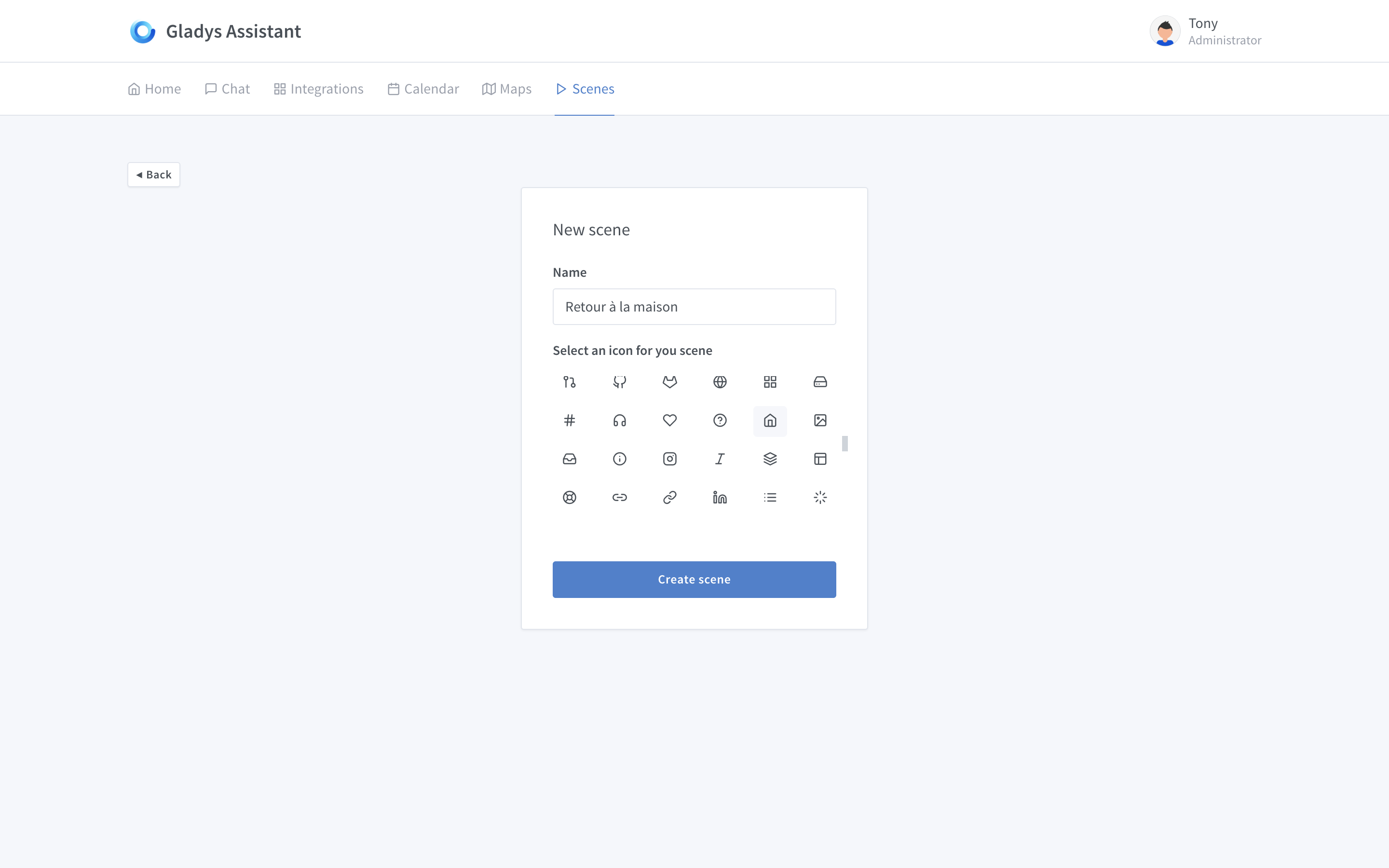
I’m currently working on the Scene view, and I wanted to share my progress with you!
Scene Creation:
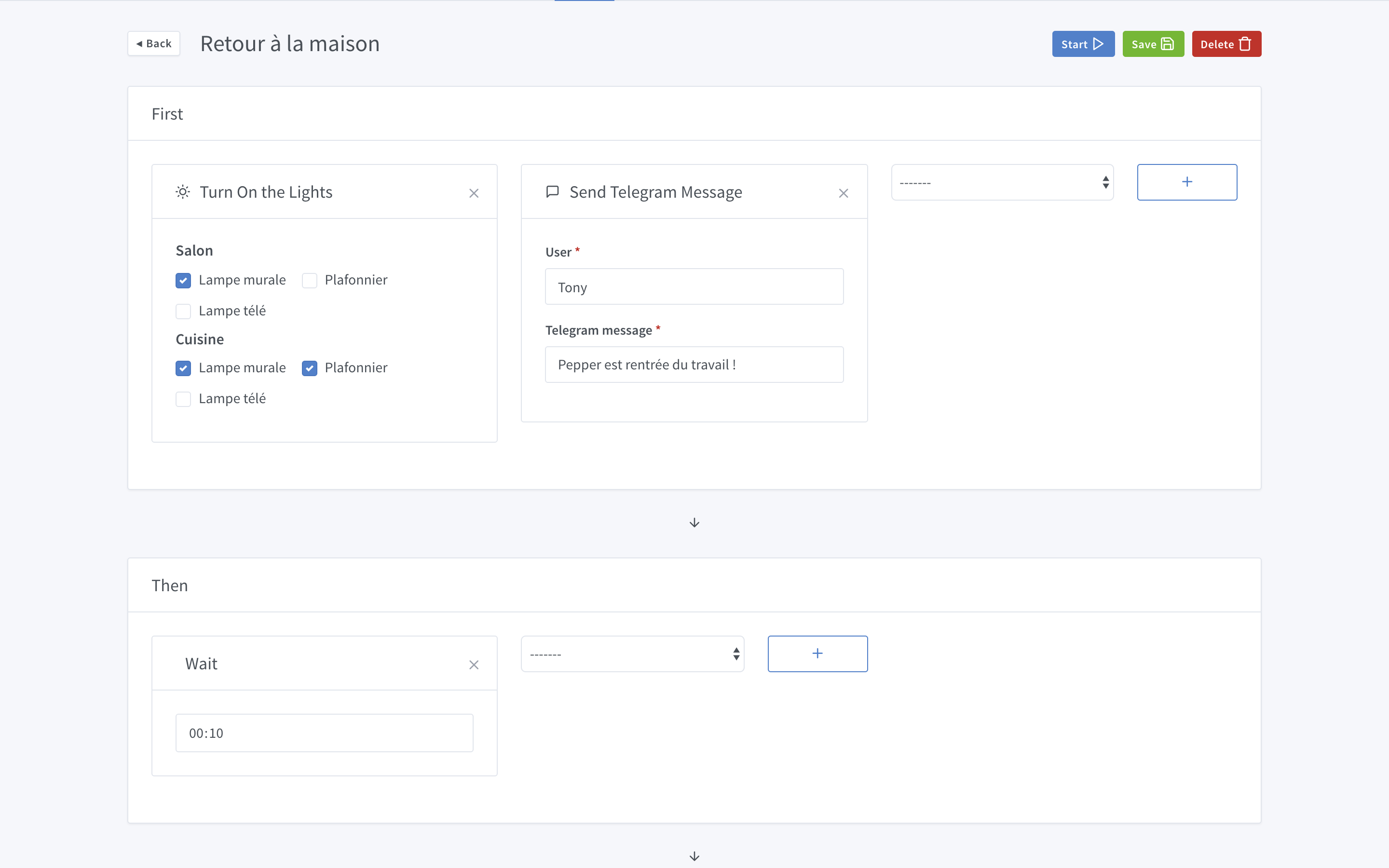
Scene Editing
I would like your feedback:
- Is it easy to understand how this UI works?
- Can you describe what the scenario does according to you?
- Does it look tech/programming, or is the interface user-friendly?
- Does this scenario editor seem powerful to you? (I mean, does it seem to offer rich features or does it seem limited?)
I admit I don’t see what the wait is for.
For me, it’s a scene that turns on lights and sends a Telegram message. We wait 10 minutes and nothing 
Ok,
turn on the living room and kitchen lamps and send a message to Tony.
What triggers the scenario?
Can we choose? (motion sensor, camera with facial recognition ‹ Netatmo ›, NFC badge,…)
I don’t understand the Then interface with the Wait 10 mins.
Ah, I have another idea:
When you turn on the wall lamp in the living room or the wall lamp or the ceiling light in the kitchen, it sends a message to Tony via Telegram.
But the Then, I don’t know.
What is in the dropdown menu? What will be there?
What is the difference between first and then?
In theory, do tasks in the same box run in parallel or in series?
The « back home » scenario turns on the wall lamp in the living room and kitchen as well as the kitchen ceiling light. In parallel, Tony receives a message indicating that Pepper is home.
I would say simplified tech. You can feel the logical sequence of actions.
Yes and no, on one hand, you can easily put a lot of things in it, but I also feel it can quickly become unreadable:
If you have 10 rooms with 2+ lamps each, the tile will be huge.
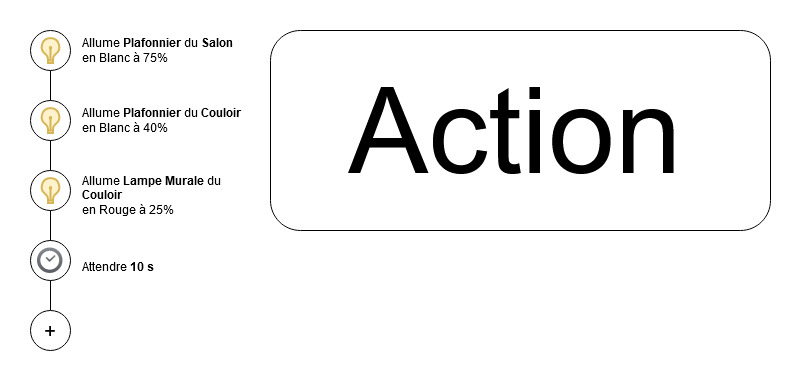
Otherwise, you can also imagine a system with a single tile to set the steps (similar to the one you propose) and a kind of vertical timeline on the side? By clicking on an element of the timeline, you can modify it.
Example in diagram:
I love your suggestion @peb (let’s see what can be done on the click of the « + ») and I’m really struggling with your design and its functionality @pierre-gilles.
@pierre-gilles your solution seems to turn on lights and send a notification, then wait 10 minutes. Why wait 10 minutes? Unless you send the notification after waiting 10 minutes? Anyway, it’s not clear to me ^^ We are still very far from the IFTTT style we were talking about the other day.
Voici la réponse!
- The first action group turns on 3 lights and sends a Telegram message
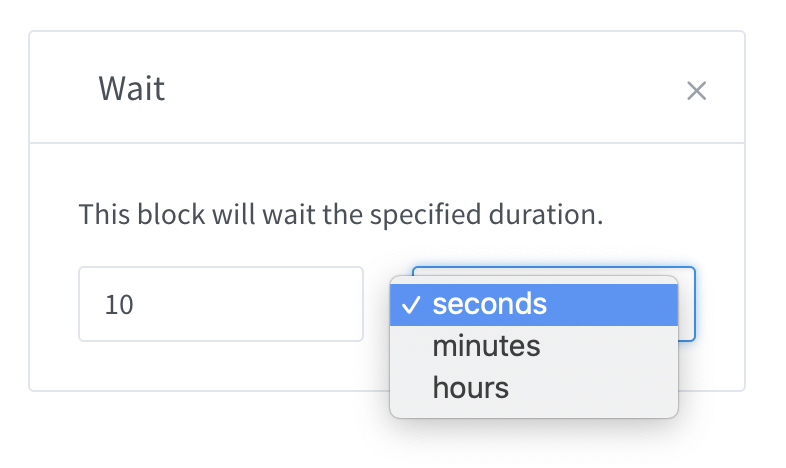
- The second group has a « wait » block that waits for 10 seconds (yes, my bad, I didn’t include the unit, it’s a first draft!)
- The third group wasn’t visible, my screen isn’t big enough for that ^^ I thought the arrow at the bottom would give you a hint but apparently not
The idea of the scenario was to have 2 actions with a waiting time between them
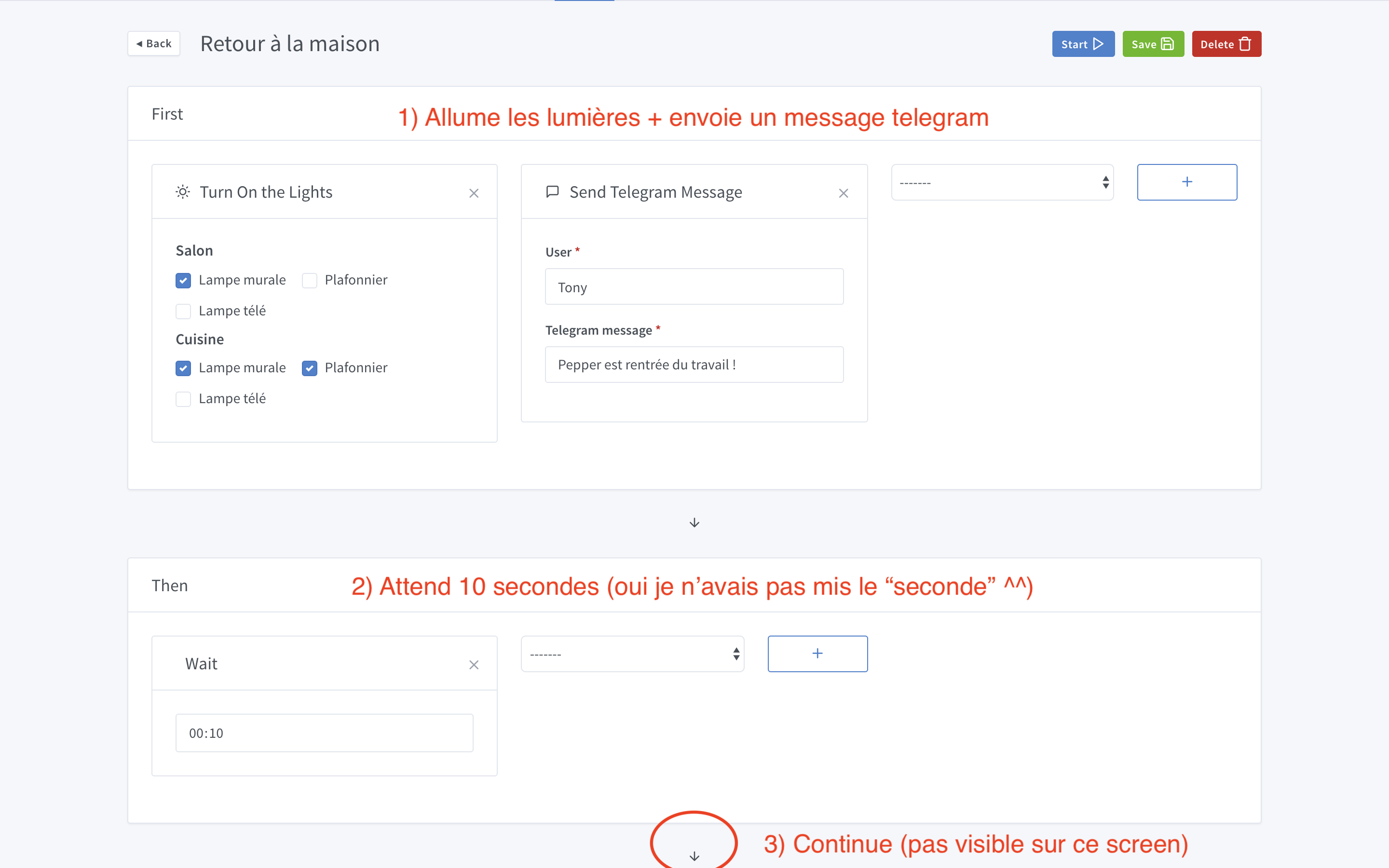
Nothing here, it’s a « scene » and not a scenario. For example, you can have a « cinema mode » scene, but you don’t necessarily have a trigger. You just want to be able to launch the scene in Gladys or by saying to Gladys « Launch the cinema mode » when you need it.
I don’t know yet where I will integrate the notion of « trigger » to trigger this scene, it’s not done yet. Maybe I will add an optional block before the action groups.
I am inspired a lot by Zapier.
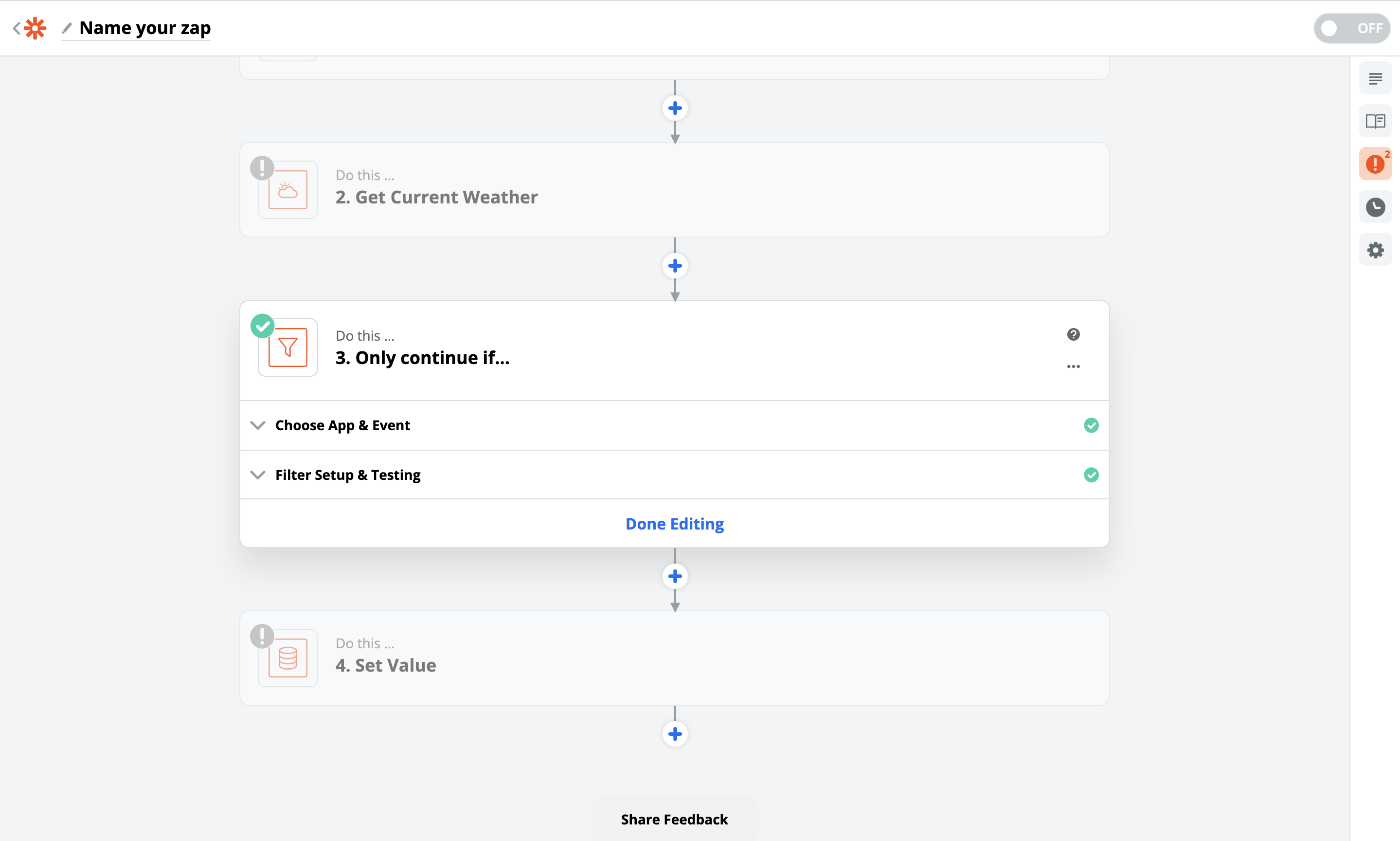
These are the types of actions to add an action! I’m not a fan of the current behavior either, I’ll try to find a cleaner way to do it, if someone has a suggestion.
Okay, the translations may not be very explicit. Maybe « Do » on each action group is more explicit.
In an action group, tasks are executed in parallel. Then, each action group in series is executed in series. (Hence the arrows in the UI, it’s sequential)
I agree with this box! I think we can plan a complete view of an action block, and a « compressed » view. I think for example of the action block « Execute a script », it would be impossible to code in this small box, it will be a separate view.
For information, here is the list of possible actions I see:
Your suggestion is interesting, but we lose the notion of tasks executed in parallel! I don’t know if it’s necessary though.
Example: You want a scenario that turns on the TV + dims the lights + cuts the music. You want everything to run in parallel, not sequentially. How to represent that in your representation?
I’m putting a small video that might be more explicit to understand:
I understand better with your explanation, I still don’t find the system simple but it seems to work.
Why not add a time and date peeker now, before getting lazy  ?
?
However, I’m not convinced by the design (but that’s just personal ^^)
Would parallel or sequential execution be noticeable in terms of timing in such a scenario?
If we don’t wait for an acknowledgment before moving on to the next task, I think everything runs « simultaneously ». Therefore, the notion of parallel tasks is not necessary.
On the other hand, if actions take time to execute or wait for acknowledgments before moving on, and there is a connection issue (with a timeout wait, for example), the scenario could get stuck on a task for a while. Therefore, launching actions in parallel is interesting to me.
@spenceur My expectations for Gladys 4 are high, the goal is not to « do the job », but to have the best system on the market. What do you see here that could be improved?
What aspects of the design bother you?
We wait for acknowledgments because there may be dependencies between tasks (tasks may pass information to each other)
As in Zapier, for example, you can fetch the weather:
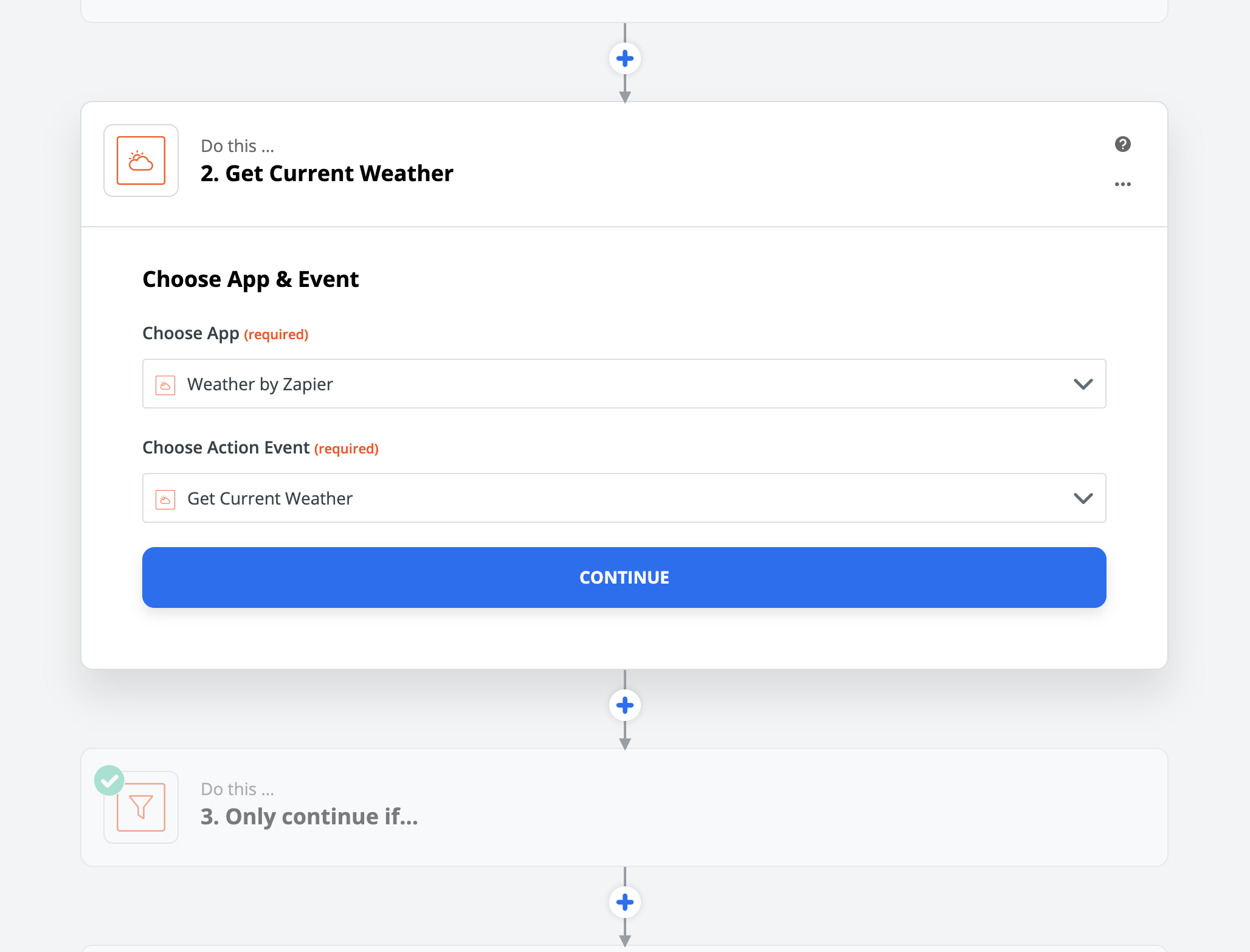
Then add a conditional block to continue the scenario only under certain conditions dependent on previous actions

For example, you could imagine a scene that:
- Every morning at 8:00 a.m. (trigger)
- Fetches the weather
- Sends a Telegram message with the weather retrieved in 2)
So if I want the lights to turn on or off in the morning when I wake up, depending on the brightness in my living room… would this be possible in this way?
Because, in fact, it’s for this kind of thing that I got interested in Gladys haha
For my part, I find the interface rather effective, the idea of scrolling to add steps seems very logical. At most, it would be necessary to highlight the arrows down (or display a « timeline » on the right for example)
Good job anyway, it’s coming along!!