Hizo
September 19, 2023, 8:22am
1
Hello,
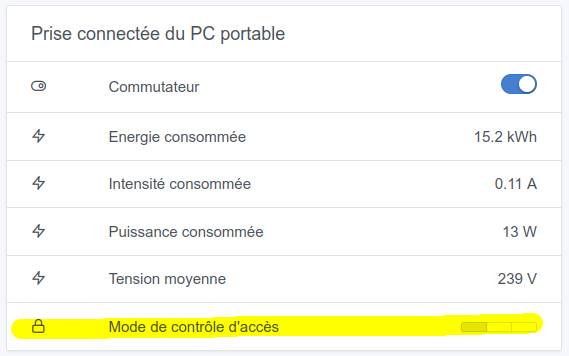
While reconfiguring a block for the smart plug, I just noticed there was « Access control mode ».
Questions :
It seems to be LOCK or UNLOCK, so why 3 positions ?
Isn’t the point of this kind of widget (segmented button) to display icons to switch between them ?
Because here, it’s not clear at all.
Hi @Hizo and thanks for your message!
Indeed that’s not clear at all.
It rather looks like the « power_outage_memory », right?
I’ll try to investigate — actually ideally I would need the « expose » of this device; I don’t know if there’s a way to retrieve it one way or another (maybe via MQTT explorer)?
guim31
September 19, 2023, 6:52pm
3
Otherwise you need to go to the z2m interface, operate the « power outage memory » from there, and observe whether this indicator changes (or not) on the Gladys dashboard. In my opinion it’s this feature too because it offers 3 states rather than 2 like the « child lock »
Ok thanks @Hizo ! Is this something you really need in Gladys then?
I’ll try to take a look, can you create a GitHub issue so I don’t forget?
Hizo
September 20, 2023, 7:34am
6
Not really necessary at the moment, but it’s always handy
ouvert 07:33AM - 20 Sep 23 UTC
fermé 11:49PM - 04 Dec 23 UTC
zigbee2mqtt
stale
**Describe the bug**
The « Mode de contrôle d’accès » of the connected electric… al socket https://www.zigbee2mqtt.io/devices/TS011F_plug_1.html#child-lock-lock is a segmented button with 3 states but the child lock have only two state (LOCK or UNLOCK).
The name of the feature « Mode de contrôle d’accès » is not clear.
**Screenshots**
Before


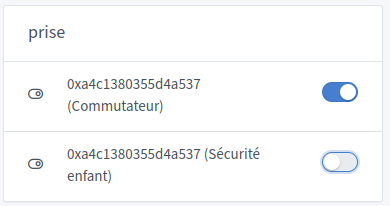
After


**Your Gladys installation (please complete the following information):**
- Manual installation: Linux
**Desktop (please complete the following information):**
- OS: Ubuntu 22.04.3 LTS
- Browser : Mozilla Firefox
- Version : 117.0.1
**Additional context**
https://community.gladysassistant.com/t/prise-connectee-mode-de-controle-dacces/8366/4
Thanks for the GitHub issue @Hizo ! I’ll try to take a look, but I can’t guarantee anything in the short term. I’m not the developer of the Zigbee2mqtt integration, and it might be easy or it could be a big project.
If it’s a big project, I’d probably prioritize other more requested developments
Will_71
November 25, 2023, 12:48pm
8
Hi @Hizo ,
I should be able to do it. If I have the time I’ll look into it over the weekend or in the coming week.
Will_71
November 25, 2023, 11:01pm
9
I tested replacing the button.
However, I’m wondering whether I should leave the name Mode de contrôle d'accès or rename it to Sécurité enfant ?child_lock
guim31
November 26, 2023, 9:09am
11
Personally, I’m not a fan of child safety. Because it doesn’t necessarily concern children ^^Security or Lock
Will_71
November 26, 2023, 9:14am
12
For now I had only translated the presentation Child lock
Hizo
November 26, 2023, 5:48pm
13
It’s true that it’s not just about children, but at least it’s fairly clear…
Will_71
November 27, 2023, 9:29pm
15
So we agree then that I can delete the device Mode de contrôle d'accès? Because I don’t see the usefulness of this three-state button without any information about the actions.
Will_71
November 28, 2023, 10:08pm
18
@Hizo ,
Here is a Docker image if you want to trywillde71/gladys-test:zigbee2mqtt-childlock
@pierre-gilles ,
master ← William-De71:zigbee2mqtt-child-lock
ouvert 10:07PM - 28 Nov 23 UTC
### Pull Request check-list
To ensure your Pull Request can be accepted as fa… st as possible, make sure to review and check all of these items:
- [ ] If your changes affects code, did your write the tests?
- [ ] Are tests passing? (`npm test` on both front/server)
- [ ] Is the linter passing? (`npm run eslint` on both front/server)
- [ ] Did you run prettier? (`npm run prettier` on both front/server)
- [ ] If you are adding a new features/services, did you run integration comparator? (`npm run compare-translations` on front)
- [ ] Did you test this pull request in real life? With real devices? If this development is a big feature or a new service, we recommend that you provide a Docker image to the community ([french forum](https://community.gladysassistant.com/)/[english forum](https://en-community.gladysassistant.com/)) for testing before merging.
- [ ] If your changes modify the API (REST or Node.js), did you modify the API documentation? (Documentation is based on comments in code)
- [ ] If you are adding a new features/services which needs explanation, did you modify the user documentation? See [the GitHub repo](https://github.com/GladysAssistant/v4-website) and the [website](https://gladysassistant.com).
- [ ] Did you add fake requests data for the demo mode (`front/src/config/demo.js`) so that the demo website is working without a backend? (if needed) See [https://demo.gladysassistant.com](https://demo.gladysassistant.com).
NOTE: these things are not required to open a PR and can be done afterwards / while the PR is open.
### Description of change
https://github.com/GladysAssistant/Gladys/issues/1886
Replace access control mode by child lock binary feature in smart plug device.
Old feature:

New feature:

Thanks! I’m waiting for feedback from a real tester and then it’s fine with me!
Will_71
November 30, 2023, 10:37am
20
For my part I tested it in real conditions, but if someone else could do it as well that would be good