This Bluetooth bug occurs intermittently, we have a PR that will definitely fix it which is in progress:
Thank you very much for the reply. I’ll be patient then!
Have a nice day
Hello,
I’m coming back to this Bluetooth issue, which still doesn’t work for me. When I start a search for Bluetooth devices, the display goes into an infinite loop:
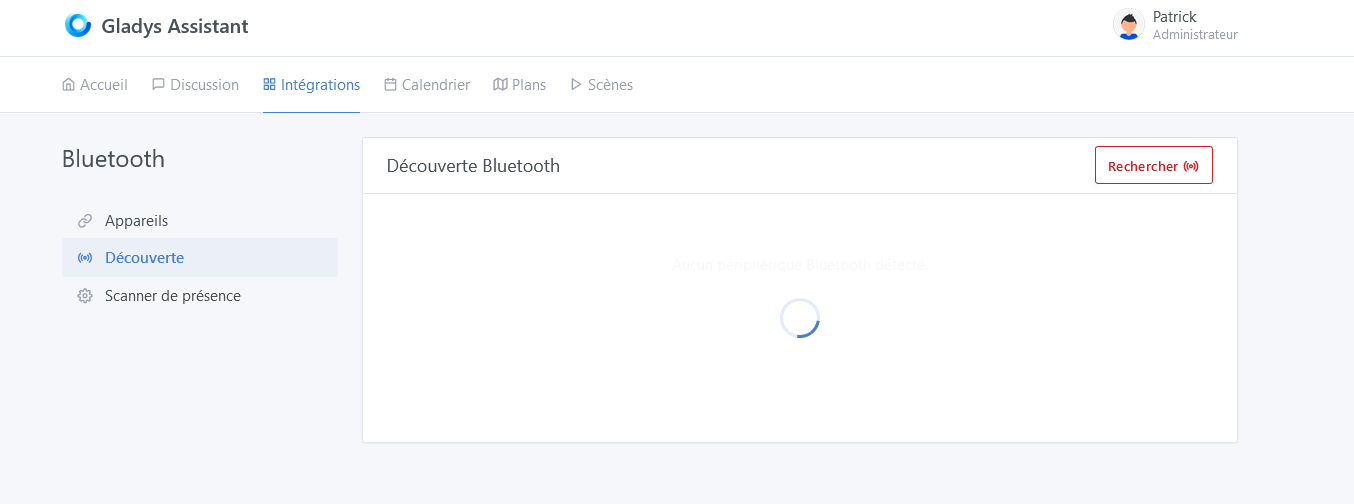
I ran this command which returns the Bluetooth status of the PI:
sudo service bluetooth status
and I get this back:
● bluetooth.service - Bluetooth service
     Loaded: loaded (/lib/systemd/system/bluetooth.service; enabled; vendor preset: enabled)
     Active: active (running) since Thu 2022-07-28 09:40:07 CEST; 1h 59min ago
       Docs: man:bluetoothd(8)
   Main PID: 599 (bluetoothd)
     Status: "Running"
      Tasks: 1 (limit: 780)
        CPU: 121ms
     CGroup: /system.slice/bluetooth.service
             └─599 /usr/libexec/bluetooth/bluetoothd

Jul 28 09:40:07 gladys systemd[1]: Starting Bluetooth service...
Jul 28 09:40:07 gladys bluetoothd[599]: Bluetooth daemon 5.55
Jul 28 09:40:07 gladys systemd[1]: Started Bluetooth service.
Jul 28 09:40:07 gladys bluetoothd[599]: Starting SDP server
Jul 28 09:40:07 gladys bluetoothd[599]: Bluetooth management interface 1.18 initialized
Jul 28 09:40:07 gladys bluetoothd[599]: profiles/sap/server.c:sap_server_register() Sap driver initialization failed.
Jul 28 09:40:07 gladys bluetoothd[599]: sap-server: Operation not permitted (1)
Jul 28 09:40:07 gladys bluetoothd[599]: Failed to set privacy: Rejected (0x0b)
And I also noticed that the output of the command
dmesg -s 1024
gave me a lot of Bluetooth errors
 380.617487] Bluetooth: hci0: Frame reassembly failed (-84)
[  380.617544] Bluetooth: hci0: Frame reassembly failed (-84)
[  380.617638] Bluetooth: hci0: Frame reassembly failed (-84)
[  380.668679] Bluetooth: hci0: Frame reassembly failed (-84)
[  380.668685] Bluetooth: hci0: SCO packet for unknown connection handle 3743
[  382.055598] Bluetooth: hci0: Frame reassembly failed (-84)
[  382.055627] Bluetooth: hci0: Frame reassembly failed (-84)
[  382.055697] Bluetooth: hci0: Frame reassembly failed (-84)
[  382.055784] Bluetooth: hci0: Frame reassembly failed (-84)
[  382.055876] Bluetooth: hci0: Frame reassembly failed (-84)
[  382.055956] Bluetooth: hci0: Frame reassembly failed (-84)
[  383.156611] Bluetooth: hci0: Frame reassembly failed (-84)
[  383.156729] Bluetooth: hci0: Frame reassembly failed (-84)

[  410.162475] WARN::dwc_otg_hcd_urb_dequeue:639: Timed out waiting for FSM NP transfer to complete on 7

[  423.615795] WARN::dwc_otg_hcd_urb_dequeue:639: Timed out waiting for FSM NP transfer to complete on 7

[  423.616213] WARN::dwc_otg_hcd_urb_dequeue:639: Timed out waiting for FSM NP transfer to complete on 6

[  463.959594] WARN::dwc_otg_hcd_urb_dequeue:639: Timed out waiting for FSM NP transfer to complete on 2

[  463.960012] WARN::dwc_otg_hcd_urb_dequeue:639: Timed out waiting for FSM NP transfer to complete on 3

[  544.861841] WARN::dwc_otg_hcd_urb_dequeue:639: Timed out waiting for FSM NP transfer to complete on 5

[  558.264820] WARN::dwc_otg_hcd_urb_dequeue:639: Timed out waiting for FSM NP transfer to complete on 4
[  683.362957] Bluetooth: hci0: Frame reassembly failed (-84)
[  683.363009] Bluetooth: hci0: Frame reassembly failed (-84)
[  683.363098] Bluetooth: hci0: Frame reassembly failed (-84)
[  684.443915] Bluetooth: hci0: Frame reassembly failed (-84)
[  684.443938] Bluetooth: hci0: Frame reassembly failed (-84)
[  684.474936] Bluetooth: hci0: Frame reassembly failed (-84)
[  684.474962] Bluetooth: hci0: Frame reassembly failed (-84)

[  718.973725] WARN::dwc_otg_hcd_urb_dequeue:639: Timed out waiting for FSM NP transfer to complete on 0

[  812.205346] WARN::dwc_otg_hcd_urb_dequeue:639: Timed out waiting for FSM NP transfer to complete on 7

[  851.972727] WARN::dwc_otg_hcd_urb_dequeue:639: Timed out waiting for FSM NP transfer to complete on 5

[  905.652002] WARN::dwc_otg_hcd_urb_dequeue:639: Timed out waiting for FSM NP transfer to complete on 4

[  959.394036] WARN::dwc_otg_hcd_urb_dequeue:639: Timed out waiting for FSM NP transfer to complete on 6

[  959.394449] WARN::dwc_otg_hcd_urb_dequeue:639: Timed out waiting for FSM NP transfer to complete on 1

[  972.750679] WARN::dwc_otg_hcd_urb_dequeue:639: Timed out waiting for FSM NP transfer to complete on 3

[  972.751142] WARN::dwc_otg_hcd_urb_dequeue:639: Timed out waiting for FSM NP transfer to complete on 1
[  980.362556] Bluetooth: hci0: Frame reassembly failed (-84)
and the last line repeats over and over again
Is it my Raspberry Pi that is failing or is it related to Gladys’ Bluetooth integration?
It’s an issue with your Raspberry Pi, nothing to do with Gladys 
A quick Google search for the error:
Hello @pierre-gilles
Thanks for your reply
Apparently SAP is the Bluetooth protocol for transferring data on SIM cards
SAP stands for SIM Access Profile.
I don’t think that’s what’s causing the crash of Gladys’ Bluetooth integration
That’s the mistake you made, though
Hello, @pierre-gilles
I agree, but I don’t think that’s what’s blocking me from discovering Bluetooth devices. From what I’ve read, SAP (SIM Access Profile) is used to transfer files to a system with a SIM card (we don’t use this protocol in Gladys, so I ignored that error.
But with dmesg -s 1024 I get this error :
Bluetooth: hci0: Frame reassembly failed (-84) [86636.344422] Bluetooth: hci0: Frame reassembly failed (-84) [86636.344511] Bluetooth: hci0: Frame reassembly failed (-84) [86636.344588] Bluetooth: hci0: Frame reassembly failed (-84) [86637.770564] Bluetooth: hci0: Frame reassembly failed (-90) [86638.021803] Bluetooth: hci0: Frame reassembly failed (-84) [86638.021817] Bluetooth: hci0: Received unexpected HCI Event 00000000
But what I don’t understand is that the discovery page refreshes correctly for 3 to 4 minutes after restarting Gladys and then the page no longer refreshes and stays stuck searching with the little blue spinning circle.
At first I didn’t have the Bluetooth errors and I had the same problem — we had already discussed it
That’s exactly the problem in my opinion. The tutorial I cited showed how to disable SAP when you don’t need it.
But it’s something to test; it may have nothing to do with it ^^
Don’t test in Gladys for now; I advise you to get Bluetooth working on your machine first, then when it works properly on the machine you can test in Gladys!
Very well, I’ll do that
Thanks a lot :slightly
Hello @pierre-gilles,
I did a clean install on a Raspberry Pi 3B (RPI 3B) and I have the same issue as the author with the Bluetooth module.
no fix despite rebooting Gladys (container and power cycle)
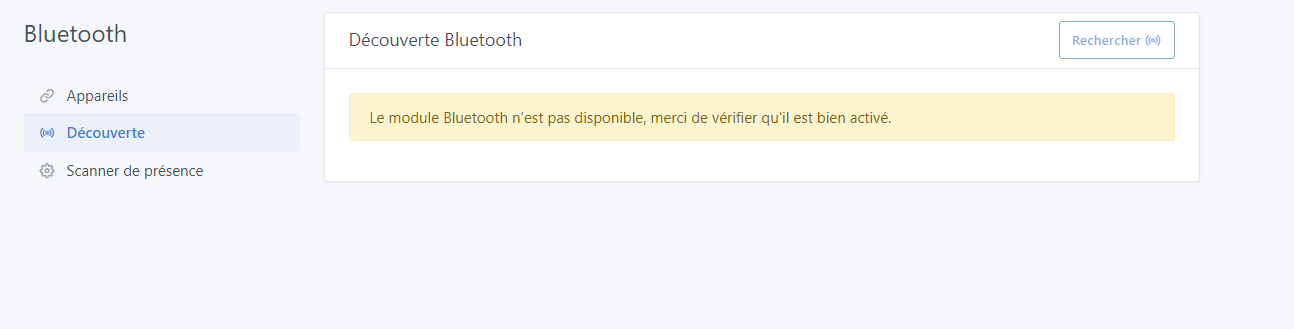
but in the logs I have this:
2022-10-09T17:33:25+0200 \u003cerror\u003e index.js:21 (process.\u003canonymous\u003e) Error: ENODEV, No such device
    at Hci.init (/src/server/services/bluetooth/node_modules/@abandonware/noble/lib/hci-socket/hci.js:100:35)
    at NobleBindings.init (/src/server/services/bluetooth/node_modules/@abandonware/noble/lib/hci-socket/bindings.js:78:13)
    at /src/server/services/bluetooth/node_modules/@abandonware/noble/lib/noble.js:60:24
    at processTicksAndRejections (internal/process/task_queues.js:77:11) {
  errno: 19,
  code: 'ENODEV',
  syscall: 'bind'
}
Any idea?
Installation from Pi Imager of the official image.
Not many ideas, I must admit! We need to investigate
Ok and how can
I meant more that you should investigate on your end
Well, actually, I’ve reported the information I could observe, I don’t see which direction to go..\nHence my thread, otherwise I would have managed, you know ^^’
A few leads from searching the error (Error: ENODEV, No such device)
I don’t know any more than you, I admit, I just copy-pasted the error into Google
Hello,
Finally I solved my problem by doing this :
sudo apt-get update \u0026\u0026 sudo apt-get upgrade
Is this due to an issue with the official image ?
On the image, only security updates are enabled automatically.
You probably picked up a new kernel
We should generate a new one that’s a bit more up to date (packages and kernel)
Hello @spenceur,
tu fais de la détection de présence avec le Bluetooth?
Et tu n’as pas de problème de latence (grosse latence plusieurs minutes voir heures) quand tu lances une découverte Bluetooth?
Hello @Psoy,
Yes, for now no issues on my side.
You should know that I