Home automation project: need your advice :)

What is my profile

  • 30 years old, familiar with computers in general, complete beginner in home automation (no prior home automation box)

What were my needs

  1. Automate the opening/closing of shutters
  2. Improve the management of indoor temperature and energy (electric heating)
  3. Improve the general comfort of the accommodation (e.g., automatically turning lights on/off…)

How I got into home automation

  • Cf my needs + my interest in computers / tinkering in general :slight_smile:

What equipment I have chosen
My installation is just starting, I haven’t invested in specific equipment yet and for now I have made do with:

  • Raspberry Pi 2B on which I installed Gladys Assistant
  • Arduino which I use as a driver for opening/closing my Somfy RTS shutters

Targeted implementation (as of date = future evolutions of my installation)

  1. Automate the opening/closing of shutters [In progress]
  • Connecting my Arduino to Gladys via the MQTT protocol
  • Creating basic scenes « at sunrise → open shutters » / « at sunset → close shutters »
  1. Improve the management of indoor temperature and energy (electric heating) [To do]
  • Monitor the indoor temperature (+ humidity) of the interior rooms (living room, bedroom, bathroom)
  • Control the electric heaters based on the measured/desired temperature
  1. Improve the general comfort of the accommodation (e.g., automatically turning lights on/off…) [To do]

Additional use cases to complete/mature, but here are the first ones I imagine:

3.a. Multi-room audio management based on presence in the different rooms.
I already have connected speakers via ChromeCast Audio in all the rooms of the house, which allows me to manage multi-room via Spotify or Google Home by playing the music on several speakers (or a group of speakers configured in Google Home for example).
To improve the system, I could put presence sensors in the different rooms that would automatically trigger the music played on the network based on the presence.
→ Would such a scenario be integrable via Gladys? If so, how?

3.b. Creation of richer scenes for the management of the shutters, taking into account the position of the sun, the brightness in the room, the temperature and/or the presence of people in the accommodation.
For example: « IF (sunny weather AND room brightness > xx lm AND room temperature > 20°C AND absent from the accommodation) THEN close the south-facing (or west-facing depending on the position of the sun / time of day) living room shutters »
→ I saw that it was possible to connect the weather service to display it on the dashboard, but is the retrieval of weather elements usable as input/condition in a scene?

To conclude a small personal experience feedback
So far not much as I am really just starting, but I will feed this section in the coming days/weeks :slight_smile:

Request for advice on compatible hardware
You will have understood, I still have a lot to do and a lot of equipment to buy… not being sure about the hardware compatibility with Gladys, I am appealing to your advice/recommendations.
→ According to the few readings I have done, I would probably mainly focus on the Zigbee protocol to guarantee reliability + wide compatibility. Is the Conbee 2 USB dongle, plugged directly into the RPi 2, well compatible with Gladys?

→ What are the sensors compatible with Gladys (+ your recommendations regarding my use cases)

  • Temperature/humidity
  • Brightness
  • Presence detector
  • Switch to control electric heaters

Hello @ars, thanks for your message!

Great choice, I recommend it to everyone :slight_smile: It’s reliable & affordable, for me it’s the star protocol in 2021.

The Xiaomi aqara temperature/humidity sensor is pretty good, available on Chinese sites for a few euros (this kind of thing => https://fr.banggood.com/Atmos-Version-Original-Aqara-Smart-Home-Temperature-and-Humidity-Sensor-Thermometer-Hygrometer-Digital-Sensor-From-Eco-System-p-1148666.html?cur_warehouse=UK&ID=557527&rmmds=search )

For all sensors, check the Xiaomi range supported by Zigbee2mqtt (the software we use to control Zigbee devices in Gladys) => Zigbee2MQTT

For the Conbee 2, I think it is supported yes => Zigbee2MQTT

@cicoub13 will help you better on this

For weather in scenes, you can use the OpenWeather API directly in scenes with the « HTTP Request » action.

Ask @lmilcent he did it on his installation and it works great, then you can use the variable in the « Continue only if » condition

As it stands, we do not yet integrate with Spotify/Google Home, but you can use the MQTT API or the « HTTP Request » box to interact with these services, it all depends on whether you can code a bit or not at all :slight_smile:

Keep us updated on your progress, and if you have any blocking points, don’t hesitate!

We are very open, and the project is open-source and in active development, so if there are missing features, we are always interested :slight_smile:

We have a « Feature Requests » category for this:

Hello,

Thank you for your quick and detailed response!

Very good choice, I recommend it to everyone :slight_smile: It’s reliable & affordable, for me it’s the star protocol in 2021.

Top, it’s sold :slight_smile:

For all sensors, check the Xiaomi range supported by Zigbee2mqtt (the software we use to control Zigbee devices in Gladys)

Thank you for this link, it’s very useful.

For Xiaomi sensors, the site mentions a recurring issue with this brand: « Troubleshooting: device stops sending messages/disconnects from network » (e.g.: Aqara WSDCGQ12LM control via MQTT | Zigbee2MQTT). As a precaution, and since this is not mentioned for other brands, I prefer to avoid it.

After looking at all possible options more closely, I think I will go for the following sensor as it combines temperature + brightness + a nice screen to visualize information without having to go through the interface: Moes ZSS-ZK-THL control via MQTT | Zigbee2MQTT

I think the Conbee 2 is supported

Indeed, but I see on the page that the Conbee 2 is flagged as « experimental », while other adapters are « recommended ». Since the prices are relatively similar, I think I will go for one of the recommended adapters (subject to availability) or even tinker with one based on a suggested chip…
@cicoub13 what do you think?

For weather in scenes, you can use the OpenWeather API directly in scenes with the “HTTP Request” action.

Good news!

Ask @lmilcent he did it on his installation and it works great, then you can use the variable in the “Continue only if” condition

Indeed @lmilcent I would be interested in an example of an HTTP request to see how this could work please :slight_smile:

As it stands, we do not yet integrate with Spotify/Google Home, but you can use the MQTT API or the “HTTP Request” box to interact with these services, it all depends on whether you know how to code a little or not at all :slight_smile:

I have some very (too) basic coding notions to tackle such a subject… nevertheless if you have even a snippet of a request / documentation that could guide me on what to do I might be able to take a look (because I am really very interested in this feature :grinning_face_with_smiling_eyes:).

We are very open, and the project is open-source and in active development, so if there are missing features, we are always looking for them :slight_smile:
We actually have a “Feature Request” category for this

OK thank you, I will not fail to complete the « Feature Request » section when I feel blocked by what is already offered… but for now I already see many scenarios that can be realized as it is and the HTTP requests already seem to be able to open up to a lot of things, so it’s up to me to make the effort to see what could be done through this means or not in a first step.

Zigbee Adapter

I went with one of the other adapters recommended by the Zigbee2Mqtt project (Slaesh’s CC2652RB stick) which has been working perfectly since its installation. The main advantage over cheaper models is that it can be updated without additional hardware.

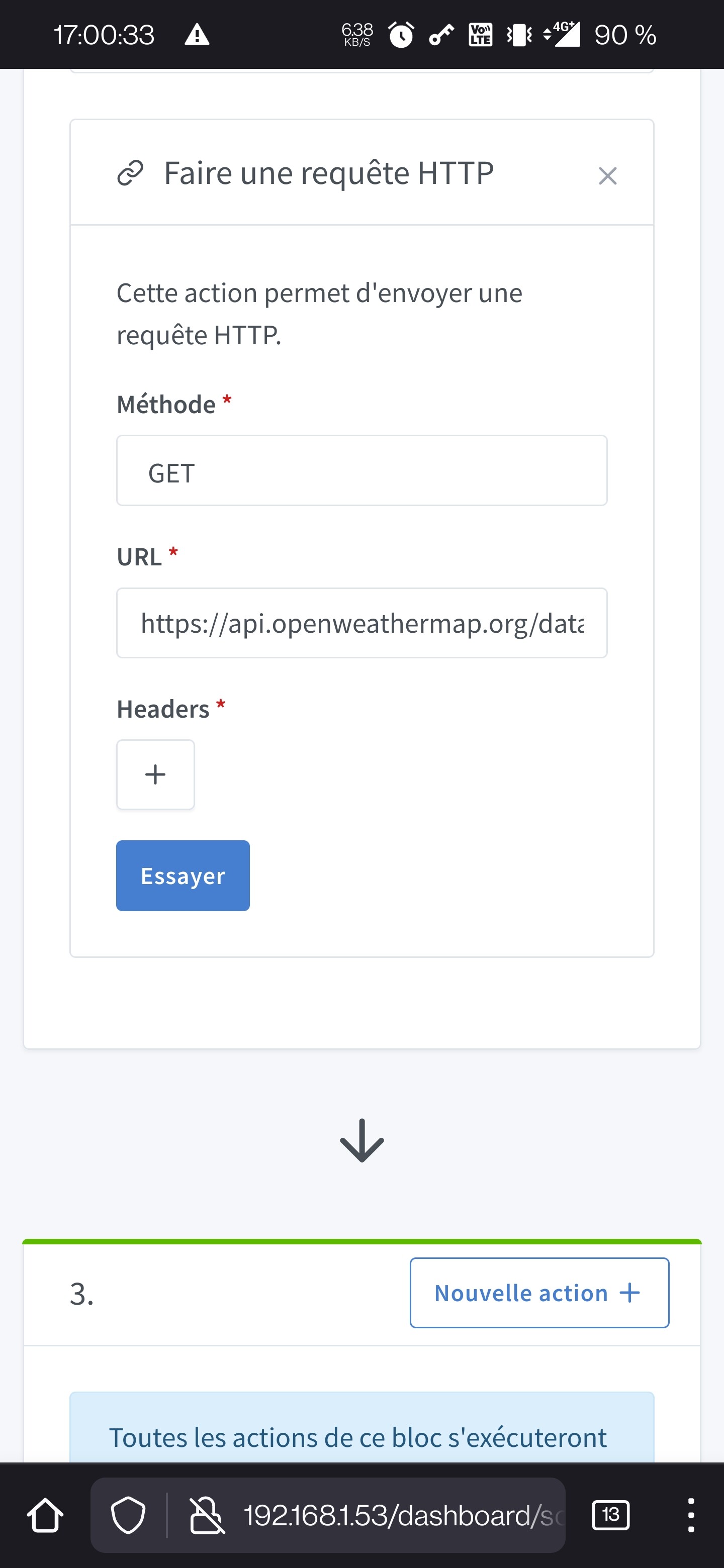
HTTP Requests

  1. To start, you need to create an account on openweathermap
  2. You can then generate an API key that allows you to use their service for free within the limit of a few thousand requests per month
  3. You need to look at their site documentation to find the URL you are interested in
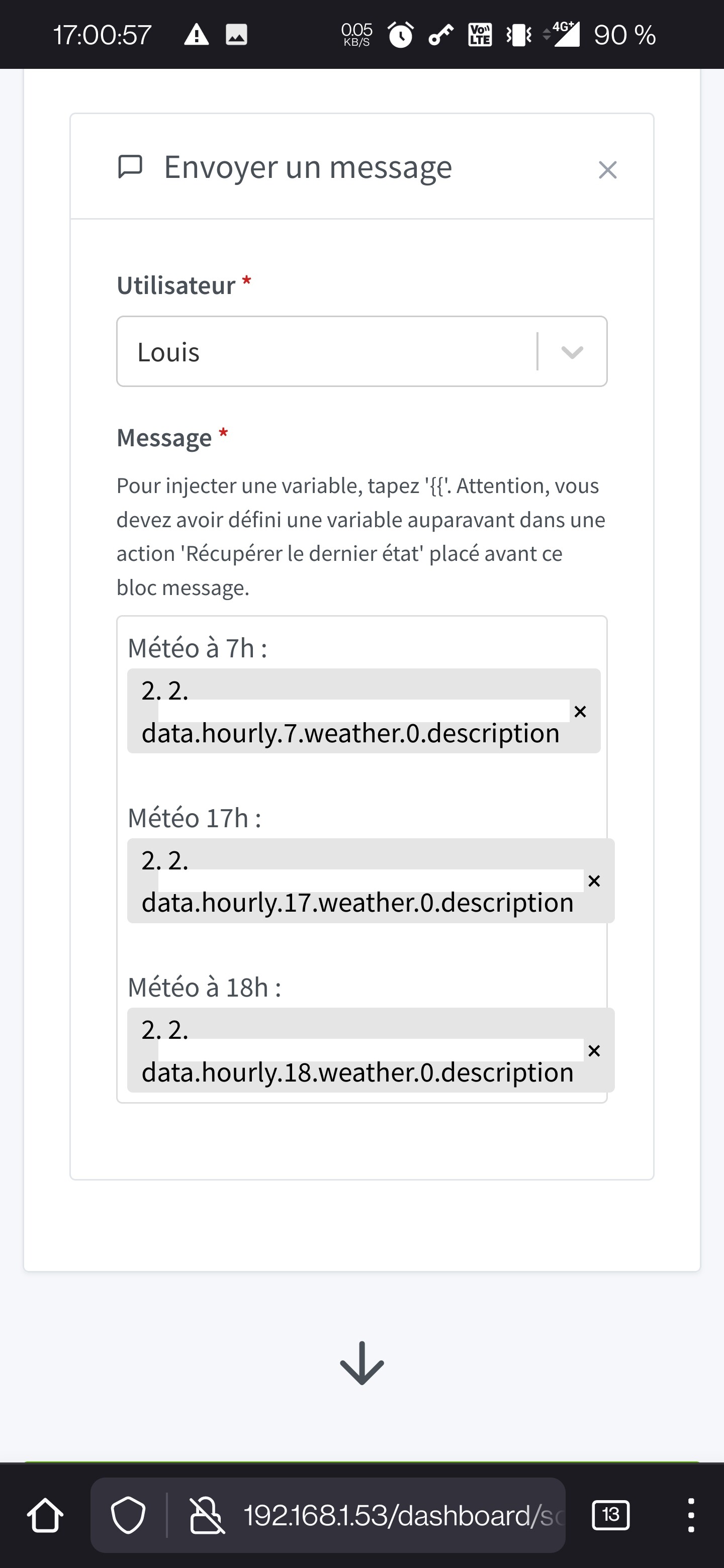
  4. All you have to do is create the scene and use the response

Example:
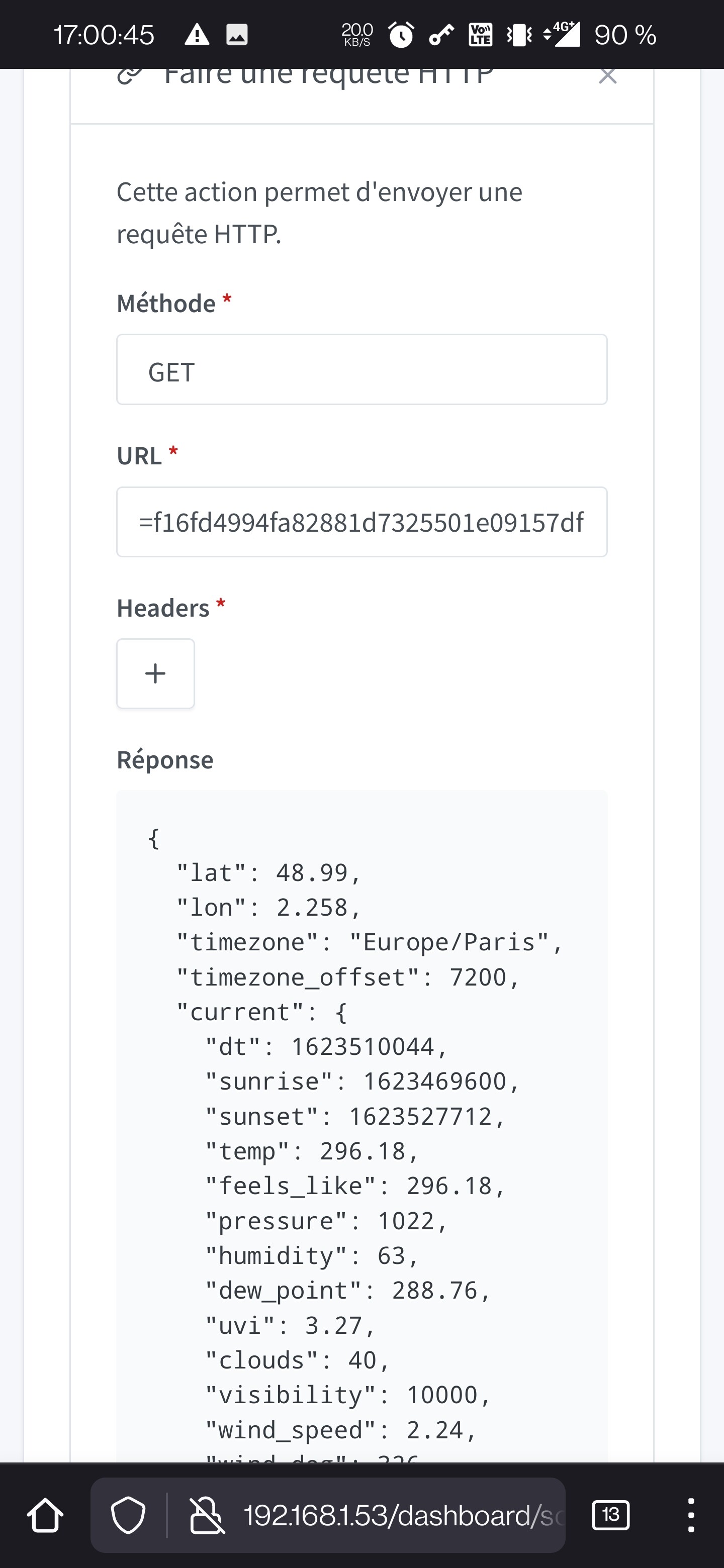
URL used (you need to change the location and the API key): https://api.openweathermap.org/data/2.5/onecall?lat=50.05&lon=2.50&lang=fr&exclude=minutely,daily&appid=f00b0000b00000b0000000a0000000

By clicking on the « Try » button:


Thanks @lmilcent for your explanations, it seems very clear, I’ll try to integrate this in the coming days and will give you feedback :slight_smile:

A parameter needs to be specified in the config for the conbee but it works

It’s in the zigbee2mqtt documentation and there’s a topic on the forum

Thanks for your feedback @VonOx!

I think I’ll stick with the Conbee 2 in this case as it is available for faster delivery than the other products and through French websites in particular.