[Présentation] William

Bonjour!

Je m’appelle William, j’ai 39 ans. Je suis passionné par l’informatique depuis mon enfance et je suis actuellement développeur (C) d’applications embarquées pour engins mobiles…
Je me suis lancé dans la domotique en 2018 après l’achat de ma maison. Après avoir longuement hésité j’ai fait le choix de Domoticz sur un RPI 3B+.

Depuis quelques semaines j’ai découvert Gladys et j’ai été séduit par l’interface. Pour ne pas casser mon installation actuelle j’ai décidé d’installer Gladys sur une VM de ma Freebox. J’ai un RPI 4 en commande mais le délai est très long. Je n’ai pas réussi à connecter un dongle zigbee SONOFF, pas détecté par Gladys mais je pense à un problème de détection USB lié à Debian 11, et aussi impossible de faire communiquer Gladys avec Telegram… bref c’est pas grave j’ai supprimé ma VM et je vais attendre mon RPI 4 pour installer Gladys!

Sinon ma config actuelle que je veux pouvoir reproduire avec Gladys est la suivante:

  • Gestion chauffage
    J’ai un Thermostat NetAtmo ou je récupère les informations du planning, consigne et température via un script Python et l’API NetAtmo. Le plugin NetAtmo de Domoticz n’est pas adapté car le temps de rafraichissement des données est trop long.
    Avec ce Thermostat je pilote un poêle à granulés qui est mon chauffage principal de la maison.
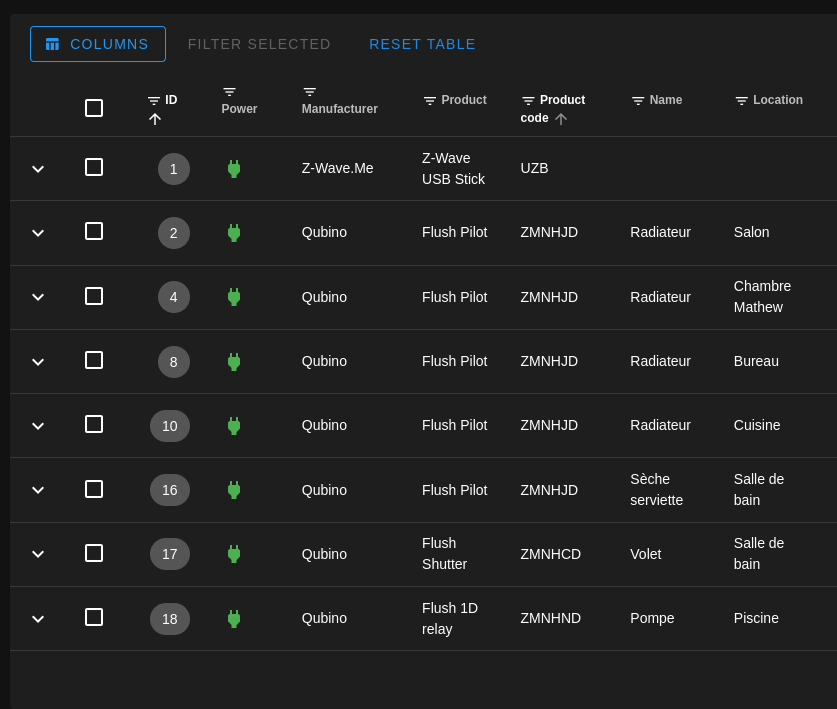
    J’ai couplé à cela des radiateurs électriques. Les radiateurs sont pilotés par des modules Qubino Z-WAVE.
    D’ailleurs je vois beaucoup de personne parlé de l’intégration Z-WAVE qui n’est pas complète dans Gladys mais qu’est-ce qu’on peut faire ou pas faire actuellement en Z-WAVE dans Gladys?
    Pour chaque pièce j’ai un thermostat virtuel et une sonde de température (XIAOMI ZIGBEE), en fonction du planning Netatmo et des consignes je pilote via un script LUA Domoticz mes radiateurs électriques.

  • Info Linky
    Je récupère via un plugin python dans Domoticz les données de mon compteur Linky

  • Gestion piscine
    Je pilote via un script LUA et un module Qubino Z-WAVE ma pompe de piscine en fonction de la température. Je prends pour l’instant la température extérieur mais dans l’idéal j’ai besoin d’un capteur de température immergé. Si quelqu’un a des idée je suis preneur

  • Gestion ouverture
    J’ai des capteurs XIAOMI et SONOFF Zigbee pour vérifier l’ouverture des portes et fenêtres

  • Boite aux lettres
    Je vérifie la présence de courrier dans ma boite au lettres avec un capteur de vibration Xiaomi Zigbee et un capteur d’ouverture. Via un script je vérifie les vibrations sur la boite au lettres pour détecté la présence de courrier/colis et le capteur d’ouverture sur la 2ème porte pour remettre à zéro, enfin de déclarer que le courrier à été relevé.

  • Présence
    Via ma Freebox je peux récupérer la présence de chaque personne si le téléphone est connecté en WIFI

  • Gestion lumière dans un placard
    J’ai installé dans un placard une bande LED Yeelight couplé à des capteurs d’ouverture Xiaomi. Donc la lumière s’allume dès qu’on ouvre une porte et s’éteint dès que les portes sont fermées.

  • Gestion volet roulant
    Je pilote via un Qubino Z-WAVE un volet roulant filaire en automatique en fonction des heures de lever et de coucher du soleil
    Le restant de mes volets sont en SOMFY IO que je n’ai pas encore domotisé.

  • Alerte par SMS
    Avec mon abonnement mobile j’ai la possibilité d’utiliser une API et d’envoyé des SMS par HTTP. Donc dans tous mes scripts j’envoi des messages en fonction de l’état de certaines actions (ouverture porte quand personne aux domicile, présence de courrier, batterie faible sur capteurs…)

  • Sauvegarde base de données Domoticz
    Avec un script shell je fais des backups journalier de la base de données Domoticz sur un NAS

Enfin je me connecte à Domoticz à distance grâce à un VPN.

Je doit encore rajouter des caméras, la gestion de mon chauffe-eau…

Voila j’ai raconté ma vie mais j’ai du boulot pour le passage à Gladys. RDV donc avec ma config sous Gladys quand j’aurais reçu mon RPI4

1 Like

Salut @_Will_71 et bienvenue dans Gladys !

Super ton installation, c’est chouette de voir une installation aussi complète :slight_smile:

Effectivement pour l’instant Gladys n’est pas compatible Debian 11 / Ubuntu 21. Max Debian 10 / Ubuntu 20.04. On travaille sur la compatibilité.

Actuellement on utilise Open-Zwave, une librairie open-source historique de contrôle du Z-Wave.

Deux choses:

  • Cette librairie n’est plus maintenue. On essaie de migrer vers la nouvelle librairie (ZWaveJS), mais c’est du boulot
  • En attendant, il y a peu de support sur l’intégration actuelle, et certains appareils ne sont pas géré. Il faut s’armer de patience pour ces appareils :slight_smile:

Génial ! N’hésite pas si tu as des retours / demande de nouvelles fonctionnalités. On est à l’écoute, et Gladys évolue régulièrement.

Merci pour ton accueil @pierre-gilles ! J’espère pouvoir intégrer tout ce que je veux dans Gladys.
Je n’hésiterai pas à revenir sur ce forum si besoin.

Sinon j’ai oublié quelques scripts pour la gestion météo, recevoir les alertes météo (orange, rouge) par SMS, détecter la présence de givre, utile pour mon épouse pour protéger le pare brise de sa voiture…

Après je n’ai pas de connaissance en JavaScript pour le développement, mais je peux peut être apporter mon aide pour tester des fonctionnalités.

1 Like

Woaw, merci pour ta présentation c’est super intéressant :slight_smile:
Bienvenue !

ça m’intéresse, tu pourrais nous dire quel opérateur c’est ? J’aimerais pouvoir faire ce genre de choses, même si idéalement ce sera via la 2G / 3G / 4G pour se passer d’internet en cas de coupure de courant.

@lmilcent Merci!

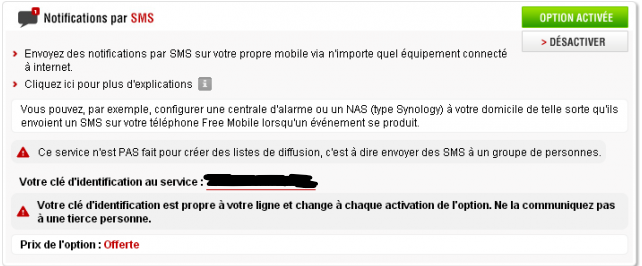
Je suis chez Free Mobile. Ils ont une option Notification par SMS. Mais on a besoin d’Internet pour exécuter cette commande!
image

Ensuite avec une requête HTTPS il est possible d’envoyer des SMS:

https://smsapi.free-mobile.fr/sendmsg?user=XXXXXXXX&pass=XXXXXXXXXXXXXX&msg=Hello%20World%20
1 Like

Dans le cas de Gladys, on utilise beaucoup Telegram, c’est peut-être plus simple/pratique, surtout que Telegram tu peux répondre à Gladys !

@pierre-gilles oui avec Telegram cela à l’air plus simple pour la discussion dans les 2 sens!

Actuellement j’utilise des SMS pour m’avertir moi ou mon épouse de certaines actions mais mon épouse ne reçois pas tout.

Est ce qu’on peut avoir plusieurs compte Telegram dans Gladys? Et du coup choisir quel utilisateur reçoit la notification ?

Oui !

En fait dans Gladys tu peux créer un compte par utilisateur, et ensuite chaque utilisateur peut associer son compte Telegram.

Ensuite, dans les scènes tu peux sélectionner à quel utilisateur tu veux envoyer un message :

1 Like

Ok cool! Merci.

Je croit que je ne vais pas pouvoir attendre mon RPI4 pour commencer a tester Gladys.
Je doit avoir un vieux PC qui doit prendre la poussière, alors je vais tacher de le remettre en état et d’installer un Debian 10 ou Ubuntu 20.04 pour tester tout ça.

1 Like

oui et d’autant plus que via node-red on peut palier a tous les manques de Gladys et adapter des scénarios ou matériel non pris en charge pour le moment ! :wink:

Good evening,

At the request of @lmilcent, I’m coming back here to present my Gladys setup and what I’ve put in place since migrating from Domoticz.

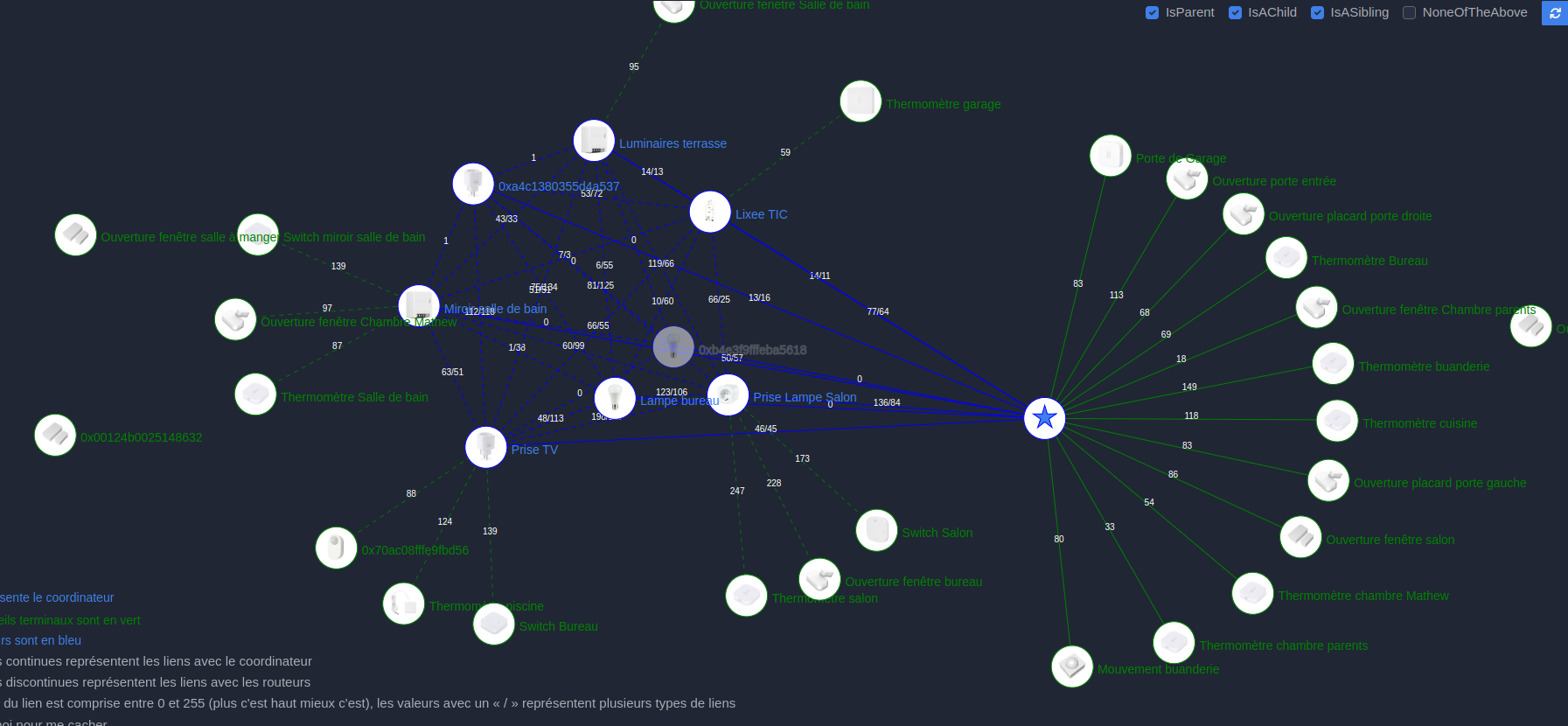
I’ve integrated a number of sensors, actuators, lamps, a Netatmo thermostat, a Sonoff module (Tasmota), Qubino Z-Wave modules, but mostly Zigbee.

Regarding Gladys, I had a bit of trouble getting used to the way scenes work at first because I used to write Python and Lua scripts under Domoticz, but in the end, coupled with Node-RED I was able to handle almost all of my needs.

For Z-Wave, I don’t use Gladys, well not the current integration, but I installed zwavejs2mqtt and thanks to MQTT + Node-RED I can control all my devices as I wish.

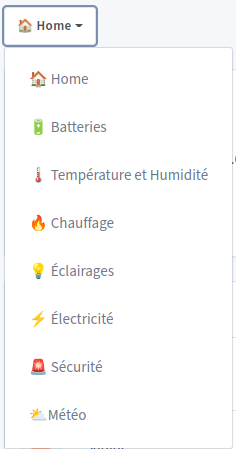
In Gladys, I created several dashboards, thanks @jerome for the idea of icons — it definitely looks nicer like this

In the home dashboard, I have basic functions like weather, presence detection, and some functions I’m currently testing.
A box for my mailbox but unlike @lmilcent I use 2 sensors, a Xiaomi vibration sensor and a contact (opening) sensor.
The vibration sensor is fixed to the door with one of the mounting screws located under the flap, so if the door opens for a parcel it generates vibrations and if the postman just leaves mail the flap closing and dropping on the screw also generates enough vibration for the sensor.
The contact sensor I fixed on the second door to know if someone has picked up the mail from the box.
I only have a small problem to solve: the system works quite well but I had to move my mailbox (the location chosen by the previous owners was really inconvenient) and I lost the sensor signal, so I need to add an external relay to improve reception quality.

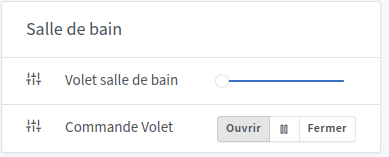
A second box that may be interesting is for my electric roller shutter.


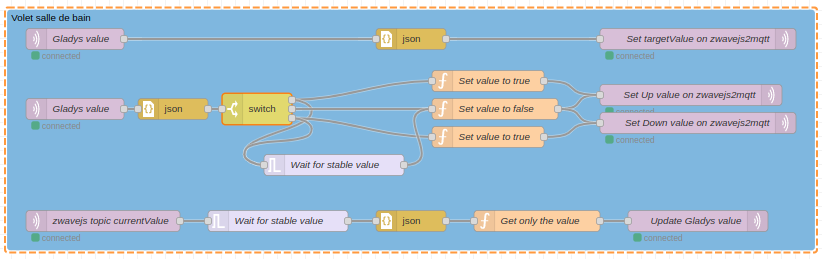
Here I have a Qubino Z-Wave module to control my roller shutter with physical buttons if needed. I followed @VonOx’s tutorial for position management and I recently modified it following the integration of open/close commands.
But I don’t really use these buttons (physical or in Gladys) because I have a scene to open the shutter at sunrise and another scene to close it at sunset.
Here is the Node-RED flow

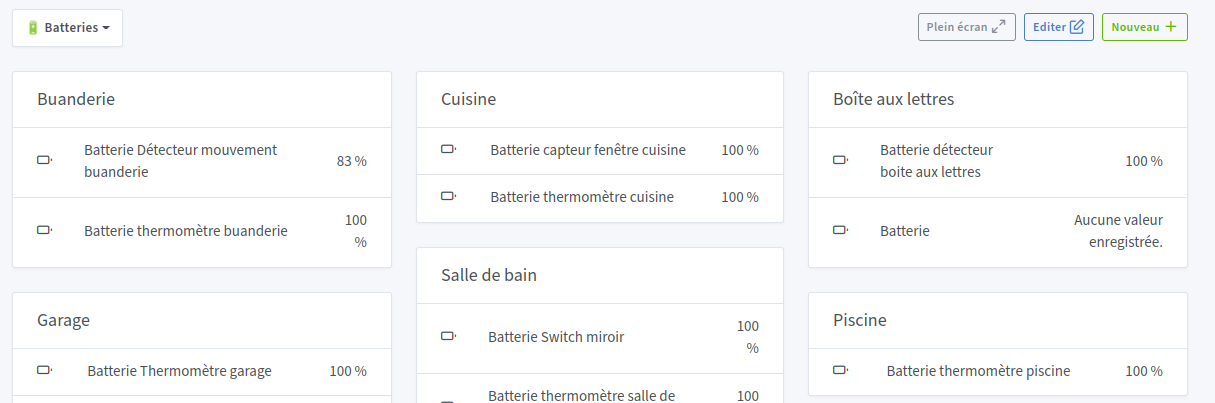
In the Batteries dashboard I put a box per room to list all my battery-powered sensors. Thanks @lmilcent I used your display.


Then I created a scene per sensor to send a Telegram message if the battery is below a threshold.
Since the battery value isn’t very reliable I find, I already had a failure under Domoticz while the sensor was still at 100%.
For this in Node-RED I added a Timeout function to measure the time between 2 MQTT messages sent by the sensor. If after 24h I haven’t received another message then I send a Telegram message.
Here is part of the Node-RED flow

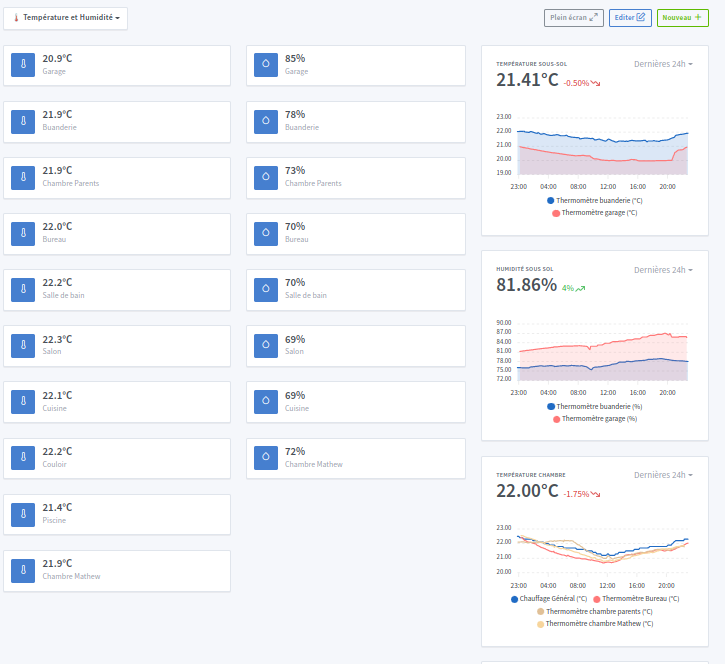
In the Temperature and Humidity dashboard, I have the list of all my temperatures and humidities. thanks @cicoub13 I was inspired by your dashboard

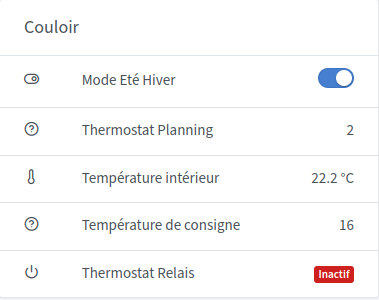
In the Heating dashboard, this part is one of the most important in managing my house.
While waiting for @Terdious’s Netatmo integration, I retrieve with Node-RED the info from my Netatmo thermostat which is connected directly to my pellet stove. The Netatmo app is well made and I use it to create my schedules.
The Summer/Winter mode is an MQTT device that I added, not present in Netatmo.

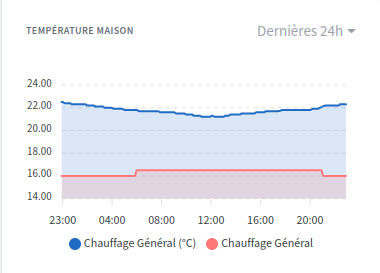
Then I display the house temperature curve + the setpoint curve (red)

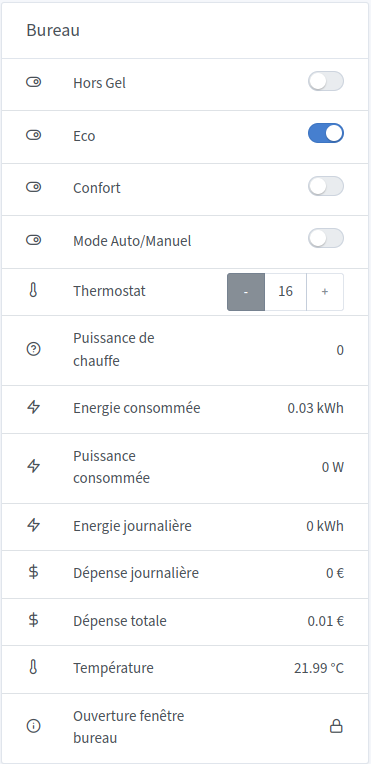
Then I have a box per room where I installed an electric radiator (+ Qubino Z-Wave module)


Here all these devices are on MQTT except the temperature sensor and the window contact sensor and are controlled thanks to Node-RED. You can see the new Thermostat module developed by @pierre-gilles which is almost functional for me (some display issues depending on screen resolution).
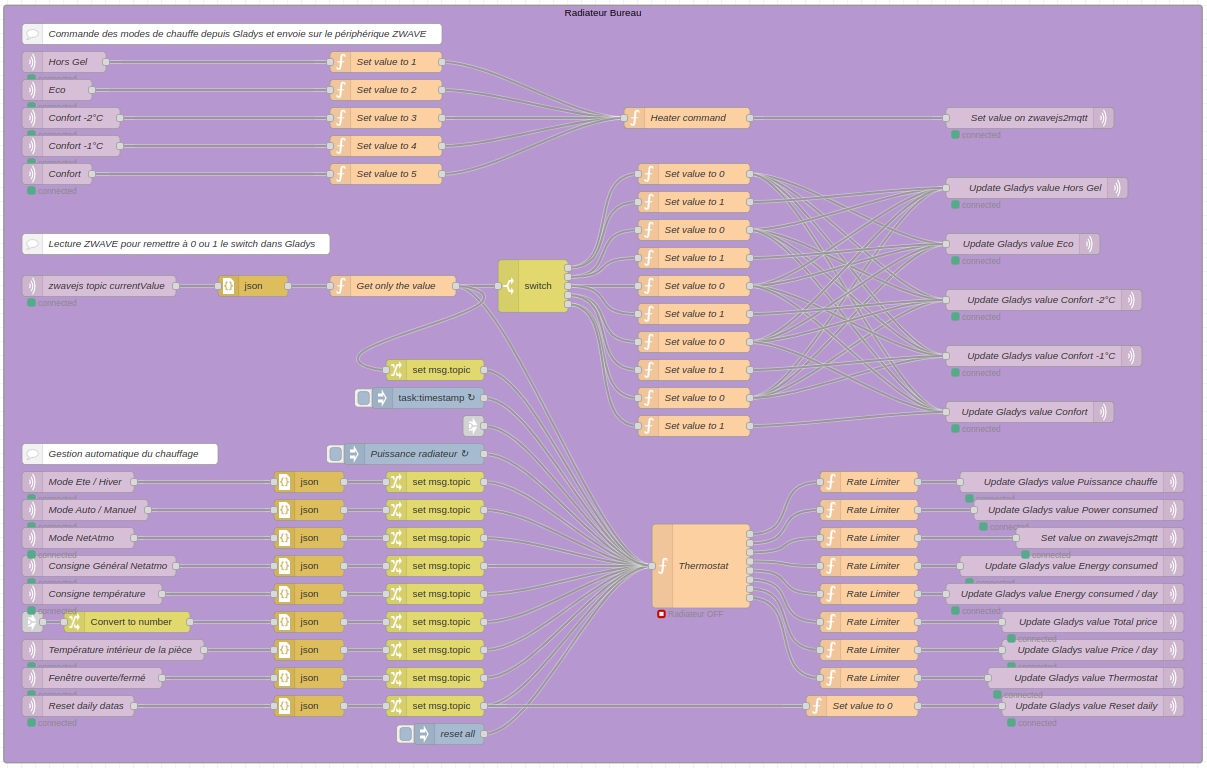
Here is my Node-RED flow to manage a radiator

The upper part manages all the modes of the Z-Wave module (Frost protection, eco, comfort…) and the lower part I created a thermostat (TPI) to calculate a heating power based on outside temperature, inside temperature, window opening… and I also calculate in this thermostat the consumed power and the price.

I also display temperature/setpoint curves and heating power for each radiator.


In the 1st graph, in red you can see the moments when the setpoint changes but since it’s still warm right now all data are at zero. Thermostat management is handled by scenes. The point of the thermostat I asked @pierre-gilles for is for example if my son comes home earlier from school he can manually increase the temperature of his room.

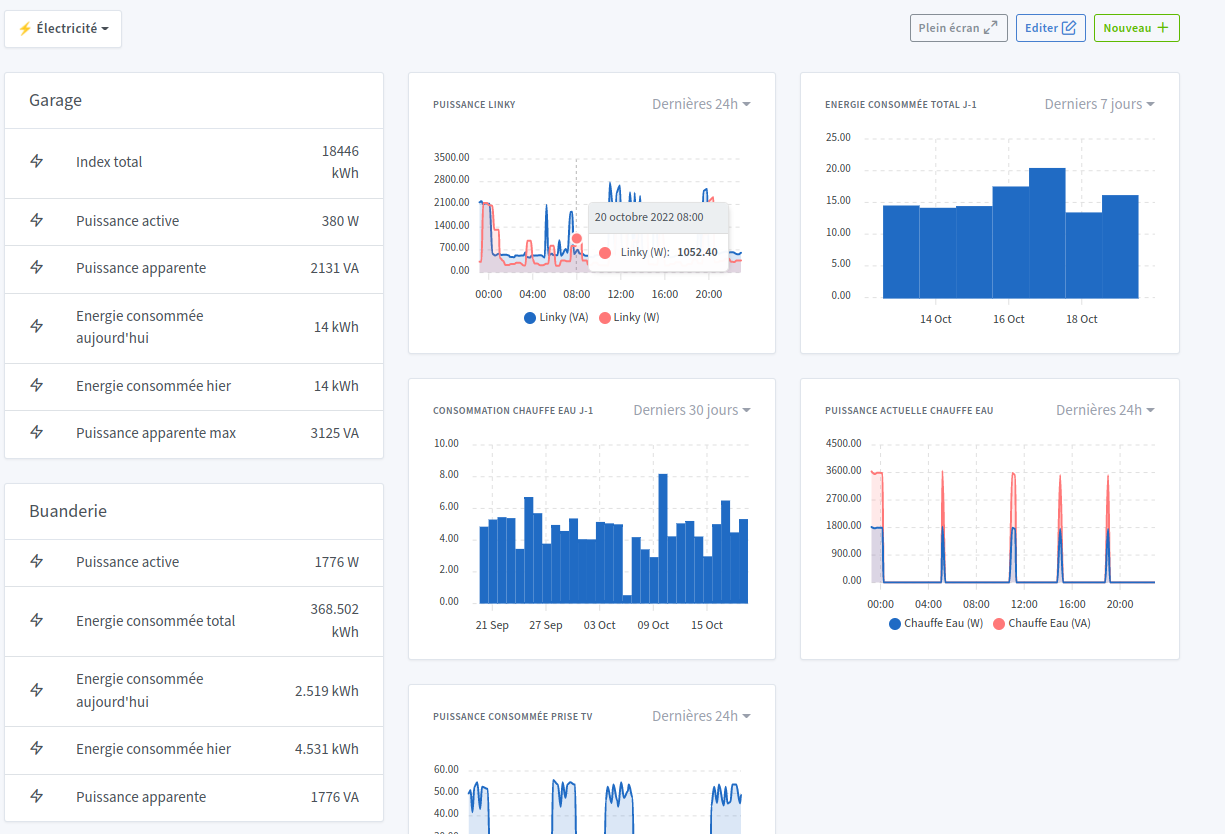
In the Electricity dashboard, thanks to a Lixee TIC module and Node-RED I display data from my Linky meter.
I also have a SONOFF module (with Tasmota) connected to my water heater to monitor its consumption.

In the Lighting dashboard, nothing special, just controls for my various lamps.
Just a small particularity about my lighting: I added an LED strip in a cupboard in my corridor and I added an opening sensor on each door. So each time a door opens the LED strip lights up and switches off automatically on closing. I have a button in the Gladys dashboard, but I never used it.
The LED strip is from Yeelight and integrated thanks to Node-RED.
One negative point for Yeelight is that it connects to a Chinese server!!! One day I’ll replace it because if there’s no Internet it doesn’t work anymore, except manually.

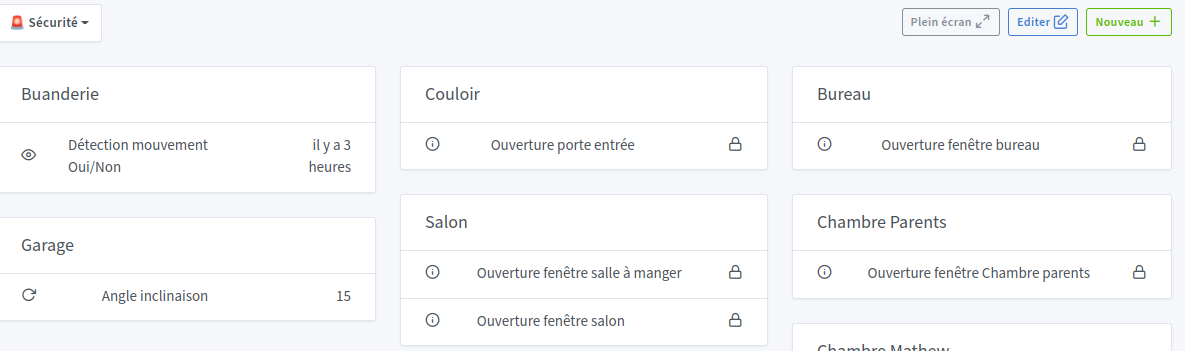
In the Security dashboard, I display all my opening sensors. I have scenes to alert me if a window opens when I’m not there, or if I forget to close the garage door.

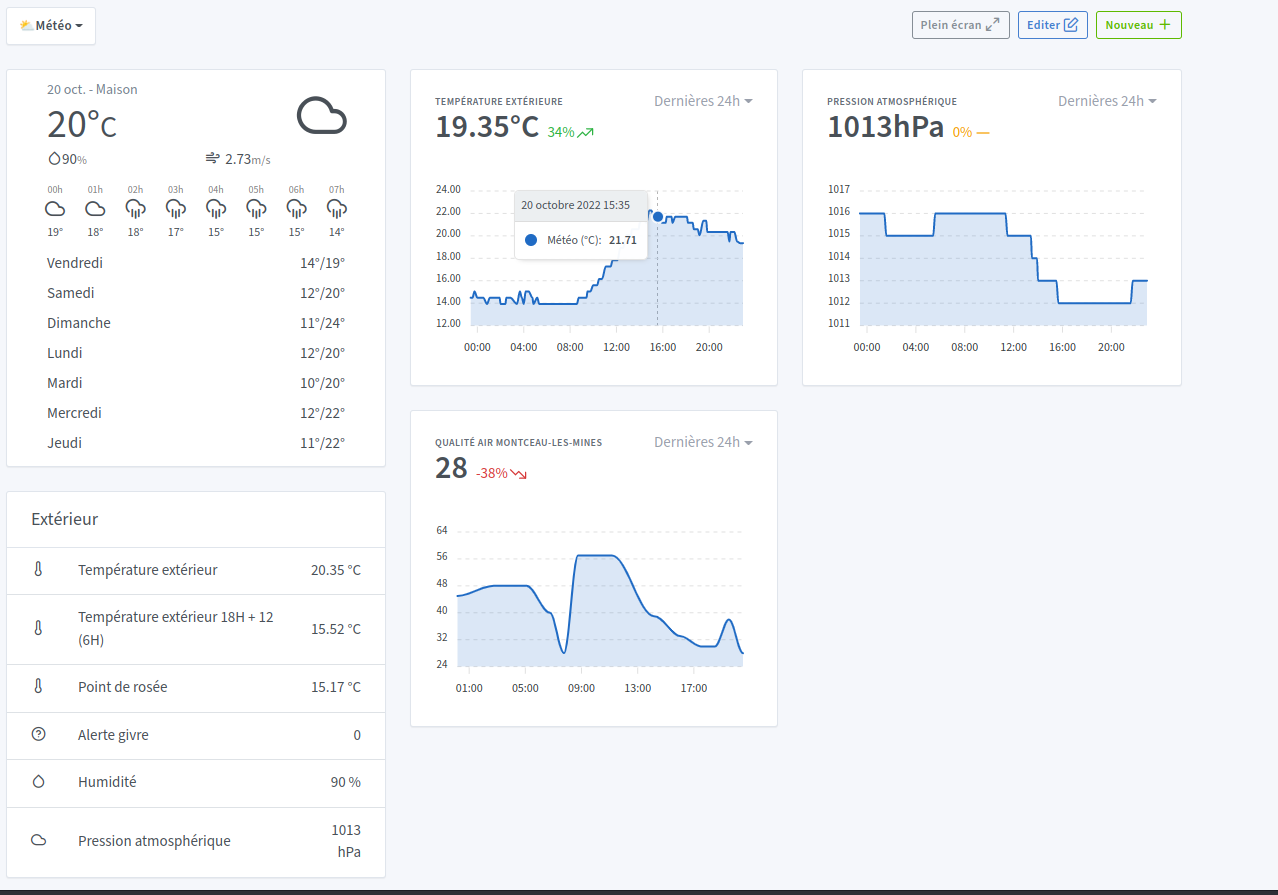
In the last Weather dashboard, I display weather data, temperatures, atmospheric pressure, air quality.
I also have a function where I retrieve the forecasted temperature for the next day at 6AM plus the dew point to calculate the risk of frost. A function much appreciated by my wife who leaves her car outside and receives a notification at 6PM. That way she knows if she needs to protect the windshield in the morning.
The only problem I have is retrieving the dew point data, because I get this info with the DarkSky API that I used in Domoticz, but this API will no longer work in 2023. Bought by Apple and you need an Apple developer account to continue using this API. I saw in OpenWeather used by Gladys that I could retrieve this information but not in the free plan. There is a paid plan (with a number of free requests) which would be sufficient for my use but I’m bothered about registering my credit card for a service that will cost me €0. So on hold for now as long as it works with DarkSky, we’ll see afterwards.

And of course the most important thing for me when I start integrating a system is a backup system.
There I subscribed to Gladys+ to support the project but I still have my backup script which makes nightly backups of Gladys, Zigbee2MQTT and Node-RED.

There you go, I’ve covered my installation, it might give you some ideas. For my part I still have plenty of ideas but I hold back because the budget would explode. One of the next integrations for me will probably be an outdoor surveillance camera. If anyone has a model to recommend I’m interested.

8 Likes

What a setup! Thanks for this very thorough post @_Will_71 :folded_hands:

I’ll share it with the community on social media!

Thanks for this very comprehensive share. A nice setup with everyone’s ideas that seem to fit your needs well :clap:

You can try https://api.open-meteo.com/v1/forecast?latitude=44.84\u0026longitude=-0.59\u0026hourly=dewpoint_2m
I know it’s free, but I don’t know the quality

1 Like

Thanks for the info

Thanks @_Will_71 for sharing.

Great setup.

If needed, can we call on you for Node-RED scripts?

Outdoor camera — I’m also interested in any feedback/experiences if there are any?

See ya

Yes, no problem — if you need anything, don’t hesitate to ask me.

hello, how did you install zwave2mqtt?
I tried to install it under Docker. Apparently everything runs but I can’t reach its home page from a remote browser (ip:8091) even though on my remote PC I opened the port for inbound and outbound.
How do you interface it with Node-RED?

Hi,

I installed it with Docker but I don’t have the command on hand. I’ll look it up if you want it.
Have you checked the Docker logs to verify that zwavejs2mqtt is working properly?

Then, to interface it with Node-RED, the answer is in its name: MQTT. Once you can access the zwavejs2mqtt web interface, you need to configure the MQTT broker.

hi again,
I also installed it with Docker but I installed zwave-js-ui because it told me that zwavejs2mqtt is deprecated.
when I run docker ps -a it shows as started, but when I look at the logs I get quite a few warnings

2022-10-14 20:53:33.680 INFO APP: Version: 8.2.1.30d0208
2022-10-14 20:53:33.695 INFO APP: Application path:/usr/src/app
  ______  __          __                      _  _____     _    _ _____
 |___  /  \ \        / /                     | |/ ____|   | |  | |_   _|
    / /____\ \  /\  / /_ ___   _____         | | (___     | |  | | | |
   / /______\ \/  \/ / _' \ \ / / _ \    _   | |\___ \    | |  | | | |
  / /__      \  /\  / (_| |\ V /  __/   | |__| |____) |   | |__| |_| |_
 /_____|      \/  \/ \__,_| \_/ \___|    \____/|_____/     \____/|_____|

2022-10-14 20:53:33.758 WARN STORE: settings.json not found
2022-10-14 20:53:33.801 WARN STORE: scenes.json not found
2022-10-14 20:53:33.821 WARN STORE: nodes.json not found
2022-10-14 20:53:34.010 WARN STORE: users.json not found
2022-10-14 20:53:34.216 INFO APP: Listening on port 8091 host 0.0.0.0 protocol HTTP
2022-10-14 20:53:34.628 WARN BACKUP: Store backup is disabled
2022-10-14 20:53:34.643 WARN BACKUP: Nvm backup is disabled
2022-10-14 20:53:34.653 WARN Z-WAVE: Z-Wave driver not inited, no port configured
2022-10-15 17:22:03.643 INFO APP: Version: 8.2.1.30d0208
2022-10-15 17:22:03.707 INFO APP: Application path:/usr/src/app
  ______  __          __                      _  _____     _    _ _____
 |___  /  \ \        / /                     | |/ ____|   | |  | |_   _|
    / /____\ \  /\  / /_ ___   _____         | | (___     | |  | | | |
   / /______\ \/  \/ / _' \ \ / / _ \    _   | |\___ \    | |  | | | |
  / /__      \  /\  / (_| |\ V /  __/   | |__| |____) |   | |__| |_| |_
 /_____|      \/  \/ \__,_| \_/ \___|    \____/|_____/     \____/|_____|

2022-10-15 17:22:04.056 WARN STORE: settings.json not found
2022-10-15 17:22:04.085 WARN STORE: scenes.json not found
2022-10-15 17:22:04.575 INFO APP: Listening on port 8091 host 0.0.0.0 protocol HTTP
2022-10-15 17:22:05.367 WARN BACKUP: Store backup is disabled
2022-10-15 17:22:05.393 WARN BACKUP: Nvm backup is disabled
2022-10-15 17:22:05.453 WARN Z-WAVE: Z-Wave driver not inited, no port configured
2022-10-17 08:51:24.565 INFO APP: Version: 8.2.1.30d0208
2022-10-17 08:51:24.582 INFO APP: Application path:/usr/src/app
  ______  __          __                      _  _____     _    _ _____
 |___  /  \ \        / /                     | |/ ____|   | |  | |_   _|
    / /____\ \  /\  / /_ ___   _____         | | (___     | |  | | | |
   / /______\ \/  \/ / _' \ \ / / _ \    _   | |\___ \    | |  | | | |
  / /__      \  /\  / (_| |\ V /  __/   | |__| |____) |   | |__| |_| |_
 /_____|      \/  \/ \__,_| \_/ \___|    \____/|_____/     \____/|_____|

2022-10-17 08:51:24.651 WARN STORE: settings.json not found
2022-10-17 08:51:24.694 WARN STORE: scenes.json not found
2022-10-17 08:51:25.081 INFO APP: Listening on port 8091 host 0.0.0.0 protocol HTTP
2022-10-17 08:51:25.316 WARN BACKUP: Store backup is disabled
2022-10-17 08:51:25.323 WARN BACKUP: Nvm backup is disabled
2022-10-17 08:51:25.333 WARN Z-WAVE: Z-Wave driver not inited, no port configured
2022-10-19 08:05:57.060 INFO APP: Version: 8.2.1.30d0208
2022-10-19 08:05:57.090 INFO APP: Application path:/usr/src/app
  ______  __          __                      _  _____     _    _ _____
 |___  /  \ \        / /                     | |/ ____|   | |  | |_   _|
    / /____\ \  /\  / /_ ___   _____         | | (___     | |  | | | |
   / /______\ \/  \/ / _' \ \ / / _ \    _   | |\___ \    | |  | | | |
  / /__      \  /\  / (_| |\ V /  __/   | |__| |____) |   | |__| |_| |_
 /_____|      \/  \/ \__,_| \_/ \___|    \____/|_____/     \____/|_____|

2022-10-19 08:05:57.282 WARN STORE: settings.json not found
2022-10-19 08:05:57.409 WARN STORE: scenes.json not found
2022-10-19 08:05:58.032 INFO APP: Listening on port 8091 host 0.0.0.0 protocol HTTP
2022-10-19 08:05:58.476 WARN BACKUP: Store backup is disabled
2022-10-19 08:05:58.481 WARN BACKUP: Nvm backup is disabled
2022-10-19 08:05:58.496 WARN Z-WAVE: Z-Wave driver not inited, no port configured
2022-10-20 08:24:11.342 INFO APP: Version: 8.2.1.30d0208
2022-10-20 08:24:11.376 INFO APP: Application path:/usr/src/app
  ______  __          __                      _  _____     _    _ _____
 |___  /  \ \        / /                     | |/ ____|   | |  | |_   _|
    / /____\ \  /\  / /_ ___   _____         | | (___     | |  | | | |
   / /______\ \/  \/ / _' \ \ / / _ \    _   | |\___ \    | |  | | | |
  / /__      \  /\  / (_| |\ V /  __/   | |__| |____) |   | |__| |_| |_
 /_____|      \/  \/ \__,_| \_/ \___|    \____/|_____/     \____/|_____|

2022-10-20 08:24:11.507 WARN STORE: settings.json not found
2022-10-20 08:24:11.517 WARN STORE: scenes.json not found
2022-10-20 08:24:11.782 INFO APP: Listening on port 8091 host 0.0.0.0 protocol HTTP
2022-10-20 08:24:12.232 WARN BACKUP: Store backup is disabled
2022-10-20 08:24:12.240 WARN BACKUP: Nvm backup is disabled
2022-10-20 08:24:12.264 WARN Z-WAVE: Z-Wave driver not inited, no port configured

The warnings are probably because you haven’t configured anything yet. Besides, you haven’t set your Z-Wave key.

However, the container — are you sure it’s running? In your logs it restarted several times and nothing since the 20th.
What is the output of the command docker ps -a

Also, from this line 2022-10-20 08:24:11.782 INFO APP: Listening on port 8091 host 0.0.0.0 protocol HTTP you should still be able to access the interface.