Today when I create a scene that involves one of my Aqara open/close sensors, I have
FYI, work is in progress 
Oh well I had missed that !!  thanks @AlexTrovato
This request should be closed!!
Good evening @Tlse-vins
Oui it’s normal, well I find it odd, but it’s a decision that was made after debate, I don’t remember where on the forum it was, but following that, we changed the closing icons for the opening sensors  I hope I’m clear
Your sensor must work the opposite way to others on the market (or else during development the value set wasn’t the correct one!)
Are there any other users of sensors of this type who can confirm?
Yep, it’s the same for me with Xiaomi sensors.
My contact sensor is a Sonoff SNZB-04.
Mine are Xiaomi and Tuya.
I have the same behavior with my Xiaomi sensors — I have to set in my INTRUSION ALERT scene that the trigger happens when the sensor is closed ^^
It used to be the other way around for a while (before the padlock icons update, as Psoy pointed out)
 it seems we have regressed
As for the sensors’ state I confirm they have always worked like that. What isn’t logical (positive or negative logic), is having a sensor with a ‹ closed › state that indicates a window open (or a door)
Searching the forum you realize there has been a lot of ambiguity about this sensor
And indeed that’s what confuses us:
I confirm, I have the same sensor and I’m forced to swap open and closed in the scenes
Maybe we should separate opening sensor and closing sensor?
Or allow inverting the info (I know @pierre-gilles doesn’t like checkboxes but…) with a short explanatory message?
I think being able to reverse the operation is a good idea. It’s actually a feature that exists in z2m with certain devices, such as roller shutters:
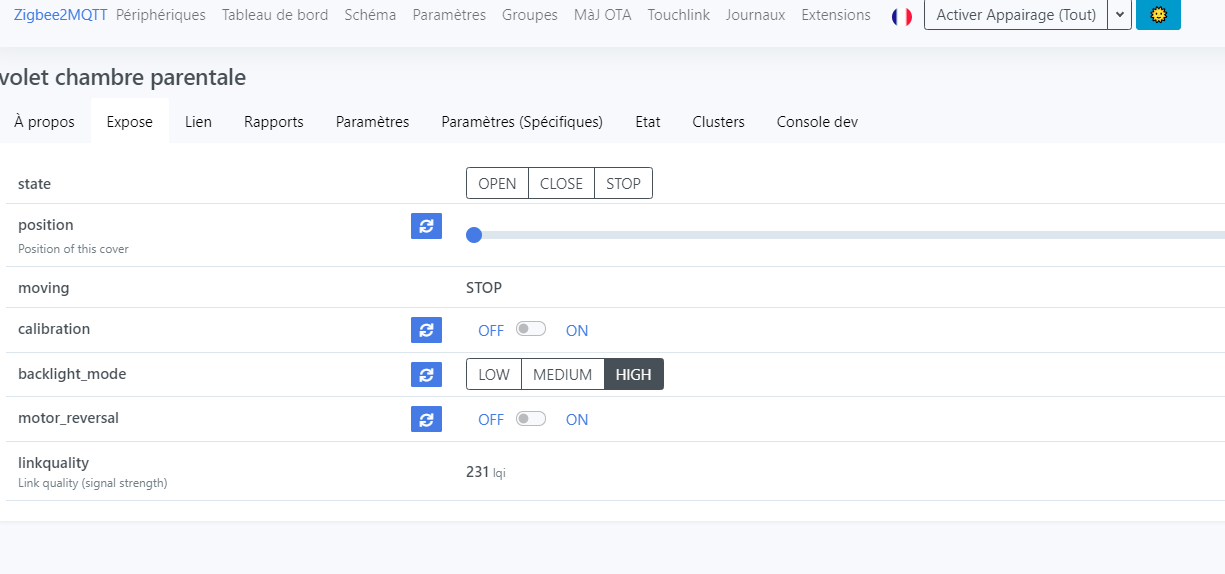
It’s something that was mentioned here as well: [feature request] Binary sensors invert option · Issue #3569 · Koenkk/zigbee2mqtt · GitHub
Why not simply invert the states : nearby sensor = 0 and separate sensor =1 . That would also
Ok, so from what we’re saying it’s just the translations that are reversed, right? We put « open » instead of « closed »?
If that’s the case, and the community confirms there aren’t any devices that are the other way around, we can swap the translations without any problem. I just want to make sure we don’t fix the issue for some by creating another issue for others 
@AlexTrovato do you remember, when you made your PR, how you « chose » the orientation? With any particular device?
The sensor is an open or closed contact/relay.
How I see it. ( the opposite of @Psoy)
Open = no contact = 0
Closed = contact = 1
If window/door is open then the sensor = 0
If we’re OK with that we make the display match.
Yeah, that’s what I thought too! In my opinion, when we did the translations, we just translated « On = 1 = Open » whereas it was the other way around
No problem for me to reverse the translations for an open/close sensor
I’ve simply swapped the values again… it seems I have indeed already made this mistake on an item of the dashboard…