I’m having trouble setting up a scene that will send me a message if my front door opens.
I want the trigger to be the state change of the opening sensor.
In the dashboard and the integration part, I see an icon that represents the open/closed state, or the text (yes/no).
However, when creating my scene, I have two buttons ON and OFF… But I don’t know what state this corresponds to.
Actually, all « binary » devices (0 or 1) are displayed with this selector, I agree it’s not clear at all, we should put another translation in the case of door opening sensors.
One of the two is « open », and the other is closed, I invite you to test and tell us which is which
Hello everyone
in the same logic as open/closed door sensors I am trying to make 2 scenes for 3 French doors, the goal is to cut the heating if one or more are open and to restore it only if all the doors are closed.
For the « doors open » scene there is no problem because the scene correctly performs the logical « OR » between the openings.
However, for the closing of all the doors I haven’t found a solution because it requires a logical « AND » and I don’t know how to do it.
Can someone explain to me how to do this please?
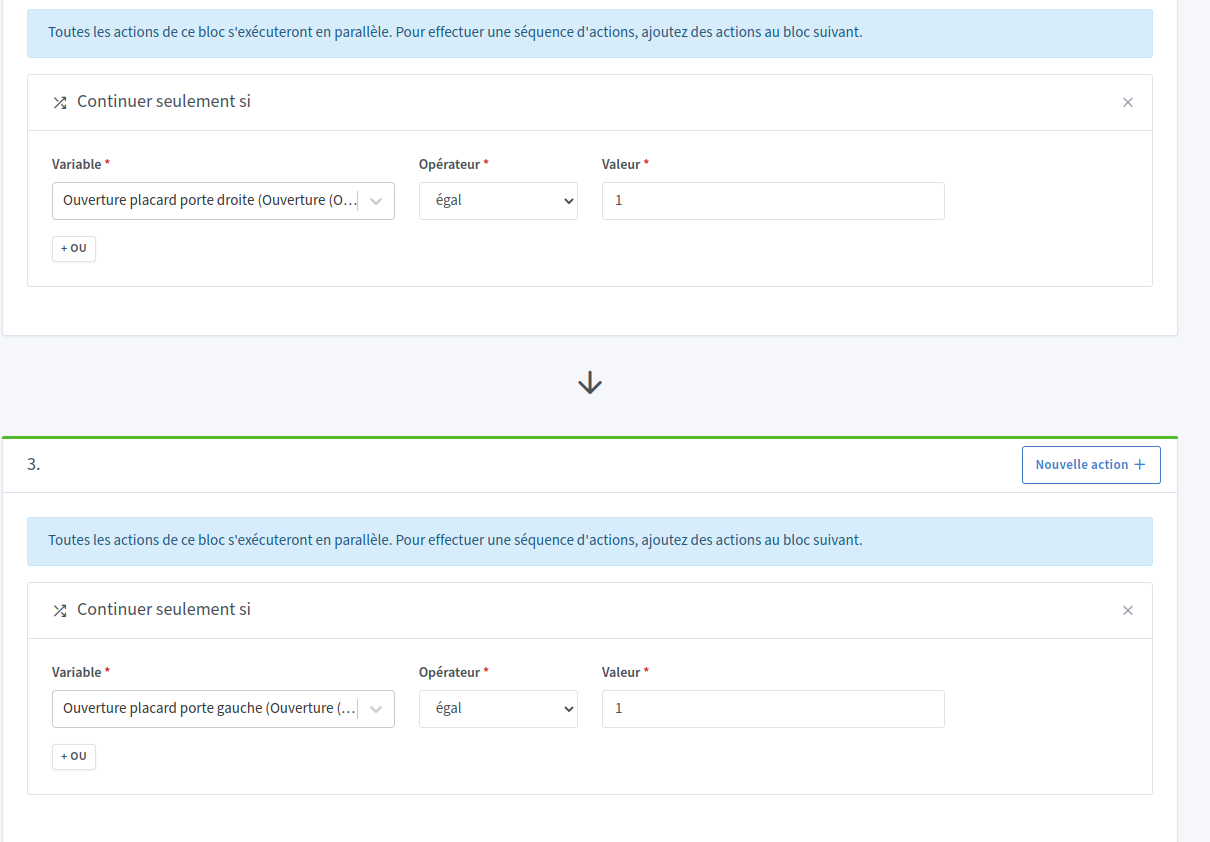
You can put multiple sequences of actions in a row in Continue only if.
Below is an example of a scene where I check that 2 doors are closed to turn off a light


 I was just pointing out the fact that the denominations are not intuitive/clear when creating the scene