That’s what I understand, but it stops for no reason!
Network outage on your end or on Docker Hub.
It happens sometimes, wait a
It’s fine, it went through after 4 attempts.
Update on the integration soon.
There’s an error and Gladys is connected at the same time, that’s weird!!
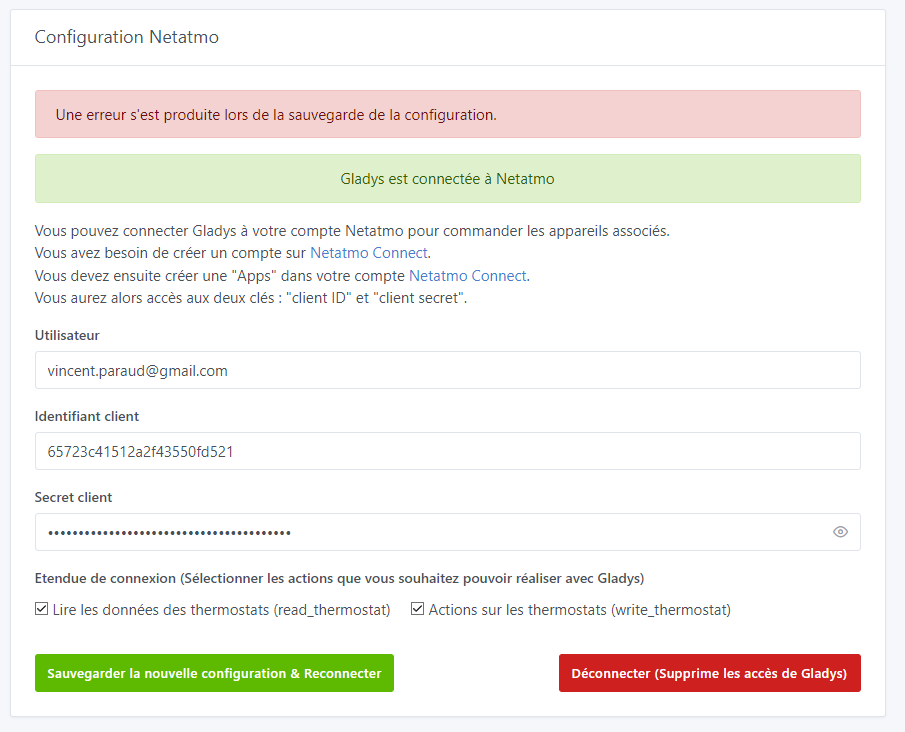
I will change the link label to the creation of the application; I didn’t click on it thinking it was the same as the one for creating the account, and I searched for a while on the Netatmo site. I’ll put « creation of the application »
I think we’re required to check both boxes, right?
If we want full control, is it useful or mandatory?
There is a small strange behavior if you get the client ID wrong with the new tab to accept on the Netatmo site https://auth.netatmo.com — a yellow banner appears and afterwards it’s hard to get rid of it.
In that same tab, after acceptance, our Gladys instance appears before the tab closes.
Do we need the tokens when creating the application?
Great job @Terdious.
For my part when I tried Sauvegarder la configuration \u0026 Connecter I got this error

2023-12-07T23:31:48+0100 <error> netatmo.saveConfiguration.js:27 (NetatmoHandler.saveConfiguration) Netatmo configuration stored errored ValidationError [SequelizeValidationError]: notNull Violation: t_variable.value cannot be null
    at InstanceValidator._validate (/src/server/node_modules/sequelize/src/instance-validator.js:78:13)
    at InstanceValidator._validateAndRunHooks (/src/server/node_modules/sequelize/src/instance-validator.js:111:7)
    at InstanceValidator.validate (/src/server/node_modules/sequelize/src/instance-validator.js:93:12)
    at model.save (/src/server/node_modules/sequelize/src/model.js:3996:7)
    at Function.create (/src/server/node_modules/sequelize/src/model.js:2280:12)
    at Variable.setValue (/src/server/lib/variable/variable.setValue.js:27:32)
    at NetatmoHandler.saveConfiguration (/src/server/services/netatmo/lib/netatmo.saveConfiguration.js:19:5)
    at saveConfiguration (/src/server/services/netatmo/api/netatmo.controller.js:30:20) {
  errors: [
    ValidationErrorItem {
      message: 't_variable.value cannot be null',
      type: 'notNull Violation',
      path: 'value',
      value: null,
      origin: 'CORE',
      instance: [t_variable],
      validatorKey: 'is_null',
      validatorName: null,
      validatorArgs: []
    }
  ]
}
I tried a second time and then the NetAtmo page opened to validate the connection.
However the error banner remained

Discovered my perfect thermostat! 

I got an error when I tried to Save and couldn’t save NAPlug.

No problem with the thermostat.
In the logs I have these 2 errors and I can’t change the temperature setpoint.
2023-12-07T23:43:06+0100 <error> netatmo.saveValue.js:72 () deviceGladys:  Thermostat featureName:  therm_setpoint_start_time  not found in the root of the Netatmo device nor in the other properties
2023-12-07T23:43:06+0100 <error> netatmo.saveValue.js:72 () deviceGladys:  Thermostat featureName:  therm_setpoint_end_time  not found in the root of the Netatmo device nor in the other properties
Otherwise all the data seems to be read

But still errors when I tried again to change the temperature setpoint
2023-12-07T23:53:31+0100 <info> netatmo.setValue.js:25 (NetatmoHandler.setValue) netatmo
2023-12-07T23:53:31+0100 <warn> netatmo.setValue.js:26 (NetatmoHandler.setValue) [ '04', '00', '00', '1a', '4e', 'e8', 'therm_setpoint_temperature' ]
2023-12-07T23:53:31+0100 <error> netatmo.setValue.js:55 (NetatmoHandler.setValue) setValue error with status code:  ERR_BAD_REQUEST  -  403 and with status message:  Forbidden
2023-12-07T23:53:31+0100 <warn> netatmo.setValue.js:63 (NetatmoHandler.setValue) error details:  13  -  Application does not have the good scope rights
2023-12-07T23:53:31+0100 <info> netatmo.setValue.js:25 (NetatmoHandler.setValue) netatmo
2023-12-07T23:53:31+0100 <warn> netatmo.setValue.js:26 (NetatmoHandler.setValue) [ '04', '00', '00', '1a', '4e', 'e8', 'therm_setpoint_temperature' ]
2023-12-07T23:53:32+0100 <error> netatmo.setValue.js:55 (NetatmoHandler.setValue) setValue error with status code:  ERR_BAD_REQUEST  -  403 and with status message:  Forbidden
2023-12-07T23:53:32+0100 <warn> netatmo.setValue.js:63 (NetatmoHandler.setValue) error details:  13  -  Application does not have the good scope rights
After this error indicating permission issues I checked the config and the 2 boxes were unchecked even though I had checked them.

I then rechecked them, revalidated the rights in NetAtmo but if I change page or refresh the page the 2 boxes are unchecked again.
That’s it for a first try. It’s promising — I can’t wait to integrate it and remove the part in Node-RED.
Thank you so much for your patience and your tests.
Unfortunately I didn’t have time to look today.
OT: I usually work on it from 4 to 7 before my job but I wanted to install the motion detectors I received yesterday following the post here of the vidéos des frères poulain and it was rather chaotic because they don’t share their code - which, by the way, didn’t work as-is on my side - but it’s working now!! ^^ I’ll make a tutorial for that once Netatmo since it’s 100 times better than the motion detector
END OF OT
For this one I hadn’t thought to do a clean test before creating the image… I’ll see more clearly that way, but it looks like a variable initialization issue.
Noted about the error messages… probably issues with my websockets
About the command… no idea as is but it must also be related to a fresh install, I’ll investigate tomorrow.
And I’ll add logs to the next image if I can’t find the problems on my side.
Indeed the first is mandatory, it would make no sense not to check it. I had enabled everything mainly to leave the choice for writing, but Pierre-Gilles is probably right, we make choices and we own them. So I’ll remove the options and indicate in the heading above that we necessarily grant read and write rights on the Thermostat because that’s the basis of the integration. We’ll see about other additions in future PRs.
Mandatory for full control.
Indeed ^^
Ah I hadn’t tested the identifier error, only the « Decline » ^^
No, it’s actually retrieved automatically from the login page
Thanks again to you!!
You’ll need to state that in the documentation.
Ready for the next tests!!
You’re an early riser; for me it’s more like 9:30 PM to 11:00 PM when my kids are in bed.
Hello,
I think I fixed all the feedback. I’m polishing it and will probably send it tomorrow morning.
I set up a fresh installation and that allowed me to have the baseline findings you had. I removed the scope stuff because the goal is indeed to control everything and that avoids any misunderstanding. I added a blurb to emphasize that. I removed the extra error and finally revised the arrangement of the buttons (see what you think if there are things to remove). @Tlse-vins when it’s available, could you do a first test with your installation to check in particular the new error I added (« no compatible devices found ») and then do a test with my installation (I’ll share temporary ID/SECRET with you)? We’ll just arrange the setpoint temperature test so we don’t end up in PLS  or
or  at home
@pierre-gilles, I was looking for an image and only wondered about the rights. I don’t know about others, but Netatmo has a guideline available: Netatmo Connect | Developer, marketing and legal guidelines and provide a Netatmo branding kit with everything needed in images and information. I wanted to use that kit, however, I’d like to be sure about respecting the legal terms, notably regarding Gladys Plus (commercial use?). Could you check the conditions at the link and tell me what we can or cannot do/use?
I’m thinking in particular about webhooks, which will therefore only be available with Gladys Plus later on. Apparently we need to send them an email if it’s for commercial use.
Thanks in advance.
On my side, I see 2 issues in the dashboard rendering, but they should be present in other usages of these categories:
-
Setpoint temperature with 150% zoom OK :
But zoom < 150% NOK, the « , » are missing:
-
And for the « open window » category I correctly receive false from Netatmo (logical, no window open) and the icon is an open padlock:
That doesn’t make sense to me, I know there’s often been debate about these binaries… but aside from finding an open/closed window icon…
I’m willing to change the received value to « 1 » rather than « 0 » but it still seems illogical, no?


For the rest I put binary switches for all binaries, but would it make sense to add categories if they’re not handled differently? Just for the icon…


@Tlse-vins, the documentation should be ready (to be modified with the new connection), I don’t remember if I had a PR in progress, I’ll check, but I should have it at home.
Edit: Indeed, the PR for the doc
It’s fine, you can use them
In Gladys, closed = 1, open = 0. It makes sense — it’s like an electrical circuit  1 = contact (closed), 0 = no contact (open)!
A binary switch is a smart plug, so no, you shouldn’t use that  Otherwise they’ll appear in certain places in Gladys I think (although, since it’s read_only = false)
I’d be in favor of creating different categories, or if that takes too long, removing them for now.
@Terdious as soon as your image is ready, one evening I’ll test it.
Sorry for the delay. I had a huge amount of work these last few days.
I made the additional corrections from @pierre-gilles and simplified the features for the moment (better to have less and add later if needed / on request!)
@Tlse-vins and @_Will_71, the new image will be ready in 1 hour.
Updates :
-
Devices Page - added devices’ connection status (green or red icon at the top left of the card), added the plug to which the thermostat is connected (in my case I have 2 and this will make even more sense when the valves are added), and finally added the room where the devices are located in the Netatmo API:
-
Discovery Page - added a blurb for compatible equipment plus a link to the forum page « Feature Request »:
-
Configuration Page - Removed the email address which isn’t useful after all, added a blurb about the scopes which give full rights to Gladys to access data in read and write, added information on how the Energy API works concerning temperature / setpoint temperature.
-
Dashboard Page - The dashboard when the boiler is not running:


The dashboard when the boiler is running:

You can see that I added the room temperature in addition to the Thermostat temperature because Netatmo acts on the room temperature. Having another Netatmo temperature sensor at the other end of the room (linked to the weather station), you can see that between the setpoint and the temperature (21 vs 21.6) the boiler would not have started.
How could I add this information more clearly in your opinion? Does it belong in the « Configuration » menu?
Image ready, I’ll put it here: docker pull terdious/gladys:netatmo-integration-dev
And @Tlse-vins, don’t hesitate if you want access.
Sorry, I also forgot to mention @spenceur and @PhilippeMA. Don’t hesitate if you’d like to test as well (the connection part and also live by sharing a controlled access if needed).
One question: I set a poll interval to 2 minutes (because at the time that was the refresh rate I observed on the Netatmo side, and it still seems to be the case).
Do you think I should mention that somewhere?
Should I reduce it to 1 minute just in case? Knowing that the limits are:

And knowing that for Gladys Plus users there will also be webhooks (not everything is supported on the Netatmo side but a wide range nonetheless)
Hello @Terdious, I just tested this new image.
The feature configuration will, in my opinion, need more explanation in the documentation section (I assume that’s already planned — it’s good to mention it). Indeed, for selecting the scope, I don’t think it’s within everyone’s reach; on my side, I selected read_station for my weather station (nothing more).
The connection went well — nothing to report on that front.
You specify in the integration:
You will only see devices currently compatible with Gladys here.
It’s good to state that, but for someone like me who doesn’t have a thermostat, when I start the scan the following message appears:
No Netatmo device was found. Have you completed all the steps in the documentation to register your devices on the Netatmo API?
Would it be possible to indicate that there is a device, perhaps even specify which one, and note that it is not yet supported?
I’ve just tested it and it’s much
Hello @PhilippeMA and thank you very much for this test!
Yes, of course, the documentation will contain (contains ^^) this part as an image!!
I added in the spiel about the scopes « You don’t have anything to configure, these scopes are automatically integrated and will be exposed to you during the connection request (see documentation if needed). »:

For the moment, I don’t want to complicate the code by surfacing unsupported devices, but indeed, that could be one of the next PRs. In the meantime I have revised the message, is it clearer? :


Crazy ^^ I’ll try the brute-force mode, possibly a side effect because on each click it does an API call to Netatmo indeed. So not great ^^ Maybe I should block the button while waiting for the request to return!!
Hi @Terdious , I could test tomorrow evening and run the test with my thermostat.
Well done on the integration, I don’t have a Netatmo but I’ll contribute:
« You have nothing to configured » => « configure » 
Thank you very much @cce66!! Any contribution is welcome, especially spelling corrections. I think an app like Gladys should be flawless.
We’re often better ‹ proofreaders › for others than for ourselves ^^ (I’m mostly speaking for myself)
Thanks

Yes ^^ that’s a basic issue with the category ^^ Not related to the PR ^^ We’ll try to fix that later !!