Hello everyone 
This is my first tutorial, I hope I’m doing it correctly, feel free to tell me otherwise.
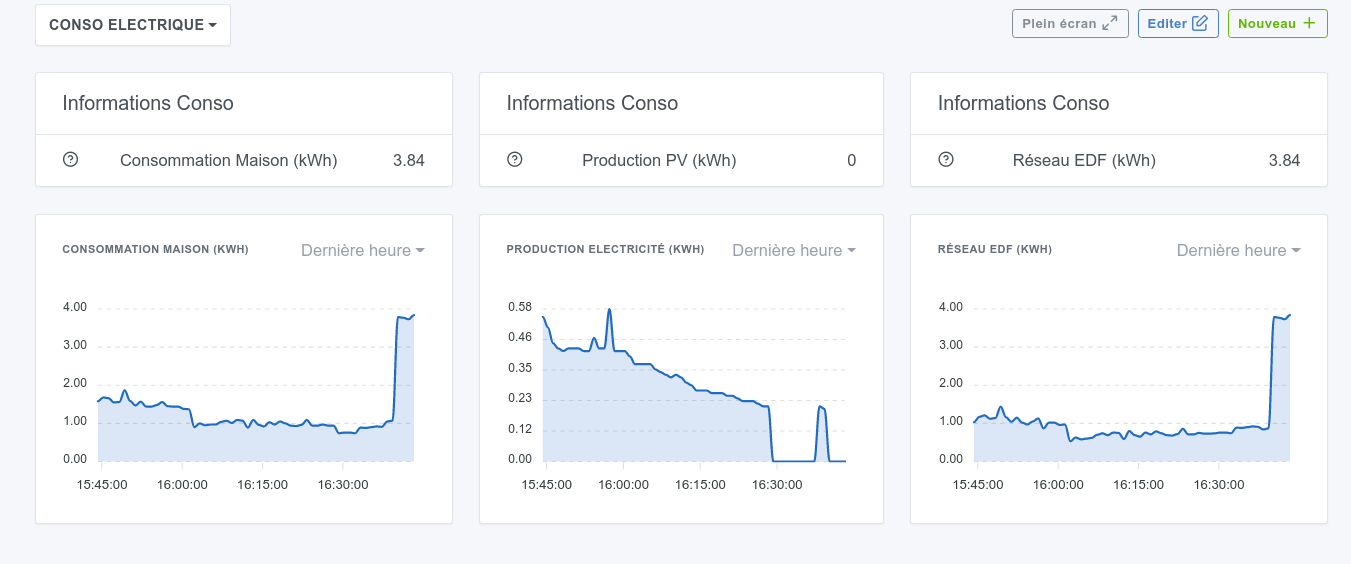
For Solarredge photovoltaic system owners, here’s how to make a basic report of the information retrieved from the brand’s servers. This will allow you to obtain this kind of result, which I will use as an example in this tutorial:
PREREQUISITES
These steps are detailed in the tutorial
- Own SolarEdge equipment and have created an API key
- Have installed Gladys (Captain Obvious at the controls!)
- Have installed the MQTT integration
- Have installed Node-red
CREATING A SOLAREDGE API KEY
To create this key, you need to go to the SolarEdge web monitoring at this address: https://monitoring.solaredge.com/
Once your credentials are entered, you will get this menu:
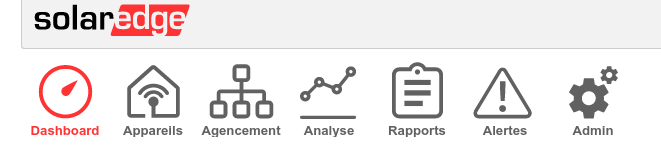
You will need to go to the ADMIN menu and then to Site Access Policy:

You will then see this tab where you can generate an API key and save it.
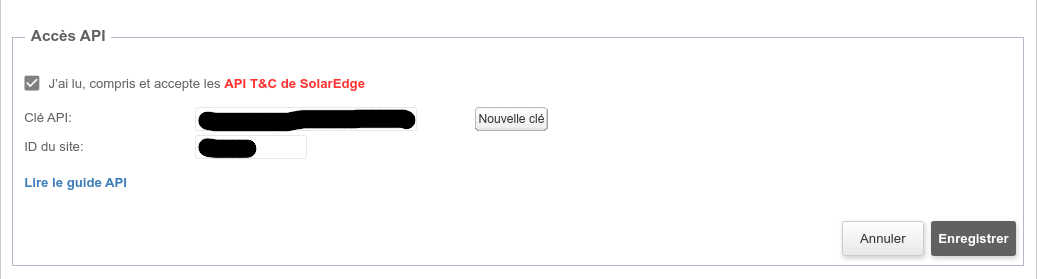
Copy this API key as well as your site ID, we will need them later.
INSTALLING GLADYS
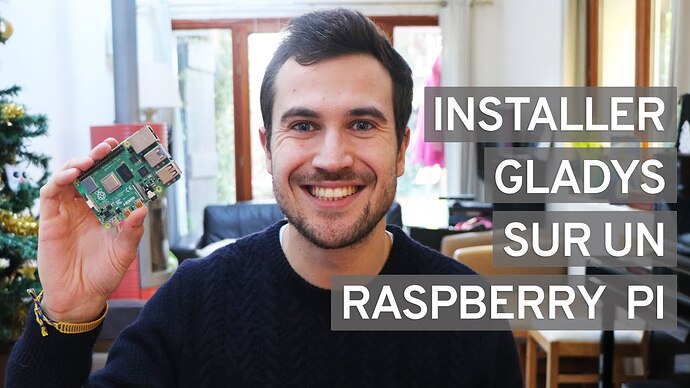
INSTALLING MQTT
This is done in Gladys, in the Integration tab, in one click.
This step is described in the video on installing Node-red
INSTALLING AND USING NODE-RED
I specify that I absolutely did not know the tool before starting… and it’s rather simple for the functions we are going to use. If you have been able to install Gladys / a Docker container, you will be able to manage with Node-red!
Once you have watched this video, you have understood how to retrieve information in Node-red and send it to Gladys via an MQTT broker.
All you have to do now is:
- Add a node in Node-red that will be responsible for retrieving SolarEdge data.
- Create MQTT devices in Gladys that will receive this information
ADDING A SOLAREDGE NODE IN NODE-RED
As seen in the Node-red video tutorial, you will need to go to the user menu then Manage palette then Install.
In the search field, type solaredge-power and you will see the node appear as here:
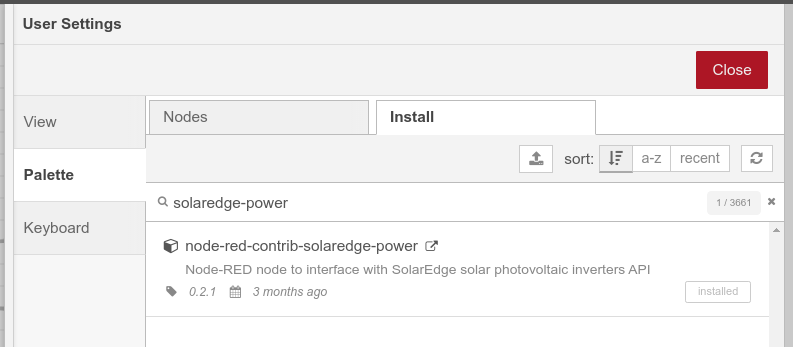
Install it by clicking on the
Install button.
You will find more information about this node and its possibilities here: node-red-contrib-solaredge-power (node) - Node-RED
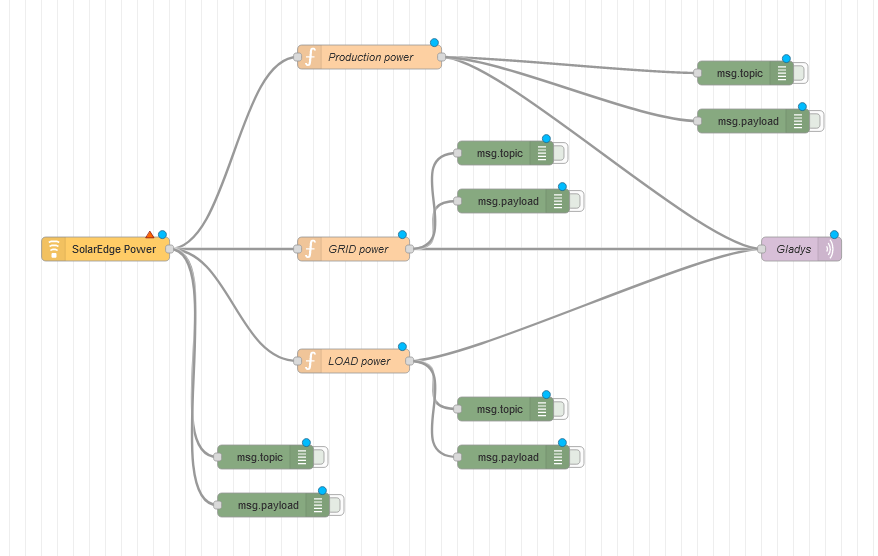
In order to obtain the result that is mine (which is just one example among many others), you can directly import this Flow into Node-red by doing Ctrl + i and then pasting the following text:
[
    {
        "id": "8b907e98a30cda10",
        "type": "tab",
        "label": "Solaredge -- Gladys",
        "disabled": false,
        "info": "",
        "env": []
    },
    {
        "id": "fa05dcc6c3f56552",
        "type": "solaredge-power",
        "z": "8b907e98a30cda10",
        "site": "2fabbdc11f7b34e7",
        "interval": "60",
        "command": "currentPowerFlow",
        "x": 240,
        "y": 240,
        "wires": [
            [
                "b8500338f743f0e1",
                "d0db7133d9d66d12",
                "a88f3e6358c15a97",
                "c3c4dc589062d8b9"
            ]
        ]
    },
    {
        "id": "942e56ee501b6810",
        "type": "mqtt out",
        "z": "8b907e98a30cda10",
        "name": "",
        "topic": "gladys/master/device/mqtt:prodpv/feature/mqtt:prodpvwh/state",
        "qos": "2",
        "retain": "",
        "respTopic": "",
        "contentType": "",
        "userProps": "",
        "correl": "",
        "expiry": "",
        "broker": "493ea564b5a53f2c",
        "x": 930,
        "y": 60,
        "wires": []
    },
    {
        "id": "b8500338f743f0e1",
        "type": "function",
        "z": "8b907e98a30cda10",
        "name": "production power",
        "func": "const input = msg.payload;\n\nmsg.payload = input.siteCurrentPowerFlow.PV.currentPower;\nreturn msg;",
        "outputs": 1,
        "noerr": 0,
        "initialize": "",
        "finalize": "",
        "libs": [],
        "x": 470,
        "y": 180,
        "wires": [
            [
                "942e56ee501b6810",
                "56c91d64cc144d13"
            ]
        ]
    },
    {
        "id": "d0db7133d9d66d12",
        "type": "function",
        "z": "8b907e98a30cda10",
        "name": "GRID power",
        "func": "const input = msg.payload;\n\nmsg.payload = input.siteCurrentPowerFlow.GRID.currentPower;\nreturn msg;",
        "outputs": 1,
        "noerr": 0,
        "initialize": "",
        "finalize": "",
        "libs": [],
        "x": 450,
        "y": 240,
        "wires": [
            [
                "994e508550b78db1",
                "c1e862f32f20a5c6"
            ]
        ]
    },
    {
        "id": "994e508550b78db1",
        "type": "mqtt out",
        "z": "8b907e98a30cda10",
        "name": "",
        "topic": "gladys/master/device/mqtt:grid/feature/mqtt:grid/state",
        "qos": "2",
        "retain": "",
        "respTopic": "",
        "contentType": "",
        "userProps": "",
        "correl": "",
        "expiry": "",
        "broker": "493ea564b5a53f2c",
        "x": 900,
        "y": 240,
        "wires": []
    },
    {
        "id": "c820a2f46af7893c",
        "type": "mqtt out",
        "z": "8b907e98a30cda10",
        "name": "",
        "topic": "gladys/master/device/mqtt:load/feature/mqtt:load/state",
        "qos": "2",
        "retain": "",
        "respTopic": "",
        "contentType": "",
        "userProps": "",
        "correl": "",
        "expiry": "",
        "broker": "493ea564b5a53f2c",
        "x": 900,
        "y": 400,
        "wires": []
    },
    {
        "id": "a88f3e6358c15a97",
        "type": "function",
        "z": "8b907e98a30cda10",
        "name": "LOAD power",
        "func": "const input = msg.payload;\n\nmsg.payload = input.siteCurrentPowerFlow.LOAD.currentPower;\nreturn msg;",
        "outputs": 1,
        "noerr": 0,
        "initialize": "",
        "finalize": "",
        "libs": [],
        "x": 450,
        "y": 300,
        "wires": [
            [
                "c820a2f46af7893c",
                "04af47c06005340b"
            ]
        ]
    },
    {
        "id": "04af47c06005340b",
        "type": "debug",
        "z": "8b907e98a30cda10",
        "name": "",
        "active": false,
        "tosidebar": true,
        "console": false,
        "tostatus": false,
        "complete": "false",
        "statusVal": "",
        "statusType": "auto",
        "x": 770,
        "y": 460,
        "wires": []
    },
    {
        "id": "56c91d64cc144d13",
        "type": "debug",
        "z": "8b907e98a30cda10",
        "name": "",
        "active": false,
        "tosidebar": true,
        "console": false,
        "tostatus": false,
        "complete": "false",
        "statusVal": "",
        "statusType": "auto",
        "x": 770,
        "y": 120,
        "wires": []
    },
    {
        "id": "c1e862f32f20a5c6",
        "type": "debug",
        "z": "8b907e98a30cda10",
        "name": "",
        "active": false,
        "tosidebar": true,
        "console": false,
        "tostatus": false,
        "complete": "false",
        "statusVal": "",
        "statusType": "auto",
        "x": 770,
        "y": 300,
        "wires": []
    },
    {
        "id": "c3c4dc589062d8b9",
        "type": "debug",
        "z": "8b907e98a30cda10",
        "name": "Complete string",
        "active": false,
        "tosidebar": true,
        "console": false,
        "tostatus": false,
        "complete": "payload",
        "targetType": "msg",
        "statusVal": "",
        "statusType": "auto",
        "x": 240,
        "y": 200,
        "wires": []
    },
    {
        "id": "2fabbdc11f7b34e7",
        "type": "solaredge-power-site",
        "siteid": "",
        "apikey": ""
    },
    {
        "id": "493ea564b5a53f2c",
        "type": "mqtt-broker",
        "name": "",
        "broker": "mqtt://localhost",
        "port": "1883",
        "clientid": "",
        "autoConnect": true,
        "usetls": false,
        "protocolVersion": "4",
        "keepalive": "60",
        "cleansession": true,
        "birthTopic": "",
        "birthQos": "0",
        "birthPayload": "",
        "birthMsg": {},
        "closeTopic": "",
        "closeQos": "0",
        "closePayload": "",
        "closeMsg": {},
        "willTopic": "",
        "willQos": "0",
        "willPayload": "",
        "willMsg": {},
        "sessionExpiry": ""
    }
]
You should end up with this:

You will then need to modify the SolarEdge Power node (in yellow) with your SolarEdge API / site ID values:

CREATING MQTT DEVICES IN GLADYS
As you saw in the video tutorial by @pierre-gilles, you can create MQTT devices that will communicate with Node-red.
Here is an example of a device to retrieve data on the total electrical consumption of the house:
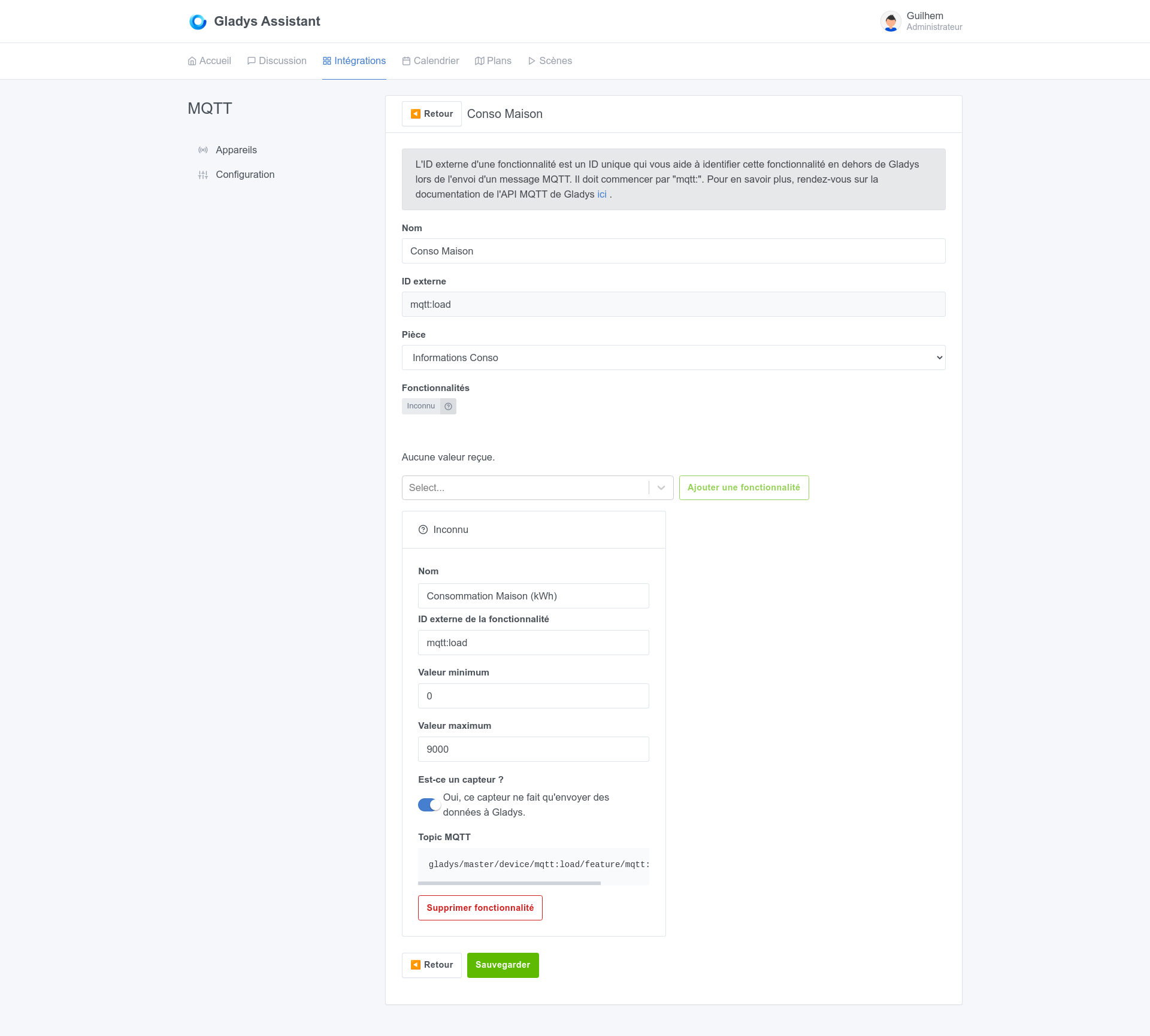
This device will be linked to this node:

To properly link them, you need to copy the MQTT Topic value in Gladys and then paste it into the node properties in Node-red, here:

You can then do the same with 2 other MQTT devices linked to the other two nodes.
You made it! Well, hopefully…
That's the end of this tutorial, I don't know if all this will have been clear, if you encounter any issues I can try to help you within the limits of my (rather limited) skills!
Happy installation!