I must admit I’m having trouble seeing what’s wrong from here (without doing a full review of the 200 files), have you made changes related to CircleCI?
Hey!
Thanks for this work @joeypic.
I have an rflink that works with GladysV3 (Chacon and Milight). I tested it with the image from @peb (Thanks to him)
I’m not an expert so I probably messed up most of the stuff, here’s where I am:
In my docker-compose I shared the USB:
devices:
- /dev/ttyAMA0:/dev/ttyAMA0
- /dev/ttyACM0:/dev/ttyA
Then for the configuration I’m not sure if it’s functional:
1/ I have the Rflink Gateway connected with success message by default. Whether I change the USB connector or not or whether I click on Connect, nothing changes (nor in the logs)
2/ If I disconnect … the message changes but I can no longer connect
3/ The MiLight pairing gives me the following error: 2020-03-23T21:43:40.784397145Z 2020-03-23T22:43:40+0100 <warn> functionsWrapper. - Pastebin.com
Ideally, I tried to get the rflink branch working via the sources but I have an issue with the interface labels. (I cloned the v4 of gladys and pulled your branch on top, I had a conflict with the i18n that I probably broke, I guess that’s why the labels don’t appear).
EDIT: I fixed my label problem, so the dev instance from the sources has the same behavior as the docker image (but at least I can make changes)
If someone has tips or can tell me what config I can use to test, I’m interested.
If I make progress, I’ll keep you updated.
Here is my capture, a ZAP.
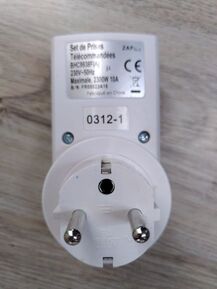
To control it with RFlink:
I create a device with
- model: « Tristate »
Then I add a « Switch » feature: - I give it a name (by the way, what is this name for, where can I find it?)
- ID: 0312
- Channel: 1
- Minimum Value: 0?
- Maximum value: 1?
I save and when I press the button in Gladys, on or off, nothing happens.
Did I miss something? Badly configured?
Small precision: for now I only have the small Chinese transmitters/receivers connected to an Arduino Mega. They worked very well under Gladys 3 with an Arduino Nano.
I will change them as soon as I receive the material from the Nodo shop.
No, I don’t even really know what CircleCI is, I only modified the following files:
- Constant.js
- Service files
- app.jsx
- i18n files
For your first problem, it’s really strange, on my configuration the messages work perfectly, for now you have to reboot gladys after clicking on connect.
I am currently writing a doc for the service
It’s fixed, I forgot to add a value in the constants  I’m going to ask for help from @isokar as it seems to be him who developed the module for the v3 and I’m having trouble with the Milight.
I think you are mistaken about the ID (on most of the sold outlets I can’t tell which one it is)
If you have a remote control with your outlet, do not create a device (beginning of the doc)
You just press the button of this outlet and the device appears!
If it doesn’t work, first check if the LED of your Arduino Mega blinks when you try to turn on your outlet in Gladys.
Thank you for all your feedback  , it occupies a bit of my coronavirus vacation
  and if you have any other questions, don’t hesitate
Oh, the documentation!  Could you add a link to the documentation (even if it’s not finished) on the integration settings page?
Hmm… the LED doesn’t seem to light up when I use the remote, I’ll investigate this during the day.
I have the TX LED that lights up when I press the remote. 
But nothing is added in Gladys
To be sure about the wiring:
| Direction | VCC | DATA | GND |
|---|---|---|---|
| Reception | D16/TX2 | D19/RX1 | GND |
| Transmission | D15/RX3 | D14/TX3 | GND |
Apparently nothing in the Gladys logs or from the debug console
I just changed the code to make the tests easier. The console should now provide more information about errors
Now look at the console when you press your remote and send me what you see
I just updated the image and it works Wouhouuuu  I managed to connect 3 plugs, I will do more in-depth tests tomorrow
So, off the top of my head, here are the issues I can report to you:
- Sometimes after a few minutes of inactivity, when I refresh the page
/dashboard/integration/device/rflink/deviceI get a blank page - When I delete a device, it stays in place (does not disappear from the UI) until I refresh the page
EDIT: - When I want to register a new plug, I press ON then OFF and it correctly creates the plug. However, after pressing ON, it already creates a device, usually of type RingBell. This may be related to the poor quality of the 433Mhz « Chinese » receiver
Great
These two issues seem to be related to Gladys as I have them on all services, the blank page is an authentication issue (invalid token or something like that).
I also get the impression that I often have to refresh the page to see the changes (on all service pages)
@pierre-gilles Are these normal issues?
I think that if you use the cheapest receivers you will probably have issues from time to time. On the rflink blog, they recommend using super-heterodyne receivers like the RXB6. It costs 1 or 2 € more but since I have one I receive all messages even at 50m.
I will still look at the code for the RingBell, anyway with the coronavirus, you won’t have a receiver before 2 months .
That’s what I was thinking too
Yup, that’s why I ordered the rflink printed circuit board, I should receive it next week and I can retest with it.
I managed to connect my 7 Zap outlets, the On/Off works well. 
I also have a Chacon opening detector, I’ll see if it is recognized, and I’ll keep you posted
I’m thinking about a useful function and I’d like your opinion:
Do you think it’s a good idea to add a button to blacklist a device (this device can no longer add itself to your device list)?
This could be useful if, for example, your neighbor opens their gate all the time and it appears in glayds
Another request for opinion:
For some 433MHz Chinese devices, we can’t detect whether it’s just a sensor or an object that can receive commands. So, this raises a question for everyone:
Do you prefer that, by default, these devices be considered as sensors or actuators (can receive commands)? knowing that you can change this later
In short, do you prefer to sometimes have sensors that you can change with a button to change their state without editing the device or rather actuators that you cannot change the state without editing the device
I think we should separate devices into 3 categories:
- New ones: they have been discovered since the last access to the page, or simply those that are not yet assigned to a room.
- Configured and functional
- Blacklist
We could see 2 possible organizations: either a single page with the 3 categories separated, or 3 pages in the left menu.
By default, I think they should be considered as sensors, this is the most « neutral » case for me. Ideally, there should be a tooltip at the top of the page specifying that some devices may be misrecognized and therefore yes, offer the status change button, only on these devices (in any case in a visible way).
Mmm no that’s not normal ^^
Everything should work… If you have more information, I’m interested  It needs to be fixed.
Indeed, in Gladys 4, the directive is that devices should never be added automatically: it’s always the user’s choice, and this choice must be made in the UI.
You can see how other services like Philips Hue do it:
-
The service automatically detects devices, it stores them in a list of devices in RAM.
-
When the user arrives on the service page, they see that new devices have been detected, and they can choose to add them to Gladys, or not.
-
When the user clicks on « create » the device, it’s the UI that sends the request to the backend to create the device. Thus, the user gets visual feedback if something goes wrong. (a device already exists with this name for example)
In Gladys 4, we avoid everything that happens in the background and could go wrong, because if an error occurs, the user has no feedback. (And no, « check the logs » is not a solution, in v4 we consider that the user should not have to check the logs, like any product)
I think it comes from the dependencies, but I don’t know which ones. I solved the problem by tweaking the versions of react-compat and other modules.
It’s done, it’s added!
I found it, it’s a bug due to how services are translated in the front end, it’s so stupid.
Basically, in some services (like the z-wave, one of the first services I developed), I use the JSON file that contains the list of integrations as a translation source, and I often do:
<ZwavePage integration={integrationConfig[props.user.language].zwave}>
  <NetworkTab {...props} />
</ZwavePage>
However, if props.user.language is not defined, it crashes.
We’re going to stop doing that for i18n, and use the i18n library that handles all of that on its own, and remove the translations from the device.en.json files.
I created a GitHub issue to reference the development:
Hello,
First of all, thank you for developing this module
I have just done some tests knowing that I have 2 sensors:
- EV1527 / SelectPlus (motion detector): Amazon.fr
- Atlantic’S MD-210R (door opening sensor): Amazon.fr
Note: I tested using the image created by @peb which is 14 days old like the Github repo (Images 🐳 pour tester des services en développement)
Here are the messages transmitted by RFlink with my 2 devices:
- EV1527: 20;01;EV1527;ID=0e28a0;SWITCH=0e;CMD=ON;
- Selectplus: 20;02;SelectPlus;ID=0575f1;SWITCH=02;CMD=ON;CHIME=01;
- MD-210: 20;09;Atlantic;ID=3e6835;SWITCH=01;CMD=ON; or 20;0A;Atlantic;ID=3e6835;SWITCH=01;CMD=OFF;
Observations:
- The RFlink card (on Arduino Mega) is detected and used without any necessary manipulation
- The motion sensor is well detected
- The motion sensor is detected as a switch. Shouldn’t it be motion?
- The door opening detector is not. Is it because the model « Atlantic » has not been implemented yet?
- Devices appear in duplicates in the « Devices detected by the gateway » section
- When I add a first device to Gladys, everything goes well but when I add an additional device, the one I just created is duplicated (just a display issue?)
- Strange behavior of Gladys, it is impossible to refresh the integrations page (the page becomes white)
- Rflink debug console: I have a value but it’s always the same even though I capture a plethora of 433MHz modules
Available for all the necessary details.
Thanks for the feedback,
For the display bugs, it’s because I based it on the zwave service code which had a defect, I’ll see how to fix it.
Does the motion sensor send the SelectPlus or EV1527 message?
I can’t find something that differentiates switches from motions in the Rflink message, I’m a bit stuck . If the sensors all have the CHIME property, that would help.
For the door opening detector, I thought it would be detected, do you have the logs? I’m looking on my side in the meantime.
Do you mean that you always see the same message displayed in the gray box but in the logs you see the correct ones?
The problems I haven’t mentioned are those that are supposed to be fixed but you may not have because of the Docker image
Thanks for helping, I don’t have much feedback so I don’t know where I stand in the service, there are a lot of things to manage with Rflink 
I don’t know how to display the logs when it’s on docker. A bit of help, what’s the command?
The sensor sends one or the other depending on the type of movement.
docker logs gladys

I think automatic distinction is impossible. The Switch seems to be used for all modules that have a binary state? RFLink Gateway - HomeAutomation
In my opinion, it is better to leave the creation of the devices to the user, otherwise, when you’re in the city (as is my case), you end up having all the detectors that will be added automatically. I like the idea of the blacklist you mention; it will allow distinguishing new detected devices from devices that we have already detected in the past but that we do not want to add .