Hello!
Great job! Well done! 
I just moved, I will restart my little Raspberry with Gladys next week, normally!
I will run tests with my outlets and opening detectors right after and I will give you feedback!
Hello,
I have a problem since a freshly installed test:
When I select the USB, it seems it doesn’t keep it in memory if I change tabs or refresh, it is no longer selected despite being noted that it is well connected.
2021-09-15T07:44:59+0200 index.js:15 (process.) unhandledRejection catched: Promise {
TypeError: Cannot read property ‹ event › of undefined
  at SerialPort.returnOpenErr (/src/server/services/rflink/lib/commands/rflink.connect.js:36:21)

  at SerialPort._error (/src/server/services/rflink/node_modules/@serialport/stream/lib/index.js:198:14)

  at /src/server/services/rflink/node_modules/@serialport/stream/lib/index.js:242:12
}
2021-09-15T07:44:59+0200 index.js:16 (process.) TypeError: Cannot read property ‹ event › of undefined
at SerialPort.returnOpenErr (/src/server/services/rflink/lib/commands/rflink.connect.js:36:21)

at SerialPort._error (/src/server/services/rflink/node_modules/@serialport/stream/lib/index.js:198:14)

at /src/server/services/rflink/node_modules/@serialport/stream/lib/index.js:242:12
Hello @syper,
You are right, the selection once saved should be the default choice displayed in the list.
I will fix that.
However, this should not cause any operational issues.
Regarding the error encountered, can you tell me more?
How did you install the image?
What hardware are you using?
On a Raspberry Pi with a DIY rflink and using Pierre-Gilles’ command:
docker run -d --log-opt max-size=10m --restart=always --privileged --network=host --name gladys-test-rflink -e NODE_ENV=production -e SERVER_PORT=8001 -e TZ=Europe/Paris -e SQLITE_FILE_PATH=/var/lib/gladysassistant/gladys-production.db -v /var/run/docker.sock:/var/run/docker.sock -v /var/lib/gladysassistant_test_rflink:/var/lib/gladysassistant -v /dev:/dev -v /run/udev:/run/udev:ro ngeissel/gladys:rflinkdev
I choose from my list:

And I have no operational issues.
Hello @ProtZ
So I did it on a Synology with this doc => Lancer une image Gladys de test? - #7 par pierre-gilles
So on a virtual image, I even checked if my Z-Wave was detected and working since USB as well and no issues on that side …
I’ll give you more information and screenshots when I get back to provide more details.
I just saw
…and just installed the test image.
I have an RFXtrx433E gateway from RFXcom
…which appears in the « gateway » section of the settings: /dev/ttyUSB0 - RFXCOM -0403
…and Oregon temperature probes
https://www.oregonscientificstore.com/p-27-oregon-scientific-thgr122nx-wireless-temperature-and-humidity-sensor-with-display.aspx
…which do not appear in the Devices even though they are simple temperature and humidity sensors
Any ideas?
Hello,
@gaetanb76 and @syper, you both have the RFXCom. I don’t have this equipment.
I quickly looked at the RFXCom website and the RFXCom manager documentation, it doesn’t seem to match the messages handled by RFLink. As far as I can see, the integration is not necessarily the same.
@gaetanb76: In the Integration => RFLink => Settings menu, you have a debug console.
The gray part displays what is sent by the USB gateway (e.g. here when I use a Chacon remote control)
The input text allows you to send a command.
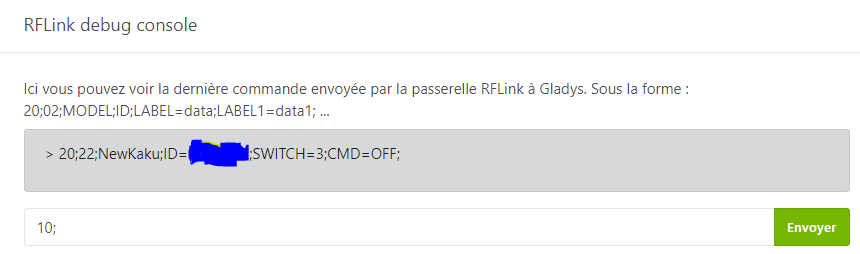
Can you tell me if you receive anything or if the message format makes sense to you?
Thanks @ProtZ for the info.
I have an X10 remote control, supported by RFXCom, that doesn’t show anything in the debug console.
I’ll probably make myself an RFLink to use my temperature sensors.
Sorry @gaetanb76, I don’t think an RFXCOM module is complicated to make, but I haven’t found affordable materials.
The RFLink costs 10 - 15 euros to invest.
By the way, I invite those who have the RFLink to do some testing: @joeypic (you’re the author of the module too!), @peb, @jeremy37, @PhilippeMA, @jojolll
I still have the documentation and videos to complete. I’ve booked a slot for the weekend of October 9/10.
Thanks @ProtZ
Ordered the material for 20€.
Now just have to wait and play with the soldering iron.
Hello,
I only have one motion detector today that works on this protocol and that I use with node-red.
As soon as I have a bit of time, I’ll test the service.
Thanks for the work 
Hello @ProtZ,
I just installed and configured.
As indicated, I only have one motion sensor. When it is detected, it is detected as a switch. When added to the dashboard, movements are detected but as it is a switch, it displays the value 1 and that’s it.
So I tried to modify the device by wanting to:
- Remove the « Switch » feature
- Add a new « Motion Detector » feature with the same ID as the one used by the « Switch » feature (prerequisite: action 1 above)
Unfortunately, I can’t remove the feature. I get the error message:
Error while saving or deleting the device
Another remark, but it’s just a detail. In the « Settings » section, when I go back after configuring the USB port to use, the selection is no longer active (the dropdown is on the default value « ----- »); I still have a message that says « RFLink Gateway connected successfully… » (an extra point  ). I think it would be good to see the selected port on each visit to this screen. Again, it’s not hyper-structuring!
Congratulations to the DEV, I can’t wait to be able to use it in production 
Hello @PhilippeMA,
Thanks for this feedback.
Motion sensors
I have the same issue with a low-end chuango sensor. I think there has been a regression in the management of a device’s features because I was on the same logic as you during my tests with success.
Motion sensor detection
Can you give me the command linked to your sensor (e.g., you pass your hand in front) that you see in the menu Integration => RFLink => Settings in the debug console?
I think it is detected as a « switch » because the command sent by the RFLink gateway contains something like SWITCH=ON; (this is the case for my chuango) I am not sure that we can do better automatically.
Device modifications
I don’t know how long this has not been working and the changes that caused this blockage. However, I made a quick fix that works. I would like to dig a bit more.
Display of the USB port selection
This is fixed in dev… silly typo error 
I’ll let you know as soon as the new image is available (maybe tonight or tomorrow)
@+
The created feature is consistent with what the sensor returns:
20;01;EV1527;ID=Xeyuze;SWITCH=0e;CMD=ON;
Hello ProtZ,
I’ve been testing your docker image for a few days, it works quite well. Great job  . I use smart plugs from Action, I have X10 motion detectors that work, I have temperature sensors made in China that send their values well. I just have a problem with the detection of all these devices, I live in a suburban area and of course I pick up everything that emits 433MHz. I wanted to know if we couldn’t erase or refresh the « Devices detected by the gateway » page, because I accumulate a significant number of devices that emit 433MHz from time to time, but which remain frozen in this list. I know they will re-transmit one day or another and they will come back to be displayed in the list, but it allows to clean up and above all to detect the last connection of a device, after having changed its batteries and that its code has changed. Moreover, I have the impression that we are limited to 20 devices displayed in the « Devices in Gladys » window. Is this normal? For my situation, I have 20 devices controlled by Gladys and 27 detected by the gateway waiting for connection. Thanks for your answer. Good evening

You’ll need a kind of ban list, actually
Rather a page refresh or the ability to delete what we are not interested in, knowing that it will be temporary, as the signals will be recaptured. But this would help us to find our way when we configure the devices at time T. To be clearer, I have devices that are connected to Gladys and that come back in the « detected by the gateway » list. I have temperature sensors that change code after a power outage (battery change), so by being able to clear this list, we would see the last connection of the device displayed. 
Oh ok I hadn’t understood it that way
01/11/21
Hello everyone,
RFlink made this morning in test mode with breadboard and Dupont wires.
My 3 Oregon Scientific THGR122NX temperature/humidity probes are well detected as soon as they are integrated and they return the temperature and humidity values on the dashboard, but not those of the battery charge.
I have X10 outlets, but I don’t know what ID value to put. For the one I’m trying, in the ActiveHomePro software, its address is D1, but in Gladys, it indicates a conflict when I try to create them.
Models: EBODE RPT and LM12
EDIT on 02/11/21
I have a MS13 motion detector that works in X10.
It is detected by Gladys. It has 2 ON and OFF buttons that allow me to see the frames received:
20;E6;X10;ID=090041;SWITCH=1;CMD=ON;
20;EA;X10;ID=090041;SWITCH=1;CMD=OFF;
When I pass my hand in front, an ON frame is well received 
EDIT on 04/11/21
I just integrated telegram and did a test with the temperature:
The values are given in fahrenheit

This is not related to the RFlink implementation. There is an issue already declared on GitHub: Gladys answers in °F for Telegram temperature request · Issue #1293 · GladysAssistant/Gladys · GitHub
Thanks @PhilippeMA for the info.
I had a feeling it wasn’t related to RFlink.
I wanted to report the issue, but I see thanks to you that it was already known